DDD-lite for event-heavy systems with clear ownership
Learn how DDD-lite for event-heavy systems keeps commands, events, and policies easy to own, so teams avoid messy background logic.
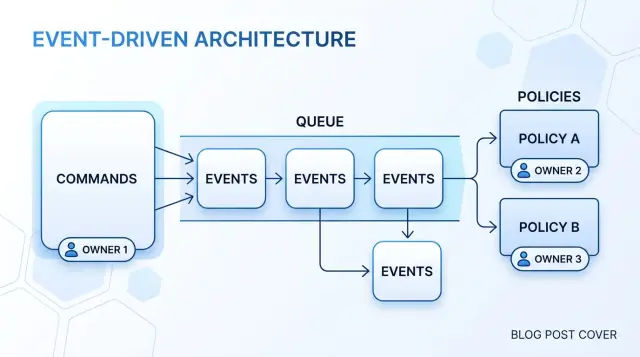
Table of Contents
Why ownership gets fuzzy
Ownership gets fuzzy when an event turns into an open invitation. One event fires, and suddenly any background job can react to it. That feels tidy at first. Then the model starts to drift.
A team ships one useful handler after an event, then adds another because it seems harmless. After a customer signs up, one job sends a welcome email. Later, another job creates a trial, another updates sales reports, and another charges a setup fee for some customers. Nobody planned a mess. It grew one small step at a time.
The trouble starts when those jobs stop doing simple follow-up work and start making business choices. A handler that should only notify a user now decides whether the user gets billed. Another decides whether finance should count the account as active. A reporting job copies the same rule again because the original logic lives deep in a queue worker. The rule no longer has one clear owner.
That confusion spreads fast. Product thinks billing owns a rule. Billing thinks support owns it because support asked for the email. Data adds the same condition to reports so the numbers look right. Then two handlers make the same choice in slightly different ways, and bugs show up in places that seem unrelated.
Background processing makes this hard to spot because the logic sits off to the side. Names like UserUpdatedHandler or OrderEventConsumer hide a lot. If one handler sends emails, charges cards, and updates reports, it owns too much. When something breaks, the team reads logs and queue histories just to answer a basic question: who decided this should happen?
That question is usually the warning sign. If nobody can point to one place and say, "this part of the business owns this rule," the event flow is already blurring ownership.
Start with commands
When an event-heavy app gets messy, the first fix is usually simple: name the action someone actually asks for. A command should read like a clear request from a person or role in the business. ApproveExpense works. RunExpensePipeline does not. One says what the business wants. The other says how the code happens to do it.
Each command should carry one business decision. If you pack several choices into one request, ownership starts to blur again. CreateAccountAndSendWelcomeOfferAndAssignPlan hides too much. Split it until one person can explain why the command exists without walking through the whole process.
Write down who can issue the command and when. That sounds minor, but it prevents a lot of confusion later. A sales rep may issue ApplyDiscount only before payment. A warehouse lead may issue ReleaseShipment only after stock is reserved. Those rules belong next to the command because they decide whether the request makes sense.
A good command also passes a plain sentence test: "When [role] needs [outcome], they can issue [command] if [condition]." For example: "When a support agent needs to close a duplicate ticket, they can issue MergeTicket if both tickets belong to the same customer." That gives you the actor, the action, and the boundary in one line.
A quick smell test helps. The name should start with a business verb, not a technical task. One decision should sit behind it. One role should be able to ask for it. And you should be able to state the condition in plain language.
This does more than clean up naming. It draws a hard line between a request and the work that may happen later. Once that line is clear, queues, retries, and handlers stop looking like the place where business ownership lives. Ownership starts where the request starts.
Keep each rule with the right owner
Teams often move business decisions into handlers because handlers feel convenient. That is where ownership slips. A handler wakes up later, on a different machine, with less context than the part of the system that received the original request. It should react to a decision, not make the first one.
For each rule, ask a blunt question: who in the business gets to say yes or no? If the rule is about issuing a refund, the refund domain decides. If the rule is about shipping, shipping decides. The owner should receive the command, check the rule, and either reject it or record the change.
A simple test helps here. If two handlers could both make the same decision, nobody really owns it. That usually leads to race conditions, duplicate checks, and weird repair code later.
The flow should stay in this order. First, send a command to the owner. Next, let that owner load what it needs and make the decision. Then save the state change. Only after that should it emit an event such as RefundApproved or OrderReleased. The event tells the rest of the system what already happened, not what might happen.
Other parts can react after that. Accounting can post entries. Notifications can send email. Analytics can count the outcome. None of those parts should decide whether the refund was allowed in the first place.
If a later step needs its own rule, give that step its own owner and its own command. After RefundApproved, payments can receive SendRefundToGateway. Payments may accept or fail that command based on gateway rules, but they should not revisit whether the customer deserved a refund. That decision already belongs elsewhere.
Commands ask an owner to decide. Events report finished facts. Policies can listen and trigger follow-up work, but they should stay out of first-level business judgment. Keep that boundary sharp, and background processing stops feeling mysterious.
Use policies for follow-up work
Policies work best when they react to facts that already happened. That usually means a policy listens for an event such as PaymentCaptured or AccountApproved. It should not wake up because a timer guessed that something might be ready, or because a cron job scanned a table and made assumptions.
That rule keeps ownership clean. The team that owns the event says, "this happened." The policy reads that fact and decides whether another area needs to act. If work crosses a boundary, the policy should send a new command to the next owner instead of reaching in and changing data on its own.
A billing example makes this concrete. When billing emits PaymentCaptured, a policy can tell invoicing to run CreateInvoice. Billing still owns the payment fact. Invoicing owns invoice rules. The policy only connects the two.
A good policy handles process concerns that do not belong in the business rule itself: when to run the next command, how long to wait before trying again, how many retries to allow, and what to do when a dependent service is down. That keeps timing and delivery concerns in one place instead of spreading them across handlers, controllers, and database jobs.
Policies still need limits. They should not hide the real decision. If the business must decide whether an order can ship, that rule belongs with the order command or aggregate that owns shipping. A policy can notice OrderPaid and send PrepareShipment, but it should not quietly decide shipping eligibility from a pile of side checks.
That split sounds small, but it prevents a lot of pain later. Many event-heavy systems drift because background code starts acting like the owner. Once that happens, nobody knows where a decision lives, and even small changes turn into a search project. Policies should coordinate follow-up work, not become a second business model.
Map the flow step by step
When a process runs through APIs, queues, cron jobs, and workers, people stop seeing who made the business decision. The fix is simple: draw one plain chain and fill it from left to right.
Start with the command. A command is a request from one actor to one owner. It should sound like a decision someone wants that owner to make, such as "approve payout" or "cancel subscription." If the phrase sounds like a log entry or a technical task, rewrite it until a business owner could claim it.
Then write the state change that proves the command succeeded. Many teams skip this and jump straight to events. That causes trouble later. First say what changed in the model: the payout moved to approved, the subscription moved to canceled, the refund moved to pending review. If you cannot name the state change in one short sentence, the command is still blurry.
After that, record the event that announces the change. The event is not a request and not a plan. It is a fact about something that already happened. PayoutApproved means the owner made the decision and stored the result. That distinction matters once retries, delays, and duplicate deliveries show up.
Now add policies, but only where another owner must react. A billing context may react to SubscriptionCanceled and stop future invoices. An access context may react and remove premium features. Those are follow-up actions. They are not the original decision. If the same owner still decides, keep the rule in the command flow instead of pushing it into another handler.
Stop when every decision has one clear home. You should be able to point at each step and answer three questions: who decided, what changed, and who only reacted afterward. If a background worker reacts to an event and quietly makes a new business decision, the map is not finished.
A good flow reads cleanly in one sentence: a user sent this command, this owner changed this state, this event announced it, and these other owners reacted. If that sentence feels messy, ownership is still hiding somewhere.
A simple refund example
Refund flows get messy fast when every event handler starts making business decisions. A cleaner model keeps one team and one part of the system in charge of the refund decision, even if several background jobs react after that.
Picture a support agent helping a customer who asks for money back on an order. Support should not decide whether the refund is allowed. Support sends a RefundOrder command with the order ID and the reason. That command says, "Please evaluate this request." It does not say, "Refund this now because support clicked a button."
Billing owns the refund rules, so billing handles the command. It checks the order status, the payment date, past refund attempts, and whatever rules the business already uses. Then billing makes the decision. If the request fits the rules, billing records RefundApproved. If it does not, billing records RefundRejected.
That ownership line matters. The part of the system that knows the rules should make the decision once. Other parts can react, but they should not quietly reopen the same decision.
The clean flow is short:
- Support sends
RefundOrder. - Billing evaluates the refund rules.
- Billing emits
RefundApprovedorRefundRejected. - Policies react to that result and start follow-up work.
Now add a fraud check. A fraud policy listens for RefundApproved. If the case looks odd, maybe the account changed cards three times this week or the order came from a flagged region, the policy sends a new command such as ReviewApprovedRefund. That is different from changing the refund decision. The fraud policy owns fraud review. Billing still owns refund eligibility.
An email policy can react in the same way. It listens for RefundApproved and RefundRejected and sends the customer the right update. The email policy does not decide anything. It tells the customer what billing already decided.
This is where many teams slip. They let the fraud worker reject refunds directly, or they let the email handler infer a decision from half-finished data. Then nobody can say who owns the rule. Keep the command with the decider, keep the event as a record of that decision, and keep policies focused on follow-up work.
Mistakes that blur ownership
Ownership gets muddy when background code starts making business choices. That usually happens slowly. A handler grows, a worker gains one extra check, and a reporting script starts fixing data because it feels convenient.
One common mess starts with a single event handler that calls five services in a row. An OrderPaid handler checks fraud, reserves stock, updates shipping, sends email, and writes to finance. That looks efficient for a week or two. Then one service times out, another retries, and nobody can say which part actually owns the decision to move the order forward.
Approval rules often leak into retry workers too. A retry worker should retry failed delivery or a failed API call. It should not decide that a refund is now approved because the third attempt succeeded. If approval logic lives there, business rules depend on timing, queue state, and failure order. That is a bad place to hide policy.
Another mistake is publishing events before you save the business change. Suppose your app emits RefundApproved and then the database write fails. Email goes out, accounting reacts, maybe support sees the refund in a timeline, but the order still shows "pending" in the source of truth. You now have two stories for the same action.
Vague commands make this worse. ProcessOrder can mean almost anything. Did the system validate payment, reserve stock, pack the item, or ask a manager for approval? Clear commands force clear ownership. ApproveRefund and CapturePayment leave much less room for guesswork.
The patterns that usually cause trouble are easy to spot. One handler coordinates many unrelated service calls. Retry code contains approval checks. Events leave the system before the state change is stored. Commands use broad names that hide real intent. Reporting or analytics jobs change business state.
That last one causes more damage than teams expect. Reporting jobs should describe what happened, count it, or flag an anomaly for review. They should not flip an invoice to paid or close an order because a dashboard found a mismatch.
If a person in the business would name the rule, keep that rule close to the command that changes state. Let background processing do follow-up work, not quiet decision-making.
Quick checks before you add another handler
When a system already reacts to lots of events, adding one more handler can feel cheap. It rarely is. An extra handler often means extra ownership, extra timing risk, and one more place where the business rule gets harder to find.
Pause and test the idea before you code it. If the answer to any of these checks is fuzzy, the model probably needs work first.
Ask who owns the rule. A new teammate should be able to point to one place and say, "this command decides it" or "this policy reacts after that decision." If two handlers share the same rule, nobody owns it.
Ask why the policy starts another command. "Because an event happened" is too weak. A good answer sounds more like, "after a refund is approved, finance must return the money," or "after an invoice is overdue, the system must suspend service."
Ask what happens if the queue is slow. If the system reaches a different business decision just because a message arrives five minutes late, the rule sits in the wrong place. Timing can delay follow-up work. It should not change the decision itself.
Ask whether replay is safe. You should be able to replay events to rebuild state without charging a card twice, sending the same email twice, or creating duplicate tickets.
A small billing example makes this plain. RefundApproved should not charge money, send mail, update reporting, and notify support directly from four separate handlers that each guess what to do. One command approves the refund. Policies can then start separate commands for payment return, customer email, and audit logging. Each follow-up has a reason, and each command can guard against duplicates.
If you cannot explain the ownership in two or three plain sentences, do not add the handler yet. Rename the command, split the policy, or move the decision earlier. That cleanup usually saves more time than the new handler saves on day one.
Next steps for a cleaner model
Take one workflow that causes the most confusion and put it on a single page. Use plain boxes or sticky notes. Write down the command that starts the work, the event that records what happened, and each policy that reacts after that.
This simple picture usually shows the real problem fast. A team thinks it has automation, but the hard business choices live inside background jobs with names like processQueue or syncWorker. When that happens, nobody can say who owns the rule, why it exists, or what should change when the business changes.
A good cleanup starts by pulling decisions out of those jobs. If a worker decides whether to refund, pause an account, apply a fee, or send a warning, move that choice closer to the command or to a named policy. Background processing should do work that was already decided, not invent the business flow on its own.
Names matter more than most teams admit. If your action says runBillingTask, it hides the point. If it says chargeMonthlySubscription or approveRefund, people can argue about the rule in normal language. That is where this style helps most. It makes ownership visible without forcing a huge redesign.
For a first pass, circle every place where a background job makes a business decision. Rename technical actions to match real business work. Check whether each event states a fact, not an instruction. Make sure each policy has one clear reason to exist.
Do this for one noisy workflow first. Refunds, trial expiration, failed payment recovery, and order cancellation are good candidates because they tend to collect hidden rules over time.
If you want an outside review, Oleg Sotnikov at oleg.is works with startups and smaller teams as a Fractional CTO and advisor. He helps untangle ownership, event flows, infrastructure, and AI-augmented development setups without pushing a heavy rewrite.
When the page is clear enough that a product person, an engineer, and an operator all read it the same way, you are close. That is usually when the code starts getting simpler too.
Frequently Asked Questions
What is the difference between a command and an event?
A command asks one owner to decide something, like ApproveRefund. An event reports a fact that already happened, like RefundApproved.
If you mix those up, background code starts acting like the owner and the rule gets hard to find.
How do I know who should own a business rule?
Ask who in the business can say yes or no to that rule. Put the command there, let that owner check the rule, and save the state change before anything else reacts.
If two handlers can both make the same call, ownership is already blurry.
When should I use a policy?
Use a policy after an event confirms that something already happened. A policy should connect one area to another by sending the next command.
It should not make the first business judgment or change data on its own just because it noticed an event.
Can a background handler make business decisions?
Only if that handler owns the rule and received a clear command to decide it. Most background handlers should react to a finished decision, not invent one later.
If a queue delay changes the outcome, you put the rule in the wrong place.
Why are commands like ProcessOrder a bad idea?
Names like ProcessOrder hide too much. People stop knowing whether the code validates payment, reserves stock, ships, or asks for approval.
A clear name forces a clear owner and a single decision. That makes bugs easier to trace and changes easier to discuss.
Should cron jobs or timers start business actions?
Use timers and cron jobs for scheduling, retries, and reminders. Do not let them guess whether a business action should happen.
If a timer decides that an order can ship or a refund should pass, the real rule lives in the wrong place.
How do I map a messy event flow?
Start with one workflow and write it left to right. Note the command, the state change, the event, and then any policy that asks another owner to act.
If you cannot say who decided, what changed, and who only reacted, the flow still hides ownership.
What does safe replay mean in an event-heavy system?
Replay should not create a second charge, a second email, or a duplicate ticket. Follow-up commands need guards so they can run again without doing damage.
That usually means you record what already happened and let events report facts, not requests.
What are the warning signs that ownership is getting blurry?
Look for handlers that call many services, retry workers that contain approval checks, and reporting jobs that change business state. Those spots often hide rules in the wrong place.
Another bad sign shows up when the team asks, "Who decided this should happen?" and nobody has one clear answer.
Where should I start if my system already feels messy?
Pick the noisiest workflow first, often refunds, cancellations, or failed payments. Rename the commands in plain business language and move decisions out of generic workers.
You do not need a full rewrite. One clear workflow often shows the pattern the rest of the system should follow.


