Database default values that age badly in growing apps
Database default values can quietly shape app behavior for years. Learn which defaults to review in new tables before they create hard-to-trace bugs.
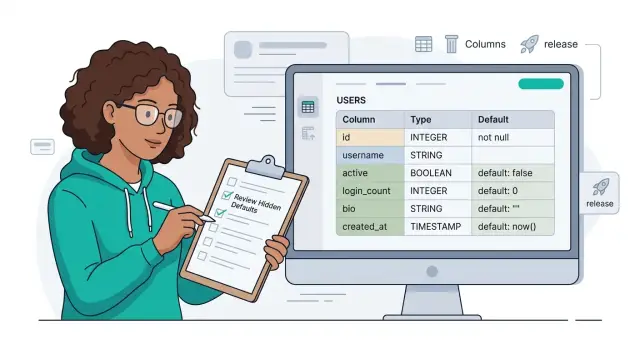
Table of Contents
Why hidden defaults cause real problems
A default does more than fill an empty column. It turns missing data into assumed data. "Unknown" becomes "yes," "false," "active," or a date that looks real enough to trust.
That small choice changes how people read the data. Someone opens the table, sees a value, and moves on. They stop asking whether a user picked that setting, whether a process actually ran, or whether the app inserted a fallback.
Bad defaults spread because they look tidy. Empty fields attract attention. Filled fields feel safe, even when the value came from a guess the team made months ago. Reports, filters, support tools, and admin screens then treat that guess as fact.
The software starts leaning on it too. One service checks for a value and skips validation. Another shows a message because it assumes the value came from the user. A third uses it in billing, routing, or notifications. Before long, the default is no longer a backup. It is product logic.
A simple example shows the problem. If a new table gives every account a default timezone of UTC, the data now says each user chose UTC, even when nobody asked them. Later, product wants to send messages at local time. Support wants to know the user's real preference. Analytics wants to group users by region. One quiet shortcut has now touched three parts of the product.
Changing the rule later usually hurts more than adding it. Old rows carry guessed values, new rows carry real ones, and the code cannot tell the difference. Cleanup often means backfills, conditionals across several services, and long arguments about what old records actually mean.
That is why every default in a new table deserves a short review. If the value carries business meaning, it should reflect a real choice, not silence.
Defaults that look harmless at first
The defaults that age badly rarely look dangerous. They make inserts easy, keep tests green, and give the UI something to show. A few months later, they start telling small lies all over the app.
Empty strings are a classic trap. Teams use "" for names, phone numbers, or notes because NULL feels annoying. Then nobody can tell the difference between "we never got this value," "the user skipped it," and "an import dropped it." That confusion spills into reports, forms, and support tools.
Booleans cause a similar mess. false sounds clear, but many fields need three states, not two. If email_verified or profile_completed starts as false, the system may read that as a deliberate no even when nobody checked yet. That changes who gets reminders, who gets blocked, and what staff see in admin screens.
Zero values hide missing numbers in a quieter way. A default 0 for price, quantity, score, or tax rate can look harmless in a new table. Later, analytics treat those zeros as real data. Averages drop, alerts stay silent, and someone wastes a day debugging business logic when the real problem is missing data dressed up as a number.
Current timestamps can be worse because they look real. A default on confirmed_at, viewed_at, or sent_at can suggest that a user took an action when the system only created a row. Once that happens, audit trails get muddy. You lose the ability to answer a basic question: did a person do this, or did the database fill it in?
Status fields go bad for the same reason. Starting every record as active, ready, or complete feels neat, but many records begin in a waiting state. If the first status is wrong, background jobs, emails, and dashboards all move too early.
During schema review, ask one plain question for every default: does this value describe a real fact, or does it only fill a gap? Good defaults save work without changing meaning. Bad ones make missing information look certain, and that gets expensive fast.
Questions to ask before you add a default
Most bad defaults start as a shortcut. A few weeks later, the app treats them like facts. The first question is simple: who will rely on this value first? The answer tells you how risky it is. A report can live with a placeholder for a while. A billing job or access check usually cannot.
The next question is whether NULL tells the truth better. If you do not know a user's timezone yet, UTC is not the same as NULL. One means you chose a timezone. The other means you have not learned it yet. That gap seems small until filters, emails, or scheduled jobs start using it.
You also need to test the default against the actual business rule. Ask what the product team means, not what feels convenient in SQL. A default like status = 'active' sounds harmless, but it may clash with rules around email confirmation, payment, or manual review. If the rule is conditional, a fixed default is often the wrong tool.
Write down the meaning in one plain sentence before you merge. For example, does is_marketing_opt_in = false mean "the user declined marketing" or "we have not asked yet"? Those are different states, and the app should not blur them. If you cannot explain the default without extra context, the column design is probably not finished.
One more check saves pain later: what happens when the rule changes? Old rows keep the old default unless you update them. New rows follow the new rule. Now the same column carries two meanings depending on when the record was created. That is how quiet bugs spread through dashboards, background jobs, and support tools.
A small test before release catches a lot. Insert one row with no value and another with an explicit value. Then read both through the parts of the app that matter most. If the result feels ambiguous in that tiny test, the default will age badly under real traffic.
How to review a new table step by step
A new table can look harmless when each column seems small on its own. Trouble starts when one quiet default turns into behavior and nobody remembers why it exists.
Start with the table itself, not the migration summary. Write down every column, its type, whether it allows NULL, and any default already attached to it. This slows the review down just enough to catch bad assumptions early.
Then split the columns into two groups. Some really do need a fallback because the system cannot work without one. Others only feel safer with a default, but that default hides missing input. A blank status, zero price, false flag, or current timestamp can all mean very different things once real users hit the product.
A simple review usually works like this:
- List each new column and ask what it means when the app creates a row with no explicit value.
- Mark the few columns that need a real fallback for the system to work on day one.
- Check the fallback with both the product owner and the backend owner. It should match the business rule, not just a code path.
- Trace every place that reads the field, including admin screens, jobs, API responses, and reports.
- Add tests for row creation, later updates, and backfills so the default does not quietly rewrite history.
That fourth step matters more than many teams expect. A default on a new field does not stay inside the database. It leaks into filters, emails, dashboards, billing rules, and support tools. If a signup table defaults marketing_opt_in to false, that may seem safe at first. Later, if the app treats false as an active choice instead of "we have not asked yet," the data starts lying to everyone who reads it.
A simple example from a signup flow
A new signup table gets an email_verified column with a default of false. On day one, that feels clean and sensible. A person signs up, the app sends a confirmation email, and the flag stays false until that person clicks the link.
The trouble starts when signup stops being the only way users enter the system. A few months later, the team imports users from a sales demo list, a partner portal, or an older product. Those imported accounts skip the normal email check, but the database still writes false because nobody set anything else.
Now false means two different things. It can mean "this person has not verified their email." It can also mean "we never asked." Defaults age badly for this exact reason: the app grows, but the original meaning stays frozen in the schema.
That shortcut spreads fast. A support tool reads false as a real state and tells agents the user is unverified. An agent may refuse a change, resend the wrong message, or ask the customer to complete a step that does not apply.
Marketing can make it worse without meaning to. Someone builds a filter to find users who still need a verification reminder. The query grabs every account with email_verified = false, including imported users who already proved identity some other way. Now paying customers get the wrong campaign, and the numbers from that campaign stop making sense.
Cleanup is never just one fix. The team has to decide what old false rows really mean, write rules for imported and migrated users, patch support screens so agents can see the difference, update filters and reports, and backfill old records with a safer state.
A better model from the start is often a nullable field or a separate status that can tell the truth: verified, unverified, or not checked yet. That takes a few more minutes during schema review, but it avoids a long trail of exceptions later.
Signs an old default already spread through the app
Old defaults rarely stay small. Once a table has been in production for a while, people stop seeing the default as a shortcut and start treating it like a rule. That is when defaults begin shaping behavior in places nobody planned.
One clear sign is disagreement between services. A billing job reads status = 'pending' as "waiting for payment," while the admin panel treats the same value as "not reviewed yet." A support script may read it as "new account." The column still has one default, but the product now gives that value several meanings.
Reports often expose the problem first. If half the rows in a new table carry the same value month after month, ask why. Sometimes that number is honest. Often it means the app kept accepting the default because nobody forced a real choice, and analytics now describe missing decisions as if they were real data.
You also see the spread in code. API handlers start filling with branches like if status == 'unknown' or if source == 'web' && created_at < cutoff. Those checks usually were not there on day one. They appeared because the old default leaked into signup flows, imports, back office tools, and scheduled jobs.
Migrations get awkward too. A simple schema change turns into two jobs: change the column, then patch old records. Teams write backfills, one-off scripts, and cleanup queries because the stored default no longer matches the current meaning. If every migration needs a history lesson, the default already has deep roots.
You can usually spot the pattern in a few ways. One value dominates dashboards far more than expected. Engineers keep adding exceptions for old rows instead of removing the cause. New code preserves the old default because another service still depends on it. People explain the column with folklore instead of a clear rule.
The last sign is social, not technical. Someone says, "We cannot change that now." That usually means nobody knows all the places that depend on it. At that point, the default is no longer a table detail. It is part of the product's behavior.
Mistakes teams make with default values
Teams often add a default to make inserts easier. The row saves, tests stay green, and nobody has to handle NULL. That shortcut often hides a missing product decision. If "unknown" and "not set yet" mean different things, a default erases that difference from the start.
Copying defaults from another table causes the same kind of damage. A column like status = 'active' may have fit an old import flow or a legacy admin tool. In a new table, that same default can be pure guesswork. Teams reuse it because it feels safe, not because it matches the new workflow.
Status columns are where this goes wrong fastest. People add pending, trial, or active before the real states exist. A month later, the app treats that placeholder as a real rule. Reports count the wrong users, automations fire too early, and support sees records that look finished when they are not.
The mess gets worse when both the database and the app set defaults. An API might send false, the database might fill in true when the field is missing, and a background worker might use an empty string. Now the saved value depends on which code path wrote the row. That is hard to test and even harder to explain.
The early warning signs are usually obvious in hindsight. The default exists only to avoid a null check. Nobody can explain why that exact value was chosen. Different services write different fallback values. Changing the rule would leave old rows in a different state.
Teams also forget the backfill plan when they change a default later. A schema change only affects new rows. Old data keeps the old assumption, which means the app now reads two meanings from the same column. If you switch a signup table from status = 'active' to status = 'pending', you need to decide what happens to existing users before you merge.
A better habit is simple: treat every default like product logic. Ask who depends on it, where it is enforced, and what an older row will mean six months from now. If the answer is fuzzy, leave the field nullable a bit longer and make the state explicit in the app.
Quick checks before you merge
A default deserves the same scrutiny as a column type. Once it lands in production, it starts shaping forms, reports, imports, and background jobs, often without anyone noticing.
Start with one blunt question: does the default describe a real fact, or does it only hide that you do not know yet? If false, 0, or an empty string can mean both "this is true data" and "nobody filled this in," the column will confuse people later.
Then check whether someone will need to tell "untouched" apart from "updated later." Support agents often need that distinction. Analysts need it too. If a query cannot separate rows that kept the default from rows a person or process changed, reporting will drift away from reality.
Look beyond the happy path. Imports, admin scripts, seed data, migration jobs, and repair scripts should follow the same rule as the main app. If those paths save different fallback values, your behavior splits in two.
It is also worth asking how painful a future change will be. Old rows keep old values, so a new default rarely fixes the past. A column like status with a default of active sounds harmless until you need to know which accounts were reviewed, which were auto-created, and which were never checked at all. One word now carries several meanings, and every team reads it differently.
Reports usually suffer first. If a table defaults is_verified to false, a dashboard cannot tell the difference between "we checked and rejected this" and "nobody reviewed it." The numbers look cleaner than the process really is, which is exactly why they are dangerous.
Last, test the default outside the UI. A manual SQL import or a one-off repair job can create rows in bulk and bypass the normal flow. If those paths do not match the same rule, you will spend days explaining strange counts instead of fixing the real issue.
If you cannot explain the default in one plain sentence, leave the column nullable for now and make the state explicit later.
What to do next
Check the newest tables first. They carry the freshest assumptions, and they spread fast because new code tends to treat their defaults as truth. If a column says status = 'active' or is_admin = false, ask whether the app really knows that at insert time or whether the database is guessing.
Remove defaults that hide uncertainty. NULL is sometimes the honest answer. An empty string, a zero value, or an auto-set flag can look neat on day one and create weeks of cleanup later when reports, jobs, and permission checks start trusting bad data.
Keep defaults only when they have clear business meaning. created_at = now() is usually fine. country = 'US' is not, unless every record must be in the US by rule, not by habit. Good defaults save typing. Bad ones quietly change app behavior.
This review does not need much ceremony. Open the last few migrations and list every default in new tables. For each one, ask who chose it and what happens if it is wrong. Treat billing, permissions, and automation columns as high risk. Delete or rewrite any default that exists only to avoid handling NULL.
If a default touches money, access, or background actions, get another set of eyes on it. For startups and small teams, this is the kind of schema review where an experienced fractional CTO can save a lot of rework. Oleg Sotnikov at oleg.is often works with companies on product architecture, infrastructure, and AI-driven development workflows, and this kind of quiet data modeling issue is exactly where an outside review can catch expensive assumptions early.
Then turn the review into one plain rule for future migrations. For example: "We add a default only when the business can explain it in one sentence." Put that rule in your pull request template or migration checklist. The next table will move faster, and the database will stop teaching the app bad assumptions.
Frequently Asked Questions
When should I leave a column nullable instead of adding a default?
Use NULL when you truly do not know the value yet. That keeps "unknown" separate from "no," "zero," or an empty value, and it lets your app collect a real answer later.
Are empty strings better than NULL?
No. An empty string hides why the value is missing. You lose the difference between "user left it blank," "we never asked," and "the import dropped it."
Why does `false` cause trouble in boolean columns?
false often mixes two states into one. It can mean "the user said no" or "nobody checked yet," and those are not the same thing for support, reminders, or access rules.
Is `created_at = now()` okay when other timestamps are not?
created_at = now() usually records a real fact: the row got created. Fields like confirmed_at, viewed_at, or sent_at should wait for the real action, or your data will claim something happened when it did not.
How do bad defaults mess up analytics and dashboards?
Reports treat defaults like real data. A default 0, false, or active can pull averages down, hide missing reviews, or make whole groups look larger than they are.
What should I ask before I add a status or flag default?
Ask one plain question: does this value describe a real fact at insert time? If the answer is no, skip the default and keep the state explicit in the app or schema.
How can I tell an old default already leaked across the app?
Watch for folklore around a column. If engineers keep adding exceptions, reports show one value far too often, or nobody agrees what a value means, the default already spread into product behavior.
Should the database and the app both set defaults?
Pick one place to own the rule. If the API, database, and background jobs all write different fallbacks, the saved value depends on the code path, and nobody can trust what it means.
What quick test should I run before I merge a new table?
Try one row with no value and one row with an explicit value. Then read both through the API, admin screens, jobs, and reports that matter most. If people cannot explain the difference, the default needs work.
When should I ask someone else to review my schema defaults?
Bring in another reviewer when a default touches money, access, imports, or automation. That kind of schema choice can create weeks of cleanup later, so an experienced CTO or architect can save time by catching the bad assumption early.


