Database archiving strategy for keeping hot tables fast
A simple guide to a database archiving strategy that moves old rows out of busy tables, keeps search clear, and makes restores predictable.
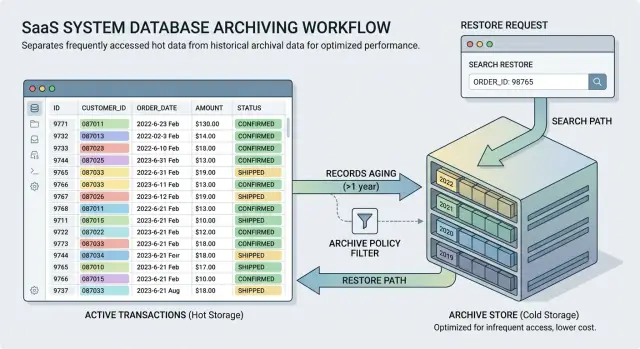
Table of Contents
What happens when old rows fill your main tables
A table doesn't need to be broken to feel slow. It only needs years of old rows mixed in with the small slice of recent data that users open every day.
At first, the slowdown is easy to shrug off. A customer list takes one more second to load. A dashboard pauses before it shows totals. Then the background jobs start slipping too. The database has more pages to scan, more index entries to maintain, and more dead space to clean up.
Writes get heavier as well. When your app inserts or updates fresh data, the database often has to update large indexes that still include records nobody has touched in years. On a busy table, that extra work adds up.
People usually notice the same symptoms. Screens that used to feel instant now pause. Reports run long enough that teams avoid them. Imports and sync jobs miss their normal window. Routine maintenance takes longer and feels riskier.
Indexes are often the hidden problem. Users may only search recent orders, recent events, or current subscriptions, but the index still holds years of history. Bigger indexes mean more memory pressure and more disk reads. Backups grow too, so every full backup, restore test, and copy to another environment costs more time and storage.
That is why hot and cold data should not live in the same place forever. Hot data is the part your product touches all the time. Cold data still matters, but people need it far less often.
An archive plan keeps recent data fast while preserving older records for audits, support work, and the occasional historical report. You are not deleting the past. You are moving it out of the busiest path so the main tables stay lean.
When teams do this well, users get faster screens, engineers get shorter maintenance windows, and backup costs drop. The database still keeps the full story. It just stops dragging that whole story into every query.
How to decide what counts as cold data
Cold data needs a rule that anyone on the team can explain in one breath. Age is the usual starting point. Many teams use 12 months for busy event tables and 24 months for orders, invoices, or customer activity that people still check now and then. Pick a rule per table, not one giant rule for the whole database.
Age alone rarely works. A row can be old and still active. An unpaid invoice from 18 months ago, an open support case, or a subscription with a billing dispute still belongs in the main table. Status matters just as much as time. Clear rules combine both, such as "older than 24 months and closed" or "older than 12 months and no longer updated."
A simple SaaS example makes this easier to see. Old user sessions may become cold after 12 months. Invoices may move after 24 months, but only after finance closes them. Support tickets may move only when the case is resolved and nobody has touched it for a set period.
Before you lock the rule, ask finance, legal, and support what they still need from older records. Finance often needs tax, billing, and audit history. Legal may need longer retention for contracts, consent records, or disputes. Support needs enough detail to answer customer questions without a scavenger hunt.
Those answers usually change the cutoff. They also reveal which rows must never leave the hot table. Current account state, latest subscription status, fraud flags, and unresolved tickets often need instant reads, even when the records are old.
Write the rule down in plain language and keep it close to the schema. Include the age limit, the allowed statuses, and the exceptions that always stay hot. That short note prevents fuzzy debates later.
Where to put archived records
Most teams have two practical choices: archive tables inside the current database, or a separate archive database. Both can work. The better option depends on how often people need old records and how much load your main system already carries.
Archive tables in the same database are easier to live with day to day. The app can use the same connection, staff can query old data without jumping across systems, and restores are usually simpler because the row shape matches what the app already knows. For a small product team, this is often the best first step.
That convenience has a cost. Old-data searches, exports, and support queries still hit the same server. If people run broad searches across years of archived rows, your live workload can still feel it.
A separate archive database gives you cleaner isolation. Heavy searches on old orders, invoices, or events stay away from the tables that handle current users. Backups on the main database get smaller and faster too. The trade-off is more moving parts: extra access rules, extra restore steps, and more chances for someone to ask, "Where did that record go?"
Wherever you store archived rows, keep the archive schema close to the live schema. If you might restore rows later, do not reshape them into a reporting model just because it looks tidy. Keep the same primary IDs, column names, and data types where you can. Add a few archive-only fields like archived_at, archive_reason, and source_table if you need them.
Naming matters more than people expect. Pick one pattern and use it everywhere. That might mean an archive schema with tables like archive.orders, paired table names like orders_archive, or a separate database such as app_archive.orders. Keep dates in metadata, not in table names. Names like orders_history_v2_old only slow people down.
A simple rule helps. If support or operations needs archived records every week, keep them close. If old-data work is rare but heavy, split it out. If nobody can say where a three-year-old order lives in five seconds, the layout is too messy.
How people will search old data later
An archive plan fails when it saves space but makes older records hard to find. Most searches in the app should hit hot tables only. That keeps pages fast and stops the system from pulling years of history when a user only wants a recent order, message, or invoice.
Make the search behavior easy to understand. For example, the default search can cover the last 12 months, and anything older can sit behind a separate "Search archive" action. Users do not need the full retention policy, but they do need to know why a record did not appear.
Do not mix live and archived results into one list unless every row has a plain label like "Live" or "Archived." Even then, mixed results cause mistakes. A support agent may open an old record, assume it is current, and give the wrong answer.
Archive search should feel deliberate. It can be slower, broader, and available only where people truly need it. Give it its own filter or screen, plus a short note about the date range it covers. If the archive lives in another database, keep that detail out of the user flow. People care about finding the record, not where you stored it.
Support should know a simple routine: check the main search first for recent data, switch to archive search for older date ranges, confirm whether the record moved or was deleted, and request a restore only when someone needs to edit or reprocess the data.
This matters more than clever search features. If a customer asks about a payment from three years ago, support should find the answer in under a minute. If they need an engineer every time, the archive plan is still unfinished.
Restore rules people can follow
Restore work should be boring and clear. If people need a meeting to decide what happens, the rule is too vague.
Start with permission. Pick one owner for approval, usually from engineering, data, or operations, and name one backup person. Support can collect requests, but most teams should not let support restore production data on its own.
Next, define the size of a restore. Most teams only need three options: one record, all records for one customer, or a date range. That keeps requests easy to review and stops someone from asking for "everything from last year" when they really need one invoice or one account history.
Then decide where restored rows go. Sending them straight back into the hot table is simple, but it can confuse reports and trigger old jobs. In many cases, a temporary restore table is safer. People can inspect the data there first, confirm that it is the right set, and move only what they need.
Give restored data an expiry date. Seven to 30 days is common. After that, the data returns to the archive or leaves the temporary area. Without a time limit, temporary restores turn into permanent clutter.
Log every restore. Record who asked for it, who approved it, what rows came back, where they went, and what happened afterward. That is not paperwork for its own sake. It saves time when someone asks six weeks later why a customer record reappeared or why a dashboard count changed.
If you can explain the restore rule in under a minute, people will actually follow it.
A safe rollout plan
Start small. If you archive years of data in one shot, you make it much harder to spot what broke and why. A safer first run uses a narrow slice of old rows and checks the result before anything becomes automatic.
Begin with a baseline. Measure table size, row count, index size, average query time, and weekly or monthly growth. Save those numbers somewhere simple. After the first archive run, compare the same queries again. If nothing moves, the effort may not be worth it yet.
A practical rollout usually looks like this. Pick one table that grows fast and hurts read performance. Choose a small date range for the first move, such as one old month. Copy that slice into your archive area and leave production data untouched while you test. Then check searches, reports, exports, and the restore flow on the copied data. Only after that should you run the real move during a quiet period.
That testing step matters more than the move itself. Search often breaks first because people expect one screen to find both recent and older records. Reports can drift too if they quietly ignore archived rows. Restores need a clear path: who can request one, how long it takes, and whether the row returns to the hot table or stays in the archive and gets viewed there.
Use copied data before production data whenever you can. A team might archive orders older than 18 months and then discover that finance still uses those rows in a monthly report. You want to learn that in a test run, not on Monday morning.
After the first live run, check row counts, query time, error logs, and support requests. If everything looks normal, turn the process into a recurring job with a simple schedule and clear alerts. Monthly runs are often easier to reason about than daily ones.
A simple example from a growing product team
Many teams feel this problem in the orders table first. After five years, the table holds every checkout, refund, cancellation, and shipment update the company has ever seen. Support, operations, and product managers still use the same table every day, even though most of their work touches recent orders.
At that point, archiving starts to make sense. Keep the last 18 months in the live table, because that is where daily work happens. Keep any order that is still open, disputed, or still changing in the live table too, even if it is older.
Then move older completed orders into an archive store on a schedule, such as each night or each weekend. The team can archive shipped, refunded, or canceled orders that have had no updates for 18 months. Recent queries stay fast because the live table now holds the data people actually use.
Finance still needs the older records, so the archive cannot become a black hole. Give them a simple way to search archived orders by date range and customer. That covers most real requests, such as checking one customer account before a tax review or pulling all orders from a past quarter.
Restores should stay small. If a dispute appears or an auditor asks for a narrow set of records, the team restores only the needed orders instead of loading years of history back into the live table. A sensible rule is simple: restore by order ID, customer ID, or a tight date range, send the data into a separate table first, keep it there for a limited time, and log who asked for it and why.
This works because each team gets what it needs. Support keeps a fast system for current work. Finance can still search old history. Engineering stops dragging five years of cold data through every normal query.
Mistakes that create trouble later
Most archive projects go wrong in quiet, boring ways. The data moves, but reports drift, old cases lose context, and staff stop trusting the system.
One common mistake is moving rows without checking every report filter first. A sales report may read only the main table. A support dashboard may count tickets by last update date. If those filters ignore archived rows, totals change overnight. People think the business changed when the query changed.
Another mistake is archiving records that active workflows still touch. A customer account may look old, but billing retries, refund checks, fraud reviews, or contract renewals can still hit it. Move that row too early and some background job fails at 2 a.m. for reasons nobody expects.
Hidden dependencies break trust
Teams often move the main record and forget the rest. Attachments, notes, comments, status history, and child tables need the same plan. If you archive an order but leave its files and line items behind, support sees a broken record instead of a complete one.
Restores create another mess when nobody keeps an audit trail. You need a simple log that shows who restored the record, when they did it, and why. Add the source table and record ID too. Without that, two people can look at the same case and argue about whether the data changed or who changed it.
Search is the last trap, and it annoys people every day. If archive search is slow, hidden, or too technical, staff stop using it. Then they ask engineers to run SQL, export CSV files, or dig through backups. A normal support task turns into a queue.
A small test catches most of this. Pick one old customer, one old order, and one closed support case. Archive them in staging, then ask finance, support, and operations to find them, read the full history, and restore one record. If any step feels awkward, fix that before you touch production.
Quick checks before you turn it on
Archive work often fails at the last step. Moving the rows is usually the easy part. The trouble starts when someone asks, "Why did this record disappear?" or "Why does this report look smaller today?"
Write the cold-data rule in plain English first. If a support lead, product manager, or founder cannot explain it in one read, the rule is still fuzzy. "Archive orders that have been closed for 180 days and have no open refund, dispute, or legal hold" is clear. "Archive inactive records" is not.
Then test how people will find old records after the move. Do not leave this to engineers alone. Ask a support person or operations manager to search for a few real examples and explain what they expect to see. If they need a separate tool, a special query, or tribal knowledge, there is more work to do.
Run a restore test with real sample records, not fake rows. Pick records with notes, child records, status changes, and awkward edge cases. Time the full path from request to restored data. You want a process that works on a normal Tuesday, not one that only works when your best database engineer is online.
Before launch, check five plain things:
- One person owns the archive rule and the exception process.
- Search still shows the record history people need for support and audits.
- Restore works on a realistic sample and leaves a clear log.
- Reports still match expected totals across live and archived data.
- Job schedules, alerts, and run logs are easy to review.
Give reports extra attention. Many teams archive old rows and then find out that a finance or operations report only reads the live tables. Check dashboards, exports, and scheduled summaries against both data sets before launch. A small mismatch can turn into a long week.
Ownership matters too. Someone needs to approve rule changes, watch failed jobs, and answer questions when a record moves earlier than expected. If that owner is "the team," nobody owns it.
What to do next
Pick one table that hurts first. Choose the one that grows fast, slows common queries, or makes backups and reports take longer than they should. A small win on a painful table beats a broad plan that never ships.
Before you move a single row, write down three rules in plain language. Decide when a record becomes cold, where it goes, and how someone brings it back. If support cannot explain the restore path to a customer, or finance cannot say how long data must stay available, the plan is still too fuzzy.
Keep the review wider than the database team. Product cares about what users still expect to see. Support cares about search speed and edge cases. Finance cares about retention, audits, and storage cost. Put all three in the same review, even if the first version looks simple.
This is also the point where you check whether archiving changes app behavior. Teams often move old rows out and only then notice that dashboards break, exports miss data, or an admin screen silently stops finding older records. Those bugs are avoidable if you review app logic, reporting, and operating cost before rollout.
If the change reaches into application code, reporting, or infrastructure spend, it can help to get a fresh outside review. Oleg Sotnikov at oleg.is works as a Fractional CTO and startup advisor, and this kind of systems-level change is exactly where an experienced second set of eyes can save a team from doing the migration twice.
Start narrow, write the rules first, and run one controlled test. If that works, you can move cold records out of hot tables with far less risk.
Frequently Asked Questions
When should I archive data instead of just adding more indexes?
Archive when old rows slow common reads, bloat indexes, or make backups and maintenance drag. If recent screens feel slow but most traffic touches only newer data, archiving usually helps more than piling on more indexes.
How do I decide what counts as cold data?
Start with a plain rule per table, usually age plus status. A good example is "older than 24 months and closed," with clear exceptions for anything still active, disputed, or under legal hold.
Should I keep archived rows in the same database or a separate one?
For most teams, archive tables in the same database make the best first step because they keep access simple. Move to a separate archive database when old-data searches are heavy enough to bother live traffic.
Can archiving break my reports?
Yes, it can if reports read only live tables. Check every dashboard, export, and scheduled summary before you move production rows, or totals will drop and people will think the business changed.
How should users search archived records later?
Keep normal search focused on recent data and add a separate archive search for older records. People should know where to look without learning your storage setup.
When should we restore archived records?
Only restore data when someone needs to edit it, reprocess it, or inspect it in full detail. If a person only needs to read old history, let them view it in the archive and leave the live tables alone.
Should restored rows go straight back into the live table?
Often, no. A temporary restore table is safer because staff can verify the rows first and avoid waking up old jobs or confusing reports. Put rows back into the live table only when the app truly needs them there.
What is the safest way to roll out archiving?
Run a small test first. Copy one old slice, check search, reports, exports, and restore flow, then move a narrow production batch during a quiet window and compare row counts, query time, and errors right after.
What records should never leave the hot tables?
Leave anything that still changes or affects current account state. Open invoices, unresolved tickets, fraud flags, active subscriptions, and records under dispute usually stay hot even when they are old.
Which table should I archive first?
Pick the table that grows fast and hurts daily work first. Orders, events, sessions, or tickets usually make good starting points because you can measure the speed gain and catch process gaps early.


