Data retention by record type for enterprise startups
Data retention by record type helps enterprise startups sort logs, tickets, files, and analytics into clear rules so deletion requests stop stalling.
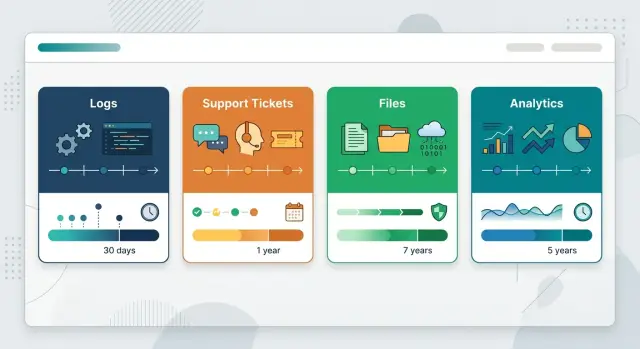
Table of Contents
Why deletion requests turn into archaeology
A deletion request sounds simple until you try to trace one customer across a real startup stack. The same person can show up in the product database, the support inbox, billing records, error logs, analytics events, file uploads, and a few CSV exports someone saved for a one-off report.
That spread happens for ordinary reasons. Teams add tools fast. They copy data to solve a problem, then leave it there because nothing breaks. Six months later, nobody remembers which copy is live, which copy is a backup, and which copy only exists because a support agent exported a list on a busy Friday.
That mix turns deletion work into manual digging. One request can send people through several systems just to answer a few basic questions:
- Where does this person's data live?
- Why do we still have each copy?
- Which records can we delete now?
- Which ones must stay for billing, security, or audits?
Volume is only part of the problem. Context matters just as much. A support ticket may include personal details that should disappear after a set period. A fraud log may need a different timeline. An invoice may need to stay longer because finance depends on it. If all of that sits in the same bucket, people start guessing.
That is where risk shows up. A team might delete something it needs for tax records or an incident review. Or it might keep too much because nobody wants to make the wrong call. Both outcomes create extra work, and both look weak when an enterprise customer asks how you handle data.
That is why retention by record type matters for startups. You do not need a giant policy binder. You need clear categories, a reason each category exists, and simple rules people can follow without asking legal or engineering every time.
Once records are split by purpose, deletion requests stop feeling like a dig through old ruins. The process gets much simpler: identify the record type, check the rule, delete or retain, and document why.
The record types to split first
Many early teams dump very different data into one bucket called user data. That seems harmless until someone asks you to delete one customer, keep a billing record, and prove what happened in support last month.
A workable policy starts with a few clean buckets, not a huge taxonomy. Split the obvious groups first, and most deletion requests get easier right away.
Product logs should live apart from support tickets. Logs track system behavior: request IDs, timestamps, IP addresses, error traces, job runs. Support tickets hold human conversations, agent notes, screenshots, and promises made to a customer. They may point to the same account, but they exist for different reasons and usually need different retention periods.
Uploaded files deserve their own category too. Teams often forget this one. A file bucket can hold contracts, CSV imports, exported reports, profile images, and customer documents. Those files often contain more sensitive data than the database row that points to them.
Analytics events should stay separate from account records. Account records support the product itself: users, workspaces, permissions, invoices, settings. Analytics events answer behavior questions, such as which page loaded, which button got clicked, or how often a feature ran. If you mix them together, you either keep analytics too long or delete account data too soon.
For most startups, five buckets are enough to start:
- Product and security logs
- Support tickets and customer communications
- Uploaded files and attachments
- Analytics events and reporting data
- Core account and billing records
Backups belong on the map, but they are not their own business record type. A backup is a copy of other records taken for recovery. It needs backup retention rules, access controls, and restore procedures. It should not become the place where old data lives forever because nobody cleaned the live systems.
In most cases, teams remove data from active systems first and let backup copies expire on their normal schedule. That works far better than trying to edit every backup set by hand.
Start with purpose before time limits
If you pick a retention period before you define purpose, the policy usually falls apart. Start by naming why each record exists. Support tickets help solve customer problems. Billing records support finance. Security logs help investigate abuse. Product analytics helps teams spot trends.
Write down one plain reason for each record type. Keep it short enough that anyone on the team can understand it without a meeting. If the reason sounds vague, like "we might need it later," that is usually a sign the data should not stay around for years.
Then match each purpose to a real business need. Some records help you run the product day to day. Others support legal duties, customer contracts, fraud checks, security reviews, or audit trails that enterprise buyers may ask about.
Be careful with security and audit records. Teams often keep huge piles of logs because storage feels cheap, but many of those logs stop being useful quickly. A smaller set of clearly named records is easier to protect, search, and delete.
A simple check helps:
- What problem does this record solve?
- Who uses it?
- Does a contract, audit, or security process require it?
- What happens if we delete it too early?
- What happens if we keep it too long?
A B2B SaaS team might keep raw application logs for incident review, but only for a short period. The same company might keep invoice records longer because finance needs them. It might drop old file uploads, duplicate exports, and stale analytics tables if nobody can explain why they still exist.
That last step matters more than most teams expect. If a record has no owner, no business need, and no audit or security reason behind it, remove it. Deletion requests get much easier when old data no longer sits in forgotten buckets, inboxes, and backup folders.
How to map your data
Most startups know their main app database. They do not always know where the same customer data goes after signup, support, billing, monitoring, exports, and backups touch it. That is why one deletion request can turn into a week of searching.
Start with one customer account and follow its path. Use a real account if you can, or a test account that behaves the same way. This makes the work concrete fast.
Begin by listing every system that can store customer data. That usually includes the app database, support tool, billing system, email tool, file storage, logs, analytics, CRM, data warehouse, backups, and any internal admin tools. Then trace what happens after signup. Check what gets created right away, what sync jobs copy later, and what users or staff can export by hand.
Put one owner next to each dataset. If nobody owns the support tickets table or the object storage bucket with uploads, cleanup work will stall when a request arrives. Add one plain rule for each dataset too: when you delete it, when you archive it, and when you place it on hold. Keep the wording short enough that support, product, and engineering all read it the same way.
Then test the map with one real customer account. Ask someone to find every related record and confirm the result instead of assuming the map is complete.
You do not need a fancy tool for this. A spreadsheet is enough at first. Give each row a system name, record type, owner, purpose, and the rule that applies.
The gaps usually show up on the second pass. Maybe your app deletes a user profile, but support tickets still keep the email address. Maybe files disappear from the product, but logs still hold account IDs for 30 days. Maybe analytics stores event data in a separate warehouse that support cannot even access.
That is normal. The point is to make hidden copies visible before a customer, auditor, or enterprise buyer asks for proof.
Build a retention matrix your team can follow
A good matrix turns policy into a daily rule instead of a legal puzzle. If people need a meeting to read it, it is too big.
Start with one row per record type and only a few columns. Most teams need five things: how long to keep it, what starts the clock, who can stop deletion, where archived records go, and a short note if a law or contract changes the default.
| Record type | Keep for | Countdown starts | Who can pause deletion | Archive location |
|---|---|---|---|---|
| App logs | 30 days | Day of creation | Security lead for incident review | Log archive bucket |
| Support tickets | 24 months | Ticket closed date | Support manager for active dispute | Ticket archive export |
| Customer files | 90 days after account closure | Contract end or account closed | Legal or account owner for hold request | Encrypted file archive |
| Product analytics | 12 months | Event date | Data owner for fraud or abuse review | Analytics cold storage |
The countdown trigger matters more than many teams expect. "Keep for 12 months" is not enough on its own. Twelve months from what? Event date, contract end, ticket close, and user deletion request can all produce different results.
Be strict about deletion holds. Someone must own the decision, and the reasons should stay narrow. A support agent should not pause deletion because a customer "might come back." A pause usually makes sense for a security investigation, billing dispute, lawsuit, or regulator request.
Archived data also needs a named home. If your matrix says "archive" but nobody knows where that is, records drift into backups, exports, and old admin tools.
Keep the matrix small. If you have 40 rows on day one, group similar records and split them later. For many startups, 8 to 12 rows is enough. The point is not perfect detail. The point is that a real person can open the table, make a decision in two minutes, and follow the same rule every time.
A realistic example from a B2B SaaS startup
A customer ends their contract and asks to delete their workspace. The startup wants to say yes quickly, but the data sits in four places with four different reasons for existing.
The app database holds projects, comments, and uploaded files. The support system has tickets with screenshots, pasted error messages, and email threads. Security logs keep account IDs and sign-in history because the team still needs a short review window for fraud checks and incident work. Product analytics lives in a separate tool, where old events still point back to the same workspace.
If the company never split these records by purpose, the request turns into a slow search across tools. Support asks engineering what can go. Engineering asks security about logs. Someone forgets the analytics tool until a week later.
When the records are already separated, the answer gets much simpler. The team knows which bucket each record belongs to, who owns it, and how long it stays.
A clean response might look like this:
- Workspace content and uploaded files: delete after the export window ends.
- Support tickets and attachments: remove or redact customer material, but keep a narrow set of billing or dispute records for the finance retention period.
- Security logs with account IDs: keep them for a defined review window, then delete them or strip identifiers.
- Analytics events in the separate tool: delete event-level records tied to the workspace and keep only aggregated counts if the company still needs trend reporting.
That structure changes the conversation. The customer gets a clear timeline instead of a vague promise. Support can answer in one message: what is deleted now, what stays for a limited time, and why.
It also saves the team from messy follow-up work. Nobody needs to read every old ticket by hand or guess whether a screenshot counts as customer data. They check the bucket, follow the rule, and log the action.
This is the part many startups miss. Deletion requests do not become hard because the data volume is huge. They become hard because logs, tickets, files, and analytics all get treated like one pile.
Mistakes that create risk and extra work
The mess often starts with duplication. A team uploads a contract to the app, emails it, drops it in cloud storage, then exports it into a support thread. Months later, one deletion request arrives, and nobody knows which copy counts as the real one. Pick one source of truth for each record type. Every other copy should be short-lived or clearly marked as temporary.
Raw logs create a different problem. Founders often keep everything because storage feels cheap and engineers want more detail when something breaks. Over time, logs turn into a shadow database full of IP addresses, user IDs, request bodies, and stray personal data. Keep raw logs for a short window, then reduce them to summaries or metrics that still help with debugging and uptime.
Another common mistake is mixing legal holds with normal retention. If legal, finance, or security asks you to preserve a record, mark that hold separately and record who approved it. Do not extend the retention period for every similar record just because one case needs an exception. That makes the rule harder to follow and weakens your deletion process.
Where teams get stuck
Support usually sees deletion requests first, but support should not carry the whole workflow alone. They can confirm the request, explain timing, and open the right internal task. Engineering, product, security, and the people who own each data store need clear steps too. Otherwise, the team deletes the account in one place while old copies stay behind.
Hidden copies cause the most repeat work. Teams remove the main record and forget the places people use for convenience: CSV exports in shared folders, scheduled admin reports sent by email, attachments copied into ticket systems, and one-off databases used for demos or migrations.
If your policy ignores those copies, every request turns into a manual hunt. The system only works when each record has a purpose, an owner, a storage location, and a clear deletion path. It sounds strict, but it saves hours of digging later.
Quick checks before you lock the policy
A policy only works when your team can answer simple questions without guessing. If people need to search Slack, ask three teams, and inspect old dashboards, the policy is still a draft.
Start with storage. Someone on the team should be able to name every place customer data can land: the main database, file storage, support tools, analytics tools, error logs, shared drives, old CSV exports, and test environments. Miss one location, and a deletion request turns into a scavenger hunt.
Give each record type one owner. Logs, tickets, uploaded files, billing records, and product analytics often live in different systems, so they need different decisions. One owner does not mean one person deletes everything. It means one person answers for the rule, updates it, and settles edge cases.
Your support team also needs a plain handoff to engineering. When a customer asks for deletion, support should know what to send, where to send it, and what "done" means. A short internal form with the account ID, affected systems, request date, and deadline saves a lot of back-and-forth.
Run one fake request before you publish the policy. Pick a test account, send the request through support, and watch where the process slows down. You will usually find one hidden export, one unclear owner, or one tool nobody remembered.
Backups need their own rule. Many startups remember live data and forget the copies. If you cannot remove one record from a backup, say that directly in the policy, set the backup expiry period, and make sure the team can explain it in one sentence.
Keep evidence. After each deletion, record who asked, which systems the team checked, what the team removed, what stayed in backup until expiry, and when the work finished. Enterprise buyers often care less about perfect wording and more about whether you can show a real process.
If any answer feels fuzzy, stop and fix it before you publish. A neat policy with unknown storage, shared ownership, and no deletion record creates more risk than a shorter policy your team can actually follow.
What to do next
Your first pass should stay small. Pick one product area this week, not the whole company. Choose the part of the product where deletion requests already cause delays, or where logs, tickets, files, and analytics still get mixed together.
Map that area in plain language. Write down what data you collect, why you keep it, where it goes, who owns it, and when you can delete it. If the map takes more than a page or two, the scope is still too big.
A simple first move works better than a full policy nobody finishes:
- Choose one real feature, such as support tickets or file uploads.
- List each record type tied to that feature.
- Give every record type one clear purpose and one owner.
- Run one deletion request from start to finish.
- Fix the slowest handoff first.
That test run tells you more than a week of debate. Teams usually find one messy spot right away: a support ticket that links to a file in another tool, logs copied into two systems, or analytics data that nobody can explain. Fix that bottleneck before you expand the policy to the next area.
Then turn the map into a short working policy. Keep it practical. Your team should be able to read it in ten minutes and use it without asking legal or engineering to translate it. If a rule only makes sense in a meeting, rewrite it.
This also helps you spot where product, infrastructure, and AI workflows overlap. A company might delete customer files on time but keep the same data in logs, test datasets, or model prompts. That gap creates risk and extra work later.
If you need help untangling this across product, infrastructure, and AI systems, Oleg Sotnikov at oleg.is works with startups as a Fractional CTO and advisor. An outside review is often the fastest way to clean up the data path when too many tools are involved and nobody owns the full picture.
Start with one area, finish one real request, and use what you learn to write the next version.


