Data contracts for AI pipelines that survive app changes
Data contracts for AI pipelines keep field names, enums, and schemas stable so app updates stop breaking prompts, parsers, and downstream steps.
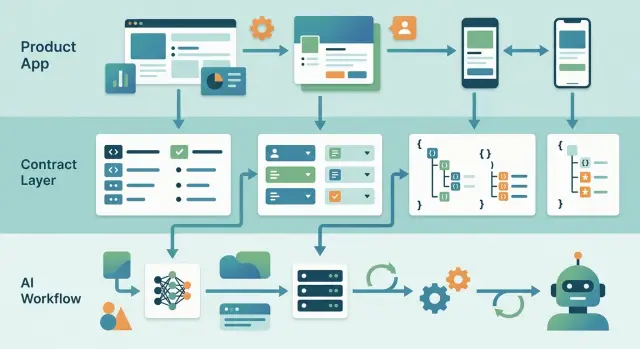
Table of Contents
Why normal app changes break AI flows
Most app changes look harmless. A team renames a field, adds a new status, or moves data to clean up the product model. The app still works, tests still pass, and the release goes out.
The AI layer can still break.
Prompt chains depend on exact names and structure. If a prompt expects customer_tier and the product code now sends plan, the model does not complain. It reads the wrong value, or no value at all, and still returns something that sounds plausible.
That is why these failures get expensive. Normal code often fails loudly. AI flows fail quietly.
Enums cause the same kind of trouble. Say your app used trial, active, and canceled, then the team adds paused. If the validator, classifier, or prompt logic still expects the old set, one new enum can start a chain of bad decisions. Records may fail validation, fall into a default branch, or get treated as something close but wrong.
Nested data changes are another common problem. A parser might look for user.profile.company.name, while the app now stores that value under account.org.name. Nothing crashes. The parser sends an empty field to the next step, and the model fills the gap with a guess.
Small teams can miss this for weeks. Support summaries get a little worse. Lead scoring drifts. Internal tags look less consistent. Nobody sees a clear error because the system keeps producing output.
That is why contracts matter at the app-to-AI boundary. Prompts, validators, and parsers sit between product code and model logic. When that boundary changes without a stable contract, ordinary product updates turn into silent AI bugs.
This shows up all the time on fast-moving teams. The app evolves quickly, but the AI side still depends on yesterday's field names. A two-minute refactor in the app can create days of cleanup in the pipeline.
What a data contract fixes
AI steps often break for small, boring reasons. A team renames plan_type to subscription, changes pro to professional, or turns a number into text for a new screen. The app still works, but the prompt chain starts reading the wrong thing, skipping a branch, or returning weaker output.
A data contract stops that drift at one boundary. It says: this task gets these fields, in these types, with these allowed values. Everything behind that line can change. Everything after it keeps seeing the same shape.
That boundary matters because app code changes all the time. Teams refactor models, split tables, merge states, and clean up old naming. If prompts read internal app data directly, every refactor can become an AI bug.
The fix is simple. Put a small adapter between product code and the AI step. The adapter maps whatever your app uses today into one fixed schema that the prompt reads every time.
Freeze the parts that affect the model most:
- field names
- types such as string, number, boolean, or date
- enum values such as
trial,active,paused - which fields are required and which are optional
Prompts do better with consistency. If one workflow sees customer_plan, another sees tier, and a third sees package, a person can usually guess the meaning. A prompt often cannot. Even a harmless rename can lower reliability.
Enums need extra care. If one service changes cancelled to canceled, a downstream classifier may quietly miss the case. That is worse than a crash because nobody notices right away. The output just gets less accurate.
A contract also shields AI steps from internal model changes. Your app can move from user_id to account_id, or split one status into three. The AI side should not care unless you decide to change the contract on purpose.
When you really do need a change, use schema versioning instead of silent edits. That makes the break explicit, gives you time to update prompts, and keeps old workflows running while the new version rolls out.
What to freeze at the boundary
Freeze the shape the AI sees, not every table and model inside your app. Your product can keep changing while the prompt chain keeps getting the same clean input.
A contract should lock down a few things with no room for guesswork.
Field names and nested paths come first. If the AI expects customer.email and your app team renames it to user.primaryEmail, the chain can fail even when the data still exists. Keep one public name at the boundary and map internal changes behind it.
Required and optional fields also need to be explicit. If shipping_address is optional, say so. Do not leave the model to infer what a missing field means.
Enum values need exact spelling. Pick one form and stick to it. paid, pending, and failed is fine. Mixing in_progress, in-progress, and In Progress creates small breaks that are hard to spot.
Formats matter too. Use one date format, one money format, and one ID type. Dates in ISO 8601, amounts in integer cents, and IDs as strings remove a surprising number of parsing mistakes.
Empty states need rules as well. Decide what null means, what an empty string means, and what a missing field means. Those three cases are not the same, and AI steps often treat them very differently.
A support tool makes this easy to picture. Say it sends tickets to an AI step that writes a short summary and picks a priority. If one release changes ticket.createdAt to ticket.opened_at, changes priority from high to urgent, and sometimes sends blank strings instead of null, the prompt may still run but return worse results. That is the annoying kind of failure because nobody sees an obvious error.
The fix is intentionally boring. Add a thin boundary layer that always outputs the same contract, even if your app uses different names and formats behind the scenes.
Use one contract per AI task
Use a separate contract for each model job. If one prompt writes release notes and another sorts support tickets, they should not share the same payload. Each task needs different inputs, and shared payloads get messy fast.
Name the contract after the job, not after the table or service that produced the data. ticket_triage_input is clear. tickets_v2 is not. A task name tells the team why the payload exists and what can change without risk.
Keep the payload plain and small. Send only the fields that affect the answer. A support triage model may need ticket_id, subject, body, language, and account_tier. It does not need the full customer record, a raw API response, or a database row with 40 columns.
A good contract usually follows a few simple rules:
- one task, one schema
- only task-specific fields
- names based on the job, not the storage layer
- preformatted values instead of raw nested objects
- payloads a person can read in seconds
This matters even more when several systems feed the same AI step. A model that creates a founder meeting summary should receive one stable input shape, even if the notes came from CRM records, call transcripts, or a form on oleg.is. The contract protects the AI step from upstream churn.
Raw payloads cause trouble because they drag in fields nobody meant to support. A prompt may start using status_label from one API response, then fail when another service sends state instead. If you flatten and rename the data before it reaches the model, you remove that risk.
Smaller contracts are also easier to test. A developer can look at one JSON example and tell whether the model got what it needed. If the payload keeps growing every sprint, the task is probably too broad. Split it before one bloated input starts doing five jobs badly.
How to set it up step by step
Start with one AI flow that already causes trouble. Pick the one that breaks after small product changes, like support ticket routing, lead scoring, or summary generation. Do not try to fix every model call at once.
Use a real example, not an abstract one. Copy one sample input from the app and one sample output you want back from the model. If a support ticket includes customer_tier, issue_type, and language, write those exact fields down. Then define the response shape too, such as priority, assigned_team, and reason.
A simple setup usually looks like this:
- Write the contract as a small schema with exact field names.
- Mark every field as required or optional.
- Freeze enum values and defaults.
- Validate data before the model call and after it.
- Publish a new version when the shape must change.
Required and optional fields need clear rules. If customer_id must always exist, say so. If promo_code may be empty, mark it optional. Defaults matter too. If missing language should become en, make that explicit. Silent assumptions cause most of the pain.
Enums deserve extra attention because prompt chains often depend on exact words. If priority can only be low, medium, or high, lock those values. Do not let one team rename high to urgent without a version change. That tiny edit can break routing, dashboards, and follow-up prompts.
Validation should happen twice. Check the input before it reaches the model so bad app data does not poison the result. Then check the model output before your product uses it. If the model returns urgent instead of high, reject it or map it with a clear rule.
This is where contracts stop being theory. They give the model a stable boundary even when the app keeps moving.
When you need a different shape, add v2. Keep v1 running until every prompt, parser, and downstream job has moved over. It takes a little more discipline, but it saves a lot of quiet breakage.
A simple product example
Picture a support app that sends every new ticket to an AI triage step. The model reads a few fields, then suggests a priority, a category, and a draft reply for the agent.
At first, the ticket payload is simple. It includes ticket_id, customer_name, issue_type, and message. The prompt chain expects those names exactly, so the triage step works fine.
Then the app changes
Later, the product team cleans up the app schema. They rename customer_name to full_name because that matches the rest of the product. It feels like a harmless update.
The AI flow breaks anyway. The prompt still asks for customer_name, so one of two things happens: the model gets an empty value, or some fallback logic fills the gap badly. The team may not notice right away because the system still runs. It just sorts tickets worse than before.
This is where a boundary contract helps. Instead of sending raw app data straight into the prompt chain, the app sends data through an adapter. The adapter reads the new app field, full_name, and maps it to the contract field, customer_name.
So the app can change while the AI input stays stable.
{
  "ticket_id": "T-1042",
  "customer_name": "Maya Chen",
  "issue_type": "billing",
  "message": "I was charged twice for the same plan."
}
The prompt chain keeps working because it still receives the same shape it was built for. You freeze the boundary, not the whole app.
Rolling out a new version
Later, the team may decide that customer_name is too limited. Maybe they want full_name everywhere, plus a new enum for ticket severity. They can publish contract version 2, update the prompt, test it, and move traffic over on purpose.
For a while, both versions can live side by side. Old flows read version 1. New flows read version 2. When the team sees clean results, they retire version 1.
That approach is boring, and that is exactly why it works. Predictable boundaries keep AI triage steady when product code keeps moving.
Mistakes that lead to silent failures
Most breakages do not crash anything. The app still runs, the prompt still executes, and the logs may look normal. You notice the problem later, when the model starts tagging records incorrectly or leaving fields empty.
A few habits cause most of these quiet failures.
Sending raw app models to the AI looks fast at first, but app models change for storage, UI, permissions, and reporting. The AI payload should be smaller and steadier than the rest of the product.
Renaming enum values to match nicer UI copy is risky. If in_progress turns into Working on it, the model or parser may treat that as a new state instead of the old one with prettier text.
Treating null, blank strings, and missing fields as if they mean the same thing creates edge cases that people forget to handle. Pick one meaning for each state and keep it consistent.
Updating prompt examples without updating the schema causes drift. The model learns from examples, so a changed example can quietly teach it to return a new shape even when your code still expects the old one.
Releasing contract changes with no version number makes debugging much harder. When outputs start to drift, you cannot tell which producer and which consumer speak different formats.
A small example shows how easy this is to miss. Say your app stores support priority as low, medium, and high. A designer changes the UI to show Low, Normal, and Urgent, and someone reuses those labels in the AI payload. Nothing crashes. But the routing prompt still expects medium, so every Normal ticket falls into a fallback path and gets slower handling.
The safer pattern is simple. Keep one stable contract at the AI boundary. Map app changes into that contract before data enters the prompt chain, and map results back after the model responds.
If examples, enums, or field names change, bump the version. Prompt samples are part of the contract, not harmless text.
Checks before you ship
Most AI flow breakages come from small payload changes, not bad prompts. One renamed field, one new enum value, or one odd date format can turn a working chain into a quiet mess. A short pre-ship review catches most of it.
Check every changed payload field by field. If product code changed customer_id to account_id, keep the boundary name stable or add a clear mapping.
Review every enum list. New values like paused, merged states, or removed options often break routing, summaries, and filters.
Test formats for dates, numbers, and IDs. 2026-04-03, 03/04/2026, 3000, and 3,000 do not mean the same thing to every parser.
Run the old and new contract versions side by side on the same records. Check the parsed result, not only the raw model output.
Parse real sample outputs before shipping. Staged examples are usually too clean and miss the ugly cases.
Use real samples, not invented ones
Pull a small batch from production-like traffic if you can. Include boring records, partial records, and the ones that caused trouble before. Five messy samples often tell you more than fifty hand-written examples.
Say your app used status: active | trial | canceled, and the product team adds paused. The UI may work on day one, but an AI classifier or summary prompt might still treat paused as unknown, or worse, map it to canceled. Users usually notice that only after reports start looking wrong.
If you support schema versioning, test both versions during the same run and log where they differ. Keep the comparison strict. Did both versions produce the same fields? Did the parser accept both? Did any record fall back to free text because the schema no longer matched?
Do not ship on trust. If one real sample fails to parse, stop and fix the boundary. Ten minutes spent checking field names and formats is cheaper than digging through silent failures after release.
What to do next
Pick one business flow that wastes time today and fix that first. Do not begin with every AI touchpoint in the product. Choose one path where a broken prompt chain slows people down, such as support ticket triage, lead enrichment, or draft generation for customer replies.
Write the contract before the next product refactor touches that flow. Teams often wait until after a rename or schema cleanup, then spend days chasing quiet breakage in prompts, mappings, and evals. A small contract written early is much cheaper.
For most teams, the first pass can stay simple:
- name the exact input fields the AI step receives
- freeze enum values the prompt or parser depends on
- define the output schema with required and optional fields
- add one version number and one owner
- keep prompt text, schema, and tests in the same review
That last point matters more than it seems. If someone edits the prompt but not the parser test, the review should fail. If someone changes an enum in product code, the contract owner should approve it before it ships. One person does not need to do all the work, but one person should decide when a contract change is safe.
A good rule is simple: if the app changes internally, the boundary should stay stable unless there is a clear reason to break it. That is how contracts stay useful. They give product code room to change without forcing every prompt chain to change with it.
If your team is already dealing with this kind of drift, Oleg Sotnikov at oleg.is works with startups and small companies on practical AI boundaries, schema versioning, and AI-first development workflows. Sometimes a short outside review is enough to spot the field names, enums, and version rules that should stop moving.
Frequently Asked Questions
What is a data contract in an AI pipeline?
A data contract is a fixed input and output shape for one AI task. It defines field names, types, enum values, and which fields must exist, so your prompt and parser keep seeing the same structure even when app code changes behind the adapter.
Why can a small app change break an AI flow?
Because prompts and parsers often depend on exact names and values. If your app renames customer_tier to plan or adds a new status like paused, the model may still answer, but it can read the wrong value and produce weaker results without any obvious error.
What should I freeze at the app-to-AI boundary?
Freeze the shape the AI sees. Keep field names, nested paths, types, enum values, required fields, optional fields, and formats stable. Dates, money, IDs, and empty-state rules should stay consistent too.
Should each AI task have its own contract?
Yes. One task should have one schema. A ticket triage prompt and a release note prompt need different inputs, so shared payloads usually grow into messy blobs that break more easily.
How should I handle enum changes?
Treat enum edits as contract changes, not UI tweaks. If you want to change high to urgent or add paused, publish a new version, update the prompt and parser, and test both versions on real samples before rollout.
Why do `null`, blank strings, and missing fields matter so much?
They mean different things, so do not mix them. null can mean known but empty, an empty string can mean the source sent blank text, and a missing field can mean no value was provided at all. Write one rule for each case and keep it steady.
Do I really need schema versioning for small changes?
Usually, yes. Even small shape changes can cause quiet drift. A version number makes the break explicit, lets old and new flows run side by side, and makes debugging much easier when results start to differ.
Where should validation happen?
Validate twice. Check the payload before it reaches the model so bad app data does not leak in, then validate the model output before your product uses it. If the model returns an unknown enum or drops a required field, reject it or map it with a clear rule.
Can I send raw app models straight to the model?
You can, but it usually causes trouble later. Raw models change for storage, UI, reporting, and permissions. A thin adapter that maps internal data into a small task-specific schema gives you a steadier boundary and simpler tests.
How do I start without rebuilding every AI flow at once?
Start with one flow that already breaks after small product changes, like support triage or lead scoring. Write a small schema for that job, add an adapter, lock enum values and formats, then test it on messy real samples. Once that flow stays stable, move to the next one.


