Customer managed secrets for safer token updates in production
Customer managed secrets let teams store, rotate, and test tokens safely, so people outside engineering can update credentials without breaking production.
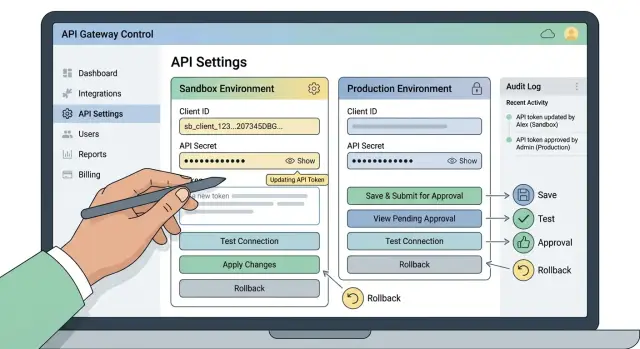
Table of Contents
Why token changes break production
Most integration outages do not start with a dramatic system failure. They start with a small admin task. A token expires, a vendor rotates credentials, or someone pastes the wrong value into the wrong field. Then orders stop syncing, invoices sit in a queue, or alerts never leave the app.
The first sign is often quiet. The API returns a 401 or 403, the error lands in logs, and nobody notices until data goes missing. By that point, the team is no longer making a calm update. People are guessing, changing live settings under pressure, and trying to work out which value is current.
The secret itself is often less of a problem than the process around it. Teams paste tokens into chat, ticket comments, shared docs, spreadsheets, and personal notes because it feels fast. That creates two risks at once. Too many copies exist, and nobody knows which one to trust. A stale token can sit in a note for weeks and then end up in production during an incident.
Business teams get stuck too. Finance, operations, or support may own the vendor account and receive the expiration notice, but they still need an engineer to update one field. What should take a few minutes turns into handoffs, waiting, and a late message after something breaks.
The mistakes are usually ordinary. A test token lands in production. A working secret gets overwritten with no easy way back. One service gets updated while a background job keeps using the old value. A new token goes live before anyone checks its permissions.
That is why customer managed secrets matter. They let the team that owns the vendor relationship update outbound integration credentials without touching code or asking engineering for every small change. Done well, the product keeps access tight, records who changed what, and tests the token before live traffic switches over. Secret updates should feel boring.
What customer managed secrets should mean
Customer managed secrets should give customers control over the token itself without giving them freedom to break everything around it. The customer owns the credential. The product owns the guardrails.
The simplest rule is also the one teams skip most often: each secret should have one approved home, and every system should read from that one place. If people keep backup copies in docs, chat, ticket comments, or local notes, the secret is no longer managed. It starts to drift.
Keep ownership clear and exposure low
A good setup lets someone outside engineering update a token without exposing the full value to everyone else. After the first save, the interface should hide most or all of the secret. People should be able to confirm that a token exists, see when it changed, and replace it when needed. They should not be able to reopen the page and copy the full value back out.
That sounds strict, but it solves a common problem. Teams often ask for wider visibility because renewals, billing changes, and vendor handoffs involve several people. Full visibility feels convenient for a few days and risky for the next year.
You also need a clear history. When a token changes, the system should record who changed it, when they changed it, and which environment they touched. If production fails ten minutes later, the team should not have to guess whether the outage came from the vendor or from a credential update.
Keep test and live apart
Sandbox and production credentials should live in separate records with clear labels and separate permissions. If they sit side by side with weak naming, someone will paste the wrong token sooner or later. That mistake is common and expensive.
Most teams should make production harder to touch. More people can usually update sandbox secrets so they can test vendor changes quickly. Production should belong to a smaller group, or require one extra approval before the switch.
When people say "customer managed secrets," they should mean controlled ownership. The customer can enter and replace credentials. The product keeps those credentials in one place, hides the full value after save, logs every change, and keeps test and live apart.
Set up the storage model
A storage model falls apart when one token lives in five places: a vault entry, a wiki note, a spreadsheet, a support chat, and someone's inbox. Once the token changes, nobody knows which copy is current. That confusion causes more outages than the token itself.
Start with one secret record for each integration and each environment. Stripe production should not share a record with Stripe staging. Salesforce production should not sit in the same entry either. Clear separation keeps test changes away from live traffic and makes reviews much easier.
Each record should store a few basic fields as separate pieces of data. Keep the secret value, a plain label that says what it is, an expiry date or review date, and the owner who can confirm changes. If labels and owners live in free text, people skip them. If review dates stay optional, old tokens linger for months and nobody knows when to replace them.
Permissions should match the way the business actually works. A finance team can update its own banking API token inside its workspace, but it should not be able to touch CRM credentials, billing settings in another account, or infrastructure secrets. Give people access to the records they own, not a shared cupboard of every secret in the company.
Production needs one extra check. A user can enter a new token, but the system should wait for a second person, or a named approver, before it replaces the active one. That pause catches wrong accounts, expired tokens, and simple paste mistakes while production is still safe.
Keep updates inside the system that manages the secret. Do not let people rotate tokens through spreadsheets, support threads, or ticket comments where credentials get copied, forwarded, and forgotten. Customer managed secrets only work when the record, permissions, and approval step live together.
Build the update flow
Most outages happen in the gap between "we received a new token" and "the app started using it." The update screen should make that gap small, visible, and hard to misuse.
Someone outside engineering should be able to open the integration settings, choose the right environment, and see exactly what will change. Sandbox and production should look different at a glance. If someone pastes a token into the wrong place, the screen should warn them before they save.
Do not force people to remove the current token first. Let them add the new token beside the active one, save it, and keep the old token in use while the system checks the new one. That one decision prevents a lot of downtime.
When someone saves a new token, the system should test it before any live requests move over. The test can stay simple. Call the provider's auth or account endpoint, confirm the token belongs to the expected account or workspace, and check that it has the permissions the integration needs.
The result should be plain and specific. "Failed" is not enough. Say "token expired," "wrong workspace," or "missing payments scope." A finance manager or operations lead can often fix those issues without asking engineering to read logs.
After the test passes, make the live switch a separate action. Keep that step apart from Save. People need a pause before production starts using new outbound integration credentials.
A short audit trail helps too. Show who added the token, who ran the test, which environment changed, and when traffic switched. If the provider still accepts the old token, keep it in place for a brief overlap window and remove it on purpose later.
Test tokens before you switch
A new token should prove two things before it touches production. It must reach the vendor, and it must reach the right account. Teams often stop at "the request succeeded." That misses the most common failure. A token can return 200 and still have the wrong scope, the wrong tenant, or access to the wrong environment.
Start with a harmless request. Ask for account details, a recent list with a limit of one, or a balance summary. Pick something that writes nothing, sends no emails, and creates no records. If the service only supports write actions, add a validation step outside the live workflow before people outside engineering can update the credential.
Then verify identity, not just access. Match the returned account ID, workspace name, merchant number, or customer code to the value you expect. This matters even more when business teams manage the token. They know the vendor account, but they may not know every API quirk.
Keep the old token ready until the new one passes the test and survives one live job. Do not revoke it the moment someone pastes in a replacement. Even a short overlap window can save a long outage if the vendor account owner copied the wrong secret.
Record the result next to the secret change. Keep the note short: who ran the test, which harmless request they used, which account the response came from, and whether the old token is still available for rollback. That note helps later when the team needs to tell the difference between a bad rotation and a separate vendor problem.
A simple example from a finance team
A finance manager needs to update the token that connects the company app to its billing system. The old token expires on Friday night, but payroll and invoice syncs run every morning, so a bad change would hurt fast.
With customer managed secrets, the finance manager does not ask an engineer to edit production settings by hand. She opens the admin screen, enters the new token, adds a short note about the vendor rotation, and sends the change for approval. The app records her name, the time, and the reason for the update.
An operations lead reviews the request and approves it. That extra step makes sense because billing access can affect refunds, invoices, and customer records. If something goes wrong later, the team can see who requested the change, who approved it, and which version went live.
The app does not switch traffic right away. It first uses the new token for a small test call, such as a status or account check that does not create, edit, or sync anything. That catches the common problems early: a copied space, the wrong environment, expired credentials, or a token with the wrong scope.
During that check, the old token stays active. Regular billing syncs keep running on the current credential, so the team does not risk production just because someone entered a new value into a form.
When the test succeeds, the system marks the new token as ready. The team still waits for the planned switch time, such as early morning before the first daily sync. That gives them a quiet window and a clear moment to watch logs.
After the switch, the app writes a full audit entry. It stores the approver, the cutover time, the test result, and the exact secret version that became active. If the billing vendor rejects requests later, the team can roll back to the previous token in minutes instead of guessing what changed.
Mistakes that cause outages
Most token outages are caused by the team, not the code. The application stays the same, but the team swaps credentials with no overlap, no clear owner, and no safe way to test.
One shared token across every customer account is a common mess. It feels simple at first. Then one expired or revoked token stops every sync at once. Customer managed secrets only work if each customer, workspace, or connection can keep its own credential and its own change history.
Teams also break things when they replace the old token too early. Someone saves a new secret and the system starts using it right away. If the new token has the wrong scope, points to the wrong account, or includes a typo, production fails on the next request. Keep the old token available until the new one passes a real validation check.
Testing creates another trap. Some teams "test" a token by running a live action against real customer data. That is risky. A bad request can send duplicate messages, move money twice, or create records nobody wanted. Safer tests use a read action, a dedicated validation endpoint, or a dry run that proves the token works without changing anything.
Error handling often makes the outage worse. If the screen only says "failed," nobody knows whether the token expired, the scope is wrong, the provider is down, or the user copied extra spaces into the field. Clear messages save hours.
Ownership matters more than many teams expect. After setup, people forget who actually owns the token. Is it the finance lead, the vendor admin, customer success, or engineering? When nobody knows, expired credentials sit unnoticed until jobs start failing.
The fix is usually simple. Give each account its own token. Validate before you switch traffic. Test with actions that cannot change data. Show specific errors. Assign one clear owner for renewals and access.
A short checklist before every change
Small token edits cause real outages when someone updates the wrong place, tests against the wrong account, or removes the old value too soon. A short checklist prevents most of that.
- Confirm the exact workspace and environment before you paste anything.
- Save the new token and make sure the app masks it after the first save.
- Run a real test call and verify the response comes from the expected account or tenant.
- Keep the previous token ready until the cutover window ends and normal traffic passes.
- Tell the owner when the switch will happen so they can watch for problems.
This takes a few extra minutes, but it saves far more time than it costs. Most token failures are not mysteries. Someone changed the wrong environment, trusted a weak test, or removed the fallback too early.
One habit helps a lot: let one person make the update and another confirm the account, environment, and test result. That is enough control for many teams, even when people outside engineering manage outbound integration credentials.
What to do next
Start with one integration. Pick the one that would hurt most if it failed, such as payroll, invoicing, bank feeds, or order syncing. That keeps the first rollout small and gives the work a clear target.
Then write the update steps for people outside engineering. A finance lead or operations manager should be able to follow them without guessing. Use plain language, name the exact fields they can edit, explain how to run a test, and say what to do if the test fails.
Before you add more tooling, make sure a few basics are in place. Production changes should need approval. Audit logs should show the user, time, and integration that changed. The app should test the new token against the real service before switching traffic. There should also be a rollback option so the previous credential can return quickly.
That foundation matters more than extra automation on day one. Teams often spend too much time on dashboards and too little time on permissions, testing, and rollback. Those are the controls that prevent most avoidable outages.
Once the first integration works, reuse the same token rotation process for the next ones. Do not redesign the flow for every vendor unless the risk is genuinely different. Consistency helps people move faster and cuts mistakes.
If you want a second opinion, Oleg Sotnikov at oleg.is works with startups and small businesses on practical CTO, infrastructure, and automation problems. A short review of your secret update workflow can catch loose access rules, missing approvals, or rollback gaps before they turn into production incidents.
You will know the process is ready when a token expires, someone updates it in minutes, the test passes, and nobody needs an emergency call.
Frequently Asked Questions
What are customer managed secrets?
It means customers can update their own integration tokens without asking engineering to edit code or production settings by hand.
The product still controls the rules. It keeps the secret in one place, hides the full value after save, logs changes, tests the new token, and only switches traffic when the token passes.
Why can't we just store tokens in docs or chat?
Because most outages start with process mistakes, not code. Teams paste tokens into chat, docs, tickets, and notes, then nobody knows which copy is current.
One approved record cuts that confusion. Everyone reads from the same place, so rotations and rollbacks stay simple.
Can someone outside engineering update a token safely?
Yes, if you limit access well. A finance or operations owner can enter a new token if the screen shows the right environment, runs a real test, and asks for approval before production uses it.
That removes slow handoffs and still keeps production under control.
Should users be able to see the full token later?
Hide it after the first save. Let people confirm that a token exists, see when it changed, and replace it when needed.
Do not let them reopen the page and copy the full value back out. That lowers exposure and stops casual sharing.
How should we separate sandbox and production tokens?
Keep them in separate records with clear labels and separate permissions. Make the screens look different enough that people notice the environment before they save.
If test and live credentials sit too close together, someone will paste the wrong one sooner or later.
What should we test before switching to a new token?
Use a harmless read request first. Check that the token reaches the vendor, belongs to the expected account, and has the permissions your app needs.
A 200 response alone is not enough. A token can work and still point to the wrong workspace or miss the right scope.
How long should we keep the old token?
Wait until the new token passes validation and survives at least one real job. That overlap gives you a fast fallback if someone copied the wrong value or picked the wrong account.
Do not revoke the old token the moment someone pastes a replacement.
Do production token changes need approval?
For most teams, yes. Let one person enter the new token and another person approve the production switch.
That small pause catches wrong environments, expired credentials, and simple paste errors before they hit live traffic.
What kind of error message should the update screen show?
Show exactly what failed. Say things like token expired, wrong workspace, or missing payments scope.
Clear errors help business users fix simple issues on their own and save engineers from digging through logs during an incident.
What's the best way to roll this out?
Start with the integration that would hurt most if it failed, like payroll, invoicing, bank feeds, or order sync.
Write plain update steps, add approval for production, log every change, test before cutover, and keep a rollback option ready. That foundation prevents most avoidable outages.


