Customer impact alert routing that pages the right owner
Customer impact alert routing helps teams page the person who can cut user pain fastest, even when the broken service belongs to another team.
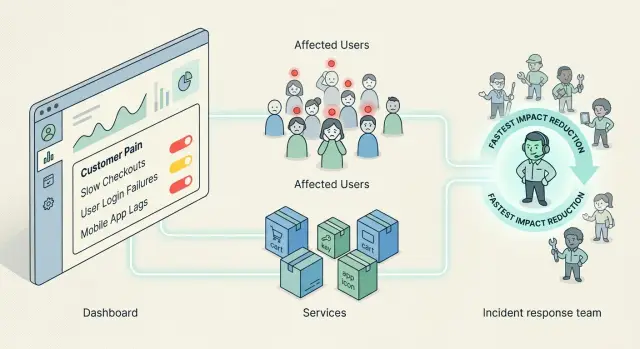
Table of Contents
Why service-based paging breaks down
Org charts look tidy. Incidents do not.
When alerts route by service name, they usually follow team boundaries. Database alerts go to the database team, cache alerts go to the cache owner, API alerts go to the backend team. That feels organized, but it often sends the first page to the person least able to reduce customer pain.
Customers do not feel "Redis is slow" or "queue-worker-3 is down." They feel "I can't check out," "my invoice didn't send," or "the app froze after I clicked pay." Service names describe parts of the system. They do not describe the damage.
That gap costs time. The cache owner wakes up, checks graphs, and sees a spike. Then they ask who is using that path and how badly it matters. Meanwhile, the checkout owner already knows the fallback, can disable a nonessential step, and can get orders moving again in a couple of minutes. The fault may sit in cache, but the fastest way to lower impact may sit in checkout.
A simple example shows why this matters. A cache cluster starts timing out. The first visible symptom is failed checkout requests because the pricing step cannot read session data fast enough. If the alert pages "cache," the cache owner may spend ten minutes tuning nodes or chasing noisy neighbors. If the alert pages the checkout owner first, that person can switch to a safe fallback, bypass one promo rule, or shorten dependence on cached data and get revenue flowing again before the cache fix lands.
That is why customer impact alert routing often works better than service-based paging. The first page should go to the person who can reduce harm fastest, not the person whose team name matches the failing component.
Service-based paging gets even weaker when one service feeds many product flows. A search index issue might slightly hurt product discovery, badly break admin tools, and completely block one paid workflow. One service alert cannot tell you which problem matters most unless the rule ties the alert to a customer-facing outcome.
A better first page starts with a few blunt questions. Which user action is failing right now? Which team owns that action end to end? Who has the fastest mitigation, not just the deepest system knowledge? Who can make a graceful downgrade without waiting on a handoff?
Once that rule is clear, the rest of the incident setup gets simpler.
What customer pain actually means
Customer pain starts when a real person cannot do the thing they came to do. They cannot log in, pay, finish signup, load a dashboard, or get a response they need. If users lose time, money, or trust, the pain is real.
Many teams still page people for the wrong signals. A database replica lagging for 30 seconds may look scary on a graph, yet customers may notice nothing. At the same time, a small bug in a billing form can block every new order and barely move any infrastructure metric.
Good routing separates user harm from technical noise. Technical noise still matters. Engineers should see it, track it, and fix it. It just should not wake the wrong person at 2 a.m. if no customer can feel it.
A simple test helps: if this problem continues for the next 15 minutes, what will users fail to do? If the answer is clear and painful, treat it as urgent. If the answer is vague, it is probably an engineering alert, not a customer alert.
Most teams already have better signals than they think. Failed orders, blocked logins, broken password resets, signup drops, user-facing timeouts, and support complaints around one task all point to customer pain more clearly than a raw service metric does.
"Checkout API is degraded" helps with diagnosis. "32% of orders are failing" tells you why anyone should care and how quickly they need to act.
Urgency should follow impact, not system ownership. If a cache node fails but checkout still works, the cache team can handle it without waking someone else. If checkout breaks because of a tax service, a feature flag, or a bad deploy in another service, page the person who can reduce customer pain fastest.
Write alerts in customer language first and technical language second. "Customers cannot place orders" is stronger than "service X returns 500s." The first line tells people what matters. The second tells them where to look.
That framing also stops a common argument. Teams spend less time debating whose box is on fire and more time fixing the part of the product that users actually touch.
Who should get paged first
Page the person or team that can lower customer pain in the next few minutes.
That sounds obvious, but a bad page order slows everything down. Customers keep hitting the same failure. Support gets flooded. The first responder wastes time finding the "right" owner instead of making the product usable again.
A practical test is simple. Who can stop the pain now? Who can add a safe workaround in 10 to 15 minutes? Who can reduce the blast radius without waiting for another team? Who can make a customer-facing change, rollback, flag flip, or temporary fallback?
That team gets paged first.
Sometimes the root cause sits deep in another system, but the fastest useful action lives closer to the user. If checkout errors come from a tax service, the checkout owner may still be the best first page. They might disable a nonessential check, switch to a fallback flow, or pause a broken step so customers can keep buying. The tax team still needs to join. They just do not always need to go first.
This is the split many teams miss: page ownership and repair ownership are not the same thing. The first page goes to the team that can reduce impact fastest. The repair stays with the team that owns the bug, service, or vendor issue.
Permanent fixes also take longer. A full repair may need logs, testing, a vendor reply, or a code change. A workaround may only need one careful decision and a config change. Good routing respects that difference.
If two teams can act, pick the one that can act alone with the lowest risk. In smaller companies, that is often the product or application owner, not the infrastructure team. In lean setups, one person may cover app, infra, and delivery. The rule stays the same: page the owner who can reduce impact first, then hand off the deeper repair if needed.
Good on-call alerts do not ask, "Who owns this service?" They ask, "Who can make this better for customers before the next five minutes pass?"
How to set up routing step by step
Most alert rules start with systems: database, queue, API, worker. That order works for dashboards, but it often pages the wrong person first. If you want to reduce customer impact quickly, start with the action the customer was trying to complete.
Begin with a short list of user actions that hurt most when they fail. For most products, that means logging in, signing up, paying, placing an order, sending a message, or exporting data. Keep the list short.
For each action, pick signals that show failure from the customer's side. Use signals people can feel, such as success rate dropping, latency spiking, retries climbing, or support complaints jumping. Then add one or two system signals that help explain the failure.
Next, choose the first owner by speed of impact reduction, not by service ownership. If checkout breaks because a third-party payment provider times out, the payments owner may need the first page even if the network team sees the fault first.
Write the rule in plain language. A person should understand it in one read. "If payment success drops below 92% for 5 minutes, page the payments on-call. They lead the incident and pull in database or infra if needed" is much clearer than "page on database saturation."
Then review every rule after a real incident. Ask three things: did the page reach the right person, did it fire soon enough, and could that person actually reduce impact?
Small teams should keep this even simpler. Use names or clear roles if that is how work really happens. In a startup, the best first responder might be the engineer who can disable a bad feature flag, the product owner who can pause a broken flow, or a Fractional CTO who can coordinate a rollback fast.
One detail matters a lot: give the first owner permission to lead even when the fault sits somewhere else. They do not need to fix every system. They need to reduce customer pain, then pull in the service owners.
If a rule cannot answer two questions, rewrite it: what customer action is failing, and who can reduce the damage first?
A simple example from a real product flow
A user picks a plan, enters a card, and clicks "Pay." The payment gateway is healthy. The checkout code is healthy too. But right before the charge, checkout asks a shared auth service to refresh the user's session.
That auth call starts timing out. Now every purchase fails even though the problem sits outside the payment stack. Customers do not care which internal service broke. They see one thing: checkout does not work.
If your alerting pages the auth team first, recovery can move slower than it should. The auth engineer may spend the first 10 or 15 minutes checking logs, comparing error rates, and deciding whether to roll back a deploy. That work matters, but it does not always cut customer pain fastest.
The checkout owner often has a faster move. They know which step is optional, which rule can be relaxed for a short time, and which fallback is safe enough to keep orders flowing. In this case, they can disable the session refresh step and let signed-in users finish payment with their current session.
That does not fix auth. It does fix what customers feel.
A sensible response looks like this:
- Page the checkout owner first because revenue is blocked there.
- Let them disable the failing auth check or switch to a simpler fallback.
- Pull in the auth team right after that to fix the shared service.
- Keep the alert open until checkout success rate returns to normal.
This order works because the checkout owner can reduce impact in a few minutes, while the auth team works on the root cause without every lost sale piling up in real time.
Teams miss this because service maps are neat and customer flows are messy. A shared auth service may support login, billing, admin tools, and mobile sessions. A page tied only to the service name treats all those failures as equal. They are not. An auth error during password reset is different from an auth error that blocks checkout.
This is also the kind of trade-off Oleg Sotnikov often writes about on oleg.is: the fastest fix is not always the deepest fix. In alerting, that distinction matters.
Common mistakes that waste time
A lot of on-call pain starts with one bad habit: paging the team that owns the box that looks broken on the architecture diagram. That feels tidy, but it often slows the fix. If the database is noisy but the fastest way to reduce damage is to pause a failing job, show a fallback message, or reroute traffic, the first page should go to the person who can do that now.
Another common mistake is sending the same alert to three teams at once. People think this saves time. Usually it creates a mini meeting before anyone acts. One team asks if the issue is real, another starts digging through logs, and the third waits because they assume someone else owns it.
One clear owner beats a noisy group page. Other teams can join through escalation if the first owner cannot reduce impact within a few minutes.
Alerts also waste time when they describe system symptoms but skip user pain. "Database pool saturation" may be true, but it does not tell the responder whether customers are blocked, annoyed, or unaffected. The alert name should make that obvious.
Teams also keep bad rules for too long. Ownership changes, workarounds change, and escalation paths rot quietly. A rule that made sense six months ago can be useless during a live incident.
Quick checks for every alert rule
If a rule wakes someone up, that person should be able to do something useful fast.
A short review catches most bad alerts. Ask whether a customer would notice the problem within minutes. If not, the rule may belong in a dashboard, a ticket, or a daytime queue instead of on-call.
Then check whether the first person paged can act right away. They should be able to roll back, fail over, disable a broken feature, post a status update, or pull in the right backup quickly.
Read the alert name out loud. It should describe user impact, not just an internal metric. "Checkout errors above 8%" is clear. "Database pool saturation" is only useful if that saturation already hurts users.
Open the runbook and look for a fallback. If it only says "investigate logs," it is not ready. It should name a workaround such as turning off a feature flag, switching traffic, or using a manual process for a short time.
Finally, confirm that someone tested the route recently. Teams change. Ownership changes. Old escalation paths break faster than people expect.
Search gives a good example. If search slows down because an indexing job fell behind, customers may see empty or stale results. The search infrastructure team may not be the first team that can reduce pain. A product owner or app owner might do it faster by hiding a broken filter, showing cached results, or pausing a fresh rollout.
For small teams, the rule is even simpler: page the person who knows the quickest safe workaround.
A fast rule for pruning alerts
If an alert does not answer who is hurting, who should act, and what they can do in the first 10 minutes, rewrite it. If nobody tested the route recently, test it this week.
That review takes little time and saves a lot of wasted paging when the next incident starts at 2 a.m.
What to do next
Start with one customer journey that really hurts when it breaks. Signup is a fine starting point. Payment is even better if it drives revenue every day. Do not try to fix every alert rule at once. One painful path is enough to prove whether your paging model works.
Then rewrite a small batch of noisy alerts around user impact. Three to five rules is usually enough for a first pass. A good alert says what customers cannot do, how long the problem has lasted, and who can reduce the damage fastest.
Examples are straightforward:
- New users cannot complete signup for 10 minutes
- Payment success rate dropped below the normal floor
- Customers cannot reset passwords in the app
- Orders are stuck before confirmation reaches the user
These alerts push people toward action because the owner is clearer than the service name.
After that, run one incident review with a narrow goal. Ignore blame and tooling debates for a moment. Look at one recent incident and ask a plain question: who got paged first, and could that person reduce customer impact in the first 15 minutes?
If the answer is no, change the rule. Maybe the database slowed down, but the person who owns checkout could have paused retries, switched traffic, or posted a customer message faster than the database team. That is the person who should get the first page.
Keep the first version simple: one primary owner for the user journey, one backup if the primary does not respond, one escalation after a short delay, and a short note on the first action that lowers impact.
Small teams often overbuild this part. You do not need a huge routing tree. You need a few clear rules that match real customer pain.
If your alert setup has grown messy over time, an outside review can help. Oleg Sotnikov does this kind of work through oleg.is as a Fractional CTO and startup advisor, especially for teams trying to keep operations lean while they move toward more AI-assisted engineering.
A week from now, you should have one journey covered, fewer noisy pages, and one clear owner per alert. That is enough to make the next incident shorter and less chaotic.
Frequently Asked Questions
Why shouldn’t I page the team that owns the failing service?
Because service ownership does not always match the fastest fix. If checkout fails because a shared service slows down, the checkout owner can often turn on a fallback, disable one step, or roll back a bad change before the service owner finds the root cause.
What counts as customer pain in an alert?
Customer pain starts when users cannot finish a real task. Think failed logins, blocked payments, broken signup, missing invoices, or long timeouts on a page people need right now.
Who should get paged first during an incident?
Page the person who can reduce harm in the next few minutes. That person should know the product flow and have enough access to roll back, flip a flag, pause a broken step, or pull in the next team fast.
Can the first paged team be different from the team that fixes the root cause?
Yes. The first page should go to the team that can make the user experience better fast. The team that owns the broken service still needs to fix the real problem, but they do not always need the first page.
What signals work best for customer impact alerts?
Use signals that users actually feel. Good examples include order failures, login success dropping, signup completion falling, user-facing latency spikes, timeout rates, and support messages about one broken action.
How should I name an alert so people act fast?
Write the user problem first and the system detail second. Customers cannot place orders tells people why the alert matters. Tax service timeout helps them diagnose it after they start acting.
Should I page several teams at once?
Usually no. One clear owner moves faster than three teams trying to decide who should act. If the first responder cannot reduce impact quickly, they should pull in the next team through a simple escalation path.
How can a small team set this up without building a complex system?
Keep it simple. Pick a few business flows that hurt most when they fail, choose one primary owner for each flow, add one backup, and note the first safe workaround. You do not need a huge routing tree to get better results.
What should the first responder do in the first 10 minutes?
They should try to make the product usable again, not solve every technical detail at once. A good first move might be a rollback, a feature flag change, a fallback path, a status update, or a quick handoff to the team that can repair the deeper issue.
How often should we review and test alert routes?
Review routes after real incidents and test them on a schedule. Teams change, workarounds change, and old ownership rules rot fast. If a route sends the page to someone who cannot act right away, rewrite it.


