Customer-hosted deals fail without a clear upgrade owner
Customer-hosted deals lose profit after launch when nobody owns upgrades, support access, and patch timing across each customer environment.
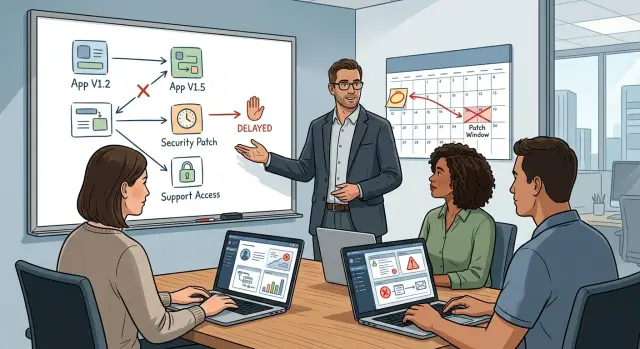
Table of Contents
What goes wrong after the sale
Closing the deal feels like the finish line. In many customer-hosted deals, it is where the expensive part starts.
Once the software goes live in the customer's environment, the vendor no longer controls the servers, access rules, deployment schedule, or even the exact version running in production. Small gaps turn into daily work.
That is where money starts leaking. Sales teams usually price the product and onboarding well enough, but they often miss the long tail: upgrade work, support delays, and odd fixes that appear months later.
The pattern is familiar. One team manages the app. Another manages infrastructure. Someone on the customer side approves security changes. Nobody owns upgrades across the whole stack. The product keeps moving, but the live system does not move with it.
At first, the split seems harmless. The customer delays one release because of an internal freeze. Then they skip another because a plugin fails in testing or the person with production access is on leave. A few months later, the vendor supports one version, while the customer runs an older build with custom patches, local workarounds, and half-finished changes.
Support slows down right there. When a ticket comes in, the vendor first has to figure out what the customer is actually running, who can grant access, whether logs exist, and whether the problem sits in the product, the hosting layer, or a missed patch. A bug that should take 20 minutes to confirm can burn half a day before anyone touches the code.
Patch timing makes it worse. Security fixes, dependency updates, and minor releases stop following a clean schedule. They wait for change windows, approvals, and for people on both sides to be available at the same time. Routine maintenance turns into project work.
Picture a SaaS vendor with a healthy margin on paper. After launch, one customer asks for help with an upgrade, then needs a firewall change, then wants support on a version the team no longer tests each week. None of those tasks looks huge on its own. Together, they pull engineers into work that sits outside the original deal and quietly cuts profit.
The sale closes fast. The mess shows up later in support queues, delayed patches, and invoices nobody expected to debate.
Why upgrade ownership gets lost
In customer-hosted deals, upgrade ownership often disappears the moment the contract closes. Everyone assumes someone else will handle it later. That works for a month or two. Then the first urgent patch or support issue lands, and nobody owns the decision.
Sales often starts the problem without meaning to. A rep agrees to customer-hosting terms to get the deal done, but the contract names infrastructure rules, security reviews, and access limits, not the person who approves upgrades. Once the deal is signed, the account moves on and that missing owner stays missing.
Customer IT teams usually pick up the operational side. They manage servers, VPN rules, backups, and change windows. That is real work, but it is not the same as owning product release timing. Most IT teams do not decide when a vendor version should move from 4.2 to 4.3, or who tests that change against business workflows.
The product team has the opposite problem. It ships code on a schedule but does not control each customer install. A team may release a fix on Tuesday and assume the issue is gone. For a hosted customer, that fix may sit untouched for six weeks because nobody on either side pushed it through approval.
Support gets trapped in the middle. If a bug hits production, support may already know the fix. It still cannot log in, inspect the environment, or apply anything until the customer approves access. A small issue turns into a long thread of emails, calls, and status updates.
Finance usually notices last. On paper, the deal looked fine. The margin drops later, when each ticket takes longer, each patch needs more coordination, and senior people spend time chasing approvals instead of solving the problem.
The pattern is simple: sales promises customer hosting, product keeps releasing, customer IT protects the environment, support waits for access, and finance sees the damage at the end. The missing upgrade owner sits in the gap between all five groups.
That gap is why a profitable deal can slowly turn into a support-heavy account with constant version drift.
How version drift starts
Version drift rarely begins with a big decision. It begins with one skipped update.
A customer delays a routine release because an admin is out, a change window closes, or nobody wants to touch a stable system before quarter end. That sounds harmless. Then the next release arrives, and the team decides to wait again so it can bundle changes.
Now the customer is two or three versions behind, and catching up feels riskier than staying put. From there, the gap starts growing on its own.
In customer-hosted deals, this gets worse because each customer runs on its own schedule. Your team ships improvements every few weeks, but one customer applies them every few months. Another asks for a local tweak, and your engineers patch that one environment to keep the account happy.
That local fix solves the immediate problem and creates a new one. The customer now runs a version that no longer matches your main release. When the next update comes out, nobody knows whether that local change will still work, so the customer waits again.
After a while, even simple communication breaks down. Your release notes describe version 6.4, but the customer still runs 6.1 plus two custom edits and one manual hotfix. Support reads the notes, the customer reads the screen, and both sides think they are discussing the same product when they are not.
Old bugs also come back. Your team fixed an issue months ago, but the patch never reached that environment, or it arrived too late and collided with another change. Support ends up relearning a problem that should already be dead.
This is where profit starts leaking. Every ticket needs extra investigation before anyone can answer the basic question: what code is this customer actually running? Instead of solving the issue in ten minutes, the team checks versions, compares local patches, reads old notes, and tries to rebuild the customer's setup from fragments.
One missed update does not hurt much. A chain of missed updates creates a separate product.
How support access and patch timing cut profit
In customer-hosted deals, support gets expensive fast when your team cannot reach the system the moment a problem starts. The issue is often not the fix itself. The delay begins earlier, when an engineer needs VPN access, admin rights, a jump box, or a customer approval that only one person can grant.
That waiting time does not look dramatic on paper. It still wrecks margin. A fix that takes 20 minutes can turn into two days of messages, meeting invites, and status checks while everyone waits for access.
Support threads grow for a simple reason. Your team asks for logs. The customer asks why. Someone from security joins late. Then a different admin says the first admin cannot approve the change. Nobody moves the work forward in one step. Your engineers still spend real time on it, even when they never touch the server.
Patch timing creates the same kind of leak. Many customers allow changes only during a narrow weekly or monthly window. That sounds manageable until a security patch lands right after the window closes. Then your team has to choose between waiting, accepting risk, or pushing for an exception.
When production breaks, the tidy schedule disappears. The team drops planned work, jumps into emergency support, and starts working nights or weekends to fit the customer's process. That work usually was not priced into the deal.
The warning signs are easy to spot. Engineers spend more time getting access than fixing the issue. Patch requests sit open until the next change window. Small tickets turn into long email threads. One hosted account starts pulling senior people away from other customers.
This is where profit slips away after the sale. One account starts absorbing hours that should support ten smaller accounts or move the product forward. Response times get worse for everyone else, and roadmap work slows down.
If you want customer-hosted deals to stay healthy, support access needs a clear path before trouble starts. Patch timing needs the same treatment. When both stay vague, every urgent issue becomes custom work, and custom work eats margin one approval at a time.
A simple customer-hosted story
A mid-size company wants your product, but only if it runs in its own cloud account. That sounds reasonable. The sales team wants the deal signed this quarter, so everyone agrees and moves fast.
The contract covers pricing, support hours, and where the system will run. One thing stays fuzzy: who owns upgrades after launch. The customer assumes your team will tell them when to update and help do it. Your team assumes the customer will schedule updates once new releases are ready.
For the first few weeks, nothing breaks. Then normal work gets in the way. The customer's operations team has other projects, a change freeze lands before month end, and one release gets postponed. Then another slips. About three months later, they are already two versions behind.
A bug shows up in production on a busy morning. Users cannot finish a workflow that worked last week. Support wants to check logs and confirm the running version, but nobody can log in right away. The environment sits behind a VPN, the admin who approves access is out that day, and the shared runbook is old.
Now the clock starts burning money. Your support engineer cannot inspect the live issue, so the team rebuilds context from old tickets, release notes, and partial screenshots. They have to remember which patch level the customer runs, whether the database changed in the skipped release, and whether the bug still exists in the current version.
By the time access opens, several hours are gone. The fix itself may take only 20 minutes. The expensive part is the detective work around version drift, missing access, and bad patch timing.
That is how customer-hosted deals lose margin after the sale. The product is fine. The support team is capable. The deal turns messy because nobody clearly owned the upgrade path when the customer said, "We will host it ourselves."
How to assign an upgrade owner
Assign the role before launch, not after the first failed patch. In customer-hosted deals, upgrades fall into a gap when each side assumes the other will push them through.
One person on the vendor side should own the upgrade plan. That person does not need to do every technical task, but they do need to keep the schedule moving, ask for access early, and raise a flag when the customer slips too far behind.
The customer also needs one owner, and that person needs real authority. If they cannot approve maintenance windows, request access, or pull in security and operations teams, the title means very little. A project manager who can only send reminders is usually not enough.
A simple setup works best:
- Name one vendor owner in the contract or launch plan.
- Name one customer owner who can approve work and exceptions.
- Set a recurring upgrade window, such as once a month or once a quarter.
- Agree on support access before anything breaks.
- Keep version, patch date, and approved delays in one shared record.
The upgrade window matters more than most teams think. If you leave patch timing open-ended, every upgrade turns into a new negotiation. Teams debate risk, calendars fill up, and version drift starts with small delays that look harmless. A written schedule cuts that friction.
Support access should also be settled early. When an incident hits, nobody wants to argue about VPN rules, admin rights, or who may touch production. Decide that before day one. Write down who can log in, who can approve emergency access, and how the vendor reaches the right people after hours.
Keep the tracking simple. One page is enough if it stays current. Record the live version, the last patch date, the next planned upgrade, and any exception with an owner and an expiry date.
Smaller vendors often skip this because it feels heavy. It is still cheaper than cleaning up a stale hosted account six months later. If your team is small, a founder or fractional CTO can own it until the volume grows.
Mistakes teams keep making
Teams lose money when they treat upgrades like casual support work. After the deal closes, nobody owns the release path, so upgrade tasks fall to whoever answers tickets that week. That feels harmless at first. A few months later, every new version turns into a small project with its own delays, testing, and hand-holding.
Another common mistake starts during sales. The team accepts custom changes to win the account, then never decides how those changes will live over time. If the work does not merge cleanly into the main product, each patch means extra comparison, extra testing, and extra risk. One small custom field or one special workflow can add hours to every release.
Support access usually gets ignored until something breaks. That is backwards. Teams should know before go-live who can approve access, who holds admin rights, who can restart services, and who can read logs. When they wait for an incident, they lose time chasing the customer's IT contact instead of fixing the problem.
Patch timing causes another slow leak. Customers ask to skip an update because they are busy, and the vendor says yes without writing down the risk. Then weeks turn into quarters. A security fix, dependency issue, or deployment bug hits an old version, and the vendor ends up doing emergency work on software the customer should have patched long ago.
Pricing is often wrong too. Teams price the deal as if every customer will stay close to the current release and follow a normal patch schedule. Real life is messier. Versions drift. Approval cycles stall. Custom code piles up. Soon each hosted environment behaves like its own product, but the contract still reflects a clean, current install.
This is where outside technical leadership often helps. A fractional CTO can set the ownership rules, define support access, and stop version drift before it becomes normal operating cost.
A short checklist before you sign or renew
Most losses in customer-hosted deals do not show up on day one. They show up later, when a serious bug appears, the customer runs an old version, and nobody knows who can approve the fix.
That is when version drift, blocked support access, and slow patch timing start eating margin. If the contract leaves those points vague, your team will argue about them again during every incident.
Use this review before a new deal or a renewal:
- Name one person on your side and one on the customer side who can approve upgrades.
- Write down how support gets access during an incident, including who grants it and how fast it must be available.
- Set a real deadline for security patches. "As soon as possible" is too loose.
- Decide what happens after a skipped release, including whether the customer can jump multiple versions.
- Separate normal updates from extra work such as backports, urgent hands-on help, or compatibility fixes.
These details feel small when sales wants a signature. They are not. One unclear clause can turn a calm account into a steady drain on support time and senior engineering hours.
A simple rule helps: if someone outside the project cannot answer "who approves, who gets access, how fast do we patch, and who pays for exceptions," the deal is still loose. Fix that before you sign.
If your team does not have strong technical leadership in the room, bring in a CTO or fractional CTO to review the terms. A short contract check now is much cheaper than six months of upgrade fights later.
What to do next
Put one name on upgrades before the deal leaves sales. If nobody owns that job, the work slips into the gap between account management, support, and engineering. That gap is where margin disappears in customer-hosted deals.
Write the rules down while the deal is still fresh. Keep them short. One page is often enough if it answers the questions people fight about later: who owns upgrades, who grants support access, how fast patches must move, and who can approve exceptions.
Then review hosted accounts every month. Do not wait for an outage, a missed patch, or an angry renewal call. A 20-minute check is often enough to confirm the current version, open patches, access status, expired credentials, and any exception still hanging around from last month.
Start small if your process is messy. Pick two or three active hosted accounts, fix the handoff, and test the rules with real people. You will find the rough spots quickly. After that, make the same process standard for every new hosted deal and every renewal.
If ownership still feels fuzzy, outside help can save a lot of wasted time. Oleg Sotnikov at oleg.is works as a Fractional CTO and startup advisor, and this kind of operational cleanup fits that work well: hosted products, support access, patch planning, and lean technical ownership.
A named owner, simple rules, and a monthly review usually do more than another tool or another meeting. They turn upgrades into routine work instead of a slow profit leak.
Frequently Asked Questions
Why do customer-hosted deals get expensive after launch?
Because your team loses control after go-live. The customer controls servers, access, approvals, and timing, so small delays turn routine upgrades into support work. Margin drops when engineers spend hours chasing context, access, and old patches instead of fixing the issue.
What does an upgrade owner actually do?
An upgrade owner keeps releases moving from plan to production. That person asks for access early, tracks the live version, pushes approvals, and raises a flag when the customer falls behind. Without that owner, upgrades drift into the gap between sales, support, product, and customer IT.
Who should own upgrades on each side?
Pick one person on your side and one on the customer side. Your owner should track versions and schedule upgrades. The customer owner should approve windows, pull in IT or security, and unblock access when support needs it.
How does version drift usually start?
It usually starts with one delayed release. A freeze, a missing admin, or a failed test pushes one update out, then the next one slips too. After that, catching up feels risky, so the customer waits longer and the gap grows.
Why does support take so long in customer-hosted environments?
Support slows when your team cannot reach the system right away. Engineers ask for logs, VPN access, or admin rights, then wait for approvals while the ticket grows. A fix that needs 20 minutes can eat half a day before anyone touches the code.
What should we put in the contract before we sign?
Write down who owns upgrades, who grants support access, how fast security patches must move, and who pays for exception work. If the contract leaves those points vague, you will argue about them during the first real incident.
How often should a customer-hosted account patch or upgrade?
Set a fixed upgrade window, usually monthly or quarterly, and set a shorter deadline for security patches. A written schedule works better than open-ended promises because it cuts debate and keeps customers close to the current release.
What should we do when a customer skips updates?
Do not let skipped releases pile up without a decision. Review the reason, check whether the customer can safely jump versions, and record who approved the delay and when it expires. If the customer keeps slipping, price the extra support or push for a catch-up plan.
Are customer-specific patches a bad idea?
Only allow them when you know how you will carry them forward. A local patch may solve today's problem, but it can break the next upgrade and force your team to support a one-off branch. If you accept custom work, decide early whether you will merge it into the main product or treat it as paid extra maintenance.
When does it make sense to involve a fractional CTO?
Bring one in when deals keep slipping after launch, renewals feel tense, or one hosted account absorbs too much senior engineering time. A fractional CTO can tighten ownership, patch rules, support access, and pricing before those problems turn into normal operating cost.


