Customer API tokens that expire, rotate, and stay scoped
Customer API tokens work better when customers can create, limit, rotate, and revoke them on their own without opening support tickets.
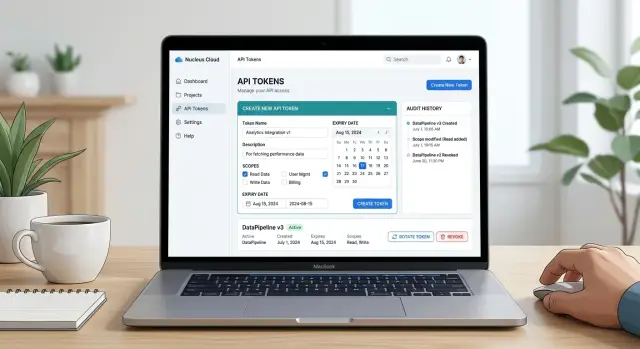
Table of Contents
Why one token for everything causes trouble
A single token looks simple at first. One secret, one setup step, and the customer moves on.
That simplicity does not last. Teams start reusing the same token in too many places: a local script, a production app, an automation, a test tool. A few months later, nobody knows where it still lives. When something breaks, nobody knows which system used it or who last changed it.
Full access makes the problem worse. If one token can read everything, write everything, and manage account settings, a small mistake spreads fast. A developer might log the token by accident. A contractor might still have it after the project ends. A script with a bug might change far more than it should.
Permanent tokens cause a different mess. People forget them. The token keeps working long after the original job is gone. Staff change roles, old integrations stop running, and test environments stay online. The account still has a live secret, but nobody remembers why.
Support teams deal with the result. Customers ask which token is safe to delete, whether a token was exposed, or how to revoke access without breaking production. Support then has to trace dependencies by hand, make an educated guess, and often disable the token under pressure.
Small SaaS teams usually see this early. A customer starts with one admin token shared across two engineers and three automations. Later, one engineer leaves, one automation fails, and the customer asks support to turn off the old token but keep the billing job running. If all five uses share the same secret, there is no clean fix.
One token for everything saves a few minutes on day one. Later it creates confusion, wider damage, and more manual support work.
What a customer token should let people do
Good customer API tokens feel ordinary in the best way. A customer should create one in minutes, use it for one clear task, and replace it without asking support for help.
That starts with self service. If someone needs a token for an integration, a script, or a one off import, they should create it in the account area on their own. Keep the form short. Explain each choice in plain language.
A token should match a narrow job. Most customers do not think in terms of internal permission models. They think, "I need to read orders" or "I need to send invoices." Your interface should reflect that. If you force people to choose from vague technical scopes, they will guess, grant too much access, or open a ticket.
At minimum, people should be able to create a token without contacting support, choose a small set of actions for one job, set an expiry date before the token exists, review where the token works and what it can reach, and later rotate or revoke it without delay.
The review screen matters more than many teams expect. Before you show the secret, show a short summary with the account, environment, scopes, expiry date, and creator. That catches mistakes early. It is much easier to spot "test account" or "expires tomorrow" before the token reaches production.
Expiry should be part of creation, not a buried setting. Some customers need a token for a weekend migration. Others need one for a monthly sync. Give them a sensible default and a few clear options so expiring tokens feel normal.
Rotation and revocation should take a few clicks. If replacing a token feels risky or slow, people keep old secrets around for months. That is how small problems turn into bigger ones.
A good design does not ask customers to understand your internal security model. It gives them clear labels, limited choices, and one last chance to confirm what they are about to copy.
Scopes people can understand
Customers should not need your org chart to create a token. Scope names work best when they match actions people already know, such as reading orders, updating products, or sending invoices. Internal names like billing.v2.write or core_admin force people to guess, and guessing creates support work.
The goal is not to expose every internal rule. The goal is simpler: help the customer answer one question fast. What can this token do?
A few action based scopes usually work better than a long list of tiny switches. Split permissions too far and people stop reading. Bundle too much and they grant power they do not need.
For example:
orders.readlets an app list and view orders. It does not let the app edit, cancel, or refund them.orders.writelets an app create or update orders. It does not let the app change account settings or manage users.invoices.sendlets an app send invoices that already exist. It does not let the app edit tax rules or payment methods.customers.readlets an app fetch customer records. It does not let the app delete records or export all billing data.
That second sentence in each description matters. People trust permission choices more when the limits are obvious.
Some combinations need extra friction. A token that can read customer data and change security settings is too broad for one click. A token that can issue refunds and export billing records deserves a second confirmation, or better yet, a split into separate scopes.
Clear naming helps your team too. Support answers questions faster, documentation stays shorter, and customers make fewer mistakes on the first try. If a new scope name feels like internal shorthand, rewrite it until a non technical user can understand it in a few seconds.
Expiry rules that fit real work
Good expiry rules reduce risk without getting in the customer's way. Most people do not want to think about token life every week, but they also do not want a secret sitting around for years.
A short default works well for testing. A small set of longer options covers ongoing work. Four presets are usually enough:
- 24 hours for quick tests and local development
- 30 days for short projects or temporary integrations
- 90 days for normal production use
- 180 days for stable jobs that someone still reviews on a schedule
That gives people room to choose without turning expiry into a policy puzzle. If someone needs longer access, ask them to create a new token later instead of offering "never expires" in the standard flow. Non expiring tokens tend to survive team changes, forgotten servers, and old scripts.
Warnings matter as much as the expiry date itself. Send a notice before the token expires and show the same warning inside the account area. Seven days works well for most cases. For very short tokens, make the deadline obvious in the interface as soon as the person creates it.
Keep expired tokens in the history view. Hide the secret, but keep the name, scopes, created date, last used time, expiry date, and creator. When a customer asks why a sync stopped last Tuesday, that history often answers the question in seconds.
Even a small team can keep this simple. A developer testing a webhook can use a 24 hour token. A nightly finance export can use a 90 day token with a reminder before it ends. Both jobs stay easy to manage, and neither leaves a forgotten credential behind for years.
If expiry is visible, predictable, and easy to renew, customers adapt quickly. Support tickets drop because the rules feel normal instead of arbitrary.
Build the flow step by step
A good token screen should feel quick and hard to misuse. If creating a token takes five minutes and a support ticket, people will keep reusing old secrets long after they should stop.
Start with a small form. Ask for a token name and an owner. Names like "billing sync for NetSuite" or "CI deploy bot" help later when someone scans a long list and needs to know what can be deleted.
Then ask for access from a short list with plain labels. Choices like "read orders," "write shipments," or "manage webhooks" are much easier to understand than "full API" or "standard access." Add one sentence under each option so people know what the token can actually do.
Before they click create, show the expiry in plain language. "Expires on 12 March 2027" is better than small text buried at the bottom of the page.
A simple setup usually works best:
- Name the token and record the owner.
- Pick the smallest set of scopes that fits the job.
- Choose an expiry date or accept the default.
- Review the summary and create the token.
- Copy the token and store it in a password manager or secret vault.
Show the full token once, then never show it again. Give people a copy button and a short warning that they will not see the full value a second time. That single rule removes a surprising number of support requests.
After creation, send them to a details page with three obvious actions: rotate, revoke, and view recent use. Recent use should show the last request time, which integration used it, and whether calls failed. If a customer sees a token named "old import" making requests last night, they can revoke it without asking support what it does.
That is the point of self service: fewer mystery tokens, fewer broad secrets, and fewer panicked messages when a teammate leaves.
Make rotation and revocation routine
Rotation should feel normal, not like a risky maintenance task. When a token expires or leaks, stress rises fast if customers have to replace it in one shot. A safer pattern is simple. Let them create a new token before the old one stops working, then give them a short overlap period to update apps, scripts, and background jobs.
That overlap window matters a lot. If both tokens work for a limited time, customers can update one system at a time and test each change. For many teams, 7 to 14 days is enough. Shorter windows fit sensitive scopes. Longer windows often just invite delay.
Status labels should be obvious. A token should never look active when it is on the way out. Plain states such as "active," "retiring," and "revoked" work well. Put the retirement date next to the old token, not inside a hidden panel.
The management page does not need many controls. It needs the right ones in the open: create a replacement token, show when the overlap ends, revoke the old token immediately, show who rotated or revoked it, and warn when a token has gone too long without rotation.
Audit logs are not only for security teams. They help support and engineering answer basic questions fast. If the log shows that Priya rotated a token on Tuesday at 10:14 and revoked the old one an hour later, nobody has to guess what happened. Keep each entry plain: actor, action, token name, scope, and time.
It also helps to warn about stale tokens early. Some customers will keep the same secret for years if you let them. A short alert when a token has not rotated for 90 or 180 days is usually enough. Tell them which token is old, when it was last rotated, and where to replace it.
Revocation should be immediate and uneventful. One click, clear confirmation, done. If a customer suspects a leak, they should not need a support chat just to shut access off.
A simple example from a small SaaS team
A five person SaaS team has customers who export daily sales data into their own reporting tools. One customer uses a basic dashboard outside the product and only needs to read order totals, refunds, and product counts once each morning.
The account owner opens the token page and creates a read only token for reports. They do not see a long list of technical permissions. They see plain options such as "read sales data" and "read order summaries," so they can pick only what the report needs.
The team uses a 30 day default. That can sound short at first, but it works because the reporting job runs every day and the customer can renew access before anything fails.
A week before expiry, the dashboard shows a clear warning. It also shows the exact expiry date and the last time the reporting tool used the token. The customer can see that this token still matters and knows when to act.
Rotation stays simple. The customer creates a new token, updates the reporting tool, runs one test pull, and checks that fresh sales numbers appear. Only then do they revoke the old token.
The report keeps running because the customer swaps credentials on their own schedule instead of waiting for an emergency. Nobody opens a ticket. Nobody asks an admin to dig through account settings. The customer stays in control, and the SaaS team avoids a small issue that could easily turn into three emails and a broken morning report.
That is the real win. A short lived, read only token limits damage if someone leaks it, and a self service flow keeps support out of routine account work.
Mistakes that raise risk and support load
The fastest way to turn tokens into a support problem is to make them hard to understand. If a customer sees scopes named org:rw, billing.admin, or tenant.execute, many will guess. Some will guess too wide, some too narrow, and both cases create tickets. Scope names should match real tasks people recognize.
Another common mistake is giving one token permission to do everything. That feels simple in the first version, but it creates too much damage when the token leaks. A token for reporting should not also edit users or billing settings.
Rotation often fails because teams treat it as "delete the old token and hope nothing breaks." Customers hate that flow because they cannot test the new token before the old one stops working. A short overlap period fixes much of that pain.
Showing the full token value again and again is another avoidable mistake. A token is a secret. Show it once at creation, then show only the last few characters so customers can identify it later. If someone needs it again, they should generate a new one.
Support load also rises when every change requires an email. Customers should not need to ask your team to rename a token, change its expiry date, revoke it, or create a replacement. Self service controls save time on both sides and reduce risky workarounds, like sharing one token across teammates because creating a new one feels slow.
The warning signs are usually easy to spot. Customers create one token and never touch it again. Staff handle routine token requests by hand. Customers do not know which token belongs to which app. Revoked tokens break jobs with no warning. When you see that pattern, the design needs work.
Checks before launch
Before you ship, ask someone who has never seen the token screen to create a token for a simple task. Give them two minutes. If they stop to ask what a scope means, where the token appears, or whether they can see it again later, the flow is not ready yet.
A solid token page gets a few basic things right:
- A new customer can create a token quickly with one clear path.
- Read access and write access look different right away.
- Rotation does not break scripts because the old and new token can overlap for a short period.
- Revocation is easy to find, so a leaked token can be disabled at once.
- The system records who created the token, when someone used it, and which token made each request.
Wording matters more than many teams expect. "Read invoices" and "Update invoices" are easier to trust than internal scope names. If a customer has to guess whether a token can change data, they will either open a support ticket or avoid the feature entirely.
Rotation also needs a real test, not just a design review. Create a token, use it in a sample script, rotate it, and confirm that the script keeps running during the handoff. Without that test, customers often delay rotation because they are afraid of breaking production.
Revocation should feel immediate. When a customer clicks revoke, the token should stop working at once, and the page should show that status clearly. Nobody wants to wonder whether a leaked secret is still active.
Audit logs close the loop. Show the creator, creation time, last used time, and a basic request history in a format support can scan quickly.
What to do next
Start with the tokens you already have. Most teams do not need a full rebuild on day one. They need a short review that separates low risk tokens from the ones that can read too much, change too much, or never expire.
That review usually reveals the trouble fast. Find tokens with broad access across many actions. Mark tokens that never expire or have no clear owner. Check which tokens customers still need support to create. Look for common tickets about lost secrets, unclear scopes, and broken rotation.
Then improve the smallest flow you can. A good starting point is one self service screen where a customer can create one token for one integration with a short expiry and a small set of permissions. If support tickets drop and customers finish setup without help, you picked the right first step.
Do not leave the wording until the end. Write the copy for scopes, expiry warnings, and revoke actions before you ship the interface. If a customer reads "read orders" or "manage webhooks," they should know what that means right away. If a token expires in 30 days, say what will stop working and when they should rotate it.
Small wording changes often save more support time than backend work. "Can view invoices" is better than a vague scope name. "Expires in 7 days" is better than a hidden rule in documentation.
If you want an outside review before the design hardens, Oleg Sotnikov at oleg.is works as a Fractional CTO and startup advisor. He helps startups with product architecture, infrastructure, and practical AI adoption, and a short review early is often cheaper than fixing a messy permission model after customers depend on it.
Frequently Asked Questions
Why is one token for everything a bad idea?
One token creates confusion and raises risk. Teams reuse it across scripts, apps, and test tools, then nobody knows what will break if they remove it. If that token has broad access, one leak or mistake can affect far more than one job.
What scopes should I offer first?
Start with a small set of scopes that match real tasks. Names like orders.read, orders.write, and invoices.send make sense to customers because they describe the job directly. Add one short line that says what each scope cannot do, so people trust the choice.
Should tokens expire by default?
Yes. Set the expiry when the customer creates the token, not later in a hidden setting. That one step removes a lot of forgotten secrets and makes short term access feel normal.
How long should customer tokens last?
For most teams, four options work well: 24 hours, 30 days, 90 days, and 180 days. That covers testing, short projects, and normal production use without turning expiry into a policy puzzle. Skip "never expires" in the normal flow.
Should customers create tokens without contacting support?
Yes. If customers need support for every token, they keep reusing old secrets because creating a new one feels slow. A simple account page for create, rotate, and revoke cuts routine tickets and gives customers more control.
What should the token creation screen show before the secret appears?
Show a short summary before you reveal the secret. Include the account, environment, scopes, expiry date, and creator, so the customer can catch mistakes before the token reaches production. After that, show the full token once and never show it again.
How do I make rotation safe for customers?
Let the customer create a replacement token first and keep both tokens active for a short overlap. Seven to fourteen days usually gives enough time to update apps, test each change, and then revoke the old token without stress.
What should happen when someone revokes a token?
Revoke should stop access at once and update the status on the page right away. If someone suspects a leak, they should not wait for support or wonder whether the token still works.
What details should I store for each token?
Keep the token name, owner, scopes, created date, last used time, expiry date, and who rotated or revoked it. That history helps support and customers answer simple questions fast, like why a sync stopped or which token an app still uses.
What mistakes create the most token related support work?
Teams often use vague scope names, allow full access, skip expiry, show the full token more than once, and force support into routine changes. Those choices look simple at first, but they create broad secrets, broken rotations, and more "which token does this app use" tickets.


