Custom deal terms in product model without team surprises
Custom deal terms in product model help sales, support, and engineering see the same rules, catch exceptions early, and avoid costly confusion.
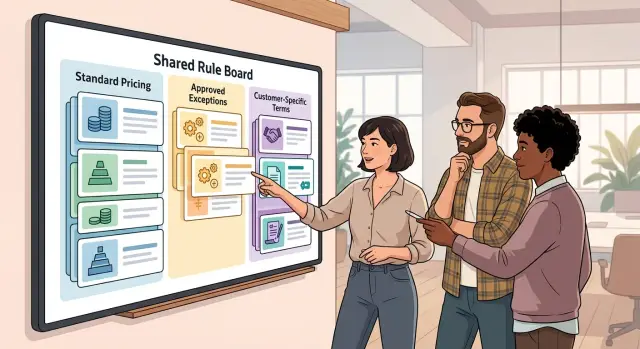
Table of Contents
Why teams get surprised
A custom promise sounds simple in a sales call: "You get 20 percent off, ten contractor seats, and weekend email support for the first six months." Sales hears an easy way to close the deal. Support hears a service promise. Engineering hears a billing rule and an access rule. One sentence turns into three different meanings before the contract is signed.
It gets worse when each team stores its version somewhere else. The discount sits in a spreadsheet. The seat exception lives in a CRM note. The support promise lands in a ticket with a vague title. All three records look close enough, but they do not say the same thing.
The mismatch often stays hidden until the customer starts using the product. Billing charges the standard rate. Support says weekend coverage is not included. The app blocks contractor accounts because the default seat policy is still active. Nobody tried to break the deal. Each team followed the rules it could see.
That is why custom terms need a home in the product model. If a rule does not exist there, people fill the gap with memory, comments, and one-off fixes. Those work for a few days. They fail at renewal, during an urgent support case, or after a product change quietly removes an exception.
The cost is real. Renewals slow down because the customer remembers promises that the account record cannot prove. Support wastes time digging through old notes instead of solving the issue. Engineering burns hours on manual overrides, special scripts, and preventable fixes. The work gets messy, trust drops, and margin slips.
Teams need one shared source of truth for every non-standard rule: price, limits, support level, dates, and exceptions. Clear rule layers make that possible. Everyone can see what is standard, what changed for this customer, who approved it, and when it ends. If a term is real enough to sell, it is real enough to model.
What belongs in the product model
If a term changes what the software does, allows, blocks, or measures, the product model should carry it. That includes feature access, usage caps, approval paths, data retention limits, tenant limits, region restrictions, and any other rule the app must enforce without a person stepping in.
That is the practical center of this problem. If support has to guess whether a customer can use a feature, or engineering has to search old sales notes to answer a basic question, the rule lives in the wrong place.
A simple test helps: put a term in the product model if the system needs to read it during signup, billing, provisioning, access control, or ongoing use. Leave it out if it is only a commercial agreement or a human promise.
The split is usually straightforward. Seat limits, API rate limits, audit log retention, SSO access, sandbox counts, and export approvals belong in the product model. Billing terms such as annual prepay, net-30 invoicing, discount end dates, and minimum commitments matter too, but they should sit next to the product model rather than inside it unless they change product behavior. Service promises like migration help, training sessions, named contacts, or weekend cutover support belong in service delivery records or the contract file. Manual favors, such as a one-time report or temporary data pull, belong in a task system, not in permanent rules.
One-off sales notes create the most confusion. A note like "customer may need extra exports" is not a rule. It is a hint. If that hint becomes a repeatable entitlement, turn it into a named rule with a clear value and owner. If not, leave it out.
Names matter more than most teams expect. Use plain labels that anyone can understand: "10 admin seats," "priority support add-on," "EU data storage," or "custom invoice schedule." Skip vague labels like "strategic package" or "special handling." Clear names reduce guesswork. Support answers faster, sales promises less that cannot be delivered, and engineering builds fewer private workarounds.
How rule layers should work
A clean rule stack starts with the standard plan. That base layer should hold the default price, billing cycle, limits, renewal terms, and support level for every normal customer. If the product cannot answer those questions without pulling up a contract, the base layer is too weak.
The next layer should hold approved exceptions. These are not casual promises from a sales call. They are repeatable rules the company has agreed to allow, such as extended payment terms for a certain segment, a temporary discount for a launch market, or extra seats for a partner program. This layer sits above the standard plan because it changes the default, but it should stay narrow and controlled.
The final layer is for customer-specific terms. Use it only when a signed deal truly needs something unique. This is where special contract terms belong, not in scattered notes, ticket comments, or somebody's memory. If a term affects billing, access, usage, renewal, or support, the system should store it in this layer with a clear start date and end date.
A simple order works well:
- Standard plan rules apply first.
- Approved exception rules override the standard plan.
- Customer-specific terms override both, but only for that customer.
Conflicts need one plain rule: the highest layer wins, but only for the field it changes. If the customer term changes payment terms, it should not quietly change usage limits too. That one detail prevents a lot of confusion.
A quick example helps. The standard plan says annual billing. An approved exception allows quarterly billing for nonprofits. One customer then signs a special deal with monthly billing for six months. The system should apply monthly billing to that customer, keep every other nonprofit rule that still fits, and fall back to the standard plan where no override exists.
Each rule should show its source, scope, and owner. When someone asks why an account behaves a certain way, the answer should be visible in one place, not rebuilt from email threads.
How to map the rules step by step
Most teams already have the raw material. It is buried in old quotes, renewal emails, CRM notes, and support exceptions. The job is not to invent new policy. It is to turn repeated promises into rules people can see, check, and follow.
Start with deals you have already sold, not imaginary edge cases. If sales gave one customer extra admin seats, a longer invoice window, or faster support response more than once, that is no longer a special favor. It is a rule candidate.
Pull recurring exceptions from signed deals, renewals, and support notes. Ignore true one-offs. Focus on terms that keep showing up. Then sort each item into a small set of buckets: pricing, usage limits, access rights, and support terms. Keep it simple at first. One rule should sit in one bucket before you worry about cross-effects.
Next, decide where each rule lives. Product usually owns entitlements and feature access. Finance or billing owns invoicing and charges. Support owns response commitments. Sales can request exceptions, but sales should not be the only keeper of the rule.
Every exception needs a start date, an end date, and an approval note. That small record stops old promises from living forever just because nobody remembers who approved them. After that, test the draft against a few real deals. If different teams read the same deal and reach different answers, the rule is still too vague.
This is where rule layers help. A base plan sits at the bottom. Contract exceptions sit above it. Temporary promotions or migration terms sit above that. Once people can see the order, they stop arguing about which promise wins.
Consider a customer on the standard plan who gets 12 months of premium support and keeps an older usage cap until renewal. That deal touches three buckets, not one. Put the support term in the support layer, the old cap in the usage layer, and keep the core plan unchanged. That structure is much easier to track and much easier to explain.
Skip this mapping work and contract exception tracking turns into memory work. Memory fails fast when a deal gets renewed, expanded, or handed to a new account owner.
A realistic deal example
A 120-person customer signs an annual contract for a product with team analytics, API usage, and standard support. Sales closes the deal at an 80-seat minimum even though the customer expects only 65 active users at first. They want a fixed budget, so they accept annual prepayment instead of a more flexible billing schedule.
They also ask for a strict usage cap. During the first contract year, the account can use up to 5 million API calls each month, and the product must block extra usage instead of charging overage. That matters because the customer cannot risk a surprise bill while rolling the product out slowly.
Support gets one exception too, but it is narrow. The customer pays for a 4-hour response time on analytics issues only. If they ask about invoices, seat changes, or admin settings, the normal response time still applies.
When a deal like this is easy to run, the account record mirrors the contract. It shows annual prepaid billing, an 80-seat commercial minimum, a 5 million monthly API cap, blocked overage for year one, and faster support for analytics tickets only.
When those terms live in the model, each team reads the same facts. Billing invoices the customer once a year for at least 80 seats. Support sees the faster SLA only when the ticket is tagged to analytics. Engineering sets a quota that stops API calls after the monthly cap and removes that block at renewal unless the next contract keeps it.
Now compare that with the same deal stored in scattered notes. Billing may send an overage invoice because nobody added the blocked-overage rule. Support may promise fast replies on every ticket because the scope was vague. Engineering may leave the API limit open because the contract never reached the product team in a usable format.
The customer sees one broken promise. Inside the company, three teams think they followed the deal. That gap is exactly why rule visibility matters.
What each team needs to see
When custom terms live in one visible place, fewer promises slip through the cracks. Sales can quote with confidence, support can answer without digging through old messages, engineering can build the rule once, and finance can bill the right amount on day one.
Sales needs a fast view before a deal closes. Reps should see which terms are standard, which need approval, and which cannot be sold at all. If someone has to ask around every time a customer wants a usage cap, a waived fee, or a delayed start date, the system is already too fuzzy.
Support needs a simple customer view, not contract prose. When a customer writes in, the agent should be able to check plan limits, exceptions, service dates, and special handling in a few seconds. "This customer has a 90-day grace period for seat reductions" is useful. "See signed order form, page 7" is not.
Engineering needs exact fields, not loose notes. "Special pricing for Acme" forces someone to guess what the rule means. Engineering should get clear values: discount type and amount, start and end dates, included usage or seat limits, overage behavior, billing frequency, and any invoice hold rules. Those fields make it possible to turn rule layers into code, tests, admin screens, and logs. They also make changes safer because the rule has a name, an owner, and a clear effect.
Finance needs to see billing exceptions before invoicing starts, not after the first complaint. If a contract includes annual billing, custom tax treatment, a one-time credit, or a delayed first invoice, finance should see that in the same record that drives product behavior. Separate spreadsheets usually create rework.
A shared rule view does not need to be complex. It needs plain labels, effective dates, approval history, and one source of truth. That sounds obvious, but many teams never get there because exceptions keep arriving faster than the model evolves.
Mistakes that cause confusion
Confusion rarely starts with the contract itself. It starts when a promise lives in one place and the product lives somewhere else. Sales agrees to a renewal cap, a custom approval step, or a billing exception, but no system stores it in a way the product can read.
That gap stays quiet until someone needs it. Then support answers from memory, engineering checks old code, and finance checks the latest invoice. Three teams look at the same customer and see three different versions of the deal.
One common problem starts with speed. An engineer adds a one-off rule to help one customer go live faster, and nobody records when that rule should end. Months later, the account changes plan, renews, or adds users, and the special case is still running in the background. What looked like a quick fix becomes hidden product behavior.
Support gets hit from another side. Someone opens an old contract version, a stale PDF, or outdated CRM notes and follows terms that no longer apply. That creates a nasty kind of issue: the team sounds certain, but gives the wrong answer.
Another mistake is mixing service terms and product rules together. A custom onboarding promise is a human process. A feature limit, price override, or usage rule is product behavior. If nobody separates those layers, people expect the app to enforce things that only the account team can deliver.
The pattern is usually familiar. A deal term lives only in email or call notes. Code handles an exception, but nobody tracks its expiry. Support reads one record while billing reads another. Service promises sit next to feature entitlements as if they were the same thing. Nobody owns approval, updates, or removal of the exception.
This works only when every exception has a home, an owner, and an end date. If a term changes system behavior, store it in the model and make it visible. If it only changes how people support the account, keep it out of product rules and show it where the team actually works.
A quick review checklist
Before a special term reaches a customer, test it like an internal handoff. A rule that feels obvious to the person who made it can still confuse support at 6 p.m., sales during renewal, or engineering when billing logic changes.
A short review is usually enough:
- A new teammate can understand the rule in about a minute. The record should say who gets the term, what changes in product behavior or billing, when it starts, and what makes it end.
- One place shows the live rule and the change history. Nobody should have to compare a contract PDF, a CRM note, and a Slack thread to figure out which version wins.
- Temporary terms have an end date in the same record as the rule.
- Support can answer common customer questions from that record.
- Sales, finance, and engineering approved the same wording.
This check does not take long. In many teams, it takes ten minutes and prevents days of back-and-forth later.
A simple example shows why. Sales writes "custom overage grace period," finance reads that as delayed billing, and engineering reads it as free usage until a threshold. Those are three different outcomes. Clear rule layers fix that before the customer ever sees the mistake.
What to do next
Start where the pain is. Do not begin with every contract variation your company has ever signed. Pull the last 10 to 20 deals that created extra support tickets, billing fixes, manual approvals, or engineering work after the deal closed. Those are the terms worth fixing first.
A quick review usually shows the same pattern: the team keeps solving the same exception in different ways. Sales writes it in notes, support learns it from a customer complaint, and engineering hears about it when something breaks. That is wasted time, and it keeps happening because the rule has no clear home.
Keep the first pass simple. Mark the terms that trigger the most rework. Turn repeated exceptions into named fields instead of free text. Review older deals and remove terms you no longer want to sell. Set one owner who approves any new exception before it reaches a contract.
Named fields matter more than most teams expect. "Priority support for 90 days," "regional usage cap," or "custom invoice timing" should not live only in a PDF or CRM note. Put them somewhere the product, billing logic, support tools, and internal reports can read.
Then clean up the backlog of old promises. Some terms were useful once, but now cost more to maintain than they bring in. If nobody wants to support a term again, retire it. Keep the old deals visible, but stop offering that exception in new contracts.
If your team still trips over the same contract edge cases every month, outside help can save a lot of wasted effort. Oleg Sotnikov at oleg.is works as a fractional CTO and startup advisor, and this kind of cleanup fits that role well: turning messy exceptions into explicit system rules, approval paths, and operational visibility.
One rule helps more than most process docs: if a term cannot fit a named field, a standard exception type, or a clear approval path, pause it. That pause is cheaper than another quarter of confusion.
Frequently Asked Questions
Why can’t we keep custom deal terms in CRM notes?
CRM notes do not control billing, access, quotas, or support workflows. Each team reads a different record, so the same promise turns into different actions.
Store any term the system must enforce in one shared model. That gives sales, support, engineering, and finance the same answer.
Which terms should go into the product model?
A term belongs there when the product needs to read it during signup, billing, provisioning, access control, or daily use. Seat limits, feature access, API caps, retention rules, region limits, and overage behavior fit that test.
If the app must allow, block, measure, or charge based on the term, model it as a rule.
What should stay out of the product model?
Keep human-delivered promises outside product rules. Migration help, training sessions, named contacts, and weekend cutover support belong in service delivery records or the contract file.
That split keeps the app focused on system behavior and keeps service teams looking at the right place.
How should rule layers work?
Start with the standard plan. Then apply approved exception rules. After that, apply customer-only terms.
The highest layer should win only for the field it changes. A custom payment term should not change usage limits unless the rule says so.
What information should every custom exception include?
Every exception needs a clear name, owner, start date, end date, and approval record. It also needs exact values such as discount amount, seat count, cap size, support scope, or billing timing.
Without those fields, teams guess. Guessing is how custom terms turn into billing fixes and support mistakes.
Who should own custom deal terms?
Usually, product owns entitlements and feature access. Finance owns invoicing and charges. Support owns response commitments. Sales can request an exception, but sales should not be the only place where the rule lives.
Give each rule one owner and one visible record. That makes updates, renewals, and removals much easier.
How do we tell a real rule from a one-off sales note?
Ask one simple question: will this promise repeat and change system behavior? If yes, turn it into a named rule with a clear value and owner.
If it is only a hint like "may need extra exports," leave it as a note until the team decides to sell it as a real entitlement.
What happens when service promises and product rules get mixed together?
Teams run into trouble when they treat human work like app logic. A custom onboarding promise needs people and scheduling, while a feature limit or API cap needs code and billing logic.
When you mix them, support expects the product to enforce service promises, and engineering ends up building odd exceptions that do not belong in the app.
How should we review a new custom term before signing?
Before sales sends the contract, run a short internal check. Make sure a new teammate can read the term and understand who gets it, what changes, when it starts, and when it ends.
Then confirm that sales, finance, support, and engineering read the wording the same way. If they do not, rewrite it before the customer signs.
Where should we start if our old deals already look messy?
Begin with the last 10 to 20 deals that caused extra tickets, billing fixes, or manual work after close. Those deals show you which exceptions create the most pain.
Turn repeated free-text promises into named fields, retire terms you no longer want to sell, and set one approval path for any new exception.


