Currency and date handling without silent bugs in apps
Learn how to keep currency and date handling consistent across browser, server, and mobile code by fixing timezone, locale, and rounding traps.
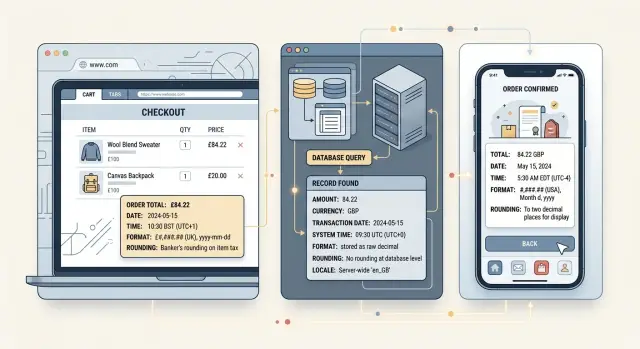
Table of Contents
Why this breaks so easily
Most bugs in currency and date handling don't look like bugs at first. The app seems fine. A date renders, a total appears, a payment goes through. Then a customer sees a renewal on the wrong day, finance finds a one-cent mismatch, or support gets screenshots from two phones that show different values for the same record.
The problem usually starts with meaning. One field can hold three very different things: a real moment in time, a calendar day with no timezone, or a display string that was already formatted for a person. Those are different values. If one team stores 2026-03-04 as a local day and another reads it as midnight UTC, the date can move backward or forward when it reaches a browser or phone.
Money breaks in the same way. A price is not just a number. It might be a unit price, a tax-inclusive total, a rounded display value, or an amount in the smallest currency unit. If the mobile app rounds each item but the server rounds only the final invoice, totals drift. One cent sounds small until refunds, accounting exports, or renewals stop matching.
Locale defaults make this worse because devices choose them quietly. One user sees 1,234.56. Another sees 1.234,56. A date like 03/04/2026 can mean March 4 or April 3 depending on the device, browser, or OS language. Nobody changed the code. The environment changed the result.
These errors stay hidden because each layer looks reasonable on its own. The browser formats for the local user. The server stores a timestamp. The mobile app caches a string. Each step feels harmless. Together they create bugs that show up late, usually when money moves or when reports have to match exactly.
That's why these issues survive testing. They often appear at month end, across timezones, or on devices with different regional settings. By then, the bug is no longer cosmetic. It reaches invoices, payroll, audits, and customer trust.
Name each value before you store it
Ambiguous field names cause quiet bugs. date, time, price, and total look harmless, but they hide meaning. Give each stored value a name that tells other developers what it actually is.
A calendar date is not the same as an exact moment. 2026-04-12 means a day on the calendar. 2026-04-12T09:00:00Z means one precise instant. If you save a birthday, billing cycle date, or due date as midnight in some timezone, another device can shift it to the previous or next day.
Money needs the same care. Store the amount and the currency code together every time. 19.99 means nothing by itself if one screen assumes USD and another assumes EUR. Better yet, pick one raw format for amounts and keep it consistent across browser, server, and mobile code.
A simple rule set works well:
- Store exact moments as timestamps.
- Store date-only values as date-only strings.
- Store money as a raw amount plus a currency code.
- Store formatted text separately from source data.
Display strings should stay at the edge of the app. 1,234.50, 1 234,50, and $1,234.50 may all describe the same amount, but they are for people, not for storage or calculations. The same goes for dates like 04/05/2026. One user reads April 5. Another reads 4 May.
You also need to say whose timezone or locale a value belongs to. Teams miss this all the time. A webinar start time may belong to the event location. A payroll cutoff may belong to company headquarters. A reminder time may belong to the user. If nobody writes that down, every team guesses, and each app guesses a little differently.
Good currency and date handling starts here: name the value by meaning, not by appearance. event_starts_at_utc, invoice_due_date, amount_minor, currency_code, and user_locale are boring names, but boring names save real money and real support time.
Where browser, server, and mobile disagree
A date or price can look fine on one screen and still be wrong in the system. Trouble starts when each platform fills in missing rules on its own.
Browsers usually trust the user's device settings. If a laptop is set to French locale and Tokyo time, the browser may show 03/04/2026 as 3 April, not March 4, and it may shift a midnight timestamp into the previous day. The code didn't fail. It followed the device.
Servers are often calmer, but only if you force clear rules. Many backend runtimes default to UTC for storage and parsing. That helps until the API sends a bare date like 2026-03-04 or a timestamp without an offset. One client reads it as local time, another reads it as UTC, and a deadline moves by hours.
Mobile adds its own problems. iOS and Android can ship with different locale data, number symbols, and calendar behavior. An older phone may format currency with a narrow symbol, while a newer one uses the code. Both can be correct. If your tests compare strings only, you get false failures. If you skip tests, users get screens that don't match support docs or receipts.
Money hides the same disagreement. One platform may round 1.005 to 1.01 with half-up rounding. Another may round it to 1.00 with bankers rounding. Add tax, discounts, or split payments and those tiny gaps turn into failed reconciliations.
A small checkout shows how fast this happens:
- The browser shows an order placed at 11:30 PM local time on March 31.
- The server stores
2026-04-01T03:30:00Z. - The mobile receipt groups orders by local day and puts it under April 1.
- The tax line rounds per item on mobile, but on the server it rounds only on the final total.
Nobody sees a crash. Everyone sees a different truth. That's why cross-platform data contracts need more than field names. They need explicit rules for timezone, locale, and rounding.
Set one contract for money and time
Most silent bugs start when each part of the app guesses what a value means. The browser treats a date one way, the API stores it another way, and mobile adds its own rules. You avoid that mess by defining one contract and using it everywhere.
Use UTC for anything that happened at an exact moment. An order placed, a refund issued, a login recorded, or a webhook received should all be stored as a UTC timestamp. Users can still see local time on screen, but the stored event stays the same in every country and on every device.
Some dates are not moments at all. A birthday, billing day, holiday, or subscription renewal date should be stored as a plain local date with no time attached. Save 2026-05-01 as a date, not as midnight UTC. If you attach a time when none exists, users in another timezone may see April 30 instead of May 1.
Money needs the same discipline. Store amounts in minor units when the currency allows it. Save 1999 with USD, not 19.99 as a floating-point number. Floats drift by tiny amounts, and tiny amounts break totals, taxes, and payment checks. Keep the currency code next to the amount so the system can apply the right fraction and rounding rules.
Send locale, timezone, and currency as separate fields. They are not interchangeable. Locale tells the app how to format text and numbers. Timezone tells it how to show time. Currency tells it which symbol and decimal rules to use. If one field tries to do all three jobs, bugs arrive quickly.
Format values only at the edge of the system, where a person actually sees them. The API and database should pass raw values such as amount_minor: 1999, currency: "USD", occurred_at_utc: "2026-05-01T14:30:00Z", local_date: "2026-05-01", locale: "en-US", and timezone: "America/New_York". Then the web app or mobile app turns those into $19.99, May 1, 2026, or 10:30 AM for display. That one rule prevents a lot of quiet, expensive mistakes.
How to implement it step by step
Silent bugs usually start before code. One team says "date," another says "timestamp," and nobody writes down the difference.
Start with an inventory. Open your checkout, invoices, reports, reminders, and admin tools, then list every field that stores money or time. Include the obvious ones like price and order date, and the easy-to-miss ones like tax rate effective date, trial end date, settlement time, coupon expiry, and refund amount.
Then label each field by meaning, not by data type. Use "instant" for something that happens at one exact point in time, such as a payment captured at 2026-04-12T14:03:00Z. Use "local date" for calendar days like an invoice due date or a birthday, where timezone conversion would change the meaning. Use "local time" for clock time without a date, such as a store closing at 18:00. For money, store the amount in the smallest unit you support, not as a float.
Money also needs one written rounding rule. Pick it once for prices, tax, and discounts, then keep it the same on web, API, and mobile. If tax rounds per line item, do that everywhere. If discounts round only after the full basket total, don't let one client round earlier. Small differences pile up fast.
Next, build one shared test set. Use the same inputs and expected outputs across browser code, server code, and mobile code. Include awkward cases: daylight saving changes, leap day, zero-decimal currencies, three-decimal currencies, 0.005 tax amounts, and dates near midnight in different timezones.
Finally, reject bad payloads early. If an API expects a raw amount in minor units and an ISO timestamp, reject formatted strings like 1,234.50 or 04/05/2026. They look harmless, but locale and device settings can change their meaning.
Teams that do this once avoid a long tail of support tickets later. The fix is boring on purpose, and that's why it works.
A simple checkout example
Say a customer in Tokyo buys a product priced at USD 49.00. Good handling starts with one rule: the shopper's location changes how you display the purchase, not what the purchase is.
In the browser, the checkout page can show the date in Tokyo time and format it for the user's locale. It might display 2026/05/12 10:30 and a total like USD 49.00. The amount stays in USD because that is the billing currency.
The raw order data should stay plain:
amount_minor: 4900currency: USDpaid_at_utc: 2026-05-12T01:30:00Zcustomer_timezone: Asia/Tokyolocale: ja-JP
That server record is the source of truth. The payment timestamp goes into storage in UTC, so every system sees the same moment. Finance can match it to the payment provider, support can verify the exact payment time, and nobody has to guess whether 05/12/2026 means May or December.
The invoice should keep USD as the billing currency too. It can format the amount later for display, but it should never replace the stored value with a formatted string like $49 or 49,00. If the customer downloads the invoice on a laptop today and opens it in a mobile app next week, both clients should read the same raw fields and render the same final total.
This also avoids a common checkout bug. If the browser silently converts USD to JPY for display while the server charges USD, the customer sees one number and pays another. If the mobile app rounds from a float instead of using stored minor units, it may show 48.99 or 49.01. Small mismatch, big support headache.
With the raw amount in minor units, the currency code stored once, and the timestamp saved in UTC, every device can format locally and still agree on the purchase.
Common mistakes that cause silent bugs
Silent bugs usually start with a value that looks obvious to a person but means two different things to code. The app keeps working. It just stores the wrong number or shows the wrong day.
03/04/2025 is a common trap. A US browser may read it as March 4. A European service may read it as 3 April. If you accept this format at all, name the format in the API and parse only that format. Better yet, send 2025-04-03 for a date, or send a full timestamp with an offset when time matters.
Dates break again at midnight. Say a mobile app sends 2025-04-03 00:00 as local time and the server saves it as UTC. For users west of UTC, that can become the previous calendar day. Birthday fields, booking dates, and invoice due dates suffer from this a lot because they look like dates, not moments.
Money bugs are just as sneaky. Floats don't behave well for finance work. Rounding each line item and then rounding the final total again can change tax or discount results by a cent or two. Device locale defaults may format numbers with the wrong decimal mark or currency symbol for legal screens. Copying display values back into calculations mixes formatted text with real amounts.
A small cart shows the rounding problem fast. If three discounted items come to 3.335 each, rounding each one to 3.34 gives 10.02. Adding first and rounding once gives 10.01. Both answers look fine. Only one matches your rule.
Locale settings help with display, but they should not decide business rules. A phone set to French can show 1 234,50 EUR. That does not mean your invoice, tax screen, or refund logic should change on its own. Those screens should follow the market, currency, and policy your app sets, not whatever the device happens to prefer.
These bugs stay quiet because every layer thinks it did the right thing. Users notice only when an invoice is off by one cent or a due date moves back a day.
A short release checklist
Most money and date bugs pass casual testing because each screen looks fine on its own. The error appears when the same order moves through the web app, API, mobile app, and reports.
Before release, create one sample order and keep it unchanged. Use the same customer, items, tax, discount, currency, and timestamp everywhere so you can compare raw data with formatted output.
Check that same order on the web, in the API response, and on mobile. Prices, tax, discount, currency code, stored timestamp, and displayed local time should all point to the same source values. Test with a user far from your server timezone. If your backend runs in Europe, try a user in Tokyo or Los Angeles and watch for dates that jump around midnight.
Run calendar edge cases on purpose. Test the last day of a month, the daylight saving switch in both directions, and leap day. Code that adds 24 hours instead of one calendar day often fails here. Test currencies with different decimal rules too. JPY has zero decimal places, while KWD uses three. A checkout that looks correct in USD can still round the wrong way elsewhere.
Export the sample order to a report or CSV and compare it with the totals shown on screen. Don't accept a one-cent mismatch because the UI looks close enough. One manual pass is worth the time even if you already have automated tests. Set one phone to another locale, open the sample order, and read each value line by line.
This kind of check is boring, which is exactly why teams skip it. Then finance finds the bug first. If one sample order stays correct across every client and every report, you can ship with much more confidence.
What to do next
Pick one flow that touches money or dates every day. A checkout, subscription renewal, invoice, payout, booking, or delivery window is enough. Fixing one real path is better than writing broad rules nobody uses.
Use that flow to write a short contract your whole team can keep open on one screen. Keep it plain and strict. Say exactly what each value means, how you store it, and how each app should display it. In most teams, that contract needs five things: how you store timestamps, whether a value is date-only or time-based, how you store money, which rounding rule applies, and which examples every platform must pass before release.
Then add shared fixtures. Use the same test cases in web, backend, and mobile code. If one fixture says an order created at 23:30 UTC shows as tomorrow in Tokyo but still today in New York, every platform should prove it handles that case the same way. Do the same for money. A fixture with tax, discount, and final total often catches rounding bugs quickly.
This work does not need a huge rewrite. Most teams can start with one document, a small test file, and a few failing cases. That is often enough to stop the usual quiet errors: off by one day, wrong currency symbol, totals that differ by one cent, or reports that don't match what customers saw.
If your team keeps finding these bugs late, an outside review can help. Oleg Sotnikov at oleg.is works as a fractional CTO and often helps teams tighten contracts like this across web, backend, and mobile systems.
Good currency and date handling is less about clever code and more about one shared definition. Write it down, test it in every app, and make new work follow the same rules.
Frequently Asked Questions
What’s the difference between a timestamp and a date-only value?
Use a timestamp for one exact moment, like a payment time. Use a date-only value for things like birthdays, due dates, and renewal days, where timezone conversion would change the meaning.
Should I store all times in UTC?
Yes for real events such as orders, refunds, logins, and webhooks. Keep those in UTC in storage, then convert them for display when a person views them.
How should I store birthdays, due dates, or renewal dates?
Keep them as plain dates like 2026-05-01, with no time attached. If you save them as midnight in a timezone, another device can shift them to the day before or after.
Why should I store money in minor units instead of 19.99?
Save money in minor units with the currency code, like 1999 and USD. That avoids float drift and keeps totals, taxes, and refunds consistent across web, API, and mobile code.
Why do totals end up one cent apart?
Teams usually round at different steps. If one client rounds each line item and another rounds only the final total, you get small mismatches that show up in invoices and refunds.
Should locale, timezone, and currency live in one field?
No. Keep them separate every time. Locale controls formatting, timezone controls time display, and currency controls amount rules and symbols.
Where should I format prices and dates?
Format values at the edge of the app, right before you show them to a person. Keep raw values in the database and API so every client starts from the same source data.
Why do browser, server, and mobile apps disagree on the same value?
Each platform fills in missing rules from its own environment. A browser may trust device settings, a server may assume UTC, and a phone may use different locale data or rounding behavior.
What should I test before release?
Test one sample order from end to end on web, API, mobile, and reports. Include dates near midnight, daylight saving changes, leap day, and currencies with different decimal rules.
How do I fix an app that already mixes formatted and raw values?
Start with one flow like checkout or invoicing. Name every money and time field by meaning, write one rounding and timezone contract, then reject payloads that send formatted strings instead of raw values.


