CRM cleanup before AI scoring: fix bad records first
CRM cleanup before AI scoring starts with owner fields, status rules, and duplicate accounts, so your model scores reflect real pipeline health.
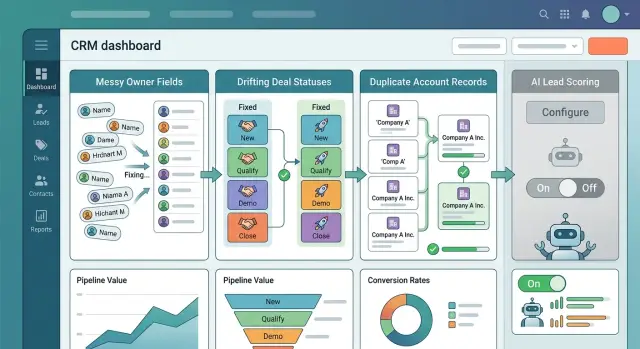
Table of Contents
Why messy CRM data breaks scoring
AI scoring does not bring common sense to a messy CRM. It reads the records you give it, looks for patterns, and turns those patterns into scores. If the records are wrong, the scores still look precise. They just point your team in the wrong direction.
Small errors get bigger once a model starts ranking leads or accounts. A blank owner field can make a normal delay look like neglect. An old status can make a warm deal look dead. Two copies of the same company can split notes, activity, and revenue into weak signals that should have been one strong one.
Many sales teams trust memory more than the CRM, and that can work for a while. It stops working when scoring starts. The model does not know a rep changed teams last month, or that "proposal sent" and "quote delivered" mean the same thing in practice. It trusts the CRM because that is the only thing it can measure at scale.
That is why CRM cleanup before AI scoring matters. You are not tidying data for its own sake. You are removing obvious lies before the model learns from them.
Three problems usually do the most damage. Owner fields drift when leads get reassigned, imported, or left blank. Statuses drift when teams invent new labels or stop updating old ones. Duplicate accounts slip in through imports, forms, or manual entry, then spread activity across multiple records.
A simple example shows the problem fast. Say one account appears twice. One record shows an active owner and recent calls. The other shows no owner and a stale status. A scoring model may rate one record as hot and the other as cold, even though both describe the same company. Your team then wastes time chasing noise that came from bad input, not buyer intent.
The fix is straightforward: clean the inputs before you tune the model. Fix owners, tighten statuses, merge duplicates with a clear rule, and only then look at scoring. If the base records are solid, the scores start to mean something.
Start with owner fields
Owner fields cause quiet damage. A lead with no owner often gets ignored, and a lead with conflicting owner signals often gets touched by the wrong person. When you do owner field cleanup, this is one of the first places to look because the model will treat those records as normal unless you fix them.
Pull a simple report first. Look for records with a blank owner, records with a primary and secondary owner that do not match, and records where the account, contact, and deal belong to different people for no clear reason.
A common mess looks like this: an SDR owns the contact, an AE owns the deal, and the account still sits under a rep who left six months ago. The scoring model may still rank that account highly, but your team will not know who should act on it.
Match ownership to your workflow
Ownership should follow the way work moves through your team. If SDRs qualify leads, AEs run active deals, and customer success handles live customers, your CRM should reflect that path without guesswork.
That does not mean every related record must always share the same owner. It means your team needs a rule for when they should match and when they should differ. The SDR can own the contact until qualification. The AE can own the deal once sales accepts it. Customer success can take over the account after onboarding starts.
Write those handoffs down in plain language. Decide who owns a new lead on day one, when sales accepts and reassigns it, when a closed deal moves to customer success, and which record stays with the previous owner during a transition.
Then treat old data and new data as two different jobs. Old records need a cleanup pass, usually by one person or a small pair who can make consistent calls. New records need rules inside the CRM so the same mess does not come back next week.
If your team is small, do not spread this across everyone. Pick one person to clear the backlog, give them a short deadline, and let a sales lead answer edge cases. Then assign clear responsibility going forward: reps set owners during handoff, and a manager reviews exceptions every week.
Skip this step and AI scoring will look precise while routing work to nobody, or worse, to two people at once.
Stop status drift
Status drift ruins scoring quickly. If one rep uses "Demo booked," another picks "Meeting set," and a third leaves the deal in "Qualified," the model reads three different signals for the same moment in the pipeline. That is why status drift in CRM has to be fixed before the model sees any history.
Pull a report of every status people actually used in the last few months, not just the official dropdown. Include old values, misspellings, imported statuses, and one-off labels that slipped in during a rush. Teams often think they have eight statuses. In practice, they may have twenty.
Then group the lookalikes. If "Contacted," "Reached out," and "Intro sent" all mean the same thing, keep one and retire the rest. A status should exist only if it changes what the rep does next or changes the real chance of closing.
A quick test helps. Ask four questions for each status:
- What must be true before a rep can move a record into it?
- What usually happens while it stays there?
- What must happen to move it out?
- If two reps read this label, will they picture the same situation?
Write one entry rule and one exit rule for every status you keep. Keep both short. For example, a lead enters "Demo scheduled" only after the buyer accepts a calendar invite. It exits when the demo happens or the buyer cancels. That is clear enough for sales, ops, and a scoring model.
Teams often make the same mistake here. They agree on a clean set of statuses, then leave custom edits open for everyone. Within a week, someone adds "Hot - follow up soon" and the mess returns. Freeze custom status edits until the final set is approved, then limit who can change it.
If you want cleaner scoring, fewer statuses usually work better than more. Five clear stages beat twelve fuzzy ones every time.
Merge duplicate accounts with a rule
Duplicate accounts look harmless until scoring starts. The model reads each record as a different company, so one customer can end up with split activity, split revenue, and mixed ownership. That weakens the score and pushes follow-up in the wrong direction.
Start by deciding which fields define one company in your CRM. For most teams, the safest signals are website domain, legal name, billing email, billing address, and tax or registration number if you store one. Do not trust display name alone. "Northstar," "Northstar Inc," and "Northstar US" might be one business, or they might not.
A simple duplicate account merge rule works better than case-by-case guessing:
- Flag accounts that share the same company domain.
- Flag close matches on legal name, especially when only suffixes change, such as Inc, LLC, or Ltd.
- Check billing details when the name is unclear.
- Do not auto-merge subsidiaries, branches, or separate entities with different contracts.
Before you merge anything, choose a source record. That is the account that keeps its ID and becomes the final version. Pick the one with the cleanest name, the most complete company details, and the newest verified owner. If one record holds the active deal or current contract, that account usually should win.
Then protect the history from the losing record. Keep notes, open deals, recent emails, meeting logs, and last activity dates. If your CRM can overwrite fields during a merge, decide in advance which values should win. Otherwise a clean source record can still lose the only context your sales team had.
A small example makes the risk obvious. One team has "Pine Harbor LLC" in one account and "pineharbor.com" in another. One record has invoices and billing contacts. The other has three recent calls and a live opportunity. If they merge carelessly and keep only billing data, the score drops because the account now looks quiet.
During CRM cleanup before AI scoring, duplicate merging should feel boring and repeatable. If two people review the same pair of records, they should make the same choice.
A simple cleanup workflow
A cleanup pass works best in a fixed order. If you jump between tasks, you create new conflicts while trying to remove old ones. For CRM cleanup before AI scoring, order matters more than speed.
Start by exporting a full snapshot of the records you plan to clean. That file is your before-state. It gives you a rollback point, and it lets you measure whether the cleanup actually reduced blanks, odd stages, and repeat accounts.
Then move through the work in this sequence:
- Fill owner gaps and fix wrong assignments first. If a record has no clear owner, routing breaks and follow-up slows down.
- Clean status values next. Pick one label for each real stage, remove old variants, and map anything vague into a small set your team actually uses.
- Look for duplicate accounts only after ownership and status rules are stable. Otherwise you risk merging two messy records into one bigger mess.
- Merge with a clear rule. Keep one account as the main record, decide which fields win when data conflicts, and record why the merge happened.
- Review a small sample by hand before full rollout. Ten to twenty records are enough to spot patterns the spreadsheet missed.
This order keeps cause and effect clear. If a score looks wrong later, you can trace it back to one stage of the cleanup instead of guessing across the whole CRM.
A small team can do this in a day or two if it keeps the scope tight. One person exports the snapshot, one sales lead confirms owner rules, and one ops person checks status mapping and merge choices. That split is usually faster than asking everyone to edit their own records.
Before you turn scoring on for all accounts, test the cleaned sample against real sales judgment. If the records now read like the pipeline your team sees every day, the model has a fair chance to rank them well. If they still look confusing to a human, fix that first.
A realistic small-team example
A five-person sales team has 220 accounts in its CRM and wants to turn on AI scoring for weekly lead review. One account jumps to the top with a score of 91, so the team plans to call it first thing Monday.
The score looks strong for a simple reason: the CRM holds the same company twice. One record says "Northwind Labs" and the other says "Northwind Laboratories." Each record has its own email opens, call notes, and website visits, so the model reads two streams of interest and treats them like one very hot account.
A second problem sits inside the deal record. The original owner left the company last month, but nobody changed the owner field. The deal has no follow-up task, no fresh notes, and no clear handoff. The model reads that silence as low momentum, even though the buyer replied three days ago on another duplicate account.
Status drift makes it worse. One record says "active," another says "proposal sent," and the open deal says "qualified." To one rep, that means the buyer is engaged. To the model, it looks messy. Mixed labels blur the stage, so the score swings for the wrong reason.
After a short cleanup, the picture changes fast. The team merges the duplicate accounts into one record, reassigns the deal to the current account owner, moves the account to one shared status, and attaches the recent activity to the merged record.
The new score drops from 91 to 67. That sounds worse, but it is more honest. The account is still warm, just not urgent. Before cleanup, the team would have treated it like a near-close deal and pushed for a contract call too early.
The next sales action changes too. Instead of a hard close, the rep sends a short recap, confirms the buyer's timeline, and books a follow-up for later that week. That fits the actual stage.
Another deal moves in the opposite direction. Once the team fixes the missing owner and stale status, the model sees recent replies, a live proposal, and clear intent. Its score rises from 49 to 78, and that becomes the deal the rep should call first.
That is why CRM cleanup before AI scoring matters. Bad records do not stay small. The model spreads them across priorities, queues, and rep time.
Mistakes that cause bad output
A rushed cleanup can make the CRM look neater while making scoring worse. The model does not know which records are real, outdated, or stitched together by guesswork. It learns from whatever you keep.
One common mistake is merging duplicates before anyone decides which record wins when fields conflict. A company might appear twice with two different owners, two revenue ranges, and two lifecycle stages. If the team combines them without a source of truth, the final record can mix old and new facts into something that never existed. That record looks complete, but it teaches the model the wrong pattern.
Status cleanup often fails in a quieter way. Teams rename stages and remove old custom statuses, then forget to remove those old values from reports, filters, and exports. Sales sees a cleaner pipeline, but reporting still pulls labels from the past. Then AI scoring reads both the new and retired statuses as if they all still matter.
Owner changes can distort the data too. Bulk reassignment sounds harmless until it touches live opportunities. If you move hundreds of accounts to new owners without checking open deals, meeting history, and active follow-ups, you create records that say one rep owns the account while another rep did the work. Later, the model may connect outcomes to the wrong person.
The last mistake is blind trust. Teams switch scoring on and accept the first rankings because the output looks exact. Precision is not proof. Sales ops should review a sample by hand before anyone acts on the scores.
A short manual review catches a lot. Compare a few high-score accounts with their actual deal history. Check whether merged accounts kept the right parent company and owner. Confirm retired statuses no longer appear in reports or exports. Inspect live opportunities after any bulk owner change.
If even a small sample looks strange, pause. Fix the records first, then score again.
Quick checks before you switch scoring on
A scoring model can look accurate in a demo and still fail in daily sales work. Bad records do not stay small. The model reads them, learns from them, and repeats the mess at scale.
Run a short manual check before you turn scoring on for everyone. It takes less time than cleaning up a month of bad priorities later.
Review active accounts, open opportunities, and live leads for missing owners. If a rep should act on a record, that record needs one clear owner. Shared inbox logic and "someone will grab it" habits usually create gaps fast.
Read each pipeline stage name and write one plain sentence for what it means. If two reps can describe the same stage in different words, the stage is too loose for scoring.
Measure duplicates against a limit your team agrees on. Some teams can live with a tiny number. Most cannot live with duplicates split across reps, territories, or deal histories.
Pull a sample of recent deals and follow the status history. Healthy data moves in a pattern that makes sense. Weird jumps, skipped stages, and records that sit in one status for months often point to process drift, not buyer behavior.
Then spot-check scored records with the sales team. If the model says a cold, neglected account looks hot, ask why. Sometimes the answer is hidden in bad dates, old activities, or merges that should never have happened.
This last step matters more than many teams expect. Numbers can look clean while the output still feels wrong to the people who sell every day. If several reps keep questioning the same type of score, inspect the input fields behind it.
Good scoring starts with boring consistency. Clean owner fields, simple stage definitions, low duplicate rates, and status histories that match real sales motion give the model a fair shot. If those checks pass, switching scoring on is much less of a gamble.
What to do next
Once the records are clean enough to trust, write the rules down. A one-page note is often better than a long playbook. Define who owns a record, when a status can change, what counts as a duplicate account, and who can approve an exception.
Keep the rules plain. If a sales rep can read them in two minutes, the team will follow them next month. If a rule needs several examples to make sense, the rule is probably too hard.
After CRM cleanup before AI scoring, add automation slowly. Manual cleanup should work first. If the manual process is messy, automation will repeat the same mess faster.
Start with a few simple checks that catch common errors. Stop new records with empty owner fields, warn users when they skip a status, and flag accounts that match an existing company name, domain, or phone number.
For the first month, review scored records every week. Do not just look at the score itself. Check whether the score fits the account, whether owner and status still look right, and whether merged accounts kept the correct activity history.
A simple rhythm is enough: inspect the highest and lowest scored records in week one, check records created after launch in week two, sample merged accounts and reopened deals in week three, and tighten any rule people ignored in week four.
You do not need a huge audit. Ten or fifteen records per review can reveal the pattern fast. If the same problem shows up twice, fix the rule before you trust the next batch of scores.
Some teams can handle this on their own. Others move faster with outside help. If you need a practical setup instead of a big software project, Oleg Sotnikov at oleg.is helps startups and smaller businesses clean up systems, add sensible automation, and roll out AI in a way the team can actually maintain.
The goal is simple: keep the data clean enough that the model learns from reality, not from old mistakes.


