Cost caps for AI agents that call tools in loops safely
Learn how to set cost caps for AI agents with spend ceilings, step limits, and stop rules so one looping task does not drain your budget.
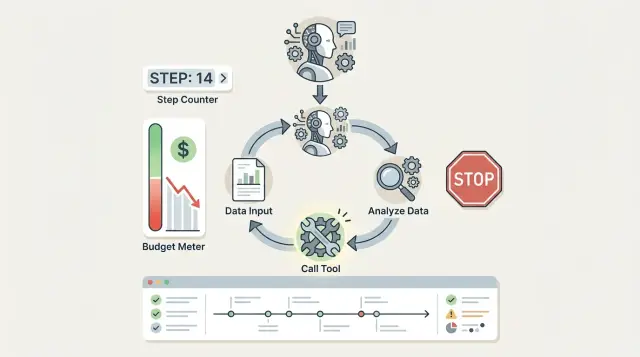
Table of Contents
Why one agent task gets expensive fast
An agent does not stop where a person would. It stops when you give it a rule, it hits a limit, or it breaks. If none of that happens early, one small task can turn into dozens of tool calls.
That gets expensive faster than most teams expect. Each step adds something: model tokens, outside API charges, database work, browser time, queue jobs, or plain compute. One extra step rarely looks scary. Twenty extra steps in a loop do.
Retries make it worse. A retry sounds safe, but it often repeats the same paid work. If a tool times out, the agent calls it again. If the answer looks incomplete, it asks the model to think again, searches again, and calls the tool again. You pay for every pass, even when nothing useful changes.
Vague prompts push costs up too. A task like "figure this out and fix it" gives the agent too much room to wander. It might search logs, open tickets, query a database, check documentation, and ask itself follow-up questions before it makes real progress. Busy is not the same as useful.
Take a simple request like "resolve a billing issue." That could mean checking an invoice, reading past emails, looking for a failed payment, updating a CRM record, and drafting a reply. If one tool returns unclear data, the agent may circle back and repeat half the path.
That is why cost caps for AI agents matter even for simple jobs. The usual problem is not one giant mistake. It is a small loop that keeps going quietly until the bill shows up.
Where the cost comes from
Most surprise bills start with a bad assumption: teams look at model pricing and ignore everything around it. An agent rarely makes one call and stops. It reads the task, asks the model what to do, calls a tool, reads the output, asks the model again, and repeats. Every round adds more cost.
The first bucket is token usage. You pay for input and output tokens on every model call. That includes the system prompt, the user request, tool results pasted back into context, and the model's reply. If an agent loops ten times, it does not pay once for the original prompt. It pays for ten growing conversations, and the later steps often cost more because the context is longer.
The next trap is tool fees. Search APIs, scraping services, OCR, speech-to-text, maps, database queries, and file parsers may all charge per call, per page, per minute, or per document. One cheap tool call feels harmless. Fifty retries do not. If the agent tries two tools for the same job, the cost doubles before you notice.
Compute adds another layer. Long jobs keep workers busy, use CPU or GPU time, store temporary files, and write logs. Background workers may keep running after the user has moved on. A task that waits on slow tools for twenty minutes might cost little in tokens but still burn money in infrastructure.
Retries and fallbacks push totals up fast. If a search request times out, the agent may try again. If model A fails, the workflow may send the same prompt to model B. If a tool returns messy data, the agent may call OCR again or run another parser. Duplicate calls often hide inside error handling, so teams miss them until the invoice arrives.
A simple way to think about spend is to track four buckets on every run: model tokens across every step, tool charges for each external call, compute time for workers and long jobs, and all retry or fallback activity. Miss one bucket and your estimate will look safe on paper and wrong in production.
Set three limits before you run anything
One runaway task can spend more money than a hundred normal ones. Agents do not notice waste. If a tool returns unclear results, or a prompt nudges the model to keep trying, the loop can continue until the bill gets your attention.
Start with a hard dollar cap for each task. This is the simplest rule, and it should stop the run the moment total model and tool cost crosses the limit. A short support task might get $0.25. A deeper research task might get $2.00. The number depends on the job, but every task needs a ceiling before it starts.
Then limit the number of steps in one run. A step might mean one model reply, one tool call, or one full cycle through your agent loop. Keep the first limit lower than feels comfortable. Ten steps is often enough to tell you whether the agent is on track. If it needs 30 steps to do something simple, the problem is usually the prompt, the tool output, or the task itself.
Time needs its own limit. Some loops stay cheap per step but still waste money because they keep waiting, retrying, or calling slow tools. Set a fixed time window and stop the run when it expires. For many internal tasks, 30 to 60 seconds is enough.
Most teams stop there, and that is where problems start. Add one more guard: block repeated calls with the same input. If the agent sends the same query to the same tool again and again, that is not persistence. It is a loop.
A solid starting setup is simple: a max spend per task, a max step count, a max runtime, and a repeat-call block for identical inputs. If a task hits any one of those limits, end it, log the reason, and send it for review.
How to pick the first limits
Start with the value of one finished task. If an agent closes a simple support ticket that would take a person 10 minutes, the value is not vague. It is roughly 10 minutes of labor, plus a bit of speed and consistency.
That gives you a ceiling. For most teams, the first budget should be a small slice of that value, not the full amount. If one finished task is worth about $4, a first automation cap of $0.20 to $0.80 usually makes more sense than $3.50. Cheap failures teach you faster than expensive ones.
Money and step limits work best together. A low spend cap alone can still let an agent waste time in a cheap tool loop. A low step cap alone can still allow one expensive model call. You want both.
A practical starting rule is this: estimate the dollar value of one completed task, allow the agent to spend 5% to 20% of that value, cut that number down further for test runs, and review real logs before you raise anything.
For early tests, be strict. Set a tiny cap, a short step limit, and a clear timeout. If the task fails, that still teaches you something. You learn where it gets stuck, which tool calls repeat, and whether the agent reaches a real finish or just keeps trying.
Raise limits only after you inspect actual runs. Look at 20 or 30 examples, not one lucky success. If you increase both spend and steps at the same time, you will not know which change helped. Raise one limit, run another batch, and check the logs again.
Use tighter caps for tasks with no clear ending. Research, open-ended browsing, and messy inbox work can drift for a long time. If the agent cannot state a finish condition in one sentence, give it less room to spend, fewer steps, and a faster stop.
Teams that treat first limits as temporary guardrails usually spend less and learn more. Teams that start loose usually pay for the lesson.
Stop conditions that end bad loops
A bad loop often starts small. An agent retries the same search, calls the same tool again, then asks for the same data in slightly different words. A few minutes later, you have extra cost and no progress. Spend caps only work when you add stop rules that cut this off early.
One repeat is often fine. The second repeat usually means the agent is stuck. If it uses the same action twice with no better result, end the run and mark it for review. That single rule catches a lot of waste.
Tool failures need a short leash too. Stop after two failed tool calls in a row. A third attempt rarely fixes a bad token, a timeout, or the wrong input format. It just burns more steps.
You also need a way to detect fake progress. Count what each step actually adds. If new steps do not add new facts, names, records, or decisions, stop. An agent that keeps rewriting the same summary is not moving forward.
Good defaults
End the run after the same action repeats twice. Cut it off after two tool errors in a row. Quit when the last steps add nothing new. Require approval before exports, bulk edits, or batch sends. Abort before the next step if the spend estimate reaches the cap.
Human approval matters most for actions that touch a lot of data. A cheap run can still create a big mess if the agent exports customer records, updates hundreds of rows, or sends messages in bulk. Put a person in that path.
The spend cap should fire before the tool call, not after it. Keep a running estimate for tokens, tool use, and any paid API calls. If the next step would push the run over budget, stop there.
These rules sound strict, and that is the point. A stopped run is easy to inspect and restart. A loop that keeps going can eat the monthly budget before anyone notices.
A simple example from a support inbox
A customer writes to support and asks for a refund on an order that arrived late. The agent reads the message, pulls the order record, checks the refund policy notes, and asks the payment system whether the charge settled.
That sounds cheap. It is, at first.
The trouble starts when one piece of data is missing. Maybe the order system has the customer email and order number, but no payment transaction ID. The agent decides it needs more context, so it runs the order lookup again. Then it checks the policy again. Then it asks the payment tool again with the same weak data.
A loop like that often follows the same path: read the ticket and extract the order number, check the order system for item, date, and status, read the internal policy notes, ask the payment tool for settlement or refund status, then retry because the payment result still says "not found."
If the agent restarts that chain 10 or 20 times, a simple refund case turns into a pile of model calls and tool calls. That is why budget control matters even in a small support inbox. One messy ticket can burn through the budget meant for hundreds of normal tickets.
A safer setup keeps the agent on a short leash. Give it a step cap of 8, stop it after 2 identical lookup failures, and set a small spend ceiling per ticket. Add one plain stop condition too: if the payment status stays unknown after the second retry, the agent must stop and hand the case to a person.
The handoff note should be short and useful. It can say that the customer asked for a refund, the order exists, policy allows review, and payment status stayed missing after two checks. A human can finish the case in a minute. The customer may wait a bit longer, but one loop does not eat the monthly support budget.
What to log on every run
If a task goes over budget, the run record should show exactly where the money went. You want enough detail to explain the bill in two minutes, not a pile of raw events nobody reads.
Start with the basics: the task goal, the inputs the agent received, every tool call it made, and the final result it returned. Without the original goal, a long chain of actions looks random. Without the final result, you cannot tell whether the extra cost bought anything useful.
Minimum run record
A good record includes the task goal and user prompt, each step in order with the model or tool used, the usage cost for that step, the reason the run stopped, and the final output, error, or handoff.
Record spend at three levels: per step, per tool, and per model. That sounds picky, but it pays off fast. If one run costs $0.18 and another costs $7.40, you need to see whether the jump came from repeated retries, a slow search tool, or one expensive model call.
The stop reason matters just as much as the spend. Did the agent finish the task, hit a step limit, hit a budget cap, time out, or fail on a tool error? If you do not save that field, bad loops and normal completions blur together.
Keep a small review set of cheap runs and expensive runs. The cheap ones show the happy path. The costly ones show where your limits need work. A support triage agent, for example, may solve simple tickets in three steps but burn through twenty when it keeps re-reading the same thread.
Once a week, review the outliers instead of the averages. Pick the 5 cheapest and 5 most expensive runs, compare their stop reasons, tool sequence, and model choice, note repeats and dead ends, and fix one pattern before the next review.
That habit catches waste early. It also gives you real data when you tighten limits or change a tool.
Mistakes that lead to surprise bills
Most surprise bills come from small decisions, not one giant model call. A cheap prompt can still trigger dozens of tool calls, retries, and follow-up steps before anyone notices.
One common mistake is using the same cap for every task type. A short classification job, a research loop, and a data cleanup task do not spend money the same way. If all three share one budget and one step limit, the simple jobs get blocked too early or the heavy jobs run too far.
Test runs cause trouble too. Teams often treat staging or local experiments as harmless, then remove limits because "it is only a test." Tests are often messier than production. People rerun them, tweak prompts, and forget background jobs are still active.
Retries are another quiet budget leak. If a tool fails and the agent keeps trying, each retry can repeat the same search, API call, or browser action. After a few minutes, one stuck task can burn through more money than the successful runs.
A safe default is simple: set a spend cap per task type, give test runs the same caps as production, limit retries to a small number, stop runs after repeated identical errors, and cap total steps even if the agent still "has ideas."
Another mistake is watching token prices and ignoring tool prices. Model tokens often look cheap, so teams relax. Then the real cost shows up in web browsing, OCR, search APIs, email sends, queue jobs, database writes, or third-party tools. In many setups, the tools cost more than the model.
That is why agent budget control should cover the whole run, not just the model bill. If an agent can call five tools, your budget rule has to count all five.
The last mistake is waiting for the invoice. By then, the bad loop is over and the money is gone. Set alerts on run spend, daily spend, and sudden spikes in failed tasks. Add a hard stop that shuts off the agent when it crosses the limit.
If you are unsure where to start, pick a small ceiling, like 20 steps, 2 retries, and a fixed dollar cap per run. You can always raise it after you see real logs.
Quick checks before you turn it on
A short review before launch catches most expensive mistakes. If someone on your team cannot explain the stop rules in about a minute, the setup is still too vague.
Use plain language. For example, the agent can spend up to $0.50 on one task, take up to 12 steps, and run for up to 90 seconds. If it hits any one of those limits, it stops and records why.
Before the first real task, make sure every job has caps for money, steps, and time. Make the stop reason visible in logs instead of burying it in raw traces. Send an alert before daily spend spikes, not after finance notices. Keep the full task history so a person can take over without guessing. And test one bad case on purpose, such as a tool returning empty results again and again.
The logging part matters more than many teams expect. When an agent stops, you want one clear line that says what happened: step cap reached, dollar cap reached, timeout, tool error, or human handoff. If the team has to read ten screens of logs to learn why a run ended, they will miss the next problem too.
Alerts should fire early. A simple rule works well: if spend for the day jumps past your normal range by a set amount, send a message right away. Waiting until the daily total is already high defeats the point.
Human takeover should feel boring. The agent should leave the latest user request, tool outputs, drafts, and stop reason in one place. Then a support lead, engineer, or founder can finish the task in minutes instead of starting from zero.
One last check is blunt but useful: if one broken prompt or one noisy tool can still burn a noticeable part of your monthly budget, do not turn it on yet.
Next steps for a safer rollout
Start small. Pick one task that repeats often, has clear inputs, and does not touch money, customer records, or production systems. Keep the first version narrow on purpose. A support triage agent that reads one inbox label is a better place to start than an agent that reads email, updates tickets, calls APIs, and drafts replies.
Set low caps for the first week. Give the agent a short step limit, a hard spend ceiling per run, and a daily budget you can live with even if it fails all day. That is cautious by design. Most surprise bills come from teams widening the scope before they have watched enough real runs.
A simple rollout works well: start with one tool and one model, run on a small batch instead of all live traffic, review transcripts and stop reasons every day, compare cost against hours saved after the first week, and tighten rules before you add another tool, model, or trigger.
That last part matters. If an agent saved 90 minutes of manual work but spent $70 doing it, the setup still needs work. If it saved a support lead 6 hours and cost $12, you may have something worth expanding. Limits only help when you compare them against real outcomes, not guesses.
Watch for patterns during early runs. Does the agent retry the same failed tool call? Does it keep asking for more context when the answer is already in the thread? Does it burn tokens on long logs nobody uses? Fix those habits before you give it more freedom.
Once the first task behaves well, widen one thing at a time. Add one more tool, raise one limit, or expand to one more queue. Small changes make bad behavior easier to spot.
If your team wants a second opinion, Oleg Sotnikov at oleg.is can review agent spend limits, stop conditions, and rollout plans as part of Fractional CTO or startup advisory work.
Frequently Asked Questions
What is a good first dollar cap for one agent task?
Start with the value of one finished task, then give the agent only 5% to 20% of that value.
If a task saves about $4 of labor, a first cap around $0.20 to $0.80 makes sense. For early tests, go lower so cheap failures teach you where the loop breaks.
How many steps should I allow before I stop a run?
For a new agent, keep the step limit low. Around 8 to 12 steps works well for many support and back-office tasks.
If a simple job needs 20 or 30 steps, fix the prompt, tool output, or finish condition before you raise the cap.
Should I set a time limit as well as a spend cap?
Yes. Money caps do not catch every bad run because some loops stay cheap per step and still waste worker time.
A short timeout like 30 to 90 seconds fits many internal tasks. When the timer ends, stop the run, log the reason, and let a person review it.
How many retries are too many?
Do not let the agent keep hammering the same tool. One retry often makes sense. The second repeat usually means it is stuck.
Stop after two failed tool calls in a row or after the same action repeats twice with no better result.
How do I tell the difference between progress and a bad loop?
Watch what each step adds. If the agent does not add a new fact, record, decision, or usable result, it is spinning.
Rewriting the same summary, rerunning the same lookup, or asking the same search in new words all count as no progress.
Should every agent task share the same budget and limits?
No. A classifier, a research agent, and a cleanup job spend money in very different ways.
Give each task type its own budget, step cap, and timeout. Open-ended work like browsing or inbox cleanup needs tighter limits than a short lookup.
Should test runs have the same caps as production?
Use the same limits in tests unless you have a strong reason not to. Test runs often get messier than production because people rerun them and tweak prompts.
If you remove caps in staging, one broken loop can burn money before anyone notices.
What should I log on every run?
Log the goal, the input, every step in order, the model or tool used, the cost of that step, the stop reason, and the final output or error.
Also track spend by step, by tool, and by model. That makes it easy to see whether a spike came from retries, one expensive call, or a noisy tool.
When should I send the task to a human instead of letting the agent keep trying?
Hand off when the agent touches sensitive or high-impact actions, or when it cannot finish after a small number of tries.
Exports, bulk edits, batch sends, and anything involving customer records deserve human approval. If a lookup stays unknown after two attempts, stop and pass along a short note so a person can finish fast.
What is the safest way to roll out a new tool-using agent?
Start with one narrow job, one model, and one tool. Run it on a small batch, not all live traffic.
Review transcripts, spend, and stop reasons every day for the first week. Raise one limit or add one tool at a time so you can spot what changed when costs jump.


