Contractor offboarding checklist to close lingering access
Use this contractor offboarding checklist to remove access from code, cloud, chat, billing, and docs before old accounts turn into cost and security problems.
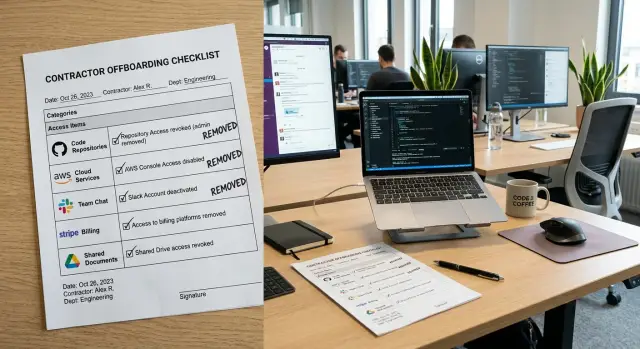
Table of Contents
Why lingering access happens
Lingering access usually starts with small, reasonable decisions.
A founder shares a GitHub repo so a contractor can fix one bug. A team lead adds them to Slack during a launch. Someone grants access to cloud hosting, docs, analytics, or error tracking because the work needs to move fast. The contract ends, the invoice gets paid, and nobody goes back through every tool that person touched.
That gap costs more than most teams expect. A forgotten seat keeps billing every month. An old API token still works in a script nobody remembers. A contractor who got admin rights for one emergency may still have them six months later. Usually nothing dramatic happens, but the risk stays open the whole time.
Employee offboarding is often cleaner because companies build a process around it. HR sets a last day, IT disables accounts, managers collect devices, and payroll closes the loop. Contractors often sit outside that system. They use personal email addresses, their own laptops, and client accounts that were never tied to a central identity provider. Even careful teams end up with a mess.
Small companies feel this more than large ones. They move quickly, grant access on the fly, and rely on trust. That works until someone asks a simple question: which logins did this person get, and who owns those accounts now?
The goal is straightforward. By the last day, you should close every path back in: code, cloud, chat, docs, billing, domains, and any token or shared secret that can still open a door. Removing one login is not enough. You need to make sure old accounts, paid seats, and quiet admin roles do not outlive the work.
What to gather before the last day
Start with a plain inventory. If you skip this step, access survives in places nobody thinks about until months later.
Ask one question first: where did this person log in, upload files, approve changes, or pay for something? Write down every system they touched, even if the access felt temporary. That usually means code repositories, CI/CD, cloud accounts, servers, password managers, chat, email, docs, project tools, analytics, support tools, billing portals, domains, and app store accounts. Small teams also forget the odd ones: DNS, error tracking, form tools, AI services, and shared automation bots.
The list alone is not enough. Each system needs one named owner inside the company. If nobody owns a tool, nobody revokes access, rotates secrets, or checks whether company data still sits there.
It also helps to put a few dates in one place: the contract end date, last working day, final invoice date, and the moment access should end. Those dates are often different. A contractor might stop work on Friday, send a final invoice on Monday, and still need limited access to a billing thread for a few days. If you do not decide that ahead of time, teams keep accounts open "just in case" and forget them.
Pay special attention to personal accounts that hold company assets. This is where teams get burned. A contractor may have bought a domain through a personal registrar account, created a cloud project under a personal email, published a mobile app through a private developer profile, or stored design files in personal storage. Those assets need a transfer plan before the last day, not after.
For a small team, one simple table is usually enough. Use five columns: system, current access level, internal owner, cutoff date, and whether anything needs to be transferred. That single page prevents a surprising number of mistakes.
The offboarding order that works
Order matters.
If you cut access too early, the contractor cannot finish the handoff. If you wait too long, old logins, tokens, and billing ties stay alive after the work ends.
A clean flow looks like this:
- Stop new work and finish the handoff.
- Transfer ownership of anything the contractor created or controlled.
- Rotate shared passwords, secrets, and tokens.
- Disable accounts and active sessions.
- Test every old access path and close billing ties.
Start by setting a clear cutoff for code changes, deployments, document edits, and support requests. Ask for a short handoff note with open tasks, current risks, system owners, and anything only they know.
Then move ownership before you remove access. Transfer repositories, cloud projects, shared docs, dashboards, domains, and vendor accounts to an internal owner. If a service still points to the contractor's email, fix that first or you may lock yourself out later.
After that, rotate anything shared. Change every password more than one person knew. Replace API keys, SSH keys, CI tokens, webhook secrets, VPN credentials, and service account access that the contractor could have copied.
Now remove access in one pass. Revoke accounts from code hosts, cloud consoles, ticketing tools, chat, email, file storage, password managers, and admin panels on the same day. Sign out active sessions, revoke personal access tokens, and remove device trust where the tool allows it.
Finally, test the old login paths and confirm they fail. Once assets are safely under company control, remove the contractor from payment methods, cancel unused seats, and make sure future invoices cannot recreate access by accident.
This is the step many small teams miss. They disable the repo account, but the cloud provider still sends alerts to the contractor's inbox, or a domain still renews on their card. That is how access survives.
Put one person in charge of the whole sequence. Several people can handle the actual removals, but one person should run the checklist, record what changed, and confirm the final state that same day.
Code, CI/CD, and secrets
Code access often stays open longer than everything else. A contractor may lose chat access on day one, but a forgotten deploy token or old SSH key can still open the door weeks later.
Start with the repository host. Remove the person from GitHub, GitLab, or Bitbucket at the organization, team, and project levels. Then check for side doors: machine users, shared accounts, personal access tokens, and saved Git credentials on build agents.
Treat CI/CD as its own system. Pipelines can keep shipping code long after a user account is gone if deploy tokens, runner access, package registry credentials, or release automation secrets still work.
A quick review should cover repo membership, team access, emergency admin roles, deploy tokens, package registry credentials, and pipeline variables the contractor could use. Rotate SSH keys, API keys, service account secrets, and signing keys tied to their work. Review branch protection rules and CODEOWNERS too, so approvals do not depend on a former contractor.
Do not forget the informal parts of delivery. Teams lose release processes because one person kept the deploy script in a private gist, a laptop folder, or a personal notes app. Move those scripts, release notes, and build instructions into company-owned storage before access changes.
Check bot users and automation accounts as well. If the contractor set up publishing jobs, registry access, or cloud deploy steps, make sure those accounts belong to the company and that someone inside the team can update the credentials.
This part can take less than an hour if your systems are documented. If they are not, write down every repo, runner, secret store, and release step while you offboard. A clean exit is a good time to build a repeatable process.
Cloud, servers, and admin tools
Cloud access is where teams usually miss something.
Start with identity. Remove IAM users, disable roles tied to the contractor, and end direct console access in AWS, Google Cloud, Azure, or any other provider you use. If they signed in through single sign-on, cut access there too, or they may get back in through a fresh session.
Then check the rest of the infrastructure path. Contractors often keep access through Kubernetes dashboards, kubeconfig files, Terraform backends, VPN accounts, SSH keys on servers, and jump hosts. If they touched production, review sudo access and any shared admin groups.
It helps to pause and check the systems around the main cloud account. DNS and domain panels get missed all the time. So do CDN and WAF dashboards, backups, monitoring tools, logs, database admin panels, and server consoles. None of these feel central until you discover the wrong person still controls them.
Ownership matters as much as access. If a cloud account, DNS provider, or backup service still uses the contractor's personal email as the owner, change it before the relationship ends. Waiting until later can turn a simple handoff into a billing or recovery problem.
Automation is the sneaky part. Old access keys often sit in CI jobs, deployment scripts, cron jobs, local shell profiles, or small helper scripts on a laptop or server. Remove the person, then rotate the keys and update the automation with company-owned credentials. Otherwise you remove the account but keep the access alive in code.
Finish with a quick audit log check. Review recent logins, API calls, and token use across cloud, VPN, and admin tools. If anything still authenticates after offboarding, fix it now.
Chat, email, docs, and shared files
Most teams remember GitHub and cloud access. They forget the tools where daily work actually happened.
Old Slack sessions, email groups, shared drives, and client inboxes can stay open for months if nobody owns this part. Remove the contractor from Slack or Teams workspaces, private channels, partner channels, email groups, calendars, and recurring meeting invites. If they used a company email, lock forwarding rules, mailbox delegates, and account recovery settings before you archive it.
Shared documents need a handoff, not just a shutdown. Move design files, specs, meeting notes, and operating docs into a folder the company controls. Assign one person to own each recurring document, such as sprint notes, release checklists, client status sheets, and operating procedures.
The same goes for quieter tools: shared vaults in password managers, folders in Drive or Dropbox, support platforms, CRM seats, whiteboards, wikis, and design workspaces. These are easy to ignore because they sit in the background. They still hold customer data, pricing, contracts, and internal plans.
Use one simple rule: if the contractor created it, name the new owner before you remove access. That includes saved email templates, internal how-to notes, meeting recordings, dashboards, and documents people update every week.
Billing, domains, and account ownership
Technical access is only half the job. Money and ownership often stay messy long after the last login is gone.
Go through every paid service the contractor touched. That includes design tools, code hosting, cloud accounts, analytics, support desks, app stores, ad platforms, payment processors, and domain registrars. Remove billing admin rights first, then confirm who receives invoices, renewal warnings, tax documents, and failed payment alerts.
Domains and store accounts need extra care. If a contractor bought a domain with a personal email, or opened an Apple, Google, or Stripe account in their own name, the company does not fully control that asset yet. Transfer legal ownership, recovery email, phone number, and two-factor settings before the final invoice goes out.
This review does not need to be complicated. Make sure every SaaS tool has a company-controlled owner, move domains and payment tools to company logins, cancel seats you no longer need, send invoices and receipts to a shared finance address, and check whether any service still charges a personal card.
Once the transfer is done, reduce the account count. Teams often keep paying for tools a contractor introduced for one short project. One extra seat is easy to ignore. Ten forgotten renewals are not.
Watch for hidden ownership in small places. Renewal notices may go only to the contractor's inbox. A trial may have become a paid plan on their personal card. They may still hold the only admin role in some niche service outside engineering. These are common vendor offboarding problems because they sit between finance, operations, and tech.
Keep one source of truth for all of it. A simple sheet with the service name, current owner, billing contact, renewal date, and backup admin is usually enough.
A simple example from a small team
A seven-person startup hires a freelance DevOps contractor for six months to set up releases, hosting, and alerts. By the end, that person has touched more than the founders realized: the code repo, CI runners, the production cloud account, DNS, Slack, error tracking, backups, and a folder full of runbooks.
This is where offboarding stops being a formality. In a small team, one person often gets broad access because it saves time. That works right up until the contract ends and nobody remembers every place they signed in.
Five business days before the final invoice, the founder and engineering lead make a full access map. They do not rely on memory. They pull user lists from the code host, cloud provider, Cloudflare, Slack, the password manager, monitoring tools, billing dashboards, and shared docs.
Then they ask a simple question: what did this contractor create with a personal account during the rush? In this case, the contractor bought a staging domain through a personal registrar login and pointed DNS to the company stack. The site works, but the company does not control the account.
On the last day, the team transfers ownership first. They move the domain, rotate cloud keys, replace CI secrets, and update alerting contacts to company emails. Only after that do they remove access from chat, code, and admin tools.
The day after matters just as much. A founder logs into the systems that used to depend on the contractor and performs real tasks, not just account checks. They run a deploy, open the monitoring dashboard, update a DNS record, and restore a small backup file. If one of those actions fails, the team still has a loose end.
That is usually the account that would have stayed alive for months.
Mistakes that keep old accounts alive
Most lingering access does not come from one dramatic failure. It usually happens because a team removes the obvious login and assumes the job is done.
Shared passwords are a major problem. You can remove someone from Google Workspace or GitHub, but if they still know the password for a registrar, hosting panel, WordPress admin, or emergency inbox, they still have a path back in. If a password ever lived in chat, a note, or a shared vault they could open, rotate it.
Teams also miss accounts that do not look like people. Service accounts, bot users, deploy keys, API tokens, and backup admin seats often sit outside the normal offboarding flow. Someone created them in a hurry, nobody wrote them down, and later nobody remembers what they can still reach.
The long tail of software makes this worse. People remember email, Slack, and the main repo. They forget the bug tracker, design tool, analytics dashboard, support inbox, invoice system, or the one-off app a contractor tested for two weeks.
Memory is the real enemy here. If your company does not keep a written system list, offboarding turns into guessing. Guessing fails, especially in small teams where one contractor may have set up domains, cloud alerts, docs, and automations without telling everyone.
Timing matters too. If you wait until after the final invoice to start cleanup, you lose the best chance to close gaps. Start before the last day, while the contractor can still answer a direct question: "What else can you still open?" That question uncovers more forgotten access than most teams expect.
Final checklist and next steps
A good checklist should fit on one page. If it is too long, people skip steps.
Keep it in one shared place the team already uses, such as an internal handbook, ops folder, or company docs space. If only one manager knows where it lives, the process will break the first time that person is out.
For the last day, keep the essentials simple:
- Confirm the exact end date and cutoff time.
- Transfer ownership of repos, domains, billing profiles, and admin roles.
- Remove access to code, CI/CD, cloud, docs, chat, and shared drives.
- Rotate shared passwords, API keys, SSH keys, and service tokens.
- Save handoff notes, pending tasks, and project docs in a company-owned space.
Then do a short day-after check:
- Test sign-in blocks on high-risk systems.
- Review audit logs for active sessions or unexpected token use.
- Check automations, alerts, invoices, and recovery emails.
- Confirm domain and billing ownership under company-controlled accounts.
- Record the offboarding date and who approved it.
After that, add a quarterly review. Access problems do not only appear when someone leaves. They also build up through side projects, rushed fixes, old tools, and admin rights nobody cleaned up.
If your startup has unclear ownership, shared logins, or no clean access map, outside help can speed this up. Oleg Sotnikov at oleg.is works with startups and small businesses as a Fractional CTO, including cleanup of access, ownership, and operating processes that teams can actually maintain.
Frequently Asked Questions
Why is contractor offboarding harder than employee offboarding?
Contractors often sit outside your normal HR and IT process. They use personal email, personal devices, and one-off accounts that nobody added to a central system.
That makes it easy for old logins, tokens, and paid seats to stay open after the work ends.
When should I start offboarding a contractor?
Start a few business days before the last working day, not after the final invoice. You need time to map access, transfer ownership, ask questions, and fix gaps while the contractor can still help.
If you wait until the work is over, people guess and miss things.
What systems do teams forget most often?
Small teams usually miss DNS, domains, error tracking, backups, analytics, support tools, shared bots, and billing portals. They also forget saved sessions, personal access tokens, and deploy credentials.
If a person could log in, approve changes, upload files, or pay for something, add it to the review.
What should I put in my offboarding inventory?
Write down every system the contractor touched and give each one an internal owner. Include the access level, cutoff date, and whether you need to transfer anything before access ends.
A simple sheet works if it covers code, cloud, chat, docs, billing, domains, secrets, and admin tools.
What order should I follow when I remove access?
Finish the handoff first, then transfer ownership, rotate shared secrets, remove accounts, and test the old paths. That order lets the contractor finish cleanly without leaving doors open.
If you remove access too early, the handoff breaks. If you wait too long, old sessions and tokens stay alive.
Do I really need to rotate passwords and tokens after I remove the account?
Yes. Removing a user account does not kill every path back in. Shared passwords, API keys, SSH keys, CI tokens, webhook secrets, and saved sessions can still work.
Change anything the contractor knew, copied, or used in automation.
What if the contractor created something under a personal account?
Move those assets into company-owned accounts before the relationship ends. Change the owner email, recovery options, two-factor settings, and billing details while the contractor still responds.
Domains, cloud projects, app store accounts, and payment tools cause the most trouble when a personal account still controls them.
Who should own the offboarding process?
Give one person full responsibility for the checklist and final signoff. Other team members can remove access in their own tools, but one owner should track every change and confirm the final state that day.
Without one owner, teams assume someone else handled the messy parts.
How do I verify that access is actually gone?
Run real tasks after you remove access. Try a deploy, open monitoring, edit DNS, check billing contacts, and review audit logs for fresh logins or token use.
A blocked user account means very little if an old script or shared secret still works.
What should I review the day after offboarding?
Check high-risk systems the next day and look for loose ends. Review automations, alert emails, invoice contacts, recovery addresses, and any service that might still point to the contractor.
That quick follow-up catches the accounts that usually stay open for months.


