Container image provenance for small teams that works
Container image provenance helps small teams trace base images, source commits, and deploy owners so security fixes reach production faster.
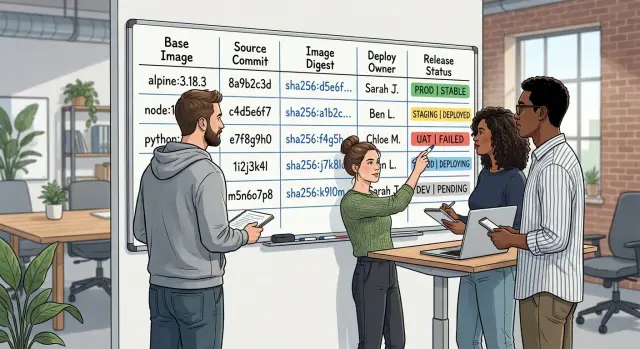
Table of Contents
What breaks when image history is missing
Small teams often ship a container that works and move on. That feels fine until a security fix appears and nobody can answer basic questions: what base image is this, which commit built it, who deployed it, and who owns the fix.
The first problem usually starts quietly. Someone updates the base image in a Dockerfile, or CI pulls a newer digest during a rebuild, but nobody records the change. A week later, the app behaves differently in staging. The team compares application code for hours, even though the real change came from the image underneath it.
Then CI makes things worse. The pipeline creates a fresh tag like api:latest or web:release-47, but the source commit is missing or buried in logs. Production runs the image, yet nobody can prove which code went into that build. Rollbacks turn into guesswork.
Ownership is where delays get expensive. A deploy reaches production, an alert fires, and three people assume someone else is already handling it. The developer who wrote the feature did not push the release. The person who clicked deploy did not build the image. The manager knows customers are affected but still cannot tell who should patch, test, and approve.
When a security alert lands, weak container image provenance turns a small fix into a slow investigation. Instead of patching, the team starts asking questions it should already know the answers to:
- Which services use the affected base image?
- Which digest is running in production?
- Which commit created it?
- Who approved the deploy?
That delay is the real cost. The patch might take 10 minutes. Finding the right image can take two hours.
Small teams feel this more than large companies because there are fewer people to remember the history. One engineer rebuilds an image on Friday, CI pushes a new tag, and a weekend deploy rolls it out. On Monday, a scanner reports a critical issue in the old base layer. Nobody knows whether production still runs the vulnerable image or the rebuilt one.
Without clear image history, every incident starts from zero.
What to record for every image
A useful image record should answer three things: what code is inside, what it was built from, and who put it into an environment. If a flaw shows up in a base package, your team should be able to find every affected image in minutes, not by digging through chat, old CI logs, and memory.
Tags alone are not enough. api:latest and web:v2 are convenient, but they move. The digest is the fixed identity, so it should sit at the center of the record.
For each built image, store five pieces of data.
First, save the final image name and its immutable digest. The name tells you what the image is for. The digest tells you exactly what was shipped.
Second, save the base image name, tag, and digest. The tag gives human context. The digest tells you the precise starting point when a CVE affects debian, alpine, ubuntu, or another shared base.
Third, save the source repo, branch, and commit. The commit matters most because it ties the image to a real code state. The branch still helps when teams use release branches or hotfix branches.
Fourth, save the build time and the CI job or pipeline run that created the image. That gives you a clean path back to logs, test results, and build inputs.
Fifth, save who deployed the image and where it went. Record the person or service account plus the target environment, such as staging, production, or a customer-specific cluster.
Keep this data close to the image, not in a spreadsheet that drifts out of date. Many small teams do fine with image labels, registry metadata, or a release record generated by CI.
A simple example shows why this matters. If a flaw appears in a shared Ubuntu base image, you can query by base digest, see which application images depend on it, find the commit that produced each one, and ask the right owner to redeploy. That shortens the gap between "patch exists" and "fix is live."
Use a simple ownership model
When a security issue lands in a base image, confusion usually wastes more time than the rebuild itself. Small teams move faster when each service has one named owner. Not a vague group. Not "whoever touched it last." One person owns the record, keeps image details current, and pushes the fix until it reaches production.
That owner does not need to write every Dockerfile change. They need enough context to answer a few questions quickly: what the service runs on, where it comes from, and who can patch it today.
Each service also needs a backup owner. People take time off, switch projects, or get pulled into another incident. A backup keeps patch work moving when the main owner is offline. If ownership changes, update the record the same day. An old owner name sends people in the wrong direction.
For most small teams, a plain table is enough. It should include the service name, the main owner, the backup owner, the source repo, the current base image, the last person who built the image, and the person who can approve an emergency rebuild.
Builders should update the source and base image details as part of normal work. If they change the Dockerfile, switch to another base image, or pin a new digest, they should update the record in the same commit, ticket, or release note. Waiting until later rarely works.
Deployers need a separate check. Before they push an image, they should confirm the target environment. That sounds obvious, but rushed fixes still end up in the wrong place because nobody paused to confirm whether the image was going to dev, staging, or production.
Emergency approval also needs a real name, not a vague rule. When a serious issue shows up at 6 p.m., the team should already know who can say, "Rebuild now and ship it."
Set up tracking in five steps
Most small teams can set this up with habits they already have. You do not need a new platform if your build system, registry, and deploy jobs can store a few extra facts.
-
Make an inventory of every image you ship. Include the main app, background jobs, scheduled tasks, migration images, and anything else that reaches staging or production. Teams often patch the web app and forget the worker still runs the vulnerable base image.
-
Stamp each build with the Git commit SHA and the exact base image digest. Human-friendly tags such as
python:3.12help people read the record, but the digest tells you the real parent image. -
Store the build record where people already look during an incident. CI logs are fine. Registry annotations are fine too. The point is simple: nobody should need to search three systems or ask the person who wrote the pipeline last year.
-
Record who started the deploy and which environment it targets. Chat messages are easy to lose, and memory gets fuzzy after a week. A short deploy record gives the team a clean trail for staging, production, and rollback checks.
-
Run one drill from alert to fixed deploy. Pick a recent base image issue, trace which images use it, rebuild them, and note who approves the deploy. Time the whole path. If the team gets stuck on basic questions, tighten the process before a real incident hits.
A small product team can do all of this in an afternoon. After that, fixes move much faster because nobody has to guess which service is affected or who should ship the patch.
Add checks to build and deploy steps
Tracking only helps if the pipeline enforces it. If builds accept missing details and deploys accept unclear ownership, people skip the record keeping as soon as they get busy.
A few hard checks solve most of this.
Build checks
Start with the base image. The build should fail if the metadata does not say which base image it used, which digest it came from, and when the team pulled it. A tag like python:3.12 is useful, but it is not enough on its own because the tag can move.
Production builds should also reject mutable tags such as latest. That sounds strict, but it removes a common source of confusion. When a fix lands for a library issue, you want one clear answer to a simple question: which exact image are we running right now?
Record the final image digest too, not just the human-friendly tag. Put that digest in release notes, deployment notes, or whatever your team already uses to track releases. If you only save tags, incident response gets slower because tags can point to different content over time.
Deploy checks
Deployment should stop when the owner field is empty. Every production image needs one named person, or one very small team, that will respond when a base image gets patched. Shared ownership often turns into no ownership.
The deploy step can check that field before it touches the cluster or server. If the owner is missing, the release waits. That small delay saves hours later.
A short daily report also helps. Show which images still run on old base images, how many days behind they are, and who owns them. For many teams, a plain text report in chat or email is enough.
When a security fix appears, nobody has to guess. The team can see the old base image, the current digest, and the owner who needs to rebuild and deploy.
A simple example from a small product team
A six-person SaaS team ships three images: api, worker, and web. The api image matters most because it handles logins, billing calls, and most database traffic. For each image, the team keeps a short record with the base image tag, source repo, build commit, current production digest, and the person who owns the next deploy.
On Tuesday morning, a new CVE lands against the public base image used by api. The team does not need to stop and ask which service depends on it. Their record already shows that api uses that base, while worker and web use different ones.
The api entry also shows something that saves time: production runs a specific Git commit, and Sam owns api deploys this week. Nobody waits for permission or guesses who should act. Sam updates the Dockerfile to the fixed base tag, rebuilds the image from the same application commit, and runs the usual smoke test.
That keeps the change small. The team patches the base image without mixing in fresh application code, so if something breaks, they know why. By early afternoon, Sam pushes a new api image, deploys it, and updates the record with the new digest and release time.
Without that record, the day looks very different. Someone searches chat logs to find who touched the Dockerfile last. Another person scans old image tags and tries to match them to commits. A third person asks whether worker might use the same base after all. The patch might still ship, but it ships later, with more stress and more room for mistakes.
For a small team, that is the whole point. Good records turn a Tuesday morning CVE into a same-day fix instead of a half-day investigation.
Common mistakes that slow security fixes
Most delays come from missing habits, not missing tools.
One common mistake is tracking tags but not digests. A tag like node:20 can move at any time. When a new CVE lands, the team checks the tag, assumes the service is current, and still misses the vulnerable image running in production. Digests give you a fixed reference.
Ownership causes just as many delays. Small teams often keep it in their heads. Everyone sort of knows who handles the worker service or the admin app until that person is on vacation, busy, or no longer on the team. Then the patch sits there because nobody wants to touch a deploy they do not clearly own.
Local rebuilds are another quiet problem. Someone pulls the repo, changes a package, rebuilds on a laptop, and pushes an image to fix an issue fast. It feels practical in the moment. A week later, nobody can tell which files changed, which secrets were present, or whether the image matches the repo at all.
A shared CI job can also create false confidence if every service gets the same metadata. The labels all look valid, but they point to the wrong repo, the wrong owner, or the same generic pipeline name. During an incident, that kind of neat-looking record wastes time.
Another mistake is writing provenance data once and never checking it again. Teams add labels or store build details, then stop looking at them. Fields go stale. Owners change. A new service copies an old template and carries the wrong values for months.
A lean team usually needs only a few checks before release:
- store the base image digest, not just the tag
- record the source commit from CI, not from a laptop
- attach a clear service owner to each deploy
- verify metadata on every build
If one of those is missing, stop the release and fix the record first.
Quick checks before each release
Release day is a bad time to hunt for missing facts. If your image history is in good shape, someone should be able to answer a few questions in less than a minute.
Who owns this image? What base digest does it use? Which commit built it? Who approved the production deploy?
That speed matters more than perfect paperwork. When a base image gets a security fix, teams move fast only if they know who owns the image, what code built it, and who pushed it to production.
For many small teams, the best place for these answers is the CI pipeline summary plus the container registry entry. If you use GitLab or a similar setup, add the owner, commit SHA, base image digest, and deploy approval to the build and deploy job output. One screen is much better than a scattered trail.
This also keeps handoffs clean. If a founder, an engineer, and a part-time CTO share release work, nobody has to guess who takes the next step when a security patch lands on Friday afternoon.
Next steps for a lean team
A lean team does not need a big program to make container image provenance useful. It needs one service, one pipeline, and one rule that people follow every day.
Start with the service that changes most often, because that is usually where missing ownership hurts first. If your API ships twice a week and your worker changes once a month, begin with the API. Record the base image, the commit used for the build, and the person who approved the deploy. That small record gives you enough context to answer the first questions during a security fix.
Do that in one pipeline this week. Do not wait for a full redesign. One working path is better than a perfect plan that lives in a document nobody opens.
Keep the process small. If people need six screens and three manual notes to ship a change, they will skip it under pressure. If the pipeline adds the data automatically and asks for one clear owner at deploy time, the habit usually sticks.
If your team wants a second pair of eyes, Oleg Sotnikov at oleg.is works with startups and small businesses as a fractional CTO and can review build and deploy flows, tighten ownership, and help teams move toward practical AI-driven engineering without adding heavy process.
Done well, base image tracking stops feeling like admin work. It becomes the fastest way to answer three questions that matter during an incident: what is running, where did it come from, and who fixes it now?
Frequently Asked Questions
Why are image tags alone not enough?
Tags help people read releases, but tags can move. If you rely on latest or a version tag alone, you can lose track of the exact image in production. Store the final image digest so your team can match one release to one exact image every time.
What should we record for every container image?
Keep the image name, final digest, base image tag and digest, repo, branch, commit SHA, build time, CI job, deployer, and target environment. That gives you one record that answers what you shipped, what it came from, and who pushed it out.
Do we need both the base image tag and the digest?
Yes. The tag gives human context, and the digest gives the exact parent image. When a CVE hits ubuntu, debian, or alpine, the digest lets you find the affected services fast instead of guessing from a moving tag.
Who should own image tracking on a small team?
Pick one named owner for each service and add one backup. The owner keeps the record current and drives the fix through rebuild, test, and deploy. The backup covers time off and keeps incidents from stalling.
Is it okay to rebuild an image locally during an emergency?
No. A laptop rebuild may fix the issue today, but it breaks your trail tomorrow. Build from CI so you keep the commit, build inputs, logs, and image metadata in one place.
Where should we store provenance data?
Put it where your team already looks during incidents. CI job output, registry metadata, and release records all work if they stay close to the image and stay current. Skip spreadsheets and scattered chat notes because they drift fast.
What checks should CI and deploy pipelines enforce?
Fail the build if metadata misses the base image digest, commit SHA, or final image digest. Stop deploys when the owner is empty or the target environment is unclear. Those checks add a little friction now and save hours during a real fix.
How do we patch a base image without mixing in new app changes?
Keep the application commit the same and only update the base image to the fixed digest or tag. Rebuild from CI, run your normal smoke test, and ship that small change. This keeps the patch narrow, so your team knows what changed if something breaks.
How often should we review image history and ownership?
Check it on every build and review it whenever ownership, base images, or deploy rules change. Team changes make records go stale fast. A short drill every few months also shows whether people can still trace an image from alert to production.
What is the fastest way for a lean team to get started?
Start with one service that changes often, usually the API. Add the commit SHA, base image digest, owner, and deploy approval to one pipeline this week. Once that path works, copy the same habit to the rest of your images.


