ConnectRPC vs gRPC-web vs REST for browser clients
ConnectRPC vs gRPC-web vs REST helps teams choose a browser API path by comparing proxy setup, tool support, error handling, and backend tradeoffs.
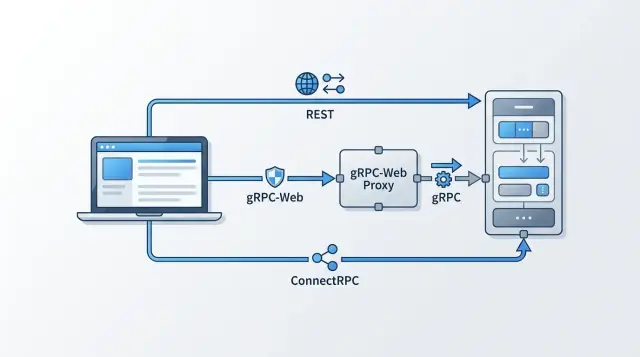
Table of Contents
Why browser APIs get messy fast
Browsers look like ordinary clients, but they follow tighter networking rules. Backend services can speak native gRPC over HTTP/2 to each other. Browsers usually cannot. That gap is where this choice starts to matter.
One backend often has to serve a browser app, a mobile app, internal tools, and sometimes partner integrations. Every client wants a clean contract, but each one expects different things from payloads, auth, caching, and error messages.
Typed clients help. Autocomplete catches avoidable mistakes, and shared schemas keep teams aligned. But many teams do not want an extra proxy or translation layer just to support the browser. What looks elegant in a diagram can turn into more config, harder local debugging, and more places for headers or cookies to break.
Small protocol choices also shape daily work. If a request fails, can a frontend developer read it in the network tab? If a response should be cached, will normal web tools understand it? If you add one field, will every client accept it without gateway changes?
This rarely feels urgent on day one. It gets urgent once one backend has to support web, mobile, and external users at the same time. The protocol affects more than performance. It affects how easy the system is to inspect, test, and change.
What each option means
For a browser client, the difference is straightforward: how the frontend sends requests, what goes over the wire, and how much setup the team must own.
REST uses standard HTTP routes such as GET /users/42 or POST /orders, usually with JSON. Most developers already know how to inspect it, mock it, and explain it to non-engineers.
gRPC-web keeps the RPC model. The client calls service methods instead of hand-built routes, which fits well when the backend already relies on protobuf schemas and generated clients. The tradeoff is that the browser cannot speak normal gRPC directly, so gRPC-web depends on a browser compatible adaptation.
ConnectRPC also keeps the RPC model, but it fits ordinary web transport much better. The browser can make method calls over regular HTTP without pretending to be a full gRPC client. In practice, that often means less friction for web apps while keeping the structure teams like about RPC APIs.
Picture an invoice preview. REST might call /api/invoices/123/preview and return JSON. gRPC-web might call InvoiceService.GetPreview with generated protobuf types. ConnectRPC can use that same method shape, but over a transport that feels more natural in the browser.
These styles are not mutually exclusive. One backend can expose more than one, if the team plans for it early. A public API might stay REST because partners expect JSON, while the company dashboard uses ConnectRPC for typed calls and shared schemas.
Where proxies matter
Proxy requirements often settle this decision faster than protocol details do.
REST usually has the shortest path. If CORS, cookies, headers, and TLS are configured correctly, the browser can call the endpoint over ordinary HTTP and the edge layer mostly just forwards traffic.
gRPC-web often adds another layer. Because browsers do not speak native gRPC the way backend services do, teams usually put Envoy or a similar proxy in front of the app. That proxy translates requests and responses into something the browser can handle.
ConnectRPC sits in the middle. It works in a browser friendly way over HTTP/1.1 or HTTP/2, so teams often do not need a dedicated gRPC-web translation layer just to put RPC in the frontend. You may still keep a reverse proxy for TLS termination, auth checks, rate limits, or routing. The difference is simpler: with REST and often with ConnectRPC, the edge layer can behave like a normal web proxy. With gRPC-web, it may also need to bridge protocol details.
That extra bridge is real work. Someone has to write the config, rotate certificates, read the logs, debug header issues, and keep deployments aligned. When requests fail, the team now checks browser tools, app logs, and proxy logs instead of just two places.
This is one reason lean infrastructure matters. Oleg Sotnikov often tackles this kind of tradeoff in his Fractional CTO work at oleg.is: remove layers that add operating cost without giving the product much back.
A blunt question helps: do you want the browser client to depend on a protocol bridge? If the answer is no, REST and ConnectRPC usually keep the path shorter. If you already run Envoy for other reasons and the team knows it well, gRPC-web can still make sense.
How the tools feel each day
Most teams do not get stuck on protocol theory. They get stuck on repeated chores: testing an endpoint, reading an error, mocking a response, and helping a new teammate get the app running.
REST is still the easiest option for ad hoc work. You can call it with curl, inspect it in DevTools, paste JSON into a mock server, and move on. It is also easier to explain to QA, product, or support when they need to check one request.
gRPC-web feels heavier right away. It works best when the team is comfortable with generated clients, protobuf files, and a more structured workflow. That can be a good trade when protobuf already drives the backend, but it is less friendly for simple browser debugging. A frontend developer cannot just type a URL, send JSON, and learn by poking around.
ConnectRPC lands in a useful middle ground. You keep protobuf contracts and typed clients, but the browser experience stays closer to normal web calls. The requests are easier to reason about, and the tooling feels less foreign to developers who mostly work on web apps.
Small teams usually notice the difference in ordinary tasks. Can you test one endpoint without running the whole app? Can you read the request in DevTools without decoding something unfamiliar? Can you create local mocks for UI work and update generated code with one repeatable command? Can a new hire understand the setup in an afternoon?
Team habits matter more than trends. If the backend team already lives in protobuf and code generation, gRPC-web or ConnectRPC may feel natural. If the frontend team depends on manual inspection, quick mocks, and lightweight debugging, REST usually keeps them moving faster.
Mixed API styles can work, but they are never free. Documentation splits, examples diverge, and onboarding takes longer because new developers must learn both the transport and the team's house rules. One backend can expose more than one style, especially in a lean Go and TypeScript stack, but every extra style adds another mental model. That cost usually shows up in week two, not day one.
How errors reach the browser
Error handling is where many browser APIs become messy.
REST is the most uneven by default. One endpoint returns { "error": "invalid email" }, another sends { "message": "unauthorized" }, and a third responds with plain text and a 500. REST can be clean, but only if the team defines one error format and sticks to it.
gRPC-web is more consistent on paper. It uses gRPC status codes such as invalid_argument, unauthenticated, and resource_exhausted, and it can attach extra details in trailers. That works well between services, but browsers do not always make trailer based details pleasant to inspect. Frontend teams often end up writing adapter code just to turn transport details into simple UI messages.
ConnectRPC keeps the RPC model but sends errors in a form that browser clients handle more easily. You still get status codes and machine readable details, but the experience feels closer to normal web work. That matters when one team owns both the backend and the frontend.
When every endpoint fails in the same shape, browser code gets much smaller. One helper can map server responses to field errors, login redirects, retry messages, and support logs. Without that, each page grows its own set of special cases.
Before launch, test real failures, not just happy paths. Try a form with several validation errors. Let a session expire. Hit a rate limit. Create a conflict where two users edit the same record. Force an internal error and make sure the user sees a safe message plus a request ID.
The difference becomes obvious fast. If signup, billing, and profile updates all return errors in one shared format, the UI can handle them the same way everywhere. If each endpoint speaks its own dialect, the frontend turns into glue code.
A simple way to choose
Start with the clients you expect over the next year, not just the ones you have today. A browser only admin panel points to a different choice than a product that will soon add mobile apps, partner integrations, and internal services.
For many teams, the best starting point is whatever fits the current stack with the least extra machinery. If your environment already runs a proxy comfortably, gRPC-web is less painful. If you do not already have that layer, adding one just for browser traffic often feels like plumbing you will end up babysitting.
Code generation is another honest filter. Some teams like strict generated clients because they catch mistakes early. Others lose patience as soon as the workflow adds build steps, generated files in reviews, or editor setup. If your team has little appetite for that, REST usually feels lighter. If you want typed contracts without as much browser friction, ConnectRPC is often the better middle ground.
A practical rule is simple:
- Choose REST when easy debugging, low setup, and broad browser familiarity matter most.
- Choose ConnectRPC when you want typed RPC calls in the browser without making proxy setup the center of the project.
- Choose gRPC-web when you already run gRPC behind a proxy and the team is happy with a protobuf first workflow.
Do not decide from documentation alone. Build one real endpoint first. Make it do something ordinary, like create an account, fetch a dashboard, or submit a form with validation errors. Then test how the browser receives success, auth failures, and field level errors.
That error test matters more than most teams expect. Pick one shared error shape early and keep it boring. The browser should know where to find the message, the code, and any field errors every time. If that contract feels awkward in the first endpoint, it will feel worse after fifty.
A lot of rework comes from standardizing too early. Build one real flow, watch where the frontend gets confused, then commit.
A realistic example from one backend
A common SaaS setup has one backend, three kinds of clients, and three different expectations.
The customer facing React dashboard wants typed requests, quick feedback, and errors that look the same on every screen. The internal admin tool wants much of the same, because the team handling refunds, account changes, or support tickets also benefits from predictable responses. Partner teams usually want something simpler: plain JSON they can test quickly in Postman or a small script.
Imagine a backend that handles billing, account settings, usage reports, and user management in one codebase. The team does not want separate services just to satisfy different clients. That usually creates duplicate auth rules, repeated validation, and more places for bugs to hide.
A practical split is often ConnectRPC for the React dashboard, ConnectRPC for the internal admin tool, and REST for partner access.
That gives the web apps generated types and cleaner client code. If a request fails, the frontend can read a consistent error shape instead of guessing whether the server returned a string, a JSON blob, or a half useful status code. A failed payment update, an expired session, and a validation error should each trigger the right UI message without custom parsing in five different places.
Partners care about different things. They often test an API before they commit to it, and REST makes that easy. They can send JSON, inspect the response, and move on. For external access, simple often wins.
This is why many teams keep REST for outside consumers and use ConnectRPC for browser apps. They still share the same business logic underneath. The server checks auth once, validates the same fields, and calls the same services. Only the transport changes.
gRPC-web can still fit, mostly when the team already has a proxy and a protobuf heavy setup in place. If Envoy is already part of the stack and everyone is comfortable with protobuf tooling, adding gRPC-web may feel normal. If not, it often adds one more moving part without solving a problem ConnectRPC or REST could not already handle.
The result is straightforward: one backend, one set of rules, and API styles matched to the people using them.
Mistakes that create rework
Teams often treat this as a thin client detail. It usually affects deployment, frontend code, and support work for months.
A common mistake is choosing gRPC-web first and realizing later that someone still has to own the proxy layer. That sounds minor until the proxy touches every release. If nobody clearly owns Envoy, nginx, or another gateway, config issues pile up quickly. A team can spend more time chasing headers, routing, and local setup than shipping features.
Another mistake is letting REST and RPC endpoints report failures in totally different ways. One route sends plain JSON with HTTP status codes. Another sends a gRPC style error object. Then the browser app needs separate logic for auth failures, form errors, retries, and toast messages. That work spreads through the codebase.
Browser support causes similar surprises. Backend gRPC support does not mean browser support. The browser cares about fetch, CORS, auth headers, cookies, and timeout behavior. Teams often prove the backend works with server side tools, then hit real problems only when they run an actual browser flow.
Code generation creates a slower kind of rework. If nobody knows how to regenerate clients, people stop doing it. Soon the frontend uses stale types, someone hand edits generated files, and every API change feels bigger than it really is.
A few checks prevent most of this. Decide who owns the proxy before choosing gRPC-web. Keep error shapes and field names close across REST and RPC. Test requests in a real browser early, not just with backend tools. Check CORS, auth headers, cookies, and timeouts together. And make client generation one repeatable command the whole team can run.
Small teams feel these mistakes first. One extra proxy, one odd error format, or one brittle code generation step can turn a simple backend into a daily drag.
Quick checks before you commit
The wrong browser path gets expensive slowly. A week of setup can turn into months of small workarounds if every new screen needs special handling.
Before you settle on an approach, answer a few plain questions. Can the browser call the service directly, or will you need a proxy that someone must deploy, monitor, and debug? When a request fails, can a developer open DevTools and understand it in under a minute? Can one backend return the format each client needs without splitting the same business logic across multiple services? If you add a field next month, will older screens ignore it safely? Can a support person read the common error messages and tell a user what to do next?
If two options still look equal, choose the one that makes failures boring. People can live with an error. They struggle with "something went wrong" and no clue why.
A simple example makes this clear. Say one backend serves an internal admin screen, a public web app, and a mobile app. REST often feels easiest on day one because every browser tool understands it. ConnectRPC often lands in the middle when you want typed RPC calls in the browser without adding a separate gRPC-web proxy. gRPC-web can work well too, but a small team should ask whether that extra moving part pays for itself.
Field changes cause more damage than teams expect. Add new fields so older screens can ignore them, keep error shapes stable, and write short support notes in plain language. If support can map an error code to a user action, they solve more cases without pulling an engineer into every ticket.
What to do next
You do not need a rewrite to make this decision. Start with one browser facing endpoint that already matters, such as account data, search results, or a dashboard summary. Keep the backend the same and ship that endpoint in one style first. Add a second style only if the team still needs proof from real code, not opinions.
That small test tells you more than a long debate. One endpoint is enough to show where the friction really lives. You will see it in the build setup, browser behavior, and the shape of the client code.
While you test, track a few concrete things: how much proxy work you had to add or maintain, how readable the browser client code stayed, how easy errors were to understand in the UI and logs, and how much custom mapping the frontend needed for retries and messages.
Numbers help. If one option adds 20 minutes to every local setup, that cost is real. If another gives cleaner errors but needs an extra proxy in every environment, write that down too.
After the test, pick a default and record it in plain language. For example: use REST for public browser APIs, use ConnectRPC for typed internal web apps, and keep gRPC-web only if the current stack already depends on it. The exact rule can differ, but new services should follow it unless there is a clear reason not to.
That one written default prevents a quiet mess. Without it, each new service grows its own pattern, its own error shape, and its own setup notes. Teams usually feel that drag months later.
If the team is still split, a short outside review can save a lot of rework. Oleg Sotnikov at oleg.is helps startups and small businesses with backend architecture, infrastructure, and AI first development workflows, and this kind of browser API decision is worth settling early.
Frequently Asked Questions
Which option should I choose first for a browser app?
Start with REST if you want the shortest setup and the easiest browser debugging. Pick ConnectRPC if you want typed RPC calls in the browser without adding a special translation layer. Choose gRPC-web only when you already run a proxy like Envoy and your team already works comfortably with protobuf and generated clients.
Can a browser call native gRPC directly?
No. Browsers do not speak native gRPC the same way backend services do. That is why teams use REST, ConnectRPC, or a gRPC-web bridge for frontend calls.
When do I need a proxy or translation layer?
REST usually works through a normal reverse proxy with CORS, TLS, and auth set up correctly. ConnectRPC often works the same way. gRPC-web usually needs a proxy that translates requests and responses for the browser.
Is ConnectRPC easier to use than gRPC-web?
For many teams, yes. It keeps the RPC model and typed clients, but the browser traffic feels closer to normal web requests. That often makes local setup, inspection, and debugging simpler than gRPC-web.
Why do many teams still use REST for public APIs?
REST stays easy for partners, QA, and frontend developers because they can send JSON, read responses in DevTools, and test routes with common tools. It also gives you a familiar shape for public APIs where simple access matters more than strict RPC method calls.
How should I handle API errors in the browser?
Define one error shape early and use it everywhere. Every response should tell the browser where to find the message, the code, and any field errors. When you keep that format steady, your frontend can handle auth failures, validation issues, and retry messages with much less custom code.
Can one backend expose both REST and ConnectRPC?
Yes, and many teams do exactly that. A common split uses ConnectRPC for internal web apps and REST for partner or public access. Keep one set of business rules underneath so you do not duplicate auth, validation, and service logic.
Does code generation help or just add overhead?
It can. Generated clients catch mistakes early, but they also add commands, generated files, and editor setup. If your team skips regeneration or edits generated code by hand, the workflow turns into drag fast.
What should I test before I commit to one approach?
Build one real browser flow and test more than the happy path. Check login expiry, validation errors, rate limits, CORS, cookies, auth headers, and how the request looks in DevTools. That small test shows where the friction lives much faster than a long debate.
When does gRPC-web still make sense?
It fits best when you already run gRPC behind a proxy and your team already uses protobuf across the stack. In that setup, gRPC-web can extend the same service model into the browser without forcing a new API style. If you do not already own that proxy layer, the extra moving part often costs more than it gives back.


