Cloudflare tunnels vs public ingress for internal apps
Cloudflare tunnels vs public ingress for internal apps: compare exposure, logging, support effort, and fit before you put another admin tool online.
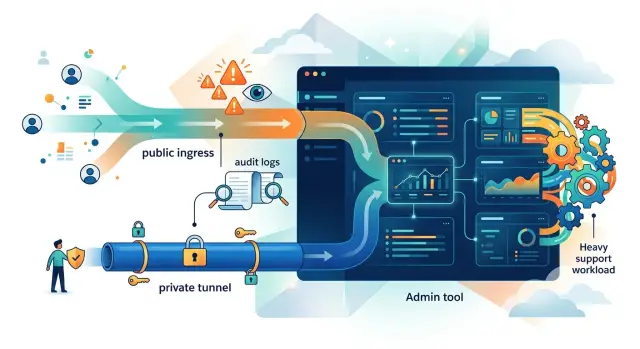
Table of Contents
Why this choice matters for internal apps
Internal apps rarely look dramatic, but they often control the parts of a business that hurt most when something goes wrong. An admin panel can change prices, approve refunds, view customer records, reset passwords, or push a deployment. A mistake there does more damage than a broken marketing page.
That is why the access path matters. When you compare Cloudflare tunnels vs public ingress, you are not just choosing a network pattern. You are deciding who can see the app at all, how much unwanted traffic reaches it, and how much cleanup your team will handle later.
The difference shows up fast when an internal screen sits on the open internet. Bots find exposed admin routes all day. They try common usernames, weak passwords, old paths, and stale bookmarks. Even when nobody gets in, the logs fill with junk, alerts get noisier, and real issues become harder to spot.
A private access path cuts out much of that noise before it starts. If outsiders cannot reach the login page, they cannot hammer it, scrape it, or keep poking at it. That removes a lot of small problems before they become support tickets.
Remote work makes the choice even more practical. Staff switch networks, travel, forget VPN steps, lose saved settings, and ask for help five minutes before a release. If access feels brittle, support work grows every week.
The same bad pattern shows up again and again. People cannot reach the app from home or on the road, admins loosen rules to "just make it work," and the app becomes easier to attack and harder to support. A better setup keeps the app hard to find, simple for the right people to reach, and easy to review later. That balance matters more for internal tools than for most public pages, because internal tools hold the controls that affect money, data, and access.
What changes with public ingress
The moment you put an internal app on a public DNS name and open a port, random traffic starts hitting it. Some of that traffic is harmless scanning. Some of it tries old passwords, known paths, or common admin URLs. Even a tiny tool with ten users gets noticed because bots search the whole internet, not just famous sites.
A web application firewall and rate limits still help. You should use them. But they do not make the app private again. The login page, session flow, and error handling still face the internet. One weak rule, one missed patch, or one noisy endpoint can attract attention from anywhere.
Support work changes almost immediately. When an employee says, "I can't log in," the team now has to separate a real user problem from background noise. Locked accounts, rate limit triggers, strange IP addresses, and false alerts start to blend together. A simple access issue takes longer because the logs are full of traffic that has nothing to do with your staff.
Login pages create most of the extra work. Someone needs to watch failed login spikes, repeated password attempts, and access patterns outside normal hours. Someone also needs to decide whether an alert points to an attack, a broken client, or a user who retried the same password ten times. For a lean team, that background work adds up fast.
A small admin panel is a good example. On a private network, support mostly handles real employee issues. On public ingress, the same panel can get scans at 3 a.m., login attempts from unknown regions, and alert noise that drowns out normal tickets. That is often the hidden cost. The app may still work fine, but the team spends more time watching, filtering, and explaining than before.
What changes with a tunnel
A tunnel blocks direct internet traffic to the app's origin. The server does not expose a public port for the tool, so random scans and background probing never reach it. That cuts casual exposure right away, which is why many teams prefer tunnels for admin panels, dashboards, and other internal tools.
That does not make the app safe by default. People still need proper identity checks before they get in. If you put a weak login in front of an internal tool, the tunnel only hides the front door from the street. It does not fix bad access control, missing MFA, or broad shared accounts.
This is the biggest shift in the Cloudflare tunnels vs public ingress decision. Instead of a public network edge, you get a private origin plus an identity gate. For many teams, that is a better default because outsiders cannot connect straight to the server, even if they guess a hostname or find an old note with the app name.
The tradeoff is operational. A tunnel agent runs inside your environment, and that agent becomes one more service to watch. You need to update it, restart it when it gets stuck, and make sure someone notices when it drops. Teams often forget this because the app itself still looks healthy.
That leads to a common failure mode. The app is healthy, the database is healthy, and local users inside the network can still open it. Remote access breaks because the tunnel connector stopped working. Support tickets pile up because users only see one symptom: "I can't reach the tool."
Take a finance approval app. With a tunnel, the server stays off the public internet and staff sign in through the company's identity provider with MFA. That is a strong step. But if the tunnel agent crashes after a system update, the finance team loses remote access even though the app itself is still running normally.
A tunnel reduces outside exposure, but it also adds a dependency. Treat that dependency as part of the app, not as an invisible extra.
Compare blast radius before you compare setup time
Start with the damage, not the setup work. Teams often focus on speed and convenience first. The better question is simpler: if one session gets stolen, how much can that person do before anyone notices?
That question changes the design. A read-only dashboard that shows reports has a much smaller blast radius than an admin panel that can delete data, rotate secrets, or change production settings. If a tool can change live systems, treat it like a control panel, not like a normal internal app.
Public ingress raises the stakes because the login page and app surface sit in the open. A tunnel reduces exposure, but it does not make a bad session harmless. If an attacker lands inside a browser session with broad access, the path they used matters less than the permissions they inherit.
Look closely at what sits behind the first successful login. Trouble grows fast when a tool relies on shared accounts, shows stored API keys or database credentials in the UI, gives one admin role far more power than one job needs, or lets someone trigger production actions with one click and no second check.
Read-only and write access should not sit behind the same weak gate. Split tools that only show data from tools that change state. Many teams skip this because one combined admin panel feels easier, but it turns every support issue or session leak into a larger incident.
The strongest checks belong in front of the screens that hurt most when abused. Pages that can delete records, change billing, create users, change roles, or touch production secrets deserve extra friction. A second approval or step-up authentication at that point can block the worst outcomes.
A simple test works well. Imagine a contractor leaves a laptop unlocked for ten minutes. If that session can refund payments, remove users, and alter production config, your blast radius is too wide. Fix that first, and the rest of the access decision becomes much easier.
Audit trails and support work
Access rules break down when nobody writes down who actually needs the app. Start with names or roles, then note where they connect from and how often they use it. A developer who opens an admin tool twice a month creates a different risk and support burden than a support lead who uses it all day from home and the office.
A short access map helps more than people expect. If only six employees need the tool, a tighter access path usually makes sense. If 80 contractors need occasional entry from many locations, the login flow and recovery process matter just as much as the security model.
The audit question is simple: what will you know after something goes wrong? You want logs that show who signed in, when they signed in, where they came from, and what gate allowed them through. If the access path cannot tie activity to a real user identity, reviews get messy fast.
Before you choose anything, write down the minimum records you need: real user identity instead of a shared password, timestamps for login attempts and successful access, source details such as IP or device, and enough event history to review suspicious activity later. That matters in routine reviews, but it matters even more during an incident. If someone changes billing settings or exports customer data, the team should not spend half a day piecing together logs from three systems.
Support load is the other half of the decision. Public ingress often creates tickets around password resets, bot traffic, certificates, and users who reach the wrong screen. Tunnel-based access can reduce exposure, but it creates its own tickets if the identity step is hard to use or blocks people who travel a lot.
Picture an internal finance panel used by eight people. Seven use it from the same country every weekday. One uses it while traveling. In that case, strong identity checks with clean access logs usually save time overall, even if the traveling user needs occasional help. A public endpoint may look simpler on day one, but it often creates more work for the support inbox later.
How to choose for one app
Start with the job the app does every day. An internal dashboard that staff use to check numbers does not need the same exposure as a partner portal or customer API. The app's role should drive the choice, not habit.
Then write down the worst action a signed-in user could take. Can they reset customer data, approve payments, delete records, or reach production systems? If yes, treat the app like a control panel. Give it the smallest opening that still lets people do their work.
The user list changes the answer quickly. Staff on managed laptops are one case. Contractors on personal devices are another. Customers are different again because they need a setup that works without your internal identity rules or support steps. A tool used by five employees can sit behind tighter access rules than a tool used by hundreds of outside users.
A practical review only needs a few questions:
- Who needs access every week, and from what devices?
- What is the worst mistake or abuse one account could cause?
- Does the app need browser access only, or API access too?
- Can the team review sign-ins and actions later?
- Who fixes access fast if login breaks on a busy day?
Pick the smallest exposure that still fits normal work. If people only need browser access and you want identity checks in front, a tunnel usually keeps the surface smaller. If the app must accept direct inbound traffic from outside systems, public ingress may be necessary. In that case, lock it down hard.
Test the boring failure cases before rollout. Sign in from a new device. Try a locked account. Remove a contractor and confirm access ends right away. Check that logs show who signed in, from where, and what they did. Recovery matters too. If one lost phone turns into six support tickets, the setup is too fragile.
A simple example
A five-person team runs an internal billing admin panel. Finance staff open it once a week to fix invoices, check failed payments, and export reports. Some work from office laptops, others log in from home networks.
If the team puts that panel behind public ingress, setup feels simple. Everyone gets one address, and there is no extra client to install. The trouble starts soon after.
Admin pages on the open internet attract scans almost at once. Logs fill with login attempts, password reset requests, and random probes. Even if no one gets in, the team still spends time checking alerts, answering access questions, and separating real trouble from background noise.
That is a lot of exposure for a small panel used once a week. Billing tools often hold customer details, payment status, and refund controls. One weak password or one missed update can turn a minor convenience into a real security issue.
A tunnel changes the picture. The panel stays off the open internet, and the team can put SSO in front of it. Finance staff sign in with the same identity system they already use, and the company can limit access to a short list of people and approved laptops.
That cuts support load too. Fewer random login attempts mean fewer noisy alerts. Audit records also get clearer because most access events belong to actual employees, not bots hitting an exposed admin page all day.
The team still needs a fallback. If the tunnel fails or the identity provider has an outage, finance may need urgent access for payroll or refunds. Usually, a simple emergency path for one technical owner, an offline break-glass account, and a monthly recovery test are enough.
For this team, a tunnel is usually the better choice. Public ingress saves a little time at the start. The tunnel saves more time later and keeps a billing panel from becoming another exposed admin surface.
Mistakes that quietly raise risk
The worst setup mistakes are small and boring. They rarely break things on day one, but they create extra tickets, messy access rules, and bigger damage when one account or endpoint gets exposed.
One common mistake is using the same admin path pattern for staff and customers. If your public app and staff console both live behind familiar routes like /admin or /staff on the same hostname, people make wrong assumptions fast. Support staff open the wrong page, customers find screens they were never meant to see, and the rules become harder to reason about.
Old access entries create a quieter problem. A former contractor may still sit on an allowlist because nobody owns cleanup. That looks harmless until you need to answer a simple question: who could still reach this tool last month? If you cannot answer in minutes, the access model is already too loose.
IP allowlists alone also age badly. They look simple, but home internet changes, mobile networks shift, offices use VPNs, and shared IPs blur who did what. Teams end up with two bad options: keep widening the list to stop complaints or keep fielding "I can't get in" messages every week. Identity-based checks with clear logs are usually less painful.
Logs get ignored for the same reason backups get ignored. Nothing feels urgent until the bad day arrives. Then the team finds out it kept connection logs but not user actions, or stored logs nobody knows how to search. Audit logging only helps when someone can search it and understand it quickly.
The messiest mistake is "temporary" public access. Someone opens an admin surface for a vendor demo, an urgent fix, or a week of remote work. The change works, everyone moves on, and six months later the door is still open. That is where risk often jumps from manageable to unnecessary.
A simple rule helps: every exception needs an owner, an expiry date, and a review. If the team cannot say who approved access, when it should end, and what logs prove its use, support load will creep up long before a breach does.
Quick checks before you expose an app
Many internal tools never need public reachability. If only employees or contractors use the app, start with a blunt question: why put it on the public internet at all? In many cases, a private network, VPN, or a tunnel with identity checks gives the same access with less risk.
The next question is about damage, not convenience. If one signed-in user can approve refunds, export customer records, reset passwords, or change roles, the app deserves tighter access from day one. An admin panel that can touch money, data, or permissions should not sit behind a weak login and hope for the best.
You also need to think about availability. If the access layer goes down, can staff still do urgent work, or does the whole team stop? A support team that cannot reach its internal tool for two hours will create a bigger business problem than a neat security diagram suggests.
Ownership is where many setups fall apart. Someone must patch the app, review access logs, remove old accounts, and answer the "I can't get in" tickets. If nobody owns that work, support volume grows fast.
This is why the choice is not just about networking. It is an operations decision. Teams that want a lean setup usually do better when they limit reach, keep identity checks tight, and assign one clear owner for access and logs. On advisory work, this is often one of the first things Oleg Sotnikov reviews before an admin surface goes live.
Next steps for a safer setup
Start small. Pick one internal tool that people use often and that could cause real damage if the wrong person gets in. A billing panel, database admin screen, or staging control panel is enough. Do not review your whole environment at once. Teams lose focus when they try to fix every admin surface in one pass.
If you are still debating Cloudflare tunnels vs public ingress, make the next decision with a short written rule instead of a long architecture document. Each admin surface needs a plain access rule that answers four questions: who needs access, where they can connect from, how they prove identity, and what logs you keep.
Keep that rule short enough that support, security, and engineering can all read it in under a minute. If someone cannot explain the access path in simple words, the setup is probably too loose.
Then fix the highest-risk path first. That is usually the admin screen with the weakest login, the broadest network exposure, or the least audit history. You do not need a large migration to lower risk. One tighter path is better than five half-finished plans.
After you change access, watch what happens for a week or two. Look at failed logins, access requests, and support tickets. If ticket volume jumps, the rule may be too hard to follow. If nobody notices the change and the logs get cleaner, you likely picked the right level of friction.
One habit helps a lot: every time you open or keep an admin surface, write down who approved it and why. That small note saves time later when someone asks why a tool is exposed, who owns it, or whether it still needs remote access.
Some teams want a second opinion before they change anything. Oleg Sotnikov and oleg.is focus on this kind of Fractional CTO and infrastructure review, especially for companies tightening internal access and reducing operational drag. Sometimes a short review is faster than cleaning up months of ad hoc exceptions.
Safer access usually comes from a few boring decisions made clearly and enforced every day.
Frequently Asked Questions
When should I pick a tunnel instead of public ingress?
Use a tunnel when the app is for staff, contractors, or a small approved group and the tool can change money, data, users, or production settings. It keeps the origin off the public internet and cuts most bot noise before it starts.
If the app must accept direct inbound traffic from outside systems or public users, public ingress may fit better. In that case, keep the surface small and put strong identity checks in front of every sensitive action.
Does a tunnel make an internal app secure by itself?
No. A tunnel hides the origin from random internet traffic, but it does not fix weak logins, shared accounts, missing MFA, or broad admin roles.
Treat the tunnel as the front gate, not the whole security plan. You still need solid identity checks, narrow permissions, and clear logs.
When does public ingress still make sense?
Public ingress fits apps that need direct outside access, such as customer portals, partner tools, or APIs that other services call over the internet. It also fits cases where a tunnel adds too much friction for the people who need the app.
Even then, do not treat it like a normal website. Protect the login flow, patch fast, and put extra checks on screens that can change state.
What usually fails with tunnel-based access?
The tunnel connector often causes the first real problem. Your app and database may stay healthy while remote users still lose access because the connector stopped, stalled, or fell behind after an update.
Watch the connector like part of the app. Add health checks, alerts, and a simple restart plan so support can confirm the cause fast.
How do I shrink blast radius if one account gets hijacked?
Start by splitting read-only work from actions that change state. A stolen session hurts far less when it can only view reports and cannot delete data, refund payments, or change roles.
Then add more friction where damage is highest. Step-up authentication, approvals for sensitive actions, and smaller admin roles lower the damage from one bad session.
What audit logs do I actually need for an internal admin app?
Keep records that tie access to a real person, not a shared password. You want sign-in attempts, successful logins, source details such as IP or device, and user actions inside the app.
Make sure someone can search those logs quickly. Logs do not help much if your team needs half a day to piece together what happened.
Are IP allowlists enough for employee access?
Usually not. Home IPs change, mobile networks shift, and offices route traffic in ways that blur who did what. Teams end up widening the list or answering the same access ticket every week.
Identity-based access with MFA and clear user logs works better for most staff tools. You can still keep IP rules as an extra check for a small trusted group.
Will a tunnel reduce support tickets?
They often lower it because outsiders never reach the login page or origin server. That means fewer scans, fewer fake login attempts, and cleaner alerts.
Support does not disappear, though. You trade bot noise for identity and connector issues, so make the sign-in flow easy to use and give one person clear ownership.
What should I do if the tunnel or SSO goes down?
Set up a break-glass path for one trusted technical owner and test it every month. Keep that path narrow, well documented, and separate from day-to-day access.
If payroll, refunds, or urgent support work depends on the app, do not wait for an outage to figure this out. A fallback only helps when your team has tried it before.
Should I get an outside review before exposing an admin tool?
Yes, if the app can touch billing, customer records, user roles, secrets, or production settings. A short outside review often finds old exceptions, shared accounts, weak audit trails, and emergency paths nobody tested.
If you want a practical check before you expose another admin surface, Oleg Sotnikov can review the access path, support burden, and recovery plan without turning it into a long project.


