Cloudflare cache keys for SaaS apps with safe variants
Learn how Cloudflare cache keys for SaaS apps can separate public, tenant, and operator views so pages load fast without mixing roles or feature flags.
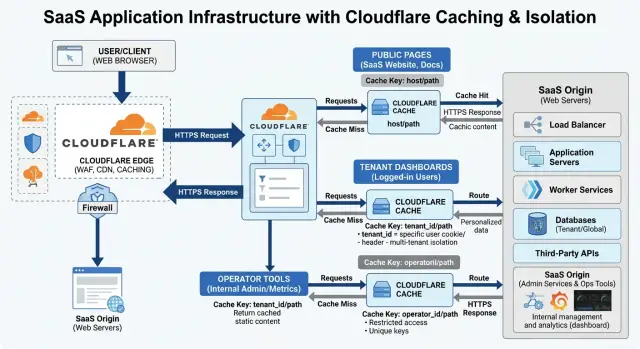
Table of Contents
Why one cache version breaks SaaS pages
A shared cache works only when every visitor should see the same page. That is true for a public pricing page, a docs article, or a landing page with no account data. One cached response can serve thousands of people because the content is identical.
SaaS apps stop being that simple as soon as a user signs in. The page now depends on the tenant, the data that tenant owns, and the permissions of the current user. If Cloudflare stores one response and reuses it for everyone, it can hand the wrong page to the next request.
The problem is not just visual. A user from Tenant A might get a page title, project count, or navigation item that belongs to Tenant B. Even if no private record appears, the app feels broken. People lose trust fast when a dashboard looks like somebody else's account.
Operator screens raise the stakes. Support staff, internal operators, and admins often see controls that regular users should never see, such as impersonation tools, billing overrides, debug panels, or account repair actions. If an operator response lands in a shared cache entry, a regular user might receive markup with those controls. The backend may still block the action, but the page is already wrong.
Feature flags add another layer. One tenant may have a new report enabled while another still uses the old version. A beta user may get an extra panel. A staff member may see an experiment switch hidden from everyone else. If the cache does not separate those cases, one version leaks into another.
That is why a SaaS cache key needs more than the URL. The route might stay the same while the correct response changes by audience. In practice, most app pages fit into three groups: public pages that anyone can share, tenant pages that must stay inside one account, and operator pages that need even tighter separation.
When all of those views share one cache entry, speed improves for a moment and correctness disappears. That trade-off usually is not worth it.
Find what actually changes
Before you design cache rules, map pages by what really changes on screen. Most teams guess. Then they either create too many variants or cache private content for the wrong person.
Start with the easy wins. Some pages stay the same for everyone, or close enough that a shared cache is safe. Marketing pages, docs, pricing, login screens, and a public status page usually belong here. If the HTML does not depend on the tenant, the user role, or a flag, keep it in the public group.
Then mark the pages that really vary. In most SaaS apps, the usual causes are simple: the tenant changes the content or branding, the user role changes what actions appear, a feature flag turns a full section on or off, or the page includes personal or account data.
This part takes discipline. A full page difference is not the same as a small UI toggle. If one tenant sees different navigation, a different dashboard layout, or different data blocks, that is a real variant. If the page is the same and only one button label changes, you probably do not need a separate cached page. Render that small change in the browser or fetch it after the main page loads.
Private data needs a hard line. Billing details, recent activity, saved drafts, support messages, and anything tied to one user should stay out of shared caches. Cache the shell if you want, but load personal data separately.
A simple dashboard shows the idea. Maybe every customer sees the same frame, but each tenant gets its own logo and plan banner. Support operators also get an extra panel, and one beta flag adds a new usage chart. That still does not mean you need dozens of versions. You may need only three buckets - public, tenant, and operator - plus one extra variant when the beta chart changes the full HTML.
Write this down before you touch config. For each page, note the smallest safe set of variants. Smaller is faster, easier to debug, and much less likely to leak the wrong content.
Use three response groups
Most caching problems start when every signed in page gets treated the same. That works until a support agent, an admin, and a customer can all hit the same URL and get different content. Split responses into three groups first, then build rules around them.
The public group is the easiest. Put marketing pages, help articles, changelogs, and other pages that do not depend on login into one shared bucket. If two anonymous visitors should see the same page, they should usually share the same cached response.
The tenant group is for normal customer traffic after sign in. Dashboards, project lists, billing pages, and account settings belong here. These pages can be cached, but the cache must vary by tenant and by any other small input that really changes the response, such as locale.
The operator group is different from both. Admin panels, support tools, internal review screens, and impersonation flows should not use the same rules as customer pages. Even when the layout looks similar, operators often see extra controls, internal notes, or data from more than one tenant.
A clean setup usually looks like this:
- Public pages use a shared cache rule with no tenant data in the key.
- Customer app pages use a tenant rule that includes a tenant identifier and only the few safe variants you need.
- Admin and support areas use a separate operator rule, often with a short TTL or no caching at all.
Rule order matters. Match operator traffic first, or isolate it on its own hostname or path. If operator requests can slip through a broad tenant rule, the whole setup becomes unsafe very quickly.
This separation also makes debugging simpler. When a page looks wrong, you can ask one question first: was this public, tenant, or operator content?
Add feature flags without killing the hit rate
Most flag systems start simple, then slowly wreck cache efficiency. If you put every raw flag value into the cache key, Cloudflare stores too many copies of the same page and your hit rate drops fast.
A better approach is to turn flags into a small page bucket. That bucket should reflect only what changes the HTML returned by the server. If two users have different raw flags but receive the same markup, they should share one cached response.
A billing page is a good example. One tenant may have new_invoice_table=true, compact_cards=false, and tooltip_refresh=true. Another tenant may have a different mix. If both tenants still get the same invoice layout from the server, they belong in the same cache bucket.
Put a flag into the cache key only when it changes the main page layout, the data blocks rendered on the server, the navigation or operator controls shown in HTML, or the permissions based page structure.
Leave out flags that only affect behavior after the page loads. A tooltip delay, a chart animation, or a collapsed panel state should not split the cache. Those details belong in browser code, not in cache variant logic.
It also helps to group related experiments. Five billing flags do not need five cache dimensions if they all support one larger change. Map them to one bucket such as billing-v2 instead of adding each flag name and value.
Old flags cause quiet damage. Teams remove the feature, but the cache key builder still includes the flag name. That stale rule keeps fragmenting the cache for no benefit. Review the flag map often and delete anything the page no longer uses.
If you keep the combinations small, caching stays useful. Many SaaS pages need only a base bucket, one or two feature buckets, and an operator bucket.
Build the cache key step by step
Start small. A good cache key includes only the inputs that change the HTML in a real way. If you add every header, cookie, and query parameter, you destroy the hit rate and make debugging miserable.
Start with the path. For many pages, /dashboard and /settings already separate content well enough. Then review the query string and keep only the parameters that change what the user sees. A sort order for a table might matter. A tracking tag usually does not.
A practical build order looks like this:
- Add the path.
- Keep only content changing query parameters.
- Add a tenant ID if the page shows tenant data.
- Add a role group such as
public,tenant, oroperator. - Add one small feature bucket only if it changes the full page.
The tenant part matters more than many teams expect. If two customers visit the same route and the page shows account specific numbers, branding, or records, the cache key needs the tenant ID. If the page is truly shared, leave tenant data out.
The role part should stay coarse. Do not use the full permission set. Group users into a few response types that really change the page shape. In most SaaS apps, public, tenant, and operator are enough.
Feature flags need the same discipline. Only add a flag when it changes the full response, not when it tweaks a label or hides one small panel after the page loads. In smaller cases, browser code or a separate request works better.
Leave out user IDs and most cookies unless the page truly depends on them. A session cookie proves who the user is, but it should not define the cache variant by itself. If one user sees the same page as every other tenant admin, cache that shared variant instead.
A safe result might look like this: /dashboard + tenant_42 + tenant + flags_A. Short, readable, and easy to test.
A simple dashboard example
Picture one route: /dashboard/billing.
A visitor who is not signed in lands there from the pricing page and sees a generic plan summary, a feature table, and a prompt to start a trial. That page can use one public cache entry for everyone because nothing on it depends on tenant data, account state, or staff tools.
Now switch to Acme, a real customer tenant. When an Acme user opens the same route, the page shows Acme's billing summary: current plan, seat count, next invoice date, and whether a payment method is on file. That response must not share cache with the public page, and it must not share cache with any other tenant.
The route stays the same, but the cache key changes with the response group.
What gets cached
For this one page, you usually end up with a small set of variants:
- one public entry for anonymous visitors
- one tenant entry for Acme users on the normal billing page
- one extra Acme tenant entry when the beta billing flag is on
- one operator entry when support staff open the same route with their toolbar visible
That gives you fast responses without mixing audiences.
The beta flag matters because it changes the page layout or the data shown. If Acme has billing_v2 enabled, Acme needs its own cached version for that flag state. But you do not want to explode the number of variants by adding every flag in the system. Include only flags that change the HTML on this page.
Support staff need their own variant too. The operator toolbar may expose internal actions, notes, or account controls. If that HTML shares cache with regular tenant users, someone will eventually see a button they should never have had.
In plain terms, the split looks like this:
/dashboard/billing + public
/dashboard/billing + tenant=acme + billing=v1
/dashboard/billing + tenant=acme + billing=v2
/dashboard/billing + tenant=acme + operator
Do the same for every tenant. Acme gets Acme's cached page. BrickCo gets BrickCo's cached page. You keep the hit rate healthy and avoid the worst SaaS caching bug: a fast page with the wrong customer data on it.
Mistakes that leak the wrong content
Teams usually break caching in small, ordinary ways. A page looks correct in one test session, then a customer opens the same route and sees the wrong banner, the wrong button, or an admin only control.
One common mistake is putting raw user IDs into the cache key. That feels safe because every person gets a separate version, but it kills reuse and often hides a larger design problem. If the page only changes by tenant, role, or a small set of flags, the user ID creates thousands of pointless variants and still does not describe what actually changes.
Operator access causes another mess. Many teams test for public users and tenant members, then forget that support staff often see extra controls such as impersonation tools, debug panels, or account notes. If operator traffic shares the same cached response as a normal tenant page, you can leak internal controls or cache a support view for everyone else.
Cookies and query parameters trap people too. If you vary on every cookie, Cloudflare treats tiny session differences as separate pages. If you vary on every query string, harmless parameters such as utm_source, ref, or minor sort values can explode the number of variants. Good cache keys stay selective. They include only the values that change the rendered response.
Feature flags create slow drift when teams leave old flags in production. A flag may stop mattering in the code, but the cache rule still reads it and keeps splitting responses. Months later, nobody remembers why two users get different HTML. Remove dead flags from both the app and the cache logic.
The easiest mistake to miss sits inside a page that looks mostly shared: a personalized fragment. A dashboard shell may be safe to cache by tenant, but a greeting, usage count, or recent activity panel may still belong to one user. If that fragment rides along in the main HTML, the page is no longer safely shared. Move it to a separate request or render it after the shell loads.
Quick checks before rollout
Run a few checks before you send real traffic to the new setup. A cache bug in a SaaS app rarely looks dramatic at first. It usually shows up as one user seeing the wrong menu, the wrong tenant name, or a feature that should stay hidden.
Start with the same URL in three states: public, tenant user, and operator. Use separate browser profiles or private windows so cookies do not mix. Load each version twice. The first request can warm the cache, and the second should prove that your rules split those responses the way you expect.
Then switch tenants while keeping the same role. A user from Tenant A should never see Tenant B branding, counts, billing info, or project names. This sounds obvious, but tenant leaks often come from one forgotten input in the cache key, such as a missing tenant ID or a cookie rule that groups too much traffic together.
Feature flags need the same treatment. Turn one flag on, load the page, then turn it off and load again. You want two stable versions, not a pile of near duplicates that miss the cache all day.
A short test pass catches most rollout mistakes:
- Open one page as public, tenant user, and operator.
- Switch between two tenants with the same role.
- Toggle one feature flag on and off.
- Reload each view twice and compare what changes.
- Check headers, origin logs, and cache status for each request.
After that, watch the numbers for a while. Shared pages should show a better hit rate. Tenant pages may hit less often, but they should still avoid a flood of origin requests if traffic repeats.
If a page keeps missing, inspect what changes on every request. Common troublemakers are full cookies, random query parameters, request headers with no business value, and timestamps embedded in the response path. Fix those first.
If you want a second review before rollout, this is the kind of architecture check Oleg Sotnikov often does through oleg.is as a fractional CTO: a practical pass over cache rules, tenant boundaries, and variant logic before small mistakes turn into support tickets.
Next steps for a safe rollout
Roll this out on a narrow slice first. Pick a few routes where the response rules are easy to explain, such as one public page, one tenant page, and one operator page. If the first batch stays correct under real traffic, you can expand with much less risk.
Write down the exact inputs for each cache key before you touch production. Keep it plain: path, tenant identifier, role group, and the small set of feature flags that truly change the response. If a flag only changes a button color or a tooltip, it probably does not belong in the key.
Track speed and correctness at the same time. A faster page does not help if one customer sees another tenant's version, or if an operator view leaks into a normal user page. Watch cache hit rate, time to first byte, and a simple count of wrong page cases from support reports, QA checks, and server logs.
A short rollout checklist helps:
- start with a small route group
- document every cache key input for those routes
- compare page speed before and after
- log and review wrong variant cases daily
- expand only after the first group stays stable
Give the first group enough time to prove itself. A day of clean traffic is nice, but a full week is better because flags change, users switch roles, and edge cases show up when teams are busy.
If roles, tenants, and flags overlap in messy ways, get another set of eyes on the plan before you widen the rollout. This is an architectural review, not a cosmetic one. An experienced fractional CTO can usually spot where a cache rule looks safe on paper but fails under mixed traffic.
Expand in small steps. Add one route family, measure it, keep notes, and move on. That pace feels slower at first, but it is much faster than cleaning up after one bad cache variant reaches every tenant.
Frequently Asked Questions
What should I put in a SaaS cache key?
Start with the path, then keep only query parameters that change the HTML. Add the tenant ID for tenant data, a coarse role group like public, tenant, or operator, and one small feature bucket only when it changes the full page.
Leave out anything that does not change the server response. A short, readable cache key is easier to test and gives you better reuse.
Should I include the user ID in the cache key?
Usually, no. A user ID creates too many variants and ruins cache reuse.
If the page changes only by tenant, role, or one feature bucket, cache that shared version instead. Load personal bits like greetings, recent activity, or drafts in a separate request.
How do I separate public, tenant, and operator pages?
Split them into three response groups from the start. Public pages share one cache entry, tenant pages vary by tenant, and operator pages use their own rule.
Match operator traffic first or place it on a separate path or hostname. That keeps support and admin views away from customer cache entries.
When should feature flags change the cache key?
Put a flag in the cache key only when it changes the HTML returned by the server. If a flag changes the page layout, navigation, data blocks, or staff controls, include it.
If it only changes a tooltip, animation, or collapsed state after load, leave it out. Group related flags into one bucket like billing-v2 instead of storing every raw flag value.
Can I cache dashboard pages safely?
Yes, if you cache the right part. Cache the dashboard shell by tenant and role, then fetch personal or fast-changing data separately.
That gives you faster page loads without mixing one user's activity, drafts, or counts into a shared HTML response.
Why do operator pages need their own cache rule?
Operators often see extra controls, internal notes, debug tools, or impersonation actions. Even when the layout looks similar, the response is not the same as a normal customer page.
If operator traffic shares a tenant cache entry, someone will eventually see markup they should never get. Separate rules stop that early.
Which query parameters and cookies should I ignore?
Ignore tracking tags like utm_source, referral tags, and most cookies. They change often but do not change the page content.
Keep only values that really affect the HTML, such as a content-changing filter, sort order, or locale. If you vary on every cookie or query string, the cache fragments fast.
What mistakes usually leak the wrong content?
Teams usually forget the tenant ID, mix operator traffic with tenant traffic, or keep dead feature flags in the cache logic. Another common problem is storing a personalized fragment inside an otherwise shared page.
You also run into trouble when you vary on every cookie or every query parameter. That makes debugging hard and drops the hit rate.
How should I test this before rollout?
Open the same URL in three states: public, tenant user, and operator. Use separate browser profiles so cookies do not mix, and load each page twice to check the cached response.
Then switch between two tenants with the same role and toggle one feature flag on and off. Check cache status, headers, and origin logs so you can see exactly which variant each request used.
What is a good rollout plan for safer caching?
Start with a small route group, such as one public page, one tenant page, and one operator page. Write down every cache input before you change production.
Watch page speed and wrong-variant cases at the same time. If the first group stays clean for several days, expand one route family at a time instead of flipping the whole app at once.


