Client vs server input validation: what each side checks
Client vs server input validation works best when the form catches obvious mistakes early and the server enforces rules that protect data.
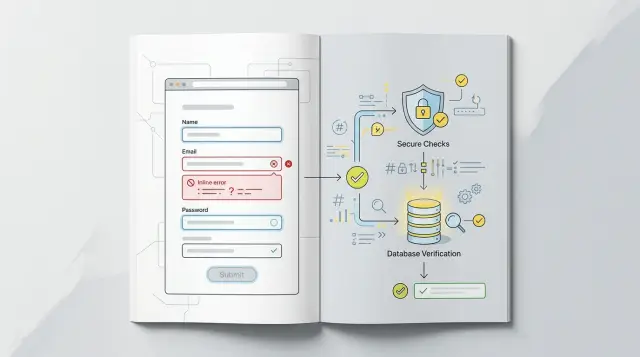
Table of Contents
Why this split confuses teams
Teams often mix speed and safety into one bucket, and that causes trouble. A form can warn about a bad email in half a second, then reject a different rule after submit. Users notice that mismatch fast, and the form starts to feel unreliable.
The browser makes this easy to misunderstand. Client-side form checks feel solid because people can see them working. A field turns red, a message appears, and the page reacts right away. That quick feedback is good for UX, but it does not create trust on its own. It only means the browser ran some code.
The server lives in a different world. It sees the final request, not the neat form behavior that came before it. An attacker can skip the page completely and send requests straight to the server with changed values, missing fields, or extra data the form never exposed. If a team treats browser checks as protection, they build confidence on top of something users and attackers can bypass.
A small signup example shows why this gets messy. The client may check that an email has "@" and that a password is at least 8 characters long. After submit, the server may reject the same password because it is too common, or reject the email because another account already uses it. From the user’s side, those rules feel like one system. Inside the product, they often live in two codebases and change at different times.
That split creates friction between people too. Designers want fast, calm feedback. Frontend developers want fewer failed submits. Backend developers want one source of truth. Security work pushes even harder in that direction, because the server-side validation must own any rule tied to stored data, permissions, pricing, or account state.
Without clear ownership, teams duplicate validation rules, let them drift, and ship mixed messages. The product feels inconsistent even when everyone did reasonable work. That is why client vs server input validation confuses so many teams: both sides matter, but they do different jobs.
What the client should check right away
The client should catch mistakes that are obvious, fast to test, and easy to explain. That gives people instant feedback instead of making them fill out a whole form, hit submit, and then hunt for one small problem.
Start with required fields. If a signup form needs a name, email, and password, the page should show the missing field before the request goes anywhere. This is the simplest win in client vs server input validation, and users notice it right away.
Format checks also belong on the client when the rule is clear. An email field can catch missing "@" signs. A date field can flag impossible dates. A phone field can reject letters if the form expects digits only. These checks do not need a round trip to the server.
Length limits are another easy one. If a username must be 3 to 20 characters, show that while the person types. A small counter or a short note under the field works better than letting them write 40 characters and fail later.
Some choices become invalid based on earlier answers. If someone picks "business account," show company fields. If they choose "individual," hide them or mark them as not needed. If a country selection changes the valid postal code format, update that rule on the page right away. This prevents choices that never had a chance to work.
Error text should stay close to the field and say what to fix in plain language. Short messages work best:
- "Enter your email address"
- "Use 8 or more characters"
- "Choose a date after today"
- "Phone number can contain digits only"
Generic messages slow people down. "Invalid input" forces them to guess.
Good client-side form checks feel almost invisible. A person types, sees a small hint, fixes the field, and keeps moving. That is the whole job: catch the easy stuff early, keep the form calm, and save the server for the checks only it can truly decide.
What the server must always own
Anything that protects money, data, access, or storage belongs on the server. Browsers are easy to tamper with. A user can turn off JavaScript, edit a request, or send data from a script instead of your form.
That is why server-side validation is not a backup plan. It is the final gate.
Start with permissions. If a request updates billing details, deletes a record, or opens an admin screen, the server must check who sent it and what that person can do. The page may hide a button from regular users, but the server still needs to reject the action when the wrong account tries it.
Money rules also stay on the server. If a checkout page sends a total of $19, the server should recalculate the full amount from its own product data, shipping rules, taxes, and discount logic. Never trust the number that came from the browser. The same goes for coupons, free trials, and plan limits.
Some rules depend on stored data, so only the server can judge them correctly. A username may look valid in the form, but the server knows whether someone already took it. The same applies to stock levels, invite codes, booking slots, and rate limits. Client-side form checks can guide the user, but they cannot see the full picture.
File uploads need strict checks too. The server should inspect the real file type, file size, and any limits you set for dimensions or length. A file name like "photo.jpg" proves nothing. People can rename almost anything.
The server should also stop unsafe input before it reaches storage. Set clear limits for length, allowed formats, and accepted characters where needed. If a field allows 500 characters, the server enforces 500. If a request contains garbage, hidden control characters, or data that does not match the field, the server rejects it.
A simple test helps: if someone can bypass the browser and still cause harm, the server owns that check.
A simple rule for drawing the line
A good rule is simple: put speed and clarity checks in the client, and put trust checks on the server. If a rule only helps people finish a form faster, the browser can handle it. If breaking that rule can cost money, leak data, or corrupt records, the server has to own it.
That split makes client vs server input validation much easier to reason about. The client can say, "This email looks incomplete" or "You missed a required field." The server has to answer harder questions: "Does this account already exist?" "Can this user change that field?" "Is this discount allowed?"
A quick way to draw the line is to ask one question: what happens if someone skips this check? People can disable JavaScript, change requests, or send data from a script instead of your form. So if skipping a rule can hurt the business, the rule belongs in server-side validation.
Client checks usually fit into a small group:
- required fields
- basic format checks like email shape or date shape
- length hints such as "minimum 8 characters"
- instant feedback that helps people fix mistakes before submit
Server rules cover the checks that need authority. That includes permissions, uniqueness, stock levels, account status, pricing, rate limits, and anything tied to stored data. A signup form is a good example. The client can warn that a password is too short. The server must still reject it if it is too short, already breached by policy, or paired with an email that is already registered.
Some rules belong on both sides. Password length is a common one. So is "username must be 3 to 20 characters." In those cases, do not maintain two slightly different versions by hand if you can avoid it. Share rule definitions, or at least share tests so both sides reject and accept the same inputs.
That last part matters more than teams expect. Many form bugs come from drift: the client says a value is fine, then the server rejects it with a different rule and a worse error message. Keep the client fast, keep the server strict, and make shared rules prove they match.
How to design validation step by step
Good validation starts on paper, not in code. Teams make fewer mistakes when they map the flow first and decide which checks help the user, which checks protect the system, and which need both.
A clean way to handle client vs server input validation is to treat the client as the fast helper and the server as the final judge. That sounds simple, but it only works if you design the rules in order.
- Start by listing every input path. Include the website form, mobile app, admin panel, CSV import, webhook, and direct API calls. If data can enter through it, it needs the same attention.
- Label each rule by purpose. A missing "@" in an email is user help. A check that stops one account from editing another user's record is safety. File type limits or date ranges often belong in both groups.
- Write the error messages before the validation code. Plain language keeps the rules honest. "Use an email like [email protected]" is much better than "Invalid format."
- Test failure cases from two directions. Break the form in the browser, then send bad requests straight to the API. Skip fields, send extra fields, use the wrong types, and try very long values.
- Log rejected requests with a clear reason. Over time, patterns appear. You may find a broken mobile client, a bot hitting one field, or a form label that confuses real users.
This order keeps the work grounded. It also stops a common problem: teams build pretty client-side form checks, then assume the job is done. A hidden field, a script, or a direct request can bypass those checks in seconds.
The error messages deserve more attention than most teams give them. If users see "Invalid input" five times, they either guess or quit. If they see "Password must be at least 12 characters" or "Date must be after today," they fix the issue fast.
Logging matters too, but keep it clean. Record the rule that failed, the endpoint, and maybe the field name. Do not dump secrets, full passwords, or payment data into logs.
Oleg Sotnikov often talks about practical systems over fancy ones, and this is a good example. Validation works best when the rules are clear, tested from outside the UI, and easy for both users and developers to understand.
A simple signup example
A signup form shows client vs server input validation better than almost anything else. The browser can catch the easy problems fast. The server keeps control of anything that affects security, account data, or abuse.
A person types an email, password, and invite code. Before they press submit, the client can check whether fields are empty, whether the email looks like an email, and whether the password meets the minimum length. That gives instant feedback and saves a round trip.
The password rule should sound the same everywhere. If the form says "Use at least 12 characters," the server should use that exact rule too. People get annoyed when the page says one thing and the backend silently wants something stricter.
A small flow might look like this:
- The client marks empty fields right away.
- The client shows a plain email error if the format looks wrong.
- The client warns when the password is too short.
- The server checks the same rules again after submit.
- The server then checks things the browser cannot trust.
That last part matters most. The server must decide whether the email is already in use, whether the invite code is real, whether it has expired or was already used, and whether signup attempts need a rate limit. A browser cannot answer those questions safely because anyone can bypass client-side form checks.
Account state also belongs on the server. Maybe signups are closed for a tenant, an invite works only for one company, or the account behind that invite is suspended. Only the server has the full picture.
Error messages should stay short and specific. Return one clear error for each problem, then let the person fix it and try again. "Email is already registered" is better than a vague "Signup failed." "Invite code has expired" is better than a generic 400 error.
If you want the form to feel calm, keep the split simple: the client helps people type, and the server makes the final decision.
Mistakes that create false confidence
A form can feel strict and still be easy to break. Teams often think client vs server input validation is settled once the page blocks a few obvious mistakes. That is where false confidence starts.
Hidden fields and disabled inputs are a common trap. They look untouchable in the browser, but users can still change them with dev tools, scripts, or a custom request. If a price, role, account ID, or discount code matters, the server must read it as untrusted input and check it again.
File uploads create the same problem. A form that only checks ".jpg" or ".pdf" in the filename is mostly theater. A renamed file can slip through in seconds. The server should inspect the real file type, size, and any content rules before it stores or processes anything.
Another mistake is copying rules by hand into two places and hoping they stay the same. It works for a week. Then one team updates the password rule on the server, while the form still accepts the old pattern. Users type something that looks valid, click submit, and get rejected anyway. That kind of mismatch makes people blame the app, not the rule.
Error messages can make this worse. If every failure says "Invalid input," users cannot fix the problem. They guess, retry, and get annoyed. A better message tells them what to change without exposing sensitive details. "Use at least 12 characters" helps. "Validation failed" does not.
Ordinary user behavior breaks many neat demos:
- people paste values with spaces at the start or end
- password managers fill forms in a different order
- mobile keyboards auto-capitalize or swap characters
- autofill inserts old data into the wrong field
If you only test slow, careful typing on a desktop, your checks will look better than they are.
A simple rule helps: if the browser can change it, the browser cannot be the final judge. Treat client checks as guidance for speed and clearer form error messages. Treat server-side validation as the source of truth, and keep the rules close enough that they do not drift apart.
A short release checklist
A form can look fine in a demo and still break the first time a real user makes a typo, pastes junk text, or clicks twice. Before release, test the rough edges on purpose.
- Leave fields empty and submit. Required fields should stop early in the browser, and the server should still reject missing data if someone sends the request anyway.
- Try values that are too long or clearly malformed. Use a bad email, letters in a phone field, or a name that goes past the allowed length.
- Skip the browser form and send the request directly. If the app accepts broken input this way, your safety rules are in the wrong place.
- Edit data that users should never control, like IDs, prices, discount amounts, or account roles. The server must ignore or reject any attempt to change them.
- Submit the same request twice in a row. Check whether the app creates duplicate orders, duplicate accounts, or repeat charges.
Watch the error text as closely as the validation itself. "Invalid input" is lazy and hard to act on. People need a plain message that says what is wrong and what to fix, such as "Password must be at least 12 characters" or "Email address is missing the @ symbol."
One small habit helps a lot: test both the normal path and the annoying path for every important form. A payment form, admin screen, or signup flow does not need dozens of clever cases. It needs a short set of checks that catch the mistakes people make and the tampering attackers try.
If a form passes this checklist, you usually ship with fewer surprises and cleaner bug reports.
What to do next
Start with one real form, not a full rewrite. Pick the form that can hurt users or the business fastest: signup, checkout, password reset, or CSV import. Then write down every field and every rule in one place. Most teams find gaps the moment they do this.
For each rule, ask one plain question: does this rule save the user time, or does it protect the system? That split clears up most client vs server input validation debates.
- Put fast feedback on the client when it helps people correct input early. Good examples are empty required fields, bad email format, weak password hints, or a file that is clearly too large.
- Put every trust rule on the server. That includes prices, discounts, permissions, account ownership, rate limits, stock checks, and anything that writes data you must trust later.
- If a rule lives on both sides, make the server the source of truth and keep the client copy small.
- Rewrite vague form error messages while you are there. "Invalid input" slows people down. "Use at least 8 characters" helps them fix the problem.
Do this form by form. A small pass on one flow is better than a grand plan that never ships. If your checkout lets the client calculate totals, move that rule to the server today. If your import tool accepts rows with missing IDs, let the client flag the problem early, but let the server reject bad records every time.
After that, test the obvious bypasses. Send requests without the UI. Change hidden fields. Repeat old requests. Try values just below and above limits. You do not need a huge security program to catch common mistakes.
If your team moves fast and uses AI to build features, validation can drift across product, frontend, and backend work. That is where a short outside review helps. Oleg works with startups and small teams on architecture, backend rules, infrastructure, and AI-augmented development workflows, so a professional consultation can uncover weak spots before they turn into bugs, charge errors, or support tickets.


