CircleCI vs Buildkite vs self hosted runners: how to choose
CircleCI vs Buildkite vs self hosted runners explained by build volume, compliance needs, and team upkeep so you can pick a setup your engineers can support.
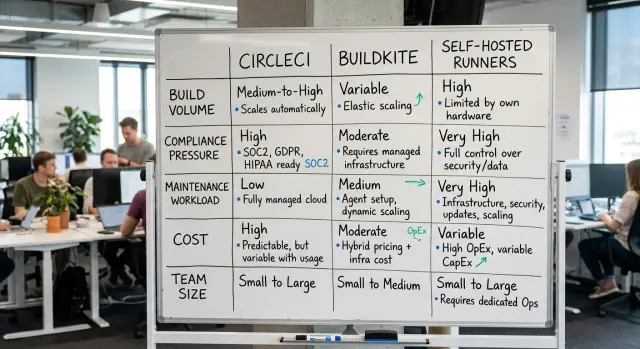
Table of Contents
Why this gets messy fast
Most teams start with the price page. That's usually the first mistake.
A CI tool can look cheap and simple, then quietly burn engineer time through slow queues, flaky runners, custom setup work, and routine babysitting. The monthly bill is only one part of the cost. If one engineer spends a few hours each week fixing runner issues or maintaining build images, that labor can wipe out any savings from a lower vendor price.
CircleCI vs Buildkite vs self hosted runners is not just a tooling comparison. You're really choosing between convenience, control, and how much operational work your team can carry without slowing product work.
Compliance can narrow the field fast. If your company needs strict network control, clear audit trails, or limits on where code and artifacts can run, some hosted options may be out before you compare features. Teams often realize this late and then rebuild everything under pressure.
Early speed can fool you too. A hosted platform can get a team running in a day, which feels great when the backlog is full. Six months later, the same team may be dealing with longer queues, higher usage bills, and awkward workarounds for builds that need private infrastructure or unusual dependencies.
Build volume changes the pain. A startup with 20 builds a day usually cares most about getting set up fast. A larger team with hundreds of daily builds feels every extra minute, every cache miss, and every maintenance chore.
That's why this choice gets messy so quickly. The easiest option today is not always the easiest one to live with.
Start with the numbers
If you skip the numbers, this turns into guesswork.
Start with build count. Track how many builds you run per day and per month, not just the average but busy release weeks too. A team with 40 builds a day lives in a very different world than a team with 2,000.
Then measure build time. Look at the average run, but also check peak hours when many jobs start at once. Ten minute builds spread across the day are manageable. Ten minute builds piled into the same hour create queues, slow feedback, and higher costs.
The next input is not really a number at all. It's your compliance list. Write down any audit duties, data handling rules, network limits, or internal policies that affect where code can run and what systems runners can reach. That step rules out bad options early.
You also need an owner. When jobs fail at 2 p.m. or 2 a.m., who fixes the runner, the cache, the secrets, or the network issue? If the answer is "whoever notices first," expect friction.
Last, count engineer time. Be honest about how many hours your team can spend on CI upkeep each week. Even two or three hours matters. Self hosted runners can save money at scale, but someone still has to patch machines, update images, and clean up broken jobs.
A simple scorecard usually covers enough:
- builds per day and per month
- average build time and busiest hours
- audit, data, and network rules
- a named CI owner
- engineer hours available for upkeep
How build volume changes the tradeoff
A team that runs 20 builds a day should not choose for the pain of 2,000 builds a day. At low volume, a simple hosted setup often wins. Setup is faster, updates are someone else's job, and the bill usually stays predictable.
That is why this decision is mostly a capacity question, not a feature checklist. If builds are short and tests are light, CircleCI or Buildkite can fade into the background.
The tradeoff changes when traffic comes in waves. A release day, a large batch of pull requests, or a busy afternoon can push many jobs into the queue at once. Then price is only part of the problem. Slow feedback breaks focus, and developers either wait or move ahead without enough signal.
Heavy test suites change the math even faster. If each pull request runs end to end tests, integration checks, and several build targets, per minute pricing starts to hurt. Self hosted runners ask more from your team, but at steady high usage they can make costs easier to control. Buildkite often sits in the middle when you want a hosted dashboard but prefer to run workers on your own infrastructure.
Retries matter more than most teams expect. A flaky job can turn a 10 minute build into 15 minutes of billed time, and that extra spend hides inside "normal" activity. Before you compare vendors, check how often jobs rerun and why.
Parallel jobs help with speed, but they rarely lower the total bill. Splitting one long workflow across four runners gets results back sooner. It also uses the same amount of compute, or more, because each runner repeats setup steps and downloads its own dependencies.
Low and steady volume usually favors hosted CI. High and predictable volume often pushes teams toward Buildkite or self hosted runners. Bursty demand sits in the middle, where queue time and retry rates matter as much as the monthly price.
How compliance changes the answer
Map the data trail in one build. Your team should know where code runs, where logs go, where artifacts stay, and where secrets live. Many teams debate tools first and answer those questions later, then run into trouble during a customer security review.
With CircleCI vs Buildkite vs self hosted runners, compliance can matter more than price. A written rule should carry more weight than team preference. If a contract, internal policy, or audit control says code and artifacts must stay inside your network, treat that as a hard limit. If someone simply feels better about one setup, weigh that against cost, speed, and upkeep.
Private network access often narrows the choice quickly. If builds need to reach an internal package registry, a private test environment, or systems that never touch the public internet, self hosted runners usually make life easier. Buildkite also fits many of these cases because the agents stay in your environment while the control layer stays outside it. CircleCI can still work, but only if its runner model and network design fit your limits.
You also need a record that people can audit without detective work. Decide how you will log runner access, secret changes, deploy approvals, and who can change build images. If your team has to stitch that history together by hand, the setup will become a headache.
Patching deserves the same weight. The more control you keep, the more update work you own. Self hosted runners and custom images give tighter control, but your engineers must patch base images, rotate secrets, and update runner software on a schedule. A small team should count that work before picking the most locked down option.
How much upkeep can your team absorb
Maintenance work is where a cheap CI choice turns expensive. A small team usually does better with fewer moving parts, even if the monthly bill looks higher on paper.
Self hosted runners and heavily customized setups need real ownership. Someone has to build runner images, patch them, rotate secrets, fix broken caches, watch disk space, and deal with the failures that show up at 2 a.m.
That ownership should have a name next to it. If everyone sort of owns CI, nobody cleans it up, old images pile up, jobs get slower, and flaky builds start to feel normal.
On call load matters as much as vendor price. Saving a few hundred dollars a month does not help if your engineers lose sleep, stop trusting the pipeline, or spend Friday afternoons nursing stuck jobs.
Ask a few blunt questions. Do you have one person who can own CI every week? Can that person handle updates and breakages without dropping product work? Do you already run similar infrastructure well? Will your team accept being on call for runner issues? Can you document the setup well enough that a second person can take over?
If most answers are no, managed CI usually fits better. CircleCI often wins here because it removes much of the day to day care. Buildkite sits in the middle. It gives you more control, but your team still carries more operational work than with a fully managed setup.
Self hosted runners make sense when you already have strong infrastructure habits, clear ownership, and a reason that justifies the extra work. That reason might be strict network rules, unusual hardware, or very high build volume. Without one of those, teams often create a side job instead of a CI system.
When CircleCI fits best
CircleCI makes sense when speed matters more than control. If your team wants working CI this week, not after a month of runner setup and patching, it is often the easiest path. You connect the repo, define the pipeline, and start shipping.
It also fits teams that do not want build hosts to become an extra job. Someone still needs to own the pipeline, but you usually spend far less time on OS updates, runner drift, disk cleanup, and odd host failures than you would with self hosted runners.
A common case is a product team with a normal stack: app build, test suite, linting, container image, deploy. If you use common languages and standard build steps, CircleCI feels straightforward. You get enough structure to move fast without asking engineers to become part time infrastructure admins.
A small SaaS team is a good example. Four developers push code all day, but they do not need private network access into a locked down data center. They need reliable builds, clear logs, and fewer moving parts. CircleCI usually fits that shape well.
The tradeoff shows up when build minutes start piling up. At low to medium volume, the convenience can easily be worth the bill. At higher volume, especially with long test runs or heavy container builds, costs can rise faster than teams expect. Watch usage early, not after the monthly invoice lands.
CircleCI also becomes less attractive if you need deep control over network layout, custom host hardening, or strict rules around where builds run. In those cases, Buildkite or self hosted runners usually give you more room to shape the environment.
When Buildkite fits best
Buildkite makes sense when you want a hosted control layer, but you do not want your actual build workers to live inside someone else's environment. Your team gets a central place to manage pipelines, logs, and permissions, while the jobs run on machines you control.
That split works well for companies with private networks, custom build images, or jobs that need direct access to internal systems. If your builds must touch private package mirrors, locked down test environments, or custom hardware, Buildkite can feel like a practical middle ground between a fully managed CI service and fully self hosted runners.
It also fits teams that need different worker pools for different jobs. One repo might need cheap Linux workers for routine tests. Another might need large machines for heavy builds, or isolated runners for sensitive code. Buildkite handles that kind of setup well, as long as your team is comfortable operating the workers.
In practice, Buildkite usually fits when you want a managed control plane, your jobs should run on your own machines, your team can patch images and monitor agents, and you can budget for both service fees and infrastructure time.
That last part matters more than many teams expect. Buildkite does not remove operational work. Someone still needs to maintain agent images, track queue health, rotate secrets, and fix worker failures. If your engineers already struggle to keep CI stable, Buildkite can become one more system to babysit.
For teams that want control without building the whole CI layer from scratch, it is often a smart pick. For teams that want the least maintenance possible, it usually is not.
When self hosted runners fit best
Self hosted runners make sense when your rules do not allow third party build execution. Some teams must keep source code, secrets, signing keys, or test data inside their own network. If auditors, contracts, or internal policy draw that line, hosted CI stops being a real option.
Cost is another clear reason. Heavy builds can burn through hosted minutes fast, especially if you build containers, run long test suites, compile mobile apps, or execute large integration jobs all day. At higher build volume, owned machines can cost less month to month, but only if your team keeps them busy and sizes them correctly.
They also fit teams that need unusual environments. A standard hosted runner may not help if you need GPU machines, ARM hardware, a private package registry, or access to internal services that never touch the public internet. Self hosted runners let you shape the environment around the build instead of changing the build to fit the vendor.
The tradeoff is simple. Someone on your team needs to own runner and OS patching, capacity planning, secrets handling, failures caused by runner issues, and incident response when builds pile up.
This setup works best when your engineers already run infrastructure with discipline. That's the pattern Oleg Sotnikov often talks about in his infrastructure and Fractional CTO work: control can save money and solve compliance problems, but only when ownership is clear. If nobody owns runner health, the build system slowly turns into a side project that keeps interrupting real product work.
A simple way to decide
Price tables pull teams in the wrong direction. A better method is to make the hard limits obvious first, then compare the options against real work instead of vendor pages.
For most teams, the choice gets clearer once you treat it as an operating decision, not just a tooling decision. Cost matters, but support load and compliance rules can matter more a few months later.
Start with the rules you cannot bend. If your builds must stay in a private network, if audit trails are strict, or if certain data cannot touch shared infrastructure, write that down before you look at pricing.
Then estimate monthly usage with real numbers. Pull build minutes from the last two or three months, note peak hours, and include the jobs that spike during releases. Low average usage can still hide expensive peaks.
Next, add engineer time to the math. If self hosted runners save money on paper but eat four or five hours a week in patching, debugging, and scaling, that is part of the cost.
After that, run one real pipeline on the top two choices. Pick a pipeline that hurts a little: long test suites, container builds, flaky caches, or private network access. Tiny demos rarely show the tradeoffs.
Then choose the setup your team can still support in six months. A lean team often needs fewer moving parts, even if the line item bill looks higher.
This is where teams often slip. They pick the cheapest path for today's build volume and forget who will own runner images, secrets, failed jobs, and weekend incidents later.
If the answer still feels close, choose the option that creates the fewest new chores for your engineers.
A realistic example
A 20 person SaaS team with 30 repos often starts with one simple goal: keep pull requests moving fast. They ship several times a day, run tests on every commit, and use parallel jobs to stop developers from waiting. That makes CircleCI attractive early on. Setup is quick, the interface is easy to follow, and nobody needs to think much about runner machines.
The problem shows up a few months later. Build volume climbs, more repos need the same checks, and parallel jobs get expensive. Nothing is broken, but the bill starts to feel out of line with the work. At the same time, the team is getting ready for a security review, so they also need clearer control over where builds run and how secrets move.
At that point, Buildkite becomes a reasonable middle option. The team keeps a managed control layer, but runs its own workers. That often reduces cost pressure from heavy parallel workloads and gives them tighter control for audits. The tradeoff is plain: someone on the team now owns worker images, patching, capacity spikes, and build queue problems.
A team with one solid platform engineer can often handle that. A team with no spare ops time usually struggles.
Full self hosted runners are usually the last step, not the default. They make sense when compliance rules demand tight control of the whole build environment, build volume is so high that hosted pricing hurts every month, or the team already knows how to run and monitor internal infrastructure.
For this kind of SaaS team, CircleCI is often the best starting point, Buildkite is the next move when costs rise, and full self hosting pays off only when control or cost leaves little choice.
Mistakes that cause rework
Teams often make the wrong call because they compare subscription prices and stop there. The monthly bill is only part of the cost. You also pay with engineer hours, on call noise, upgrades, broken runners, and time spent debugging flaky pipelines.
Another common mistake is using only successful builds to estimate usage. Real pipelines retry jobs, rerun failed tests, rebuild after cache misses, and burn time on branches that never ship. If you ignore retries, your forecast will look neat and be completely wrong.
Security creates a different kind of confusion. Some teams treat every security preference as a hard rule. Wanting tighter control is not the same as having an audit requirement, data residency rule, or customer contract that forces your hand. If you blur those together, you may choose a harder setup than you need and spend months maintaining it.
Migration plans cause plenty of rework too. Moving every repo at once sounds clean on a slide. In practice, it turns one change into ten. One pipeline fails because of secrets, another because of caching, and another because the old build scripts only worked by accident.
A safer approach is boring, which is exactly why it works:
- price engineer time next to vendor fees
- count retries and reruns in build volume
- separate compliance rules from general security preferences
- move one or two repos first
- ask who will own runner upkeep every week
That last point gets skipped a lot. Platform engineers do not magically absorb extra work. If nobody owns patching, capacity, logs, and incident response, the maintenance debt lands on the nearest capable team member. You usually feel that a month later, not on day one.
Quick checks before you commit
Teams often overrate feature lists and underrate ownership. If one person cannot say who handles CI day to day, the decision is probably still too early.
That owner does not need to do every task alone. They do need to know who fixes flaky builds, updates runners, rotates secrets, watches costs, and answers when deploys stall at 6 p.m.
Before you choose, sanity check the parts that usually cause regret later:
- name the person or small team that owns pipelines, runners, secrets, and support
- look at peak build hours, queue times, and failure rate, not just average daily usage
- confirm whether your rules keep builds, logs, artifacts, or source code inside your network
- test how portable your setup is, because custom images, caching tricks, and secret handling make switching harder than people expect
Peak hours matter more than many teams think. A setup that feels cheap at noon can turn painful when every branch pushes at once and developers wait 15 minutes for feedback.
Compliance can end the debate quickly. If your rules say builds must stay inside your network, managed convenience matters less than control. If your rules are lighter, maintenance work usually becomes the deciding factor.
Try a short trial before you commit. Move one real service, measure queue time and failure rate for a week, and note how much manual care the setup needs. That small test tells you more than any pricing page.
If this decision touches budget, security, and team structure at the same time, an outside review can help. Oleg Sotnikov at oleg.is does this kind of Fractional CTO and infrastructure advisory work and can pressure test the tradeoffs before you commit to a setup that your team will have to unwind later.
Frequently Asked Questions
Which option usually fits a small team best?
If your team runs a modest number of builds and wants fast setup, start with CircleCI. You get working pipelines quickly and avoid most runner maintenance. That usually beats chasing a lower sticker price while your engineers fix CI issues every week.
When is CircleCI the right choice?
Choose CircleCI when speed and low upkeep matter more than deep control. It works well for common app builds, tests, container images, and deploy steps, especially when your jobs do not need private network access or unusual hardware.
Why would I choose Buildkite over CircleCI?
Buildkite fits teams that want a hosted control layer but want jobs to run on their own machines. That setup works well when builds need private systems, custom images, or separate worker pools. You still need someone to patch agents, watch queues, and fix worker problems.
When do self hosted runners make the most sense?
Self hosted runners make sense when rules force code, secrets, or artifacts to stay inside your network, or when heavy build volume makes hosted minutes too expensive. They also help when you need GPU, ARM, mobile, or other custom environments. Pick this route only if your team already runs infrastructure well and can own the upkeep.
How much build volume justifies moving off hosted CI?
Look past average usage and study busy hours, retries, and long test runs. A team with short, steady builds often does fine on hosted CI. If you run many heavy jobs every day and keep machines busy, self hosting or Buildkite usually gives you better cost control.
How do compliance rules change the decision?
Start with where code runs, where logs go, where artifacts stay, and where secrets live. If contracts or internal rules require private network access or tighter audit control, CircleCI may not fit cleanly. Buildkite or self hosted runners usually make those rules easier to meet.
What hidden costs do teams miss with CI tools?
Count engineer time, not just vendor fees. Slow queues, flaky jobs, retries, image maintenance, secret rotation, and weekend runner issues all cost real money. A cheaper monthly plan stops looking cheap once your team starts babysitting it.
Who should own CI inside the team?
Give CI a clear owner. That person does not need to fix everything alone, but they should know who handles runners, caches, secrets, costs, and failed jobs. If nobody owns it, small issues pile up and developers stop trusting the pipeline.
Should I migrate all repos at once?
No. Move one or two real pipelines first and watch queue time, failure rate, cache behavior, and manual care. A small trial shows the pain early and keeps one bad migration from turning into a company wide mess.
Can I start with CircleCI and switch later?
Yes, many teams do exactly that. Starting on CircleCI and moving later to Buildkite or self hosted runners works if you keep pipelines simple and avoid too many custom tricks. The easier you keep images, caching, and secret handling, the easier you can switch later.


