CI runner queue bottlenecks: find wait time before it hurts
CI runner queue bottlenecks show up as waiting, not broken builds. Learn how to track jobs by class, split slow work, and cut queue delays early.
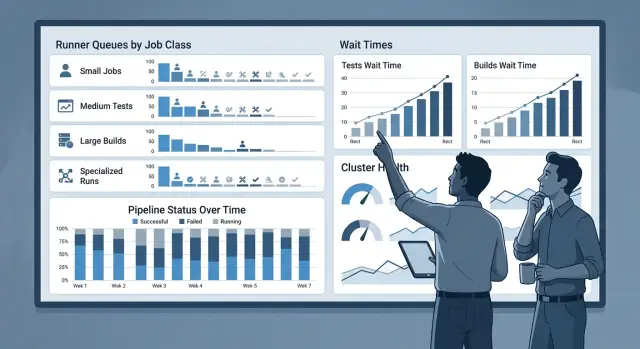
Table of Contents
Why the queue hurts before builds fail
Most teams feel CI pain before anything actually breaks. A job sits in line for four or five minutes, then runs for six, and nobody calls it an outage. Still, that delay adds up all day and slowly drains focus.
The real cost shows up before the first test even starts. An engineer pushes a branch, waits for feedback, starts something else, then gets pulled back when the result finally appears. One context switch is small. Twenty in a week is not.
Green builds can still feel slow because developers experience the full loop, not just execution time. If tests need seven minutes but the runner queue adds eight more, the build is not a seven-minute task. It is a 15-minute pause in decision-making.
That is why queue bottlenecks are easy to miss. Dashboards often show test time and build time, but hide the wait before a runner picks up the job. When those numbers get lumped together, teams try to speed up tests that were never the main problem.
A simple example makes this obvious. Say a growing team opens 30 pull requests in one busy afternoon. If each job waits three minutes before starting, that is 90 minutes of team time lost before any work begins.
People usually see the symptoms before they find the cause. They click retry because a delayed job feels stuck. They start another change while waiting, then come back with less context. Merges slip later into the day, review cycles get longer, and small pull requests turn into larger ones because nobody wants to wait twice.
Queue delay also changes behavior in quieter ways. Teams merge later, batch more changes together, and start to treat slow feedback as normal. That is risky because the build still looks green, so the system appears healthy while delivery gets slower.
Once you separate queue time from test and build time, the problem gets much easier to see. A healthy pipeline does not just pass. It starts fast enough for people to stay in the same train of thought and finish the merge while the change is still fresh.
What to measure first
Start with three numbers for every job: queue wait time, run time, and total pipeline time. If you only watch job duration, you miss the part that frustrates people most - the minutes spent waiting for a runner.
Queue wait time tells you how long a job sits before it starts. Run time shows how long the job actually works. Total pipeline time shows what a developer feels from push to result. You need all three, because a fast test suite can still feel slow when it waits in line behind other work.
It also helps to label each job with a small set of classes so you can compare similar work. Five labels are usually enough: build, unit test, integration test, deploy, and housekeeping. Keep them boring and consistent. If one team uses "test," another uses "checks," and a third uses "ci-test," your data gets messy fast.
Context matters as much as timing. Store branch type, time of day, and runner pool for every job. A build on a feature branch at 10 a.m. can behave very differently from the same build on main right before a release. If one pool handles builds and another handles test jobs, you want that split in your data from day one.
Do not stop at the average. Track p50 and p95 for wait time and run time. The p50 shows a normal day. The p95 shows the slow, annoying cases that make engineers think the whole CI system is stuck. An average of 40 seconds can hide a p95 of eight minutes, and that is the number people remember.
A small example makes the difference clear. If integration tests run for six minutes but wait seven minutes on a shared pool every weekday around 2 p.m., the tests are not your first problem. The queue is. That changes the fix from rewriting tests to moving work or adding capacity where the delay actually starts.
If you already collect CI logs, this usually takes less work than people expect. The hard part is discipline: use the same labels, keep the same pool names, and review the numbers every week. Once those basics are in place, queue delays stop hiding.
Group jobs by class
Most teams start by grouping CI jobs by repo or team ownership. That looks tidy, but it hides the queue that people actually feel. One repo can contain fast lint checks, slow browser tests, release packaging, and nightly scans. Those jobs compete for runners in very different ways.
Group by purpose instead. Ask what the job does, how long it runs, how often it runs, and how painful the wait feels to engineers. Keep the first version simple. If you create ten classes on day one, the charts turn into noise and nobody trusts them.
A short list works well: pull request checks for linting, unit tests, and small builds; long tests for integration, browser, or end-to-end suites; release builds for tagged versions, container images, and signing steps; and background jobs for nightly scans, migrations, and other non-urgent work.
This makes queue data much easier to read. If pull request checks wait six minutes, your team notices fast. If a nightly scan waits six minutes, that may not matter at all. One average queue number mixes both cases and hides the real problem.
Put flaky long tests in their own class, even if they live in the same pipeline as normal test work. They tend to retry, run longer than expected, and pile up at the worst time. Once you isolate them, you can cap their concurrency or move them to a separate runner pool without slowing every pull request.
Release builds deserve their own class too. They often need more CPU, more disk, or stricter secrets handling. If they share runners with everyday pull request jobs, a few large builds can block dozens of small checks. That is a bad trade when developers need quick answers to keep working.
A simple rule helps: if two jobs have different urgency, runtime, or machine needs, split them. In lean CI setups, that small change often exposes the queue problem in a day or two.
How to track wait time step by step
Start with one week of pipeline data. That is usually enough to show a pattern, but still small enough to review by hand in a spreadsheet.
Export each job's created time, actual start time, finish time, branch, and name. Queue time is just the gap between created and started. Keep the raw export untouched, then work from a copy so you can sort and group without breaking anything.
Next, give every recurring job a simple class label. Use names people already understand, such as unit_tests, integration_tests, build_image, lint, or preview_deploy. Do not make the list too detailed. If every job gets its own class, the pattern disappears.
For the first pass, keep it simple. Add one class column to every job row, group jobs with the same purpose together, leave rare one-off jobs out, note whether the job blocks merges, and record the runner pool each class uses now.
Once the labels are in place, plot queue time by class and by hour of day. A basic bar chart or heatmap is enough. You want to see which classes wait the longest and when that wait spikes. Average wait can hide the pain, so include median wait and a high-end number such as the slowest 10 percent.
Then mark the classes that slow merges most often. A 10-minute wait on a nightly security scan may be annoying, but a four-minute wait on every pull request is worse. Focus on the jobs that sit in front of engineers all day.
One team might find that build_image waits six minutes around lunch while unit_tests wait only 40 seconds. Another team may see the reverse: tests pile up every morning because everyone pushes at once. Both teams have the same kind of CI problem, but the fix is different.
Review the top two pain points before you buy more runners. Most teams jump to capacity too early. Often the cheaper fix is to split one noisy class, move a heavy job to a lower-cost pool, or cut a bloated step that should not run on every merge.
A simple example from a growing team
A product team grew from six engineers to 14 in a few months. Their CI setup did not grow with them. Everyone used the same shared runner pool for unit tests, browser tests, and release builds.
At first, the problem looked random. Unit tests usually started in less than 30 seconds, so people assumed the queue was fine. But browser tests told a different story. Around midday, those jobs often sat in the queue for 18 minutes before they even began.
A few days of logs made the pattern obvious. Every afternoon, release builds started piling up in the same pool. Those builds were heavy and ran for a long time, so they held runner slots at the same time the team pushed the most pull requests.
That mix hurt more than it seemed. A developer could get fast feedback from unit tests, then wait almost 20 minutes just to learn a browser test had failed on a checkout flow or a login screen. The queue did not look broken, but it was already wasting a lot of time.
The team changed two things. They moved browser tests to a cheaper runner pool with a longer startup time, and they gave release builds their own runners instead of letting them share the general pool.
The first change sounded odd at first. Why move flaky, slow browser tests to runners that take longer to start? Because those tests already ran for several minutes, so an extra minute of startup barely mattered. What mattered was keeping them away from short jobs that needed quick feedback.
The second change fixed the afternoon jam. Release builds no longer blocked everyday test work, and the shared pool stayed open for the jobs engineers watched most closely.
The next week, the numbers were much better. Browser test wait time dropped from 18 minutes to about four. Unit tests still started fast. Release builds finished on their own runners without clogging the queue for everyone else.
They did not buy faster machines first. They split work by job class, accepted slower startup where it was cheap, and stopped forcing every job through the same door.
Split slow work across cheaper pools
The fastest way to cut queue pain is to stop treating every job the same. A lint check that should finish in 90 seconds does not belong behind a 40-minute browser suite or a heavy image build.
Keep the fast feedback path on small runners that stay online all the time. Those runners should handle the jobs developers watch most closely after every commit: lint, type checks, and unit tests. Warm caches and zero spin-up delay matter more here than the lowest possible price.
Long jobs fit better on burst pools. If an end-to-end suite takes 25 minutes, sending it to cheaper runners with slower startup usually makes sense. The extra minute or two at the start hurts less than making every short job wait in the same line.
In practice, many teams end up with three pools: an always-on pool for lint, type checks, and unit tests; a burst pool for integration and browser tests; and a separate heavy pool for builds, packaging, and release artifacts.
One huge test job still causes trouble, even after you move it to a cheaper pool. Split it into smaller chunks with similar run times. If one shard finishes in six minutes and another in 28, the team still waits for the slow shard, and the queue still spikes when several pipelines start at once.
Use past run data to balance those chunks. Group tests so each job takes about the same time, then send them to the burst pool. This is one of the simplest fixes because it cuts both wait time and total wall-clock time.
Heavy build steps should also live away from fast checks. Container builds, mobile packaging, and asset compilation can sit in their own pool and run only after lint and unit tests pass. That keeps a broken import or simple test failure from consuming expensive build capacity.
Costs can still get out of hand if you let every pool scale forever. Set a hard cap for each burst pool. A growing team might keep two always-on runners for fast checks, allow the browser test pool to scale to six cheap workers, and keep release builds on one isolated builder. That setup keeps feedback quick without letting one noisy day double the bill.
Mistakes that hide the bottleneck
Most queue problems stay hidden because teams reach for the wrong fix first. They add more runners before they measure wait time. That feels practical, but it often hides the real issue for a week or two and raises cost right away.
Extra capacity does not help much if build jobs, test jobs, and deploy jobs all compete for the same pool. One noisy class of work can still block everything else. You need to know who waits, how long they wait, and when the queue starts piling up.
Teams also create trouble when they mix deploy jobs with everyday test traffic. Deploys are less frequent, but they are time sensitive. Regular test jobs are constant. If both share the same runners, a normal burst of commits after standup can delay a release, or a release can slow feedback for the whole team.
Another common mistake is keeping one giant test job because it looks simpler on the dashboard. It is simpler to read, but harder to fix. A single large job waits longer, runs longer, and hides which part of the suite actually burns time.
Split that work into smaller test groups by service, package, or test type. Then compare queue time and run time for each group. You will usually find one heavy slice that belongs on its own pool, often on cheaper runners.
Time of day matters more than many teams expect. The queue might look fine as a daily average, yet feel awful from 10:00 to 11:00 or right after lunch. If five people push code at once, engineers can lose 10 minutes per build even though the daily report says everything is healthy.
Flaky tests get blamed for almost every slow pipeline. Sometimes that blame is fair. Still, many teams spend days chasing flaky failures while the queue causes most of the lost time on successful runs.
A quick review usually exposes the real problem. Track wait time separately for build, test, and deploy jobs. Compare busy hours, not just daily averages. Split oversized test jobs before buying more capacity. Keep deploy traffic off the same pool as routine test work. Then deal with flaky tests once you know the queue is not the bigger drag.
Once you measure the line instead of guessing, the bottleneck stops looking random. Then you can spend money where it actually cuts delay.
A short queue health checklist
A healthy queue feels boring. Engineers open a pull request, quick checks start almost at once, and nobody asks why "CI is slow" when the code itself only needs a few minutes to run.
A short weekly review is usually enough. Most pull request jobs should start within about two minutes. Long test suites and heavy build jobs should stay away from quick checks like linting, type checks, and small unit tests. You should be able to name the three job classes with the worst median and p95 wait times without guessing. After every runner change, compare queue time before and after. And match spend to demand spikes, not to the daily average.
A small team can do this in 10 minutes each week. Pull the last seven days of data, group jobs by class, and look for patterns by hour. You do not need a huge dashboard to spot trouble. A plain table with job class, run count, median wait, and p95 wait is often enough.
One detail matters more than people expect: separate "slow because it runs long" from "slow because it waits long." Queue bottlenecks hide in that gap. A 20-minute test job may be fine if it starts right away on a low-cost pool. A three-minute check that waits eight minutes is the one developers will hate.
Teams that run lean infrastructure usually do better with a few clear rules than with constant tuning. That is also the style Oleg Sotnikov brings to AI-first delivery and infrastructure work: measure the delay, name the crowded job classes, then move only the work that blocks developers most.
Next steps for a leaner CI setup
Pick one repo, not all of them at once. One week of queue data usually shows enough. For each job class, track two numbers: wait time before a runner starts the job, and run time after it starts. That split helps you spot bottlenecks without guessing.
Start with the class that wastes the most team time. For many teams, that is either long test jobs during busy hours or heavy build jobs that block everything behind them. Fix that one class first, then measure again for another week. Small changes are easier to trust when you can see the before and after.
A simple plan works well. Keep pull request checks on the fastest pool. Move long test shards and large image builds to cheaper pools. Separate release jobs from daily developer traffic. Name each pool by purpose so people do not have to guess. Review queue data every week until wait time stays low.
Write those pool rules next to the CI config, not in a separate doc that nobody opens. New jobs often land in the default pool because it is easy, not because it is right. A short comment in the pipeline file can save hours of delay each week.
It also helps to assign one owner for queue health. That person does not need to rebuild the whole pipeline. They just need to watch for drift: a new test suite that grew too large, a build step that should move to a cheaper runner pool, or a release task that started sharing capacity with regular commits.
If your team still sees long waits after the basics are fixed, a second opinion can help. Oleg Sotnikov at oleg.is works as a Fractional CTO and reviews CI/CD runners, cloud spend, and pipeline layout for startups and smaller companies. That kind of review works best when you already have a week of queue data and one or two painful examples, because the discussion stays concrete and the fixes are usually fairly small.
Frequently Asked Questions
How can I tell if CI feels slow because of the queue and not the tests?
Track three numbers for each job: queue wait time, run time, and total pipeline time. If wait time is high and run time stays normal, the queue is your problem, not the tests.
Which numbers should I measure first?
Start with queue wait, run time, and total time from push to result. Then add job class, runner pool, branch type, and hour of day so you can see where delays pile up.
How much queue wait is too much for pull requests?
For pull request checks, aim for jobs to start within about two minutes. A three-minute check that waits eight minutes will frustrate people more than a long test that starts right away.
How should I group CI jobs when I review queue delay?
Group jobs by what they do, not by repo or team. Simple classes like lint, unit_tests, integration_tests, build_image, and deploy make the bottleneck easier to spot.
Should I add more runners as soon as the queue grows?
No. First, check which job class waits the longest and when it happens. Many teams fix the problem faster by splitting noisy jobs or moving them to another pool instead of buying more capacity.
Which jobs belong on always-on runners?
Keep fast feedback jobs on always-on runners. Lint, type checks, and small unit tests need quick starts because developers watch those results right after each push.
When should I move jobs to cheaper runner pools?
Use cheaper burst pools for long jobs that already run for several minutes, like browser, integration, or end-to-end tests. An extra minute of startup hurts less there than blocking short checks in the same line.
Should release builds share runners with everyday test jobs?
No. Release builds often use more CPU, disk, or secrets, and they can block dozens of small checks. Give them their own pool so daily development work stays quick.
Why should I split one big test job into smaller shards?
One giant test job waits longer, runs longer, and hides where time goes. Split it into smaller chunks with similar run times so you cut both queue pressure and total wall-clock time.
What is a simple first step to find the bottleneck?
Pull one week of job data, calculate queue time from created to started, label recurring jobs by class, and chart wait time by class and hour. Then fix the top one or two pain points and measure again the next week.


