Chunking by task for AI assistants that answer cleanly
Chunking by task helps AI assistants answer the right question, keep policy apart from examples, and stop pulling in old exceptions.
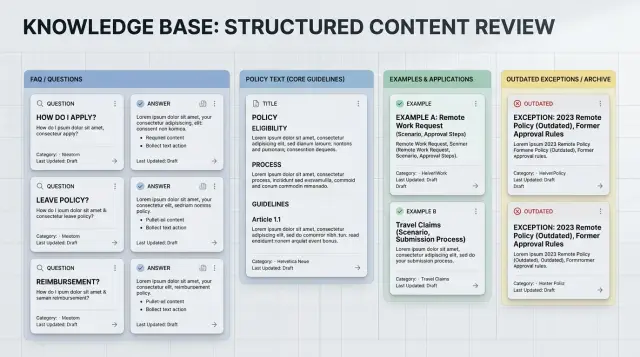
Table of Contents
Why page-length chunks cause mixed answers
A long page often does several jobs at once. It starts with the current rule, adds background, shows examples, and leaves an old exception at the bottom because nobody wanted to delete it. When an assistant retrieves that whole block, it does not get a clean rule. It gets a pile.
That pile leads to blended answers. Ask a simple question like "Can a customer get a refund after 30 days?" and the assistant may mix the current policy with a past exception, a special enterprise case, and a sample support reply. The answer can sound confident while still being wrong.
Page layout usually reflects how teams publish documents, not how people ask questions. Writers group content by department, page owner, or menu structure. Users do something else. They ask narrow task questions: "What should I send?" "Who approves this?" "Does this apply to contractors?" One long page rarely matches those questions well.
Old exceptions make the problem worse. Teams update the top of a page and leave legacy notes below it. A careful reader might scan the whole page, notice a date, and realize the old note no longer applies. An assistant does not read that way. If retrieval pulls in the old note with the current rule, the model may treat both as equally relevant.
A common page looks like this: the first section says invoices need manager approval, a later paragraph says finance accepted direct submission during a pilot last year, and the bottom of the page includes a support example that skips approval for one large client.
Now a user asks, "Do invoices need manager approval?" The assistant may answer, "Usually yes, but sometimes no," even when the pilot ended months ago and the client exception does not apply.
That is why page-length chunks create messy retrieval. They glue together policy, examples, expired notes, and special cases that should travel separately. The assistant then tries to reconcile all of it in one reply. Mixed answers usually start there.
If you want clean answers, chunk around the task a person wants to complete. A page can stay long for human reading. The retrieved unit should stay narrow enough that one question pulls one rule, with the right exception only when it truly applies.
What users actually ask
People do not think in page titles. They type the problem in plain language, usually in one short sentence. If your knowledge base is organized around names like "Employee handbook" or "Billing policy," the assistant has to dig through a lot of text that does not match the question.
Real chat logs sound more like this: "Can I change the invoice after payment?" "What happens if I miss the renewal date?" "Do contractors get the same security access as employees?" "Can I use a customer example in a case study?" "Who approves a refund over $500?"
Those questions already tell you how to split the content. Each one points to a task: edit an invoice, handle a late renewal, assign access, reuse a customer story, approve a refund. That is a better unit than a full page because the assistant can pull the exact rule it needs instead of dragging in background text, old notes, and side cases.
This is where task-based chunks usually beat page-based chunks. A user asking about refund approval does not need the full finance manual. They need one rule, maybe one threshold, and possibly one exception. If you give the model all 2,000 words around that topic, it may mix the refund rule with travel expenses, payment terms, or an outdated example from the same page.
Document names still matter, but they should stay in the background. The front of the structure should match the jobs people try to complete. "Request refund," "reset access," and "update contract terms" are clearer than "Finance policy v3" or "Operations guide."
A simple test helps. Read the first sentence of a user question and ask, "What is this person trying to do right now?" Use that answer as the basis for the chunk.
For example, if someone asks, "Can I return an opened item?" the assistant usually needs the return rule and the opened-item exception. It does not need the whole shipping and returns page. When one question needs one rule, smaller and cleaner chunks produce cleaner answers.
How to split content by task
Most messy assistant answers start with the source material, not the model. Teams save one long page called "returns," "security," or "pricing rules," then expect the assistant to pull the right part every time. It often blends the main rule with an example, an outdated note, or a rare exception.
A better approach starts with the questions people ask in real life. Pull them from support tickets, sales calls, and onboarding chats. Support shows where people get stuck. Sales shows what people ask before they commit. Onboarding shows what new users need in their first hour, which is often different from what the team thinks they need.
If the same question keeps coming up, give it its own chunk. One chunk should answer one question or help with one decision. "Can a manager approve this refund?" is one chunk. "What happens after approval?" is another. If the answer changes the next action, split it.
Keep the full working answer together. That means the direct answer, the scope of the rule, and the next action should live in the same chunk. If the rule sits in one place and the action sits in another, assistants often return a half-right answer. The user gets the policy but misses the step, or gets the step without the limit.
Edge cases need their own chunks. Do not bury old exceptions, temporary workarounds, or region-specific rules under the main answer. Put them in separate chunks and label them with when they apply. That keeps the default answer clean and gives retrieval a better chance to pull the exception only when the question calls for it.
This RAG chunking strategy is simple, but the effect is immediate. When someone on your team can look at a chunk and say, "This answers one exact question," your knowledge base structure is probably in good shape.
Keep policy, examples, and exceptions apart
When one chunk holds the rule, three examples, and two old edge cases, the assistant usually blends them into one answer. That is how a clear policy turns into a confused reply. The model sees everything nearby as equally relevant, even when one line is the actual rule and the rest are just context.
Task-based chunking works better when each chunk has one job. A policy chunk should state the current rule in plain language and nothing else. Keep it short enough that the assistant can quote or summarize it without dragging in side notes.
A separate example chunk should show one normal case. Pick the case that matches what most users ask. If your refund rule says returns are allowed within 30 days with proof of purchase, the example should show a standard return, not a holiday exception or a damaged item.
Rare cases need their own chunks. If you leave exceptions next to the main rule, assistants often treat them as common. That creates answers like, "Usually no, unless..." even when the exception applies to one small group. Put each exception in its own chunk and label the scope clearly.
A practical split is simple:
- Policy: the current rule only
- Example: one everyday case
- Exception: one rare case per chunk
- Dates: when the rule started, changed, or ended
Dates matter more than most teams expect. If a rule changed in March, say so in the chunk. If an exception applied only during a holiday sale or a pilot program, include the end date in the exception chunk. That gives retrieval a better chance to pull the current rule instead of stale text.
Removing expired exceptions matters just as much. Teams often keep old notes nearby "just in case," and that habit pollutes answers for months. Archive them outside the active retrieval set, or delete them if you do not need them.
Think about a travel reimbursement policy. The current rule might allow economy flights only. One example can show a normal domestic trip. A separate exception chunk can cover approved medical needs or last-minute client travel. When those cases live apart, the assistant stops mixing special approvals into everyday answers.
A simple chunk format
Most messy answers start with messy chunks. A chunk should answer one real question, not act as storage for everything copied from a page.
Use the user's question as the title. Write it the way a person would ask it. "How do I reset a customer's password?" beats "Account recovery policy." The assistant can match the question faster, and the answer usually stays on topic.
Then give a short answer first. Two or three sentences often do the job. If the user only needs a fact, stop there. If the user needs to do something, add a short step list after the answer.
Question: How do I reset a customer's password?
Answer: Support staff can reset a password after they verify the user's email and last sign-in date.

Steps:
1. Open the admin panel.
2. Check the user's identity.
3. Send the reset link.
4. Log the action.

Limits:
- Do not reset accounts for suspended users.
- Escalate VIP accounts to a manager.
- Rule updated on 2025-02-01.

Tags: audience=support, product=admin panel, process=account recovery
The last part is easy to overlook. End each chunk with limits, dates, or approval rules. Assistants often fail on those details. If you place them in a predictable spot, the model has a clean place to find them instead of pulling an old exception from a long page.
Tags help retrieval when two questions sound alike. A sales rep, a support agent, and an engineer may all ask about "access," but they do not need the same answer. Tag by audience, product, or process so the assistant pulls the right chunk.
This is also the kind of structure Oleg Sotnikov works with on oleg.is when helping teams build AI workflows and internal assistant setups. Clean chunks do not make the model smarter. They make the right answer easier to find.
A realistic example
Take a travel expense page that grew over time. It started as a plain policy, then someone added sample requests, then finance pasted in a one-off exception from last year's sales retreat. Now it is one long document, and the assistant pulls all of it at once.
The page says employees can claim flights, hotels, trains, and local transport for approved work trips. Farther down, it shows two sample submissions with made-up numbers. Near the end, it says that during last year's retreat, the company reimbursed spa access up to $50 because it was bundled into the hotel invoice.
A user asks, "Can I expense a taxi from the airport to my hotel?"
If your retrieval setup grabs a big chunk from that page, the assistant may answer like this:
"Yes, travel costs are usually reimbursed. Submit the receipt with your expense report. In some cases bundled hotel charges were also approved, such as spa access during the retreat. See the sample request format below."
That answer is not fully wrong, but it is messy. The user asked about a taxi. The assistant mixed a rule, a process note, an old exception, and sample content that does not help.
Task-based chunks fix this quickly. Instead of storing the whole page as one or two large blocks, split it into small units that match the question types people ask: eligibility for ground transport, steps to submit an expense, special cases and one-time exceptions, and sample requests for formatting only.
Now the same question retrieves only the eligibility chunk. The assistant can answer:
"Yes. You can expense a taxi from the airport to your hotel if the trip was approved for work. Keep the receipt and include the date, route, and purpose in your expense report."
That answer is cleaner because the chunk contains only the rule that matches the question.
If the user asks, "How do I submit it?" the assistant pulls the steps chunk instead of the eligibility chunk. If the user asks, "Does the retreat spa charge count?" it can pull the special-case chunk and say that this applied only to that event.
This is why a good RAG chunking strategy should follow user tasks, not page length. When rules, examples, and old exceptions live in separate chunks, the assistant stops blending them into one answer. Users get a direct response, and support teams spend less time correcting edge cases that should never have appeared in the first place.
Mistakes that keep answers messy
Most messy answers start in the source material, not in the prompt. If the assistant keeps blending rules, examples, and edge cases, the content usually gives it no clear boundary to work with.
The first common mistake is cutting content by character count alone. That sounds tidy, but it breaks ideas in the middle. One chunk ends with half a policy, and the next chunk starts with an example or an exception. When retrieval pulls both, the assistant treats them as one thought.
Packing many FAQs into one chunk causes a similar problem. A user asks one narrow question, but the model also sees nearby answers about different cases. Then it borrows wording from the wrong FAQ and produces a blended reply.
Duplicate rules are another quiet source of bad answers. Teams often copy the same policy into onboarding docs, help articles, internal notes, and old project files. If one version says "refunds take 5 days" and another says "refunds take 7 days," the assistant has no clear winner unless you mark one source as the active rule.
Screenshots also trip teams up. People save process steps as images, pasted slides, or screenshot-heavy PDFs, then wonder why the assistant misses details. The model needs plain text for reliable retrieval. Text inside images often gets extracted badly, especially when the screenshot includes tables, labels, or tiny notes.
Old policies stored next to active ones create the worst kind of confusion because the answer sounds believable. A retired exception from last year can look current if it sits in the same folder and uses similar wording. Separate archived material from live guidance, and exclude it from retrieval unless the question is explicitly historical.
A quick test helps. Ask the assistant one simple question, like "Can I change my plan after payment?" If the answer includes current rules, a one-off exception, and a vague example from another case, the content structure is still doing the damage.
Clean chunks beat clever prompts almost every time.
Quick checks before you publish
A chunk can look neat in a document and still fail in retrieval. The usual problem is simple: it tries to answer two or three different questions at once. Then the assistant pulls in extra detail and gives a mixed answer.
A fast review catches most of this before it reaches users. Each chunk should have a single job.
- Make sure each chunk answers one question. If a chunk explains refund timing, keep account closure, rare exceptions, and support stories somewhere else.
- Put the direct answer in the first lines. Many systems weigh the start of a chunk heavily, and users do too.
- Keep policy chunks clean. Move examples, sample replies, and worked scenarios into separate chunks so the model does not repeat an example as if it were the rule.
- Remove old rules from the active set, or mark them with clear dates and status. A retired exception from last year can still leak into answers if it sits beside current policy.
- Test with five real user questions before publishing. Use plain wording, not internal labels, and see which chunk the assistant reaches for first.
That last check is especially useful because real users ask shorter, messier questions. They skip product names, use casual terms, and often ask for the exception before they ask for the rule.
A small test makes weak chunks obvious. Ask things like "Can I get a refund after 30 days?" and "What if support already approved it by email?" If the assistant blends the base rule with an old one-off case, your structure still needs work.
One practical rule helps a lot: if you cannot point to the single chunk that should answer a question, the assistant probably cannot either. Split it again.
Teams often resist archiving old content because they want to keep history. Keep the history, but do not keep it in the same retrieval path as current guidance. Store it separately, label it with dates, and make the current rule easier to find than the old one.
A clean knowledge base can feel a bit repetitive to the writer. That is fine. Repetition is cheaper than confusion.
What to do next
Start with one area that gets a lot of traffic and a lot of wrong answers. Pick something like refunds, account access, pricing rules, or support limits. Do not try to fix the whole knowledge base at once. A small rewrite usually shows the problem quickly.
Take that area and rebuild it around the jobs users bring to the assistant. If people ask "Can I get a refund after 30 days?" then make a chunk for that task. Keep the rule in one place, keep examples in another, and move old edge cases out of the main answer path.
A simple first pass works well:
- Choose one policy area with frequent questions.
- Split it into 5 to 10 real user questions.
- Create separate chunks for rules, examples, and exceptions.
- Remove old notes that no longer change the answer.
Then test with real prompts, not ideal ones. Ask short questions, messy questions, and questions with missing details. If the assistant still mixes policy text with examples, inspect the chunk that got retrieved. Most of the time, the fix is boring but clear: shorten the chunk, rename it, or split one exception into its own piece.
Keep a simple review date on the calendar. Once a month is enough for many teams. Without that habit, exceptions pile up, old approvals stay in the text, and the assistant starts sounding unsure again. That drift is common, and it gets expensive because bad answers look plausible.
If your team wants an outside review, Oleg Sotnikov at oleg.is works with startups and smaller companies on AI-first workflows, internal assistant design, and content structure. That kind of review helps when retrieval is decent but answers still come back tangled.
You do not need a giant migration plan. One busy topic, ten test questions, and one review date will usually show you where the real problems are.


