Choose an AI model by failure cost, not benchmark rank
Learn how to choose an AI model by review burden, tool use, and blast radius so each task gets the right speed, cost, and human checks.
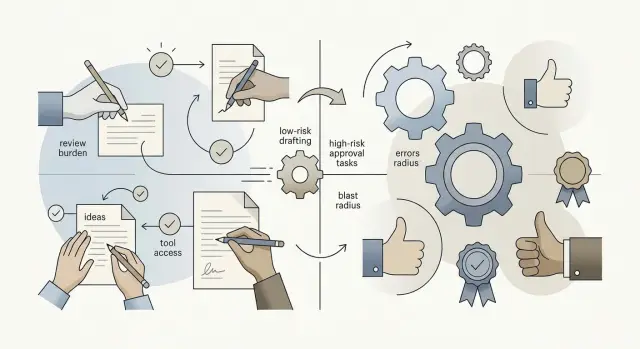
Table of Contents
Why benchmark winners still make bad choices
A model can top a benchmark and still be the wrong pick for your team. Most benchmarks test narrow tasks in clean conditions: answer a question, solve a coding problem, summarize a passage. Real work is messier. People move between chats, docs, tickets, approvals, and retries. The model is only one step in that chain.
Teams often treat ranking tables like a shortcut. They copy the default model from a demo, or the one everyone mentions, and use it for everything. That feels objective. In practice, it often creates more checking, more rework, and more avoidable errors.
What matters most is cost per mistake. One wrong answer can cost more than ten slow answers if the error slips into billing, customer support, or production code. A model that looks slightly better on a public test can still be the worse choice if your team has to double-check every output.
Benchmarks also miss the parts of work that eat time: incomplete context, waiting for approval, updating a ticket after the first draft, or cleaning up a bad output that triggered more work downstream. That last one gets expensive fast. A weak summary might cost five minutes to fix. A bad tool action or a wrong assumption inside a workflow can burn half a day.
When you choose a model, look past the answer on the screen. Ask who checks it, what tools it can touch, and how much damage one miss can cause. A top score tells you how a model did on a test. It does not tell you what a mistake will cost inside your workflow.
What failure cost looks like in daily work
Failure cost is what you pay when the model gets something wrong. Sometimes that cost looks small: one annoyed customer, ten extra minutes of checking, or a support agent fixing the same mistake all afternoon. Small costs add up.
The difference between low-cost and high-cost failure shows up quickly. If a model writes bland homepage copy, you might lose a few clicks. If it sends the wrong refund amount or misreads a billing rule, people lose trust and your team has to clean up the mess.
The same pattern shows up inside the company. A bad meeting summary wastes time because someone has to reread the notes and correct it. A bad contract draft is a different class of problem. One wrong clause can create legal or financial risk that far outweighs the cost of the model call.
This is why API spend is only part of the bill. If a cheaper model saves $200 a month but creates 15 extra hours of review, it is not cheaper. A five-person product team feels that quickly because review work steals time from shipping, support, and sales.
Volume makes minor errors worse. If one output in fifty needs a fix, that may sound fine. Run that across 2,000 emails, summaries, or tickets in a week and dozens of corrections pile up. Work slows down, people stop trusting the tool, and the expected savings disappear.
That is why failure cost should drive AI model selection. A model can be good enough for draft copy, internal notes, or low-stakes tagging and still be a bad fit for refunds, contracts, access control, or anything tied to money, security, or customer records.
How review burden changes the model you need
A model can score well in tests and still waste time if people must inspect every answer. Before you pick a model, ask a simple question: who checks the output before anyone uses it? The answer changes what "good enough" means.
Count review minutes, not just output quality. If a support manager spends 15 minutes fixing a draft reply, the cheaper model may stop being cheap. If an engineer already reads every generated SQL query line by line, a lower-cost model can make sense because the human review is doing most of the safety work.
Most teams do better when they sort tasks by review level. Some outputs go straight to a customer, a system, or a database. Some get a quick scan for obvious mistakes. Others get strict review, where a person checks every line, number, or step before using it.
The less review a task gets, the more careful you need to be. If nobody checks the result, a mistake can spread fast, so you usually want a stronger model, tighter prompts, and clearer limits. Light-review work sits in the middle. Strict-review work is different: if staff already read everything, benchmark rank matters less than cost, speed, and how easy the output is to inspect.
This is where many teams overspend. They buy the best model for every task even when a person rewrites most of the result anyway. That makes little sense for first drafts, internal summaries, or code suggestions that a developer will inspect in detail.
A useful rule is simple: the more human review you already pay for, the more room you have to use cheaper models. If nobody checks the result, or only glances at it, pay more for reliability. Review burden is part of the real cost.
Tool use raises the stakes fast
A chat reply usually stays in one place. If the model gets something wrong, a person can ignore it and move on. A tool call is different because it can change data, send a message, or trigger work in another system.
That shift matters more than benchmark rank. If you need a model for tool use, start with what the model can touch. Reading internal docs is one thing. Writing to a CRM, sending a customer email, or changing a support ticket is a different level of risk.
A weak reply in chat may waste a few minutes. A bad CRM update can confuse sales, annoy a customer, and create hours of cleanup. If the model saves the wrong status, edits the wrong account, or sends a draft too early, the mistake is no longer local.
Keep permissions narrow. Give the model access to one job at a time, not every tool your team has. If it only needs to search docs, let it search docs. Do not also let it edit records or publish content.
Checks before action matter just as much as model quality. Require approval before send, save, delete, or publish actions. Show the exact fields that will change. Log each action with the prompt and result. Block bulk actions unless a person confirms them.
This is one reason teams often use different models for different jobs. A cheaper model may be fine for search, summaries, or drafting notes. Actions that touch customers, money, or shared systems need tighter rules, better review, and often a more reliable model.
A sensible workflow often separates readers from writers. One model can read, search, summarize, and suggest. Another, or a human, handles actions that write, send, publish, or modify records. It sounds strict, but it prevents small model errors from turning into real business problems.
Blast radius tells you how careful to be
Blast radius is the amount of damage one bad output can cause. A weak draft for an internal note is annoying but easy to fix. A wrong update that touches 5,000 records can create days of cleanup, support tickets, and lost trust.
That difference should shape your model choice more than any leaderboard. If a task stays in a private draft and a human reads every line, you can accept a cheaper or less consistent model. If the model can publish, send, approve, delete, or edit data at scale, you need tighter limits.
Customer-facing work needs more care. A rough product description on a staging page is one thing. A broken refund email, a wrong price, or a bad status message sent to every user is another. When output reaches customers quickly, review rules should get stricter.
Finance, legal, and security work need the narrowest scope. Do not give a general model broad freedom to write policy text, change billing records, or decide who gets access. Give it a small task, clear rules, and a human checkpoint.
A simple way to think about it:
- Low blast radius: drafts, summaries, brainstorming, internal notes
- Medium blast radius: support replies, product copy, reports that still get reviewed
- High blast radius: database updates, payments, contracts, access control, public messaging sent at scale
If the blast radius is high, reduce what the model can touch. Limit tool access. Use dry runs. Ask for approval before any action that changes real data. The safer model is often the one that does less, not the one that scores higher on a benchmark.
How to sort tasks before you pick a model
Teams get stuck when they try to use one model for everything. Start with the work itself, not the model.
Make a short list of the ten AI tasks your team uses most often. Keep it concrete: drafting support replies, summarizing calls, writing test cases, querying internal docs, editing marketing copy, or suggesting code changes.
Then add five quick notes for each task. Write down what tools it can touch, such as email, docs, code, tickets, or production systems. Note who reviews the result and when they review it. Name the most likely serious failure, not the weirdest possible one. Estimate how hard that failure is to catch before it causes damage. Then group the task as low, medium, or high risk.
This takes less time than another round of model demos and tells you far more. If nobody checks the output before it goes out, review burden is high even for a simple task. If the model can call tools, blast radius grows quickly.
A small example makes this clear. Turning meeting notes into a rough project summary is usually low risk because a manager can scan the draft in a minute. A task that writes SQL, updates billing settings, or sends customer emails sits much higher because one bad result can cost money or trust.
If you want to choose an AI model well, match the model to the task group. Low-risk work can use a cheaper, faster model. High-risk work needs tighter review, less tool access, and often a stronger model. The goal is not to find the "best" model. The goal is to avoid paying for mistakes you could have predicted.
A simple model plan for low, medium, and high risk
If you need a workable team setup, split the work into risk bands first. One default model for every job sounds tidy, but it usually wastes money in one place and creates mistakes in another.
A basic plan is often enough:
- Low risk: use fast, cheap models for first drafts, tagging, short summaries, data cleanup, and rough research notes
- Medium risk: use stronger models for work that still gets human review, but not line by line, such as customer email drafts, internal docs, non-sensitive code edits, and report summaries
- High risk: reserve your most reliable model, plus approval steps, for actions that can change systems, money, legal text, security settings, or customer data
Tool access should follow the same pattern. A low-risk drafting model may not need tools at all. A medium-risk model can use a narrow set of tools, such as search, tests, or a read-only database view. High-risk work needs more than a good model. It needs guardrails, logs, and a human who approves the final step.
A small product team might use one cheap model to tag support tickets, a stronger one to draft release notes, and its best model only for production changes or billing workflows. That setup is not fancy. It is practical.
Two weeks of real use will tell you more than any benchmark chart. Track where people spend time fixing output, where they trust the result, and where errors would hurt. If the cheap model saves five seconds but creates ten minutes of cleanup, move that task up a level. If the expensive model handles easy work all day, move that task down.
A realistic example from a small product team
A six-person product team can make this practical without writing a huge policy document. They sort work by what happens if the model gets it wrong. That one habit changes more than any benchmark chart.
For support replies, they use a fast, cheap model. It works inside saved templates, pulls from approved help content, and drafts answers for common cases like password resets or refund status. If it makes a small mistake, a support agent can fix it in seconds. Review burden stays low, so speed matters more than benchmark rank.
Release notes get different treatment. The team uses a stronger model because the writing needs better judgment, cleaner wording, and fewer odd claims. Even then, an editor reads every note before it goes out. A clumsy sentence in release notes will not break the product, but it can confuse users and create extra support work.
SQL generation sits behind a human approval step every time. The model can draft a query, explain what it plans to do, and suggest a safer read-only version first. An engineer still checks the tables, filters, and row count before running anything. One bad query can damage data, expose private records, or take a service offline.
Billing messages get even more checks. Before anything sends, the team verifies customer segment, amount, dates, and message template. They also send test batches to internal accounts first. Billing errors are expensive because they trigger refunds, angry replies, and trust problems.
The team tracks cost per mistake, not which model topped a public leaderboard. They look at review time, how often humans correct outputs, how many errors reach customers, and what each error costs in time or money. That is how they choose a model for each task instead of forcing one model onto everything.
Common mistakes when teams standardize too early
Teams often lock into one model plan before they map their real work. That looks neat on a spreadsheet, but it mixes very different jobs into one bucket. Writing draft replies, summarizing calls, reviewing code, and running tools against production systems do not carry the same risk.
Another common mistake is judging a model from a polished demo. Demos hide retries, bad outputs, and the human cleanup happening off screen. Logs tell the more useful story. They show where the model stalls, where people step in, and which tasks create rework several times a day.
Price gets distorted too. Many teams stare at token cost and ignore review time. A cheaper model can become expensive fast if someone has to read every answer line by line, fix formatting, or catch subtle mistakes before anything ships. If one model saves a few cents but adds 20 minutes of checking per task, it is not the cheaper option.
Tool access is another place where teams move too fast. They connect a model to internal docs, a database, or deployment scripts before they set limits. Then a weak output stops being just a bad answer and starts changing records, creating noisy tickets, or touching live systems. Guardrails should come first, not after the first scare.
Some teams also copy another company's stack because it sounds proven. That only works when the task mix and the risk are similar. A startup using AI for support drafts can accept more errors than a team using AI to write migration scripts or approve refunds.
A few questions cut through the noise. How much review does the task need? Can the model use tools or take actions? What breaks if it gets the answer wrong? Who has to clean up the mistake? Teams that answer those questions early usually avoid the worst standardization mistakes.
Quick checks before you set a default
A default model can look fine in a demo and still get expensive in real work. If a task goes wrong ten times in one day, the cost is not the benchmark miss. It is the support ticket, the bad record, the lost hour, or the message a customer should never have seen.
Before you choose a default, check the task around the model, not just the model itself. The same answer quality can be safe in one workflow and reckless in another.
- Ask what ten bad outputs in a day would actually do. Some errors waste a few minutes. Others create refunds, broken reports, or cleanup work that drags into next week.
- Ask who spots the mistake first. A trained reviewer can catch a weak draft quickly. A customer, finance lead, or compliance manager will catch it much later.
- Ask whether the model can use tools, send messages, or edit records. Once it can act, a small mistake turns into an operations problem.
- Ask whether you can undo the result. Rewriting a summary is easy. Fixing changed data across synced systems is not.
- Ask whether a person already reviews every output. If review happens every time, you can accept a faster or cheaper model. If review is uneven, raise the bar.
Teams standardize too early because one model feels good enough in general. General is not a workload. Set your default by failure cost, review burden, and blast radius, then make exceptions on purpose.
What to do next
Pick two or three tasks that already happen every week. Keep the first batch narrow: one low-risk task, one task that needs human review, and one task that touches a tool or customer data. That gives you enough contrast to see where failure cost stays small and where it climbs.
Write down simple rules before anyone gets attached to one model. Decide who reviews output, which tools the model can touch, and how your team rolls back if the result is wrong. If a model can send emails, change records, or open a pull request, rollback should be clear enough that a tired teammate can follow it in two minutes.
Price matters, but model price alone is a weak metric. Track cost per saved hour instead. A model that costs more per call can still win if it cuts review time in half or prevents one bad change that takes a day to clean up.
A small checklist is usually enough: name the task and the person who reviews it, define tool access in one sentence, set a rollback step, note the time saved when the output is good, and note the time lost when the output is wrong.
Then revisit the choice when the workflow changes. A model that works well for drafting support replies may fail once you add API calls, customer records, or code changes. Teams often make the wrong call by locking a default too early.
If you want a second opinion, Oleg Sotnikov at oleg.is helps teams map tasks, review steps, and tool limits before they wire AI into real workflows. That kind of outside review is most useful when expensive mistakes keep showing up in places a benchmark never measured.
Frequently Asked Questions
Why isn’t the top benchmark model always the best choice?
Because benchmarks test narrow tasks in clean conditions. Your team works across docs, tickets, approvals, and tools, so the better choice is the model that creates less rework and fewer costly mistakes in that flow.
What does failure cost mean in practice?
Failure cost is the time, money, and trust you lose when the model gets something wrong. A cheap call stops being cheap when one bad answer triggers review work, refunds, broken data, or customer confusion.
How do I tell if a cheaper model is actually more expensive?
Count review minutes and cleanup time, not just token price. If a cheaper model saves a little on API spend but makes people fix drafts all day, you pay more overall.
When is a cheaper model good enough?
Yes, when a person checks every line before anyone uses it. That works well for first drafts, internal notes, rough summaries, and code suggestions that an engineer already plans to inspect.
Why does tool access change model choice so much?
Tool use raises the risk fast because the model stops being just a writer and starts changing records, sending messages, or triggering work in other systems. Even a small mistake can spread and create hours of cleanup.
What is blast radius, and why should I care?
Blast radius is how much damage one bad output can cause. A weak internal draft has a small blast radius, while a wrong billing change, contract edit, or bulk update can hit many people at once.
How should I sort tasks before I choose a model?
Start with the tasks, not the models. For each task, note what tools it can touch, who reviews it, what the worst likely failure looks like, and how hard that failure is to catch before it causes damage.
Should my team standardize on one model for everything?
Usually no. One default model often wastes money on low risk work and adds risk on high impact tasks, so most teams do better with a small mix based on review burden and failure cost.
What should I measure during a real trial?
Track review time, correction rate, errors that reach customers or systems, and the time or money each mistake costs. Those numbers tell you far more than a leaderboard screenshot.
What’s the safest way to roll out a default model?
Pick two or three weekly tasks with different risk levels and write simple rules first. Decide who reviews the output, what the model can touch, and how your team rolls back a bad result before you make anything the default.


