Caddy vs nginx vs Traefik for small product teams
Caddy vs nginx vs Traefik for small product teams: compare TLS setup, config drift, and debugging so you can pick a tool you can run.
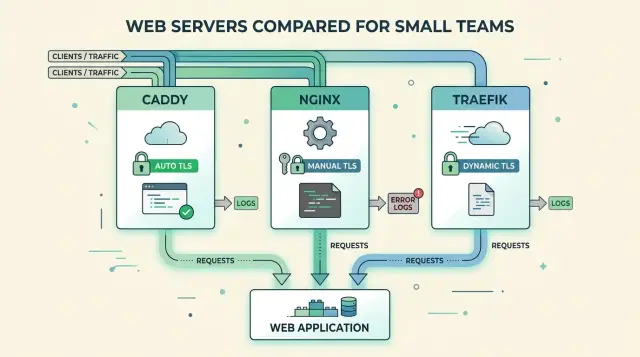
Table of Contents
Why this choice gets messy fast
Small product teams do not pick a reverse proxy because it is interesting. They pick one because somebody has to send traffic to the right service, keep TLS working, and avoid a late-night outage when a certificate expires.
That work usually lands on one person. Sometimes it is the founder who still deploys the app. Sometimes it is the engineer who knows just enough DNS and Linux to keep things moving. One person ends up owning routing, certs, redirects, headers, and cleanup after something breaks.
That feels manageable when there is one app and one domain. It gets messy after a few small additions. A marketing site appears. Then an API. Then staging. Then an admin tool behind basic auth. Each change looks tiny, so the team copies a block, changes two lines, and moves on.
That is how drift starts. A copied rule keeps an old hostname. A timeout stays even though the new service does not need it. A redirect gets added in the proxy, then added again in the app or CDN. Nobody plans a tangled setup. It grows because shipping wins over cleanup.
The Caddy, nginx, or Traefik choice often gets framed as a syntax debate. For small teams, it is usually an ownership problem. If TLS lives in one place, routing in another, and special cases in deploy scripts or container labels, nobody can see the full path of a request at once.
The warning signs show up early. Two services answer on the same host and nobody knows which rule won. Cert renewal works in staging but fails in production. A redirect loops only behind the CDN. A deploy quietly restores a rule that somebody removed last week.
At that point the proxy is no longer a tiny utility. It has turned into a small platform layer, and the team did not mean to build one.
How each tool feels in daily use
The real difference between these tools shows up during ordinary work. Someone needs to add a subdomain, change a route, or fix TLS before the next deploy. That is when the trade-offs become obvious.
Caddy feels closest to "edit one file, reload, move on." Most teams keep a short Caddyfile, add a site block, and let automatic HTTPS request and renew certificates. That removes a surprising amount of routine work. If you have a website, an API, and maybe a staging copy, Caddy usually stays easy to read.
nginx gives you tighter control. That is why it still appears almost everywhere. You can split config into several files, use includes, write very specific routing rules, and decide exactly how TLS behaves. The downside is plain: two engineers can build the same nginx setup in completely different ways. Both can work. The next person still has to learn that style before they can change anything safely.
Traefik moves the work to a different place. Instead of one central proxy file, it often reads labels or service metadata from Docker or Kubernetes. That feels clean if your team already deploys through Compose files or cluster manifests. You add a service, attach routing labels, and Traefik picks it up. The catch is that proxy rules now live beside app deployment settings, so small routing changes can hide in places people do not expect.
Day to day, the pattern is simple. Caddy keeps most changes in one readable file. nginx gives you more control, but also more ways to drift. Traefik folds proxy logic into service definitions.
That matters more than feature tables. Small teams rarely suffer because a proxy lacks one advanced option. They suffer because nobody remembers where the last person put the rule.
If one person handles operations part time, Caddy is often the calmest option. If your team already knows nginx well, its control can still be worth the extra effort. If your deployments already revolve around Docker labels or Kubernetes objects, Traefik can feel clean and fast until debugging sends you through several files instead of one.
TLS when one person owns ops
TLS is where small teams either save time or lose an entire afternoon to a certificate problem that sat quietly in the background.
Caddy is usually the easiest starting point. Point the domain at the server, write a short config, and it will request and renew certificates on its own. For a small team, that means fewer moving parts and fewer chances to forget a cron job, Certbot hook, or renewal script.
Traefik also automates TLS, but it asks for more setup. You need certificate resolvers, storage, and router rules. That is still manageable, but it feels more like running a traffic controller than a plain web server.
nginx gives you the most control and the most chores. It does not handle ACME certificates by itself, so teams usually add Certbot or another client around it. That works, but renewal now depends on extra files, timers, reload steps, and somebody remembering how it all fits together six months later.
What changes after day one
The first certificate is rarely the problem. Renewal is.
With Caddy, renewals are built in, so failures usually show up in logs and startup checks. With Traefik, renewals are also automatic, but you need to know where it stores certificate data and where it logs ACME errors. With nginx, the weak spot is the glue around it. The server can look healthy while the certificate job fails quietly in the background.
Wildcard certificates narrow the gap, but they do not remove the operational burden. All three tools can use them, yet wildcard issuance usually means DNS-01 challenges. That pushes work to whoever controls DNS. If DNS access sits with a founder, an agency, and a registrar account nobody can find, wildcard plans get irritating fast.
For staging and local development, Caddy is pleasant because HTTPS stays close to production with little effort. Traefik can handle this well too, though setup is less friendly. nginx often ends up with self-signed certs, manual steps, or a local workflow that behaves differently from production.
A simple ownership rule helps more than any tool choice: one person should own DNS access, certificate alerts, and renewal checks. If that person changes often, use the tool with the least ceremony. For most small teams, that usually means Caddy first, Traefik if you already route many services, and nginx only if you want manual control badly enough to maintain it.
Where config drift starts
Config drift usually starts with a reasonable shortcut. Somebody copies an nginx server block from production to staging, changes two lines, and moves on. A week later, CORS, headers, or timeouts no longer match. Nobody set out to make a mess. Small edits just stopped meeting each other.
Small teams feel this early because the same few people do everything. They ship features, patch outages, renew domains, and tweak proxy rules between meetings. When a live fix solves the immediate problem, many teams never copy it back into Git. The server works, so the task disappears. Then the next deploy removes that fix, or another box never gets it at all.
nginx drifts in familiar ways: copied snippets, half-shared include files, and hand-edited configs on one server but not another. Caddy reduces some of that because the config is shorter and TLS is simpler, but drift still appears when people edit the Caddyfile directly on a server during an incident. Simple syntax does not protect a team from undocumented changes.
Traefik has a different trap. It can hide routing rules inside Docker labels or app manifests, so proxy config stops looking like proxy config. One developer changes a label in one Compose file, another service uses a different naming pattern, and now routing logic lives across several repos. That feels tidy at first. At 2 a.m., it feels scattered.
The fix is boring and effective: choose one source of truth. Put routing, TLS settings, redirects, and upstream targets in one place, then make every change go through it.
A few habits prevent most drift:
- Keep proxy config in Git, even for hotfixes.
- Use the same layout in dev, staging, and production.
- Do not mix file-based rules with hidden labels unless the team agrees on a clear pattern.
- Leave comments for odd or temporary rules.
If your team cannot answer "where does this route live?" in ten seconds, drift has already started.
Debugging at 2 a.m.
Most proxy comparisons focus on setup. The bigger difference appears when a deploy breaks login, the API starts returning 502, and nobody wants to read three layers of config half asleep.
Start with one real request and trace it hop by hop. Pick a URL, send the request, and follow it through DNS, the proxy, and the app. If you jump straight into application code, you can lose an hour on a problem that lives in routing or TLS.
Access logs come first. They tell you whether the request reached the proxy, which host and path matched, and what status came back. The usual patterns are straightforward: if the proxy never logged the request, look at DNS, TLS, or the load balancer in front. If it logged a 404, the route match is probably wrong. If it logged a 502, the proxy found the route but could not reach the app. If the browser shows a certificate warning, check the proxy before touching application code.
Caddy is often the least painful for TLS errors. Because it manages certificates for you, the logs usually point to the actual issue: challenge failure, wrong DNS, or a blocked port 80 or 443. When Caddy returns a 404, the site block or route usually did not match. That is annoying, but it is normally easy to narrow down.
nginx gives you plenty of control, but debugging depends on how disciplined the config is. A 404 can come from location order, a missing root, or a request falling into the wrong server block. A 502 usually means the upstream is down, the port is wrong, or the socket path is broken. The good part is that nginx reloads predictably, and that matters when you are testing a fix under pressure.
Traefik feels smooth until the source of truth gets fuzzy. A 404 often means no router matched the host or path rule. A 502 usually points to the backend service or network. TLS can stay simple, but once you add several entrypoints, resolvers, and labels, it gets harder to see which setting actually won. Hot reloads are convenient, but they can also confuse you if Docker labels or another provider keep pushing old config back in.
At 2 a.m., boring wins. The best proxy is the one that lets one person answer four questions fast: did the request arrive, what matched, where did it go, and what changed after the reload?
Choosing without overthinking it
Most small teams do not need the most powerful proxy. They need one they can change on a busy Tuesday without opening six docs or guessing why TLS stopped renewing.
Start with a plain inventory. Write down every service, every hostname, and every environment that needs separate routing. A small product often has more surface area than the team admits: a site, an API, an admin panel, staging, maybe preview apps. Once that list is real, the choice gets easier.
Then decide where routing rules should live. If your team likes config files in Git, Caddy or nginx usually feels simpler. If services appear and disappear through Docker or another scheduler, Traefik often makes more sense. Problems start when one route lives in labels, another in a file, and nobody knows which version is current.
A short trial tells you more than a long feature table. Create one real certificate and make sure renewal works. Send traffic to one backend that is down and watch the error path. Change one hostname and time the full update. Then ask a teammate to explain the setup without notes. That last test is blunt, but it works. If only one person can explain why requests reach the admin app, the setup is already too hard for the team you have.
For most small teams, the rule is simple: pick the tool your team can explain, edit, and debug half asleep. Caddy fits teams that want automatic HTTPS and readable config with very little overhead. nginx fits teams that want fine control and do not mind more manual work. Traefik fits teams that already think in containers, labels, and service discovery.
If you still feel stuck, run the same tiny app on all three for one afternoon. Site, API, admin. Add TLS, break one backend, rotate one hostname. The right choice usually feels a little dull. That is a good sign.
Example: a small app with site, API, and admin
Picture a team of three. They run a public site, a JSON API, and an admin panel behind login. Everything lives in Docker Compose, with one stack for staging and one for production.
This is where the choice stops being abstract. You do not need a platform team. You need a proxy that still makes sense when the same tired person handles deploys six months later.
A common setup looks simple on paper: the site answers on the main domain, the API sits on a subdomain, and the admin panel uses its own subdomain or path with stricter access rules. The details are what get expensive.
With Caddy, one Caddyfile can describe all three routes in plain text. Automatic TLS removes one recurring job, and staging often looks close to production. Months later, a teammate can still open the file and understand what maps where.
nginx works here too, but teams often split config into several files, snippets, and copied blocks. That is where drift creeps in. Staging gets one header, production gets another, and nobody notices until login breaks or the admin panel caches something it should not.
Traefik feels nice on day one because Docker labels travel with each service. When the site, API, and admin panel move together, that can reduce setup work. After a few months, though, routing rules can hide inside several Compose files, and simple questions take longer to answer. Which service owns TLS? Which router adds the middleware? You have to inspect labels instead of reading one config.
Deploys show the difference clearly. Caddy usually needs the least ceremony. nginx often needs careful reloads and more manual TLS work. Traefik reduces hand edits during deploys, but it adds mental load when something routes to the wrong container.
If your team wants the least overhead, Caddy is usually the calmest choice. If you need very exact behavior, nginx still earns its keep. Traefik makes sense when Docker metadata already drives most of your setup.
Mistakes that waste a week
Teams often go wrong before they write the first config file. They pick the tool with the most buzz, or the one a friend used at a larger company, instead of asking a simpler question: what can this team read, change, and fix under pressure?
That matters more than feature lists. If two developers know nginx well and nobody understands Traefik labels, Traefik will not save time. If nobody wants to manage certificates by hand, Caddy can remove a lot of repetitive work.
TLS is a common source of slow pain. Somebody enables automatic certificates, then later adds manual cert files for one domain because of a special case, then forgets about it. A month later, one hostname renews fine, another serves an old cert, and the team wastes half a day proving the app is healthy while the proxy is the real problem.
The fix is simple: choose one TLS path for each environment and stay with it. If you use automatic certs, let the proxy own that job. If you use manual certs, document who updates them and where they live.
Routing rules create the next trap. This happens a lot with Traefik, but any tool can end up here. Part of the routing lives in Docker labels, another part sits in a file, and one odd redirect hides in a deploy script. Soon nobody can answer a basic question like, "Why does /admin go there but not here?"
When rules live in three places, people stop trusting the config. Then they either make careful changes very slowly or risky changes very fast. Both are expensive.
A rollback plan sounds dull right up until a production change fails. Without one, teams start editing live config, restarting containers, and guessing. With one, they can return to the previous state in a minute and debug the real issue after users stop feeling it.
A small product team does not need the best proxy on paper. It needs the proxy the team can operate without detective work at midnight.
Quick checks before you commit
Before you settle on a proxy, run a boring test against your real setup. Small teams do better with systems they can explain, rebuild, and fix without a hero on call.
Ask a few plain questions. Could a teammate add a new hostname in about ten minutes with a pull request and no private notes? If users hit a 502, could your team tell whether the fault sits in the proxy, the app, or the network within a few minutes? Could you rebuild the full ingress and TLS setup from Git alone on a clean machine? When a certificate fails, do the logs make the cause obvious, or does everybody start guessing?
If the answer is "no" to two or more, the tool may be fine but the setup is not.
In most cases, Caddy wins for small, fairly static setups because TLS is simple and the config stays short. nginx still makes sense when you want explicit control and your routing rules do not change much. Traefik fits teams that already deploy through containers and labels, but drift can creep in when routing logic gets scattered across Compose files, dashboards, and service definitions.
A quick dry run helps. Spin up one site, one API, and one admin host on a fresh server. Add TLS, force HTTPS, break one upstream on purpose, then restore it. Time each step. If one tool adds twenty extra minutes every time you touch it, that cost adds up fast.
Then write down the next step in plain terms. Maybe that means keeping nginx and moving all config into Git. Maybe it means replacing hand-built TLS work with Caddy. Maybe it means keeping Traefik but using a stricter pattern for labels and deployment.
If the setup still feels fuzzy, a second opinion can save a lot of cleanup later. Oleg Sotnikov at oleg.is helps startups and small businesses with infrastructure, Fractional CTO work, and practical automation, so a short review of your ingress, TLS, and deployment layout can catch drift and debugging problems before they turn into recurring outages.
Frequently Asked Questions
Which proxy should a small team choose first?
For most small teams, start with Caddy. It keeps config readable and handles HTTPS with very little setup.
Pick nginx if your team already knows it well and wants exact control over routing or TLS. Pick Traefik if your services already live in Docker or Kubernetes and you want routing to follow that setup.
When does nginx make more sense than Caddy or Traefik?
nginx makes sense when you want very exact behavior and your team can maintain it without guessing. It gives you fine control over routes, headers, timeouts, and TLS.
The trade-off is upkeep. You usually need Certbot or another ACME client, plus a clear config style, or changes get messy fast.
Is Traefik the right choice for Docker Compose or Kubernetes?
Yes, if your team already deploys through Compose files or cluster manifests. Traefik can pick up services from labels or metadata, so new routes can feel quick to add.
That only works well if you keep the pattern consistent. If some rules live in labels and others live in files, debugging gets slow.
Which tool makes TLS the least painful?
Caddy usually gives the easiest path. Point your domain to the server, add a short config, and let Caddy request and renew certificates.
Traefik also automates TLS, but it needs more setup. nginx works fine too, but you have to wire certificate management around it and keep that glue healthy.
How do we stop config drift before it gets bad?
Keep one source of truth in Git and push every proxy change through it, even hotfixes. Use the same layout in dev, staging, and production so people do not learn three different patterns.
Do not edit config by hand on a live server unless you also commit that change right away. Drift usually starts with one quick fix that nobody writes down.
Where should routing rules live?
Choose one place and stick to it. If you want file-based config, keep routing, redirects, TLS settings, and upstream targets there. If you want label-based routing, keep the same rule across services.
Teams run into trouble when one route lives in a proxy file, another hides in Docker labels, and a third sits in a deploy script.
What do 404 and 502 errors usually tell me at the proxy layer?
Start with the proxy access logs. If the proxy never logs the request, check DNS, TLS, or the load balancer in front. If you see a 404, the route probably did not match. If you see a 502, the proxy found the route but could not reach the app.
That simple split saves time. It keeps you from digging into app code when the problem sits in routing or certificates.
How should we test a proxy before we commit to it?
Run one small test that looks like your real setup. Put up a site, an API, and an admin host. Add TLS, force HTTPS, break one backend on purpose, then change one hostname.
After that, ask a teammate to explain the full setup without notes. If only one person can do it, the tool or the layout is too hard for your team.
Can one person safely own proxy and TLS setup?
One person can handle it, but the setup has to stay boring. That usually points to Caddy first, because it cuts down TLS chores and keeps changes in one readable file.
nginx and Traefik can still work with one owner, but they ask for more discipline. If ownership changes often, pick the option with less ceremony.
When should we ask for outside help?
Get help when your team cannot answer simple questions fast. If nobody knows where a route lives, certificate renewals fail quietly, or deploys keep bringing old rules back, you already have an operations problem.
A short review of your ingress, TLS, and deployment layout can catch that early. Oleg Sotnikov helps startups and small businesses with infrastructure, Fractional CTO work, and practical automation when the setup starts costing too much time.


