Buyer workflow availability checks that catch real failures
Buyer workflow availability checks show whether people can sign up, log in, pay, and reach support before a simple status page says anything is wrong.
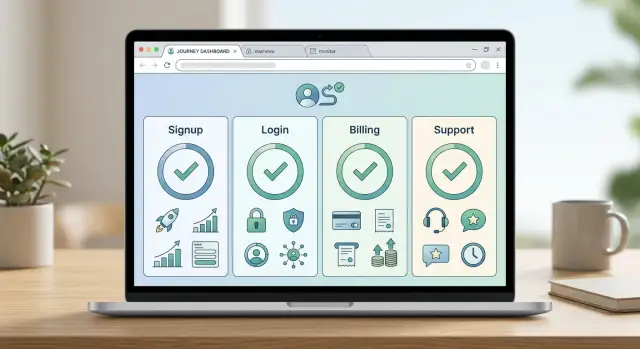
Table of Contents
Why one health endpoint misses real problems
A single health endpoint tells you only one thing: one part of the app answered. It does not tell you whether a new buyer can complete the steps that lead to revenue.
That is why teams can stare at a green status page while signup fails in the browser. The server can return 200, yet the form still breaks because a script did not load, a captcha stopped working, or a validation rule changed and blocked every submission.
Login problems hide the same way. After a release, the app can still respond to a basic ping while real users get stuck in a redirect loop, hit a bad cookie setting, or fail at password reset. The app looks up. Buyers still cannot get in.
Billing is often worse because money passes through several services. A simple health check usually skips the card form, tax calculation, payment provider, webhook, and receipt email. Any one of those can fail and leave checkout half-working. That kind of outage hurts fast because most people do not report it. They leave.
Support paths break quietly too. If your contact form stops sending, chat fails to load, or mail routing drops replies, customers lose the only route they have when something goes wrong. Your monitoring can stay calm while frustration climbs.
Synthetic transaction monitoring catches more of this because it behaves like a buyer, not a server admin. It checks the path from the outside:
- open the signup page
- submit a test account
- log in
- reach billing
- send a support request
That is the point of buyer workflow availability checks. They do not ask, "Is the app alive?" They ask, "Can a real person complete the steps that matter?"
If you only watch one health endpoint, you measure pulse. You do not measure whether the business still works.
What buyers actually do before they pay
The outages that hurt revenue usually do not start on your health endpoint. They show up in the small actions a buyer takes while deciding whether to trust you with a card.
Start with the shortest path from first visit to paid account. For many SaaS products, that path is simple: visit the pricing or product page, open the signup form, confirm the email, log in, and either start billing or contact support if something blocks the purchase.
That is the path your outside checks should follow. If a visitor can load the homepage but never gets the confirmation email, the product is down for that buyer. If login works but the billing page spins forever, revenue is blocked just as surely.
A lot of this flow often lives outside your app. Email delivery may run through one service. Authentication may depend on another. Billing may go through a payment provider. Support may sit in a chat widget, ticket tool, or shared inbox. Your server can look healthy while one of those services quietly fails.
So the check needs to mark every handoff. Did the email arrive? Did the confirmation link open the right page? Did the session survive the redirect? Did the billing form load the payment fields? Could the buyer still reach support when payment failed?
You do not need to test every page on the site. Checking every marketing page, blog post, and settings screen creates noise and burns time. Start with the route that leads to money. Add other flows later.
A simple example makes the problem obvious. A founder wakes up to normal uptime alerts, yet trial signups dropped to zero overnight. The app is running. The database is fine. The real issue is an expired email API token, so nobody can confirm an account. A basic health check misses that. A full journey check catches it fast.
Once you map this path well, you stop measuring server uptime and start measuring whether a buyer can actually buy.
Which paths to test first
Start with the path that turns a stranger into a user in the fewest steps. If someone can visit your site, create an account, confirm the email, and land in the product, that path deserves the first check. When it breaks, new revenue stops even if your health endpoint still says everything is fine.
For most teams, the order is simple. Test the path that loses a new account first, then the path that loses money, then the path that locks people out, and then the path people use when they get stuck.
- New account creation
- First payment or trial upgrade
- Password reset
- Support contact
The payment path usually comes next because billing fails in quiet ways. A card form can load while tax calculation fails, a coupon field can break checkout, or the plan can change in the UI but not in the billing system. One outside check can catch all of that.
Password reset belongs near the top, not near the bottom. People may forgive a brief signup problem if they can try again later. They do not forgive being locked out when the reset email never arrives.
Include one support path early too. Buyers often reach support before they pay, especially when pricing, access, or trial limits confuse them. If that form drops messages or the mailbox rejects them, you lose deals you will never see in product analytics.
Leave rare edge cases for later. You do not need to test every coupon type, every SSO provider, or every unusual billing country on day one. This works best when you start with the shortest, busiest paths and grow from there.
A good first set is small: signup, upgrade, reset, support. If those four work from the outside, you cover most of the places where real buyers disappear.
How to set up outside checks step by step
Write down one real buyer journey exactly as a stranger would see it. Do not begin with a status page or a health endpoint. Begin with the path that gets closest to money, such as signup, email confirmation, login, upgrade, and a support request.
Start with one buyer path
Keep the flow small at first. If you try to monitor every path on day one, you will end up with noisy checks that nobody trusts.
Open your site in a private browser window and record each click, field, and expected result in order. A simple script is enough if it can repeat the same steps every time. Fancy tooling is not the hard part. The exact sequence is.
Use a dedicated test account, not a real customer account. For billing, use a payment method or sandbox setup that lets you test charges safely without creating accounting noise. The goal is to prove that the billing path works, not to create real revenue events.
Run the check from outside your own network. If you test only from inside your office, VPN, or cloud account, you can miss DNS, CDN, firewall, and third-party failures that buyers hit right away. Schedule it often enough to catch short outages, but not so often that you trigger your own rate limits.
Save proof and alert carefully
Each run should leave a trail your team can inspect later. Save:
- a screenshot for each major step
- total step timing
- the exact error text
- the step where the flow stopped
- the time and location of the run
This matters when the failure is partial. A health endpoint may stay green while the signup button does nothing, the login form loops, or the billing page never loads its payment widget.
Be careful with alerts. One failed run can be a network wobble. If the same buyer step fails twice in a row, then page the team. That simple rule cuts a lot of alert noise without hiding real issues.
These checks earn their keep because they tell you whether a person can move from interest to payment, not whether one server replied with "200 OK."
What each check should confirm
A check that only looks for a 200 status code tells you almost nothing. These tests should confirm that a person can move through the step without confusion, delay, or a dead end.
Start with speed. The page should load in a time that feels normal on a home connection, not just inside your data center. If the signup page takes nine seconds to render, many people will leave before they type an email.
Then test the form itself. The fields should accept normal input, reject bad input, and show plain error messages. If someone enters a weak password or mistypes an email, the page should explain what went wrong in one sentence. Silent failure is one of the easiest ways to lose a buyer.
For flows that send an email or one-time code, the check should wait for that message and confirm it arrived within a set window. That catches problems app health checks miss, like a broken mail provider, a delayed queue, or a template error that stops delivery.
Billing checks need a stricter rule. They should confirm that a buyer can reach the final success page after payment, or a clear failure page if the card is declined or the gateway times out. Both outcomes matter. If the system leaves people on a spinner or drops them back to the cart with no message, the flow is broken.
Support checks matter too, especially after payment. A support form should accept the message, send it, and show a confirmation that makes sense. If the form looks fine but never submits, frustrated users will assume nobody is there.
A solid outside check usually confirms five things:
- the page becomes usable fast enough for a normal visitor
- the form accepts input and handles mistakes clearly
- the expected email or code arrives on time
- the billing step ends on a clear result page
- the support request sends and shows confirmation
Keep the pass rules concrete. "Loaded under 3 seconds," "email arrived in 60 seconds," and "success text appeared" are much better than "page worked." Clear rules make alerts more useful and failures easier to fix.
A simple example from signup to support
A buyer lands on the pricing page, clicks "Start trial," and fills out the form. The page loads fast. The form accepts the details. The app says, "Check your email to confirm your account."
But the confirmation email never arrives. The mail service has a bad credential, or a sending rule broke. To the buyer, the product is unavailable in the only way that counts: they cannot start.
Inside the company, the team may not notice right away. The health endpoint still returns 200. The app server is up, the database responds, and the dashboard stays green. At the same time, trial signups start dropping because people get stuck before the first login.
This is where an outside check helps. It opens the pricing page, submits the trial form with a test account, watches the inbox, and waits for the confirmation message. If no email shows up after a short delay, the check fails and sends an alert.
A useful check confirms a few simple points:
- the pricing page loads
- the form accepts valid details
- the confirmation email arrives on time
- the email link opens the account setup page
- the support form still works if the flow breaks
That last item matters more than many teams think. If the buyer cannot confirm the account, they need a way to ask for help right away. A working support path turns a hard stop into a short delay.
With this setup, the team catches the problem within minutes instead of discovering it later in a weak conversion report. Someone checks the mail provider, fixes the broken setting, and reruns the test. New trials start moving again before support tickets pile up and before the sales team spends a day chasing a mystery.
Synthetic transaction monitoring works because it follows the same path a real buyer takes. A single health endpoint can only say that one small part of the system responds. It cannot tell you whether a person can sign up, log in, pay, or get help when something goes wrong.
Common mistakes that hide real outages
Teams often miss real failures because they test what is easy, not what buyers actually touch. A home page can load, one API route can return 200, and money can still stop coming in.
The first mistake is a check that is too narrow. If you only test the landing page or /health, you will miss broken forms, failed redirects, expired tokens, and JavaScript errors that block checkout. A green dashboard can hide a very real outage.
Another common problem is using admin or staff accounts for tests. Admin users often skip the same steps new buyers must complete. They may bypass email verification, rate limits, plan selection, or fraud checks. The test passes while new users fail.
Teams also skip the parts that depend on outside systems. They verify that the page loaded, but they never check whether the email arrived, whether the payment widget rendered, or whether the support message landed in the right inbox. Those are exactly the places where silent failures show up.
Alerting can create its own trouble. If every small wobble wakes somebody up, people stop trusting the monitor. If the alerts are too soft, real outages sit for hours. Requiring repeated failure before paging is a simple middle ground.
One more mistake is trying to cover everything at once. When a team builds too many checks too early, maintenance goes up and trust goes down. Start with the main buyer path. Expand only after the first checks prove useful.
Quick checks for every week
Weekly testing should feel routine, not dramatic. Run the same few actions every week and you will catch drift before buyers do.
Use a real browser and a real network path. Internal dashboards can stay green while signup emails stop arriving, payment forms fail, or support replies vanish into the wrong inbox.
A good weekly pass is simple:
- finish a fresh signup in a clean browser profile
- log in with a normal user account and open the first page a customer would actually use
- run one billing action, such as a small test charge or trial upgrade
- send one support request and review recent failures for noisy alerts
A fresh signup matters more than many teams expect. Cached sessions hide a lot of trouble. A clean browser profile shows what a new buyer sees when they arrive cold.
Keep the test accounts simple and label them clearly so billing and support teams can ignore them without guessing. One dedicated card, one inbox pattern, and one test user are usually enough.
This weekly pass often takes 15 to 20 minutes. That is cheap compared with losing a day of signups because one email template, webhook, or payment setting broke quietly over the weekend.
What to do next
Pick one path that leads to revenue and test it this week. For many teams, that means signup, email confirmation, login, and the first billing step. If that flow breaks, a green health endpoint does not matter.
Keep the first version small. One full outside check that runs on a schedule is better than six half-finished tests nobody trusts.
A simple first pass can confirm four things:
- a new account can be created
- the user can log in and reach the app
- the billing screen loads and accepts a test action
- the team gets a clear alert when any step fails
Let that run for a while and watch the failures closely. Some will point to obvious bugs. Others will reveal weak spots between systems, like delayed emails, broken session handling, or a payment page that loads but never finishes.
Once the first flow stays stable, add one support path. That can be a contact form, chat handoff, or help request from inside the product. When buyers cannot get help during a problem, the outage gets worse fast, even if the app itself still works.
Do not review failures in isolation. Product sees where buyers get stuck, support knows what people report first, and engineering can trace the technical cause. A short shared review each week is usually enough to spot patterns and cut noisy alerts.
Resist the urge to map every edge case on day one. Expand only after a check catches a real issue or covers a path that clearly affects sales or retention. Simple checks that fire for real reasons beat a big test suite full of false alarms.
If your team wants an outside review, Oleg Sotnikov at oleg.is can help as a Fractional CTO. His work across product architecture, infrastructure, and practical AI-assisted development fits teams that want tighter operational checks without adding much process.
By next week, aim to have one scheduled test protecting revenue and one clear decision about the next path to add.
Frequently Asked Questions
Why is one health endpoint not enough?
Because /health only proves that one endpoint answered. It does not prove that a buyer can sign up, confirm an email, log in, pay, or reach support when something breaks.
Which workflow should I test first?
Start with the shortest path from first visit to money. For most SaaS teams, that means signup, email confirmation, login, and the first billing step.
How often should buyer workflow checks run?
Run automated checks often enough to catch short outages without tripping your own limits. Every few minutes works for many teams, and a simple weekly manual pass adds another layer.
What should a signup check confirm?
Check that the page loads fast, the form accepts valid input, the confirmation email arrives, and the email link lands on the right page. If any one of those steps fails, new users stop there.
Do I need to test email, payments, and other outside services too?
Yes. Many revenue problems start in services outside your app, like email, auth, payments, or chat. If you skip those handoffs, your monitor will miss the failures buyers actually feel.
How do I cut alert noise without missing real problems?
Require the same step to fail more than once before you page the team. Save screenshots, timing, and the exact error so people can tell a real outage from a short network wobble.
Should I use real customer accounts or real cards for these checks?
No. Use dedicated test accounts and a safe billing setup made for test charges or sandbox flows. That keeps support, finance, and customer records clean.
How many workflows should I monitor at the start?
Keep the first version small. One full journey that people trust beats a pile of noisy checks that nobody believes.
What should my team check manually every week?
Do a fresh signup in a clean browser profile, log in as a normal user, run one billing action, and send one support request. That usually takes less than half an hour and catches quiet drift before buyers do.
When does it make sense to get outside help with this?
Bring one in when your team ships often, depends on several outside services, or keeps finding revenue issues too late. A Fractional CTO like Oleg Sotnikov can map the buyer path, set sane checks, and tighten the flow without adding much process.


