Buyer-hosted installs: set rules before deals expand
Buyer-hosted installs need clear rules on topology, upgrades, and log access early, so one enterprise deal does not reshape your whole team.
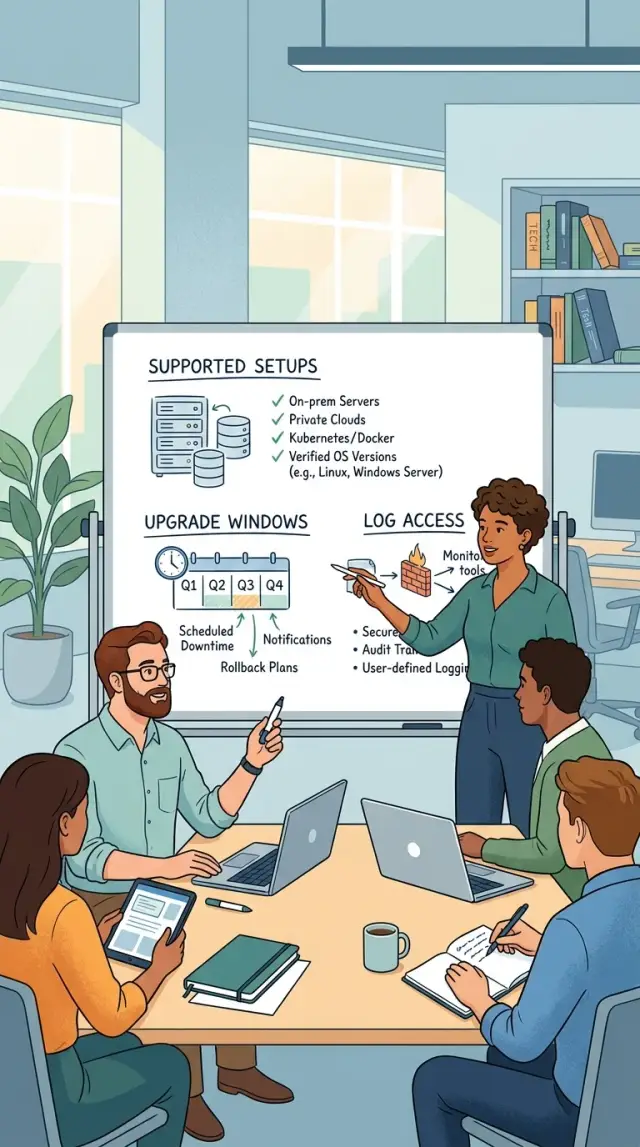
Table of Contents
Why this gets messy fast
The first buyer-hosted installs deal often sounds simple. One customer wants your product inside their own environment, under their own security rules, with their own change process. If you agree without limits, you stop running one product in one way. You start running a second product line.
That second line affects more than hosting. Sales may promise special terms that sound minor on a call, such as delayed upgrade windows, unusual approval steps, or restricted support log access. Later, engineering and support have to carry those promises during real incidents.
Every exception adds work in places teams do not notice at first. A new deployment shape means different setup steps, different docs, different monitoring, and different ways things can fail. One buyer asks for a private subnet. Another wants their own database rules. Soon, your team tests less against the standard product and more against one customer's setup.
The pain gets worse during upgrades and outages. If one buyer stays three versions behind, your team has to remember old behavior, old scripts, and old bugs. If support cannot see logs or recent deploy history, they spend the first hour asking for access instead of fixing the problem.
A few things usually push the team into a bad operating model:
- Sales closes the deal before anyone defines supported deployment topologies.
- The contract gives the buyer broad control over upgrade timing.
- Support has no clear path to logs, metrics, or an admin contact.
- Engineers start making one-off changes to keep that account running.
This is where the product team starts serving one buyer instead of improving one product for everyone. That shift is expensive, and it rarely shows up in the original deal math. Good Fractional CTO advice is boring on purpose here: set the rules early, write them down, and make sure sales, support, and engineering all sell the same promise.
Pick the topologies you will support
Every extra environment adds work. One release across three deployment layouts can become nine support combinations once you add two database options and two storage paths. That is how buyer-hosted installs turn from a sales win into a support problem.
Pick a short menu and stay with it. Decide up front whether you will support installs in the buyer's cloud, a local data center, or both. If you support both, make them look as similar as possible so your team can test, document, and upgrade the same way each time.
A simple support menu might look like this:
- Linux virtual machines in the buyer's cloud
- Buyer-managed Kubernetes only in approved versions
- Local data center installs on standard x86 servers
- Air-gapped installs only as a separate paid package
That list does two things. It tells sales what they can say yes to, and it tells engineering what they must keep working.
Then limit the moving parts inside each topology. Do not allow any database, any object store, or any network pattern the buyer prefers. Choose the few you will support, write them down, and test only those. If you allow PostgreSQL, say which versions. If you need shared storage, name the storage type. If the app needs outbound access for updates or alerts, say that in plain words.
Minimum system requirements should read like a checklist a buyer can hand to their IT team. Say how many CPU cores, how much RAM, disk type, operating system version, open ports, TLS needs, backup method, and whether your team needs shell access during setup. Skip vague wording like "adequate resources." That causes arguments later.
Say no to one-off layouts that need custom scripts, special VPN hops, rare appliances, or buyer-only monitoring tools. Those requests feel small during a deal. They usually become permanent support debt.
This is often where good Fractional CTO advice pays for itself. A clear deployment policy protects margins, keeps upgrades predictable, and stops one large buyer from quietly defining your product.
Set upgrade windows before the contract
Upgrade rules protect your roadmap. If a customer can delay every release or demand same-day patching on their schedule, your team ends up carrying a private branch for one account.
For buyer-hosted installs, set a release rhythm before anyone signs. Keep it simple. You might ship regular updates once a month, larger version changes once a quarter, and security fixes outside that schedule when needed.
The contract should name a notice period for planned maintenance. Pick numbers your team can keep without stress. A common pattern is 7 to 14 days for standard upgrades and shorter notice for patches that close a serious security hole.
Write down who can approve urgent fixes on both sides. If the buyer needs three internal meetings before a production patch, say that delay is their choice and their risk. If your team can declare an emergency fix, define what counts as an emergency so nobody argues about it later.
Rollback needs the same level of detail. Do not stop at "we can roll back." Say which version counts as the fallback, who keeps the backup, how long rollback should take, and what happens to any schema or config changes made during the failed upgrade.
A short contract clause set usually covers the hard parts:
- the standard release calendar
- the notice required before planned maintenance
- the people who can approve emergency work
- the rollback steps and recovery target
- the end date for each supported version
Older versions need an end date, even if a buyer asks for "just a bit more time." Without a written end-of-life policy, old installs stay alive for years and absorb support time every month. That is how one deal starts to bend your whole operating model.
Teams that run lean feel this first. A small advisory team or fractional CTO setup cannot pause every week to patch five different customer versions. One supported window, one emergency path, and one clear retirement date keep the work predictable.
Agree on logs and operational access
Support breaks down fast when your team can see only part of the system. For buyer-hosted installs, decide on log access before the deal closes, not during the first outage at 2 a.m.
Your support team should name the data it needs from day one. That usually means application logs, web server logs, background job logs, deployment history, audit records, and basic system events. If login, billing, or data sync problems matter to the product, say so in plain words and list those sources too.
Screenshots are almost never enough. Ask for live or near-live access to metrics and alerts, or a shared export that follows the same format every time. If your team normally works from tools such as Grafana, Prometheus, Sentry, or a central log store, define the equivalent view the buyer must provide. A picture of a red CPU chart does not help much when you need the exact timestamp, error rate, and request trace.
Set retention periods early. Many incidents show up days later, not in the same hour. If logs disappear after 24 hours, your team ends up guessing. A simple rule works well:
- keep application and infrastructure logs for at least 14 to 30 days
- keep audit records longer if changes affect security or compliance
- keep deployment records for every release and rollback
- keep alert history so support can match symptoms to timing
You also need one agreed path for sharing data during incidents. Some buyers prefer a secure upload, some grant temporary access, and some send exports through their ticket system. Pick one primary method and one backup method. Then write response times around that process, so delays in data sharing do not count as your support failure.
Redaction rules matter just as much. Decide which fields must be masked before logs leave the buyer's environment. Personal data, tokens, secrets, payment details, and internal IDs often need special handling. Write the rule once, test it on sample logs, and make sure both teams know who does the redaction. If nobody owns that step, incident response stalls for legal review.
Draw the line between your team and theirs
When buyer-hosted installs go wrong, the worst disputes usually start with one simple question: whose job was that? If the answer changes from ticket to ticket, support turns into blame trading.
Put ownership in writing before launch. Keep it plain. If a certificate expires on the buyer's side, your team should not carry the outage. If your release breaks the app, their infra team should not spend the night proving it.
A short split like this prevents most confusion:
- Your team owns the application, release process, bug fixes, and any scripts you provide.
- The buyer's team owns servers, backups, operating system patches, network rules, storage, and certificate renewal unless the contract says otherwise.
- Decide who stores secrets, who can read them, and who rotates encryption keys and service credentials.
- If the buyer's firewall, DNS, storage, or identity system causes downtime, say that uptime on your side does not apply until they remove the blocker.
- Set response times for both teams, not just yours.
Secrets need extra care because people assume someone else is handling them. Spell out where credentials live, who can create them, who can rotate them, and who gets called if one leaks. If your team never touches production secrets, say that clearly.
Response times also need two columns. Your support promise means little if the buyer's admin replies the next morning. A simple rule works well: your team acknowledges a production issue within the agreed window, and the buyer names an on-call contact who joins within their own window.
Use one escalation path for every serious incident. One shared channel, one ticket, and one named owner on each side is enough. A sales engineer, project manager, and security contact can still join later, but the first path should stay simple.
This line may feel strict in the sales process. It saves a lot of pain after go-live.
How to package buyer-hosted installs
A buyer-hosted install needs a price, a scope, and a short menu. If you treat every deal like a fresh design job, sales will promise anything and delivery will inherit the mess. Start with one default package that fits most customers and that your team can run without special handling.
That base package should define one layout, one upgrade path, one monitoring method, and one support path. Keep it boring on purpose. Boring installs are easier to maintain, easier to document, and much easier to quote.
A simple package usually includes:
- one approved deployment layout
- a fixed split of buyer tasks and vendor tasks
- standard upgrade windows and rollback rules
- a defined way to collect logs and health data
- one onboarding and acceptance process
Then add a small set of paid options. Two or three is enough. You might offer a second topology for buyers with strict network rules, paid help for single sign-on, or an extra staging environment. Each option needs its own scope, price, and support limit. Do not leave room for "we will figure it out together."
When the same request shows up in several deals, make a decision. Turn it into a product rule, or say no and keep it out. Custom work feels harmless in one contract, but five "small exceptions" can create a second product you never meant to build.
Sales needs a short script and a plain offer sheet. If they can sell only approved layouts, your delivery team gets fewer surprises. This matters even more with buyer-hosted installs, because every extra firewall rule, access method, or environment adds support cost later.
Review the package after each completed install. Ask three plain questions: what slowed the team down, what confused the buyer, and what change would prevent that next time? This is a good place for Fractional CTO advice. Someone needs to own the rules early, before edge cases turn into promises your team has to carry for years.
A simple example from a sales call
A mid-sized buyer gets on a sales call and says they need a private deployment in their own cloud. Their security team adds two limits right away: your team cannot keep standing admin access, and you cannot pull logs directly from production.
That request sounds special, but the reply should stay boring. Instead of designing a fresh setup for one deal, your team offers two supported deployment topologies. Option one is a single-tenant install in the buyer's cloud, with their team owning network and access. Option two is the same app layout, but with a controlled log export path so support can still work without direct login.
The buyer asks, "Can you just adapt to our internal setup?" A good answer is, "We can support these two layouts. If you need something else, that is a custom project, not standard support." That line saves a lot of pain later.
The contract also sets upgrade windows before anyone signs. Routine updates happen once a month during a named maintenance slot. Emergency fixes follow a separate rule, such as buyer approval within 24 hours for security issues or major outages. Nobody argues about timing when a patch is ready, because the rule already exists.
Log access gets the same treatment. The buyer keeps production locked down, but they agree to export a standard bundle when something breaks. That bundle might include application logs, recent system events, version details, and a timestamp for the failure. Your team reviews the export, reproduces the issue in the matching supported layout, and sends back the fix or the next action.
Support then follows the normal playbook. Triage starts with the exported logs. If the issue is a bug, the team patches it and ships the update in the next slot, or faster under the emergency rule. If the issue is local to the buyer's environment, their team handles the change. That is how buyer-hosted installs stay manageable instead of turning into custom support forever.
Mistakes that create custom support forever
Custom support rarely starts with a formal strategy. It starts with one easy yes on a sales call, one loose promise in redlines, and one workaround during the first incident. A year later, your team is carrying a private version of the product for one customer.
The first mistake is simple: you accept whatever topology the buyer prefers. One asks for a single-tenant setup in their cloud. Another wants bare metal in their data center. A third wants part of the stack on their network and part on yours. That sounds flexible, but it changes the whole cost of buyer-hosted installs. Every extra topology needs its own test path, docs, upgrade steps, and failure playbook.
Another common mistake is promising upgrades with no downtime before you test them. Sales hears the request and says yes because it helps close the deal. Then the first database migration or message queue change turns into a long night for engineering. If you have not tested failover, rollback, and version compatibility in a realistic environment, do not promise seamless upgrades. Promise a maintenance window and keep it honest.
Logs create trouble in a quieter way. Teams often wait until an outage before they discuss log access. That is backwards. If support cannot see application logs, system metrics, and recent deployment events, every incident turns into guesswork. You do not need full control of the buyer's environment, but you do need agreed access, retention, and a named contact who can act fast.
Procurement can make this worse when they define support terms alone. Their job is to reduce vendor risk and tighten obligations. That is fair, but they do not run incidents at 2 a.m. If procurement writes response times, upgrade duties, and uptime promises without engineering and product in the room, your team inherits terms it cannot operate. This is exactly where Fractional CTO advice pays off: someone has to translate contract language into real support work.
The last trap is keeping old versions alive for one customer. It feels cheaper than forcing an upgrade. It is not. Old versions keep old bugs, old docs, old deployment steps, and old security problems alive too. One exception becomes a second branch, then a separate support queue, then a permanent drain on the team.
A simple rule helps: if a promise changes testing, on-call work, or release timing for everyone, treat it like a product decision. If you would not offer it to the next five customers, do not offer it to one.
Quick checks before you say yes
A buyer-hosted install can look like easy revenue on a sales call. It can also trap your team in a one-off setup that slows every release after that. Before you agree, check whether the deal still fits the product you already know how to run.
Five questions usually tell you enough:
- Does the request fit one of your supported deployment topologies, or does it add a new pattern you would need to maintain?
- Can your team patch, upgrade, and roll back on the same schedule you use elsewhere?
- Can support get logs fast during an incident, without waiting on three approvals and a customer admin who is offline?
- Can both teams name one owner for upgrades, backups, certificates, and incident response?
- Will this install force changes to your normal release process, such as extra branches, manual steps, or a separate test path?
If the first answer is no, pause. A new topology is not a small exception. It often means new docs, new testing, new failure modes, and a new support burden.
If the second or third answer is fuzzy, expect pain later. Upgrade windows and support log access sound like contract details, but they shape your daily work. During an outage, minutes matter. If your team cannot see logs quickly, they are guessing.
Ownership matters just as much. I have seen teams lose hours because nobody knew who handled DNS, who renewed certificates, or who could restart a service. A simple owner table avoids that.
The last check is the blunt one. If one buyer-hosted installs deal changes how you build, test, and ship for everyone else, you are not closing a normal deal. You are starting a custom product line. Fractional CTO advice is often simple here: if you cannot answer all five questions clearly, price the extra work openly or say no.
What to do next
If your team keeps treating buyer-hosted installs as one-off requests, the next deal will turn into a custom support promise. The fix is simple, but it needs to happen before sales, legal, and engineering each make different assumptions.
Start with a one-page policy. Keep it plain and specific. Name the deployment topologies you support, how upgrades work, what logs your team can access, who owns backups, and what happens when the buyer changes the stack on their side.
Then turn that page into a checklist that sales and onboarding both use. If a rule matters after the contract is signed, it belongs on the checklist before the contract is signed.
A good checklist usually covers four things:
- The exact environment you support, including network shape, database choices, and any required third-party tools.
- The upgrade window, including how much notice you need and how long older versions stay supported.
- The support boundary, so everyone knows which incidents your team handles and which ones stay with the buyer.
- The operational access you need, especially logs, metrics, and a named contact who can act during an outage.
Use that checklist on the next serious deal. Do not wait for a bigger customer or a more complex install. The first real use will show where the policy is vague, too strict, or missing a step that your team always ends up doing by hand.
When you find a fuzzy rule, fix it before you sign another exception. Small exceptions pile up fast. After three or four deals, they stop looking small and start shaping your product, your support load, and your release schedule.
If the scope still feels blurry, bring in outside review before you commit. Oleg Sotnikov can help as a Fractional CTO by reviewing the install scope, support lines, and upgrade rules so one buyer request does not rewrite how your company operates.


