Buyer due diligence questions before legal gets involved
Use buyer due diligence questions to prepare clear answers on access, backups, logging, and support coverage before bigger deals stall.
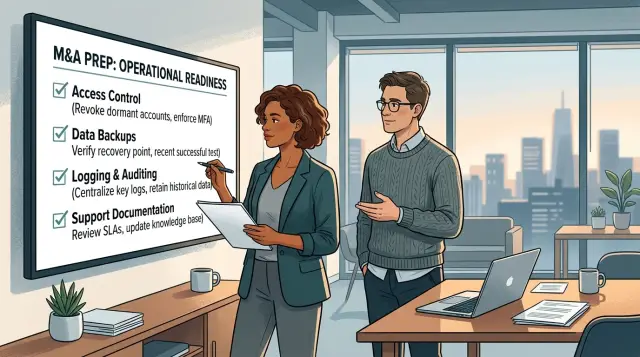
Table of Contents
Why this stage slows down
A deal can feel close to done, then the tone changes. The buyer stops asking about features and starts asking plain, slightly dull questions about data access, backups, logs, and support coverage.
That shift catches a lot of teams off guard. Early calls focus on product fit and business value. Later, a larger buyer starts thinking like an operator. They picture a bad day: the wrong employee gets access, a restore fails, an incident happens at night, or nobody can explain what the system recorded.
The questions are usually simple. The delay starts when the answers sound uncertain or change depending on who speaks. Sales says access is tightly controlled. Engineering admits a few people still share admin access because it is faster. Customer success promises quick replies, but nobody has written down support hours. Small gaps like that make the risk feel bigger than the upside.
That is why this part of buyer due diligence slows healthy deals. The product can be strong, but fuzzy operational answers make the company look less prepared than it really is.
Most of the friction comes from the same few areas: who can access production systems and customer data, how backups run and how restores are tested, what logs you keep and for how long, and what support looks like outside business hours.
When none of that is written down, people answer from memory. That is where deals drift. One email turns into six. One buyer call turns into a thread with sales, engineering, and legal all trying to say the same thing in different words.
A short fact sheet fixes more of this than most founders expect. One page with plain answers, checked by both sales and engineering, cuts confusion fast. It does not need legal wording. It needs clear facts that everyone on your side can repeat the same way.
What buyers usually want to confirm
Buyers usually want facts, not polished promises. They want to know who can access customer data, how you recover from a bad day, what records you keep, and whether someone capable is available when a problem lands on a Friday night.
Access questions usually come first. A buyer wants to hear that only specific people can reach production systems or customer data, that access matches each person's job, and that you remove access quickly when someone changes roles or leaves. Shared logins make people uneasy. So does a vague answer like "the engineering team can get in if needed."
Backups come next because buyers assume failures will happen sooner or later. They want to know how often you back up data, where those backups live, whether they are separate from the main system, and whether you have tested recovery in real conditions. A backup policy sounds fine on paper. A tested restore makes the answer believable.
Logging matters for the same reason. If something goes wrong, can you tell what happened? Most buyers expect logs for sign-ins, admin actions, production changes, and serious errors. They also want a clear retention period. "We keep logs" is too thin. "We keep access logs for X days and audit logs for Y days" is much easier to trust.
Support coverage often decides whether the deal keeps moving. Buyers want to know when support replies, what counts as urgent, and who covers evenings, nights, or weekends. If after-hours support depends on one founder checking messages when they wake up, say that plainly. Most buyers are not looking for perfection. They want to know whether your setup is real.
Ownership matters too. Each answer should have a clear owner inside the company. The engineering lead usually owns backup and restore details. The CTO or security lead handles access and permissions. The support lead explains response times and escalation. Someone else should keep the final answers in one place so every buyer hears the same version.
When a team gives clear, consistent answers, buyers relax. When three people answer the same question three different ways, the sale starts to wobble.
How to prepare your answers
Past buyer calls tell you what will come up again. If three buyers asked about admin access, backup frequency, or weekend support, put those questions in one document and treat it as your working draft for the next deal.
Do not spread ownership across a group chat. Give each topic to one person who can answer quickly and keep it current. Sales can own commercial terms. Engineering can own logging and backups. One lead should review the full set so the answers sound like they came from the same company.
Start with plain language. A buyer does not need your internal shorthand or a wall of tool names in the first answer. Write the short version first, then add the facts that make it credible.
A simple format works well. Start with one direct sentence that answers the question. Follow it with one or two lines describing your setup today. Add a number or time window, such as backup frequency or support response time. End with who owns that process.
Numbers calm people down. "We back up production data every 6 hours and test restores once a month" works better than "we run regular backups." "Two engineers have production admin access" works better than "access is limited."
Use tool names when they help the buyer judge risk. If you track errors in Sentry, store logs in a central system, or use role-based access in your cloud account, say so. Specifics save time because they cut off obvious follow-up questions.
Last, check wording across teams. Sales should not say "24/7 support" if engineering means "alerts after hours for production issues only." That mismatch creates more friction than a modest support policy stated clearly.
Good security questionnaire prep is not fancy. It is a shared document, clear owners, plain language, and facts you can defend on a live call.
Access and permissions
Buyers want plain answers here, not theory. They want to know who can see production data, who approves access, and how quickly you remove it when someone leaves.
Start with roles, not tools. Name the people or job types that can access production systems and customer data. For many teams, that list is short: founders or senior engineers with admin duties, infrastructure owners, and support staff with limited case-by-case access. If contractors can get access, say so directly and explain the limits.
If your support team cannot see full customer data by default, say that clearly. If engineers use separate admin accounts for production, mention that too. Small details make the answer feel real.
Then explain the approval process in one or two sentences. A buyer does not need a speech. They need something concrete, like: a manager requests access, the technical lead approves it, and the team grants the lowest level needed for the job. If you review access on a schedule, include the timing.
Offboarding matters just as much. Say who removes access when an employee leaves, which systems you check, and how fast you do it. A simple answer works well: the team disables email, VPN, cloud accounts, source control, and internal tools on the last day, or sooner for urgent exits. If one role owns that checklist, name it.
Contractors deserve their own sentence. Some buyers ask about them right away because outside staff can create extra risk. If contractors get the same rights as employees, say that and explain why. If they get less access, explain the limits, such as time-bound accounts or no direct production access unless a senior employee approves it.
Keep proof ready for follow-up. Screenshots of role settings, an access request form, an offboarding checklist, or identity provider groups can save days of back-and-forth. You do not need to send everything on the first call, but you should know where it is.
Backups, logs, and support
Buyers want proof that your product can recover from a bad day and that someone will respond when things break. Vague answers slow the review. Clear answers keep it moving.
Start with backups. Say exactly what you back up, how often you do it, and whether the backup covers only the database or also files, configs, and other critical app data. "We back up our production PostgreSQL database every 6 hours, store daily snapshots for 30 days, and back up uploaded files once a day" is much stronger than "we back things up regularly."
State where those backups live. Buyers often ask whether you keep them in the same cloud account, a separate region, or a separate provider. They also want to know who can restore them. Name the role, not only the person. For example: "Only senior engineers and the CTO can start a restore, and we log every restore action."
Logs matter for two reasons: security and support. Security logs should show sign-ins, failed login attempts, permission changes, admin actions, and access to sensitive areas. Support logs should help your team trace errors, outages, and customer-reported issues without guessing.
Retention matters too. If you keep logs for 7 days, say 7 days. If you keep audit logs for a year and application logs for 30 days, say that plainly. Buyers do not expect every company to keep everything forever. They do expect a real policy.
Support is often where gaps show up. If you offer weekday support, state the hours and time zone. If you handle production incidents after hours, explain how. Maybe an on-call engineer gets paged, then escalates to the CTO if the issue lasts more than 30 minutes or affects multiple customers.
A lean team can still answer this well. Buyers get nervous when the team sounds unsure, not when the team is small.
A simple example from a growing SaaS team
A 14-person SaaS team gets through the product demo, pricing talk, and a good buyer call. Then someone asks a simple question: "Who can open the production database today?" The founder answers from memory. He names himself, the head of engineering, and one senior developer.
It sounds fine for about six hours.
Later that day, the ops lead checks the actual access list and finds two more admin accounts. One belongs to a former contractor. The other is a shared emergency login still sitting in the password manager. Nobody used either account recently, but both still work.
That is where the mood changes. The buyer did not ask a hard technical question. They asked a basic one, and the answer shifted after the call. That makes people nervous fast.
The next email brings more questions. Legal wants written notes on backups and support coverage before they move forward. Security asks where backups live, how often the team tests restores, and who can read the logs. The buyer also asks what support looks like after hours and on weekends.
The company can answer all of it, but not from one place. Engineering knows the backup schedule. The founder knows what he promised in sales calls. Support knows who checks urgent tickets at night. Nobody has a short document that matches real operations.
So the deal pauses. One engineer checks cloud settings. Another confirms log retention. The founder rewrites the support answer twice because the first version does not match what the team actually does. A simple request turns into a week of cleanup.
Nothing catastrophic happened. The team just relied on memory instead of facts they could hand over.
A short internal doc would have saved that week. It only needed four things: who has production access today, how the team removes old accounts, where backups run and who can restore them, and what support hours and on-call coverage the team actually offers.
That is the quiet benefit of preparing for these questions early. You do the boring work before the sale slows down, not after a buyer catches a gap on a live call.
Mistakes that make buyers nervous
Buyers get uneasy when answers sound casual, fuzzy, or too polished. At this stage, they are not looking for perfect systems. They want clear, believable answers before the process reaches legal and security teams.
A common mistake is saying access is limited to "only a few people" and stopping there. That sounds vague. Buyers want roles, not reassurance. Say who has access, why they have it, and how you remove it when someone changes jobs or leaves.
Specific detail helps. "Production access: CTO and one senior engineer" feels much more credible than "production access is tightly controlled." The same goes for billing systems, customer support tools, and internal admin panels.
Another mistake is mixing guesses with facts. Teams often say, "I think logs are kept for a few months" or "backups should be running every night." Words like "think" and "should" make buyers nervous fast. If you know, say it clearly. If you do not know, say you will confirm and send the exact answer later. A clean follow-up beats a shaky answer on the call.
Support coverage gets missed all the time. A founder says, "We support customers seven days a week," when the truth is closer to "we answer critical issues after hours when someone sees the alert." Those are not the same thing. Buyers need to know whether you have business-hours support, true on-call coverage, or best-effort help outside normal hours.
Backups create another trust problem. Many teams claim backups exist because the database setting is turned on or the cloud provider says snapshots run. Buyers often ask the next obvious question: when did you last restore from one? If nobody has tested a restore, the backup answer is weak. A backup only counts when your team can recover data and say how long that takes.
Sales can also make things worse by promising more than the team can deliver. That usually happens when the deal gets warm and everyone wants to keep momentum. A rep says you already have enterprise logging, 24/7 support, custom access controls, or one-hour response times. Then the technical team has to walk it back. Few things damage trust faster.
One simple fix helps a lot: keep a short internal answer sheet for access, backups, logging, and support. Teams that do this sound calmer, more consistent, and much more credible when buyer questions get specific.
Quick checks before the next buyer call
A buyer call goes better when your team can answer routine questions quickly and in the same way every time. Most of these questions are boring on purpose. The buyer wants proof that your day-to-day operations match what you say in meetings.
Do a short review before the call with the person who will answer security and ops questions. If that person still needs to search Slack for backup timing, log retention, or admin access rules, the answer is not ready.
Keep the review simple. Assign one clear owner to each topic: access, backups, logging, and support. Compare your written backup schedule, recovery window, and retention period with the tools you actually use. Cut your support explanation down to two sentences: when customers can reach you, and who handles urgent issues after hours. Check whether your written access rules match real work today, especially shared admin accounts, old contractor logins, and broad permissions. Then read the answers again the next day. If the wording or numbers change, the process is still fuzzy.
Consistency matters more than polish. A small SaaS team does not need enterprise wording. It does need clear rules, real numbers, and answers that stay stable from one call to the next.
A good test is to ask a teammate to play the buyer and fire off five plain questions in a row. Who has production access? How often do you back up data? How long do you keep logs? Who gets alerted if something breaks at 2 a.m.? Who answers customers on weekends? If the answers come out clean and match your tools, you are in good shape.
If you need to send follow-up notes after the call, send the same numbers and the same wording. That kind of steadiness builds trust faster than a polished slide.
What to do next
Treat your current answers like a working sales tool, not a pile of notes in Slack or somebody's head. When bigger buyers ask the same questions twice, that is your signal to turn those answers into a short due diligence sheet.
Keep it plain and short. One or two pages is often enough at this stage. Buyers usually want clear answers on who gets access, how you remove access, how backups run, what logs you keep, and when support is available.
A simple sheet should cover access rules for staff, contractors, and admins; backup frequency, storage, and restore checks; logging scope, retention, and who can view logs; and support hours, response times, and escalation steps.
Do not wait for procurement to find the holes. If your backup restores have never been tested, test them now. If former contractors still have accounts, remove them now. If support coverage depends on one person checking messages late at night, write a real handoff plan before a buyer asks.
Review the sheet after every larger sales conversation. Those calls are useful because buyers show you what feels unclear or weak. If one prospect asks about audit logs and another asks about weekend support, add both answers so the next call moves faster.
This habit also makes the team calmer. Instead of scrambling for screenshots and half-remembered answers, you give the same clear response each time. That saves time and makes you sound organized without trying too hard.
A growing SaaS team can do this in an afternoon. One founder, one engineer, and one customer lead can usually draft a first version, spot the obvious gaps, and assign fixes.
If the answers still feel loose, an outside review can help. Oleg Sotnikov at oleg.is works as a Fractional CTO and startup advisor, and this kind of operational cleanup is the sort of thing he helps teams tighten before a promising deal stalls.
Frequently Asked Questions
Why do deals often slow down before legal gets involved?
Because the buyer stops looking at features and starts checking risk. If your team gives fuzzy or conflicting answers on access, backups, logs, or support, the deal slows even when the product looks strong.
What should I prepare before a buyer asks ops or security questions?
Create a short fact sheet with plain answers on production access, backup frequency, restore testing, log retention, and support hours. Put real numbers in it and make sales and engineering use the same wording.
Who should own the answers to these buyer questions?
Give each topic to one owner. A technical lead can own access and backups, a support lead can own response times and escalation, and one person should keep the final document current.
What do buyers want to hear about production access?
Name the exact roles or people who can reach production systems or customer data, explain who approves access, and say how you remove it when someone leaves. Buyers trust a short, direct answer more than broad claims about tight control.
How detailed should my backup answer be?
Say what you back up, how often you do it, where the backups live, and who can restore them. If you test restores, include the last test cadence because that makes the answer believable.
Will buyers care if we have backups but never tested a restore?
Yes, many buyers ask that right away. A backup matters less if nobody has proved the team can restore data and explain how long recovery takes.
What logs should I mention in a buyer call?
Start with sign-ins, failed logins, admin actions, permission changes, production changes, and serious errors. Then state how long you keep each type of log so the buyer does not need to guess.
How should I describe after-hours support without overselling it?
Use the setup you actually run today. If you answer urgent production issues after hours but do not offer full 24/7 support, say that plainly and explain who gets alerted.
What mistakes make buyers nervous fastest?
Guessing hurts trust fast. So do shared admin accounts, old contractor logins, vague retention periods, and sales promises that the team cannot back up with facts.
How long should a due diligence fact sheet be?
Keep it short enough that people will use it, usually one or two pages. The goal is not perfect wording; the goal is stable answers that match your real operations on every call.


