Business rules in operations, not code: what to move
Learn when business rules in operations should replace feature logic in code, so teams can update approvals, exceptions, and ownership faster.
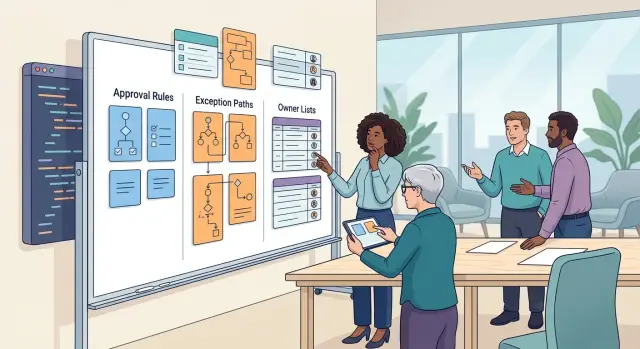
Table of Contents
Why this slows teams down
Fast-changing policy and slow release cycles do not work well together. When a team updates approval thresholds, exception handling, or ownership rules every week, code turns into a bottleneck.
A small policy edit rarely stays small once it enters engineering. Someone writes a ticket, an engineer finds the rule, changes tests, waits for review, and ships it with the next release. That is a lot of motion for a change that might be as simple as "refunds over $500 now need finance approval" or "this customer tier can get a manual exception."
The bigger problem is priority. These tiny edits compete with real product work. Engineers stop building features because they are busy changing approval paths, updating who owns a queue, or adding another exception for a special case. Over a month, those interruptions eat a surprising amount of time.
Support teams feel the pain first. A customer asks for something that should be easy, but the system only allows the default path. Support cannot approve the exception, and operations cannot change the rule on their own, so everyone waits for engineering. The customer sees delay. The team sees more internal messages, more manual work, and more frustration.
This also creates a strange ownership problem. The business owns the policy, but engineering controls the only place where the policy lives. That means engineers become editors for decisions they did not make and often should not own.
Teams then start building workarounds. Someone tracks approvals in a spreadsheet. Someone else handles edge cases in chat. Another person keeps a private note with the latest ownership table because the product still reflects last month's structure. Now the system says one thing, and the team does another.
That gap is why many teams end up moving business rules in operations instead of leaving them buried in feature code. If policy changes faster than software, the release process becomes the wrong tool for day-to-day decisions.
Oleg has seen this pattern in both startups and larger companies: once weekly policy edits start landing in the product backlog, feature delivery gets crowded out by admin work dressed up as engineering.
What belongs in operations
Many business rules in operations follow the same pattern: the workflow stays, but the policy changes. When that happens, the changing part should sit with the people who run the process each day, not inside feature code.
Approval limits are a clear example. A company may allow support to approve refunds up to $100 in one market, while another region needs finance review above $50 because of local risk or compliance. The product flow does not need a rewrite for that. Operations can own the limits in a simple table or settings layer, and the app can read them.
This also applies to exception path management. Most teams have normal paths and messy paths. A return may go straight through for a standard customer, but a disputed charge, a reseller account, or a launch-week complaint may need manual review. Those exceptions change fast. Ops can add them, remove them, and document who handles them without waiting for a sprint.
Ownership tables belong here too. If one queue goes to support, another goes to finance, and enterprise accounts go to an account team, that routing should not live in hardcoded logic. Team structures shift. People go on leave. Volumes spike in one segment and fall in another. Ops can keep ownership tables current far faster than engineers can ship code changes.
Escalation contacts and response windows are another strong fit. If no one answers within 20 minutes, the rule should point to the next person or team. If weekends need a different contact, ops should update that directly. The software can enforce the timing, but people details should stay outside feature work.
Temporary rules almost always belong with operations. Audits, product launches, migrations, and incident cleanup often create short-lived policies. You may need an extra approval step for two weeks, or a special queue for one account type during a rollout. When policy changes and software moves slower, that rule should be easy to edit and easy to remove.
A simple test helps:
- If the rule changes monthly, ops should probably own it.
- If a manager can explain and update it without an engineer, move it out of code.
- If the rule has an expiry date, keep it close to the team running the process.
That split makes approval workflow design much cleaner. Engineers build the path once. Ops adjusts the moving parts as the business changes.
What should stay in code
Some teams hear "business rules in operations" and swing too far. If a rule protects money, data, or uptime, keep it in code so the product applies it the same way every time.
Security checks are the clearest example. Access control should not depend on a spreadsheet, a Slack message, or someone remembering who can do what. The app should decide who can view payroll, export customer data, change billing details, or approve a high-risk action.
Data validation also belongs in code. If an order needs a shipping address, a tax field, or a signed date, the product should block incomplete records at the moment someone enters them. Operations can own the policy, but the app should enforce the basics.
Pricing logic with fixed math should stay put too. If the formula is stable, code it once and test it well. A good rule of thumb: if two people using the same inputs should always get the same total, the app should calculate it, not a document or a manual step.
Audit logs should never rely on human discipline. When someone changes a limit, edits a contract term, or approves a refund, the product should record who did it, when they did it, and what changed. Manual notes go missing. Automatic history does not.
Hard limits that protect uptime belong in code even when they annoy people. File size caps, rate limits, timeout ceilings, retry rules, and job concurrency limits stop one bad request from slowing everyone else down. Teams often want exceptions here, but one rushed workaround can turn into an outage.
A rule usually belongs in code when it meets one of these tests:
- It must run the same way every time
- It protects security, billing, or service availability
- It needs a reliable change history
- A mistake would create legal, financial, or support risk
Take refund approvals as a simple example. Operations can change who reviews edge cases this month. Code should still enforce who can issue the payment, require the needed fields, record the action, and reject requests that break hard limits.
How to move rules out of feature work
Start with the rules that keep changing. If a team tweaks an approval limit, exception path, or owner every few weeks, developers should not reopen the same feature each time. That is usually a sign the rule belongs in operations, not in code.
A good filter is change frequency. Review the last six to twelve months of tickets, chat threads, and meeting notes. If a rule changed more than once a quarter, put it on a shortlist. These are often policy decisions, not software decisions.
Next, give each rule one owner. Not a group, not "ops and product," and not whoever notices the problem first. One person should answer basic questions, approve edits, and check whether the rule still makes sense. Shared ownership sounds polite, but it often leaves old rules sitting around for months.
Then move the rule into a plain table. Keep it boring. A spreadsheet, an admin panel, or a small internal form is enough for many teams. Each row should answer five things: when the rule applies, what action should happen, who owns it, what the fallback is, and when the team last changed it.
For example, a refund rule might say that orders under a set amount go to support, higher amounts go to finance, and repeat abuse cases go to a manager. That does not need a code release every time finance changes the threshold or switches the approver.
Operations also needs a clear update process. Decide who can edit the table, who reviews the change, when it takes effect, and how people hear about it. If the process takes ten approvals, people will bypass it and ask engineering to hardcode the rule again.
Finally, keep a small change log and review results. Check whether approval time dropped, whether exceptions became easier to handle, and whether people used the latest rule. This is where business rules in operations becomes practical. The table is not just a document. It becomes the source the team trusts, and code can stay focused on the parts that should stay stable.
A simple example with refund approvals
Picture a store that usually approves refunds up to $100 without manager input. One day, a customer asks for $180 back after a delayed shipment. The request is outside the normal limit, but the refund flow itself does not need a new feature.
Support opens the case and checks three things: the amount, the customer's country, and how old the account is. Those checks are business rules in operations. They change more often than the code that records a refund, notifies billing, and updates the order status.
Now add a busy holiday week. Shipping delays spike, support volume jumps, and operations decides to raise the refund threshold to $200 for a short period in a few countries. That choice belongs in an operations rule table or policy document, where the team can update it the same day.
Engineers should keep the refund flow the same. The system still collects the request, shows the same fields, writes the same audit trail, and sends the same approval event when a case needs review. No release, retest, or emergency patch is needed just because the temporary limit changed.
That split matters more than it sounds. If the dollar cap lived in code, a small policy change would turn into a ticket, a code review, QA time, and a deployment window. By the time the update shipped, the holiday spike might already be over.
Exceptions still need human review. If the amount is above the temporary cap, the account is only a few days old, or the country falls outside the current rule, support sends the case to a manager. Managers can review those exceptions in one batch at the end of the week and decide whether the temporary threshold worked or created too much risk.
This setup keeps each team in the right job. Support follows the latest policy. Operations adjusts limits when conditions change. Managers judge edge cases. Engineers protect the core refund flow so it stays stable, predictable, and easy to maintain.
How to keep ownership tables useful
An ownership table only works if people trust it enough to use it during a real decision. If the table is vague, old, or too broad, teams stop checking it and go back to asking around in chat.
Use plain names that match how people talk every day. "Finance" beats "Revenue Operations Group," and a real backup owner beats "TBD." When someone is out for a week, nobody should guess who can approve the action.
Temporary coverage needs an end date. If Alex owns vendor approval while Priya is on leave, write both names and add the dates. That small detail prevents a common mess: temporary owners quietly becoming permanent because nobody cleaned up the table later.
Keep each row tied to one business action. Do not group five actions under one line like "customer issues" or "billing matters." Split them into clear items such as "issue a refund over $500," "approve a contract change," or "waive a late fee." One row, one action, one owner. That makes business rules in operations much easier to follow.
A short table beats a complete but bloated one. Rows that nobody uses create noise, and noise makes the table feel unreliable. If a rule has not come up in months, ask whether it still belongs there or whether the business dropped it without telling anyone.
A few signs tell you the table is drifting:
- people ask the same ownership question more than once a week
- temporary owners stay listed with no end date
- one row covers several unrelated actions
- former teams or job titles still appear
Org changes break ownership tables faster than most teams expect. A reorg, a new manager, or a split team can make half the rows wrong overnight. Review the table after those changes, not at the end of the quarter. Ten minutes right after the change usually saves hours of confusion later.
One more habit helps: let one person keep the table clean, but do not make that person the owner of every decision in it. Editing the table and owning the action are different jobs. When teams separate those two, the table stays current and decisions move faster.
Mistakes that create churn
Teams create churn when they treat every policy question like a product change. A small rule gets buried in code, then nobody feels safe changing it without a release.
One common mistake is coding every edge case. That feels tidy at first, but it ages badly. The fifth exception rarely looks like the first, and soon a simple approval flow depends on old assumptions, one-off conditions, and special handling that only one engineer understands.
Another problem starts outside the product. A manager answers one exception in chat, support writes a note in a doc, and operations updates a spreadsheet later. Now the rule exists in three places, and none of them match for long. People stop trusting the system because the "real" answer depends on who replies first.
Ownership causes a lot of churn too. If two teams can change the same approval threshold, queue rule, or escalation path, they will drift apart. One group adjusts the process to cut response time. Another group changes it to reduce risk. Both choices may make sense on their own, but together they create rework, arguments, and surprise exceptions.
Fallback ownership is another place where good intentions fail. Exceptions always show up: a manager is on leave, a region has no assigned reviewer, a customer issue lands between teams. If nobody owns the fallback path, the work stalls. Support then invents workarounds just to keep things moving.
Policy changes can also move costs from one team to another. A tighter approval rule may look harmless on paper, but support may suddenly handle 40 extra tickets a week. That is why business rules in operations need a quick reality check before anyone updates them.
A few warning signs show up early:
- engineers ship code for routine policy edits
- support keeps asking who can approve exceptions
- two teams give different answers to the same case
- requests sit idle when the main owner is unavailable
A simple test helps. Ask, "If this rule changes next month, who updates it, and who feels the extra work the same day?" If the answer is unclear, churn is already building.
Quick checks before a rule change
A rule change should feel like editing a policy, not shipping a feature. If one small approval tweak needs engineering time, a release slot, and a nervous wait for deployment, the rule is still living in the wrong place.
A short review catches most bad changes before they reach customers. It also keeps business rules in operations practical instead of turning them into another hidden code layer.
Use five quick checks.
- Ask whether operations can change the rule without a deploy. If the answer is no, teams will bundle small policy edits into product work, and that usually creates delay.
- Ask whether support can explain the path in under a minute. If the flow needs a diagram and a long Slack thread, it is too tangled for daily use.
- Ask whether a manager can see who approved an exception. Names, timestamps, and the reason should be easy to find. If they are buried in logs, people will argue about what happened.
- Ask whether someone tested one bad input and one rare case. Normal cases are easy. Trouble starts with a refund just above the limit, a missing document, or a customer that falls between two categories.
- Ask whether you can roll the change back the same day. If rollback needs code changes, database edits, or late-night help from engineers, the rule is risky.
A refund policy shows why this matters. Say operations raises the manual review threshold from $500 to $750. Before saving that change, support should know which refunds still need review, managers should see who approved exceptions, and the team should test one broken request and one odd but valid case. If any of that is unclear, the new threshold is not ready.
These checks take about ten minutes. They save a lot more than ten minutes later. When a rule passes all five, it is usually clear enough to run, explain, audit, test, and undo without drama.
What to do next
Start with a rule that changes often enough to annoy people. A refund approval limit, a discount exception, or a handoff between teams is usually a better first target than a rare edge case. If the same request triggers Slack messages, manual checks, and small code edits every few weeks, that rule is ready to leave feature work.
Keep the first move small. Do not redesign the whole system at once. Move one threshold and one owner table into an operational process that non-engineers can review and update without asking for a deploy.
A simple first pass usually looks like this:
- Pick one approval flow that changed at least twice in the last quarter.
- Move one amount, limit, or condition out of code and into a rule your team can edit.
- Move one ownership table so everyone knows who approves, who steps in, and who resolves exceptions.
- Run it for two weeks and track where people still get stuck.
After those two weeks, look for friction instead of perfection. Did support stop asking engineers for tiny edits? Did finance or ops update the rule faster? Did anyone get confused about who owns an exception? Small answers matter more than elegant diagrams.
This is also where many teams learn whether they actually want business rules in operations or whether they just renamed code and made it harder to trace. If people cannot find the rule, cannot tell who owns it, or cannot see when it changed, fix that before you move anything else.
If policy and code keep mixing, an outside review can save time. Oleg Sotnikov works with startups and small companies on operational design, product architecture, and AI-first development setups. A practical review of one messy approval workflow can show what should stay in code, what should move into operations, and what process you need before you automate more.
Set the process first. Then automate the parts that already make sense on paper.


