Log business events before model calls in lean teams
Lean teams should log business events before model calls so they can explain AI failures, trace user impact, and fix broken flows faster.
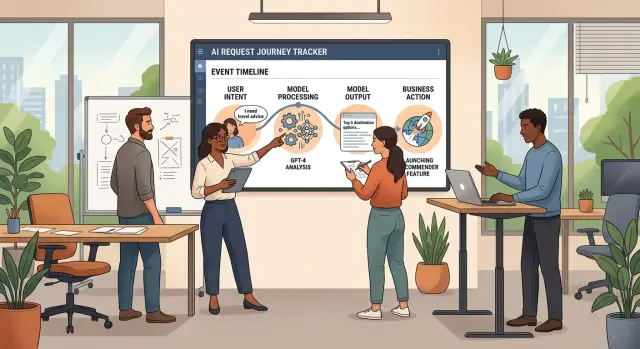
Table of Contents
Why failures feel random
Most AI failures do not look random because the model is mysterious. They look random because the logs start too late.
By the time someone opens an incident, the record often begins with a timeout, invalid JSON, an empty field, or a rejected API call. That tells you where the system broke. It does not tell you what the user was trying to do.
That missing context changes the whole investigation. A parse error tells you the model returned the wrong shape. It does not tell you whether the user was submitting a refund, rewriting a support reply, or updating an order that had already changed twice.
Even a full prompt and response pair is often not enough. The real story lives in the business state around the call: who the user was, which screen they were on, what they clicked, what draft already existed, and what other systems changed right after.
Imagine a small SaaS team handling a support complaint. A user says, "Your AI changed the wrong customer note and then failed." The logs show one model response and a database error. Support still has to figure out whether the user was editing a draft or a live record, whether the app had already saved part of the change, whether another service rejected the update, and whether this was the first try or a retry after a slow response.
Without that timeline, the team repeats the same ritual every time. One person searches old chat history. Another reruns the prompt locally. Support asks the customer for screenshots. A bug that should take 10 minutes to explain eats half a day.
That is why it helps to log business events before model calls. A short event like "user requested refund explanation for invoice 1842" is often more useful than a giant prompt dump. It gives support a plain record of intent, and it gives engineers a starting point that matches the real workflow.
The same goes for what happens after the call. If the model suggested a change, did the app save it, reject it, or send it to review? A failure rarely lives inside the model alone. It usually shows up where the answer meets product rules, billing rules, or permissions.
When those events are missing, every incident feels new. When they are present, the failure stops looking mysterious. You can read the trail in simple words: what the user tried to do, what the system knew then, and what changed next.
What to capture before the call
A model reply is much easier to judge when you know what the app was trying to do before the prompt left your system. If you only store the prompt and response, support teams start guessing, and every bad answer starts to look the same.
Start with the user's goal in plain words. "Customer wants to change a delivery date" tells a clear story. A raw button name like submit_flow_17 does not. One short sentence gives everyone the same context, even if they never saw the screen where the request began.
Then record the user state that shaped the request. That often includes the page or step they were on, their plan or account type, language, recent actions, and any facts your app already knew, such as "invoice overdue" or "refund already reviewed once." These details explain why the same prompt can lead to different results for two people.
You should also record what the app expected to happen next. Maybe the system should draft an email, mark a ticket for human review, update a field, or stop and ask for confirmation. When the result does not match that expected action, debugging gets much faster.
For most lean teams, a small set of fields is enough:
- a short intent sentence written for humans
- the user state that affected the request
- the expected action after the model reply
- request ID, user ID, and account ID
- exact time, timezone, and app version
Those IDs matter more than they seem. A support agent may search by account. An engineer may search by request ID. Someone else may only have a user record from a billing note or complaint. If one of those IDs is missing, the trail often breaks.
Time and version data save real time during incidents. If a bug started right after a mobile release, a prompt update, or a backend deploy, you can spot that pattern in minutes instead of reading scattered logs for hours.
Why timing matters
If you wait until after the model call to log the story, you lose the part that explains the failure. A timeout, bad output, or API error then looks like a random break instead of a failed attempt to do something specific for a real user.
The event should exist before you send the prompt. The model call is only one step in a longer action. The useful record starts when the user clicks, types, confirms, or triggers a workflow.
Small teams feel this problem fast. When one person handles product, support, and engineering, nobody has time to reconstruct a broken path from scattered traces. A before-the-call event gives you a clean starting point in plain language: what the user wanted, what state the app saw, and what the system expected to do next.
Write first, call second
Say a customer asks to cancel a subscription and get a final invoice. Your app sends that request to a model to classify the intent and draft the next step. If you only log after the model replies, a failed call leaves you with almost nothing. You know the API errored, but you do not know what the customer asked for, which account state mattered, or whether the app was about to create a billing task.
If you write the business event first, the failure stays readable. Support can see that the user wanted cancellation, the account had one open invoice, and the model never returned a usable reply. That removes a lot of guesswork.
This is the point where logging business events before model calls stops being a nice idea and becomes a practical habit. The order changes the quality of every later investigation.
Keep the original state intact
Do not overwrite the first event with a cleaned-up version after the call. Keep the original state exactly as it was when the request started. If the model fails, you still have the untouched input, the user state at that moment, and the exact intent your app tried to process.
Later, you can compare that intent with the model reply. Sometimes the model answers the wrong question. Sometimes it gives a reasonable answer for stale account data. Those are different problems, and timing helps you separate them.
The same rule helps with follow-up jobs. After the response, your system may queue a task, send an email, update a CRM record, or open a ticket. When those steps attach to the earlier event, you can trace what ran and what stopped. Without that order, teams often blame the model for bugs that happened two steps later.
Good timing turns a messy incident into a short timeline people can read without opening five dashboards.
A simple event flow
Lean teams need one thing from their logs: a story they can read quickly. When each user action leaves a trail that explains what the user wanted, what the app knew, what the model did, and what changed after that, support and engineering stop arguing about where the bug lives.
Start the story when the user does something real. That might be clicking "Generate reply," asking for a refund, or uploading a file for review. Create one request ID at that moment and carry it through the full request.
That request ID should connect user intent tracking, the model call, and every downstream update. If the model fails, or a later step breaks, your team can follow one thread instead of searching across three systems.
A simple flow is usually enough:
request_started- who acted, where they acted, and the request IDcontext_saved- the intent, important inputs, and current business statemodel_called- which model ran, which prompt version you used, and whychange_recorded- each update the app made after the responserequest_finished- success, partial success, or error in plain language
The second event does most of the heavy lifting. Before the model sees anything, log the business facts that explain the situation. If a user asks the app to rewrite an invoice email, save the invoice status, customer type, language, and whether the message is a first draft or a follow-up. That gives you context without forcing someone to read raw payloads.
When you send the model call, keep the same request ID. Add enough detail for debugging, but keep it readable. A short note like "draft reply for overdue invoice" helps more than a huge blob of internal data.
After the model responds, log each change in the order your app makes it. Maybe it creates a draft, updates a CRM record, and sends a notification. If the CRM update fails after the draft is saved, the log should show that exact sequence.
Finish with a final event that says what happened in normal language. "Draft created, but email send failed because the customer record had no address" is much better than process_error.
This does not need to be a big system. For many teams, five clean events per request are enough to explain a messy failure in a couple of minutes.
A support case that finally makes sense
A user opens support chat and says, "Your app approved my refund, but nothing happened." On the surface, it sounds like the model made something up. Support sees a friendly AI reply, a failed payment update, and a confused customer.
The situation gets much clearer when the team records business events before the call. The useful part is not the prompt alone. It is the business state that existed a second before the model answered.
In this case, the user asked the app to refund the last order. The app already knew something the model reply did not make obvious: the account had a pending refund hold from an earlier request. That detail lived in the payment system, and it mattered more than the wording in the chat.
What the event trail shows
A clean event trail tells the story in order. First, the system captured the user's intent as "refund last order" with the order ID and account ID. Next, the app recorded the current account state, including the pending refund hold. Only then did it call the model to draft a response.
The model wrote a polite approval message: "I can help with that. Your refund is being processed." That sounded fine to the user, but it did not change the payment rules.
A moment later, the payment job checked the account and rejected the refund change. The reason was simple. A refund was already in progress, so the system would not open another one.
Now support does not have to guess. The events show a clear sequence: the user asked for a refund, the account already had an active hold, the model returned approval-style language, and the payment job blocked the change because the hold was still active.
That sequence explains the mixed signals in plain words. The model was only part of the problem. The app let the model speak before it tied the message to the actual business state.
With this trail, support can answer clearly: "A refund request was already open on your account, so the payment system blocked a second one." That is far better than saying the system had an error.
The product team gets a clear fix too. They can block approval language when a refund hold exists, or skip the model for that case and return a direct status message. That is the real payoff of business event logging and downstream change tracking. It turns a messy AI issue into a normal product bug with a clear cause.
Mistakes that make logs hard to use
Teams often think they have enough data because they saved the prompt and the model reply. They do not. That record shows what the model saw and said, but not what the person tried to do.
If a user clicked "approve invoice" and the assistant answered with a summary instead, the prompt alone will not tell you whether the user lacked permission, the invoice was already closed, or another job changed the record a second earlier. The missing business context usually holds the answer.
Raw dumps create a different problem. Engineers may tolerate a huge JSON blob, but support staff and founders usually will not read it. When every event is just payload after payload, people stop using the logs because they cannot scan them quickly.
Plain labels help a lot. invoice_approval_requested is easier to read than a wall of fields. trial_expired_blocked_checkout is better than trying to infer the reason from a nested object. Keep the raw data if you need it, but put a short human label next to it.
Teams also damage their own history when they rename events every sprint. One release says chat_start, the next says conversation_opened, then someone ships session_init. Now the same action looks like three different trends. Pick one event name, keep it stable, and add a version number when the fields change.
State is another common gap. Many failures only make sense when you log the conditions around the action. A blocked account, an expired plan, a missing document, or a locked record can matter more than the model output. If you skip that state, people blame the model for a business rule.
Background work makes this worse. One user action can trigger a model call, a retry, a queue job, and a follow-up update five minutes later. If you do not tie those steps to the same request ID or workflow ID, the trail falls apart. Support sees four unrelated errors. The user saw one click.
Downstream changes belong in the trail too. If the system created a draft, sent an email, changed a status, or wrote to a CRM record, log that in plain language. Otherwise you know the model answered, but you still do not know what the product actually did.
A few simple rules prevent most of this:
- log user intent before the model call
- use short event names people can read
- keep names stable across releases
- record the business state that can block the action
- connect retries and background jobs to the original request
If you skip that context and the call fails or gets retried, the missing story is gone. Then every incident turns into guesswork.
A quick check before you ship
Run one broken request through staging and read the event trail like a support agent would. You want a clear story, quickly. If someone needs three tabs, a database query, and a Slack message to understand what happened, the logging is still too thin.
A good review should answer five simple questions:
- Do the event names sound like business actions a human can read at a glance?
- Can you tell what the user tried to do in their own terms, not your internal step names?
- Can you see the state before the model ran, such as account status, draft version, permissions, or selected language?
- Can you follow every change after the reply, including writes, queued jobs, sent messages, and skipped actions?
- Can one teammate explain the failed request out loud in under a minute?
Names matter more than many teams expect. plan_change_requested tells support something useful. pre_llm_step_2 does not. When the timeline reads like a short incident report instead of a machine dump, people actually use it.
The user story should stay visible through the full request. "User tried to regenerate an invoice with old tax settings" is better than "prompt built and sent." That short line gives debugging real context. It also cuts down the usual blame game, where support blames the model and engineering blames bad input.
The state before the call is where many teams cut corners. Log the facts that shape the answer: which record the user opened, which version existed, which limits applied, and whether a human edited anything first. Without that snapshot, the model reply floats in space.
Then trace what happened after the reply. Did your app save the draft? Did it reject the output? Did it send a notification anyway? Downstream change tracking turns a vague complaint into a simple sentence.
A useful failure note sounds like this: "The user asked to rewrite contract draft 3. The workspace was in read only mode. The model returned a valid summary, but the save step failed, so the app showed stale text and skipped the email." One person can read that and know what to fix first.
If your team cannot produce that sentence from one event trail, do not ship yet.
What to do next
Pick one flow that already creates support work and add logging there first. A refund request, a lead qualification step, or an account change is enough. If you only do one thing this week, record business events before model calls in that single flow and see what changes.
Keep the first version small. Most teams do better with five clear events they trust than twenty they never read. A basic set might be intent_received, user_state_checked, model_requested, action_applied, and human_review_needed.
Those names matter. If product, engineering, and support all use the same event names, a failure stops sounding mysterious. Support can say, "The system got the user's intent, but no action was applied," and everyone knows where to look.
Use the same pattern every time you name an event. Pick a format like verb_noun and stick to it. That small habit cuts confusion fast, especially when different people read logs under pressure.
Then look at three recent failures. Not ten. Just three. Read the timeline for each one and ask two questions: what did the user want, and what changed after the model call? Any missing answer points to a gap in your schema.
You will probably notice that some fields feel tempting but do not help much in real incidents. Remove them. Keep the fields your team reads every day, such as user ID, request intent, model name, decision outcome, and downstream action. If nobody uses a field during support or debugging, it is noise.
It also helps to make the logs readable outside engineering. If a support person cannot explain the event trail to a customer in one minute, the wording is too technical. Plain language wins here.
One realistic example: a user asks to change a subscription plan, the model misreads the request, and billing updates the wrong tier. With clean business events, your team can see the original intent, the user state before the call, the model output, and the billing change that followed. That short trail can save a long argument.
If you need a second pair of eyes, Oleg Sotnikov at oleg.is works with startups and small teams on AI-first workflows, product architecture, infrastructure, and Fractional CTO support. An outside review can help when the team knows something is missing but cannot see the gap clearly.
The best next move is small and practical: instrument one risky flow, review a few failures, trim the schema, and make sure support can read it without a translator. Once that works, copy the pattern to the next flow.
Frequently Asked Questions
Why isn't logging the prompt and response enough?
Because a prompt and reply only show what the model saw and said. They do not show what the user wanted, which record they touched, or what your app planned to do next.
When you log intent and business state first, the failure reads like a real story instead of a random API problem.
What should I capture before the model call?
Start with one short intent sentence in plain English, then save the user state that shaped the request. Include things like account status, record ID, screen or step, language, and what your app expected to do after the reply.
Also save request ID, user ID, account ID, time, timezone, and app version. Those fields make it much easier to trace one broken request across systems.
When should I create the event?
Write the business event before you send the prompt. If the call times out or fails, you still keep the original reason for the request and the state your app saw at that moment.
If you wait until after the reply, you lose the part that explains the failure.
Do we need a big event system from day one?
No. Most lean teams do fine with a small, consistent flow. Five events per request often cover enough ground to explain what happened.
A simple pattern works well: request started, context saved, model called, change recorded, and request finished.
What makes an event name useful?
Use names that sound like business actions, not internal plumbing. plan_change_requested tells a clear story. pre_llm_step_2 does not.
Keep the names stable across releases. If the fields change, add a version instead of renaming the same action every sprint.
Do I really need request ID, user ID, and account ID?
Yes. One ID rarely solves every search. Support may search by account, engineering may search by request ID, and billing may only have a user record.
When you save all of them on the same trail, people can find the request from different starting points without guessing.
Should I overwrite the first event after the model returns?
Keep the first event exactly as it was when the request started. Do not replace it with a cleaned-up version after the model replies.
That original snapshot helps you compare intent, state, reply, and later actions. Without it, stale data and wrong assumptions hide inside the timeline.
What counts as a downstream change?
Track anything your app does after the reply. That includes saved drafts, status changes, queued jobs, CRM writes, notifications, emails, and review steps.
Those changes show whether the problem came from the model or from rules and systems that ran after it.
How can I tell if our logs are actually usable?
Open one failed request and read the trail like a support person would. If someone needs several tools and side messages to explain the issue, the logs are still too thin.
A good trail lets one teammate explain the failure out loud in under a minute using plain words.
What's the best first step for a small team?
Pick one flow that already causes support work, such as refunds, plan changes, or document updates. Add a small set of clear events there first, then review a few real failures and trim the fields nobody uses.
That approach gives you something practical fast. Once the pattern works, copy it to the next risky flow.


