Refactor by business capability in small reviewable slices
Refactor by business capability with small, reviewable slices that move code from controllers and services into clear domains your team can follow.
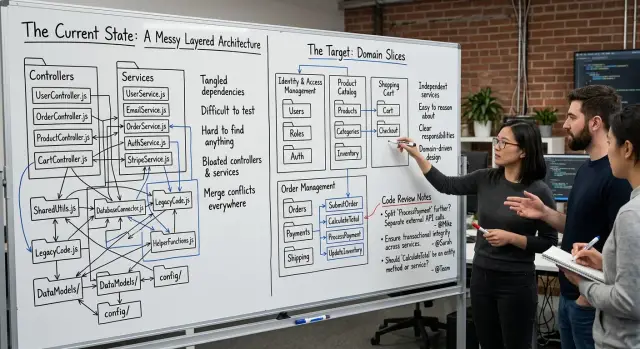
Table of Contents
Why this code layout starts to fight the team
A codebase split into controllers, services, repositories, and helpers can look tidy on day one. The trouble starts when one business rule changes. That rule is rarely in one place.
Part of it sits in a controller because someone needed to reject a bad request. Another part lives in a service because that is where the amount gets calculated. A third piece hides in a job that updates accounting or sends an email. After a few months, nobody can point to one clear home for "refund rules." A small policy change turns into a search.
That is why teams keep editing the same logic in three places. Folder names like services and controllers tell you which layer runs the code. They do not tell you where refund policy, plan upgrades, or account holds live. That helps the framework more than it helps the team.
Reviews get messy for the same reason. One change touches many layers, so the reviewer has to rebuild the business rule by jumping between files. A pull request that should read like one clear story gets scattered. People miss edge cases because the full rule never shows up in one place.
You can usually see the cost in day-to-day work:
- developers ask who owns a feature and get three different answers
- bug fixes take longer because people search before they change anything
- reviewers spend time on wiring and naming instead of the rule itself
- duplicate checks creep in because nobody fully trusts the old ones
Vague ownership makes this worse. If billing lives partly in controllers, partly in services, and partly in shared utilities, nobody feels fully responsible for it. When a bug appears, the team passes it around. When a new developer joins, they learn architecture labels first and the business second.
Refactoring by business capability fixes that. The point is not prettier folders. The point is to make one area of the product feel like one area again. When the code matches the business, changes get smaller, reviews get easier, and ownership gets clearer.
What a business capability looks like
A business capability is a chunk of work the company can name in plain language. Billing is one. Refunds are another. Password reset, order shipment, and trial signup count too. People outside engineering can usually name these things without seeing the code.
That is the test. If a product manager, founder, or support person says, "We need to change how refunds work," your team should know where to look. If the answer is "partly in controllers, partly in services, plus some helpers," the code follows layer names instead of business behavior.
A controller describes where code sits. A service often turns into a bucket for whatever did not fit anywhere else. A business capability describes why the code exists. That difference matters. When the code is grouped by capability, the slice is easier to review and easier to own.
Good names sound like actions or clear areas of work: create-invoice, collect-payment, issue-refund, cancel-subscription, send-renewal-reminder. Those names tell the reader what the code does before they open a file. Folders called controllers, services, or utils do not.
Refunds make a good first example because most teams already understand the flow. Someone asks for money back, the system checks the order, records the decision, updates payment state, and sends a message. That path may touch an API handler, business rules, database code, and notifications, but it still belongs to one capability.
The slice does not need every refund case on day one. Start with one path, such as "refund a paid order within 30 days." Give that path a home named refunds or issue-refund, then move the code that supports it. Leave unrelated billing work where it is for now.
If a name sounds like a team task instead of a user outcome, rewrite it. "Payment service" is vague. "Issue refund" is concrete. Teams review concrete changes faster, and they waste less time arguing about where new code should go.
Choose the first slice you can finish
Start with a flow your team touches all the time. If people change it every sprint, they already know where the pain is. That makes the first move easier to review, and it gives you a fair test of whether this approach helps.
Good first slices have a clear start and end. A user submits a refund request. An order gets approved. A password reset token is checked and consumed. You want one path with obvious inputs, obvious outputs, and a small set of rules in the middle.
The best first move is rarely the biggest problem area. Teams often point at billing, auth, or the oldest shared module and say, "we should fix that first." That usually slows everything down. Big modules hide too many side effects, too many owners, and too many old assumptions.
Pick something smaller that still matters. A good candidate is one flow triggered by one request or one job from start to finish. You should be able to name its input, result, and rule in one sentence. You should also be able to move it in one pull request, or maybe two small ones, without rewriting half the app. Existing tests should cover the behavior even if the structure changes.
If the work spills across half the codebase, shrink it again. "Refunds" might be too broad for a first pass. "Create refund request" is better. "Payments" is too big. "Mark invoice as paid after confirmed webhook" is much safer.
Set the finish line before anyone writes code. Keep it boring: move one flow out of controllers and services, keep behavior the same, keep the old entry point working, and add or update tests. If you cannot describe done in two sentences, the slice is still too large.
Teams that do this well leave themselves an exit. They move one slice, learn where the hidden dependencies are, and stop. That is enough. The goal is not to clean the whole system in one push. The goal is to finish one piece the team can review without fatigue.
Move one slice step by step
When one user flow lives across controllers, services, models, and random helpers, a full rewrite turns into a mess fast. Pick one flow, trace every file it touches, and move only that path. The smaller the slice, the easier it is to review. It is also easier to undo if something breaks.
A simple sequence works well:
- Start with a file map for the flow. Find the controller action, the service methods it calls, the model code that reads or writes data, and any helper functions for validation, formatting, or permissions. Write the list down so you do not miss the small pieces.
- Create one folder or module for that capability. Name it after the work the business cares about, not the framework layer.
order-cancellationis clearer thanservicesorutils. - Move the business logic before you chase naming cleanup. Put the rules into the new module first, then let the old controller or service call into it. That keeps behavior changes separate from file moves.
- Leave the old entry points in place for a while, but make them thin. A controller should read the request, call the domain code, and return the response. If an old service still exists, let it act as a wrapper and nothing more.
- Stop after each move and run tests. If the flow has weak coverage, add one or two focused tests before you keep going. Several small refactor slices beat one giant pull request every time.
That order matters. If you rename files, move folders, rewrite imports, and change logic in one pass, reviewers have to guess what actually changed. When you move the logic first, they can check behavior with less noise.
That is how teams move from controllers to domains without freezing delivery. Each merge leaves the code a little easier to follow, and nobody has to approve a risky rewrite all at once.
A simple refund example
A refund flow is a good first slice because most teams already know where it starts and what "done" looks like. A customer asks for money back, the app checks a few rules, talks to a payment provider, records what happened, and returns a result.
In many codebases, the controller does far too much. It parses the request, checks whether the order exists, verifies the refund window, blocks double refunds, calls the payment API, writes an audit log, and triggers an email.
That can work for a while. Then one small policy change turns into a messy review because the business rule sits next to HTTP details.
Before the move
Imagine a RefundController with 120 lines. Near the top it reads JSON input. In the middle it decides that only paid orders from the last 30 days can be refunded. At the bottom it calls the payment gateway and sends a confirmation email.
Now the reviewer has to answer several different questions in one file. Did the controller parse input safely? Is the 30-day rule still correct? Should the audit record happen before or after the gateway call? What happens if the order was already refunded?
Those are different concerns, but the code mixes them together. That is where this kind of refactor starts to pay off.
After the move
Keep the controller boring. It should read the request, call the refund domain, and shape the HTTP response.
The refund domain can hold the parts that actually define refunds: validation, refund eligibility, payment reversal, audit entry, and follow-up actions such as email. You do not need a giant rewrite. Move one piece at a time until the refund flow reads like one business action instead of five scattered ones.
Review gets simpler when the flow has one home. Instead of broad comments like "this controller knows too much," reviewers can ask direct questions about the rule itself. Should the domain allow partial refunds? Should duplicate requests return the same result? Do you record a failed gateway attempt?
That shift matters. The code starts to match how people talk about the product. When someone asks, "How do refunds work?" the answer lives in the refund domain, not across three folders.
Review rules that keep the slice small
A refactor gets into trouble when one pull request asks the reviewer to judge five things at once. Move code, change names, fix tests, and clean old files in the same diff, and the business change gets buried. One reviewer should be able to read the pull request in about 15 to 20 minutes and explain what changed for users.
That usually means one slice equals one business path. If you are moving refund logic into a refund domain, keep the pull request about that path only. If the work pulls in billing, email, and reporting changes, stop and cut the rest into follow-up tasks.
Small architecture changes need a hard boundary. Touch only the files that support the slice. If you need to interact with older controller or service code, add a thin adapter and move on. Do not use the slice as an excuse to rename half the project.
Rename only inside the area you are already changing. Local names that match the business concept help the reviewer. Broad renames across unrelated folders do the opposite. They fill the diff with noise and make real behavior changes harder to spot.
Pull request notes should stay short and concrete. Name the business flow. Say what stayed the same. Say how you checked it. Mention any cleanup you postponed. A note like "Refund creation now lives in the refund domain. API behavior stays the same. I tested full and partial refunds. Old billing naming stays for a separate task" is enough.
Keep cleanup separate, even when the old code annoys you. Dead helpers, broad file renames, comment cleanup, and formatting sweeps can wait. A second small pull request is easier to review than one giant "while I was here" change.
Teams move faster when they protect review time this way. The code improves, and nobody has to decode a 2,000-line diff just to approve one refund change.
Mistakes that slow the refactor down
Most refactors drag for the same reason: the team turns a clear move into a broad cleanup project. If you start with refunds, keep the branch about refunds. Once the branch touches billing, account settings, helper files, and test rewrites all at once, nobody can review it with confidence.
The usual problem is not the code move itself. It is scope. A small slice gives reviewers a fair shot at understanding the change, testing it, and merging it fast.
The failure patterns are predictable. One branch grows until it touches half the app. Reviewers stop reading carefully, comments pile up, and the work sits open for days. Or the team renames folders before it moves logic. That creates noise first and clarity later, which is backward. Move the behavior, prove it still works, then clean up the names.
Another common mistake is mixing feature work into the same pull request. A bug fix, a UI tweak, and an architecture move together make blame hard to trace when something breaks. The code may still ship, but the team loses any clean view of what changed.
Naming causes trouble too. New folders called core, common, or shared-domain hide ownership instead of making it clear. A refund rule should live with refunds, not in a bucket that means everything and nothing.
The worst version is when old rules stay in the old place while new rules show up in the new place. For a while the app still works, so the team ignores it. A month later, one tax rule changes in one file but not the other, and now you have two versions of the truth.
Small teams feel this faster. A founder, lead engineer, or Fractional CTO often reviews code between other jobs, so a huge architecture branch loses momentum fast. In practice, short branches win because they answer one simple question: did we move this capability safely or not?
If a slice starts to sprawl, cut it down. Drop the rename. Move the feature work out. Delete the duplicate rule. A boring pull request that reviewers can finish in 15 minutes beats an impressive one that never lands.
Checks before you merge
Before you merge a slice, open the diff and ask a plain question: if someone joins the team next week, can they find this business flow in under a minute?
A slice is ready when the answer is yes. The code for one flow should live in one place that matches how people talk about the product. If the refund rules sit in a refund domain, but half the logic still hides in controllers, helpers, and old service files, the slice is not finished yet.
A quick review usually has a few clear signs:
- the controller stays thin and calls one domain action
- the business rules sit together in one obvious folder or module
- tests cover the rules, not only HTTP status codes
- a reviewer can describe the whole change in one sentence
- the team knows who will answer questions about this slice after merge
The test coverage check matters more than many teams think. If you only test the endpoint, you can still move broken rules into a nicer folder. For a refund flow, test the decision itself: who can refund, when a refund is blocked, and how the system handles a partial refund. Those tests make the move safer, and they keep future edits honest.
The one-sentence rule is a good filter for scope. If a reviewer says, "This moves refund decision logic into billing/refunds and leaves the controller as a thin entry point," the slice is probably small enough. If they need a full paragraph, the diff is doing too much.
Ownership is the last check, and teams skip it all the time. After merge, someone should know that this area is theirs to keep clean. That does not mean one person guards it forever. It means the team can name who will review the next change, fix naming drift, and stop logic from leaking back into random files.
If these checks pass, merge it. If two or three fail, cut the slice again before the branch gets older and harder to review.
What to do with the rest of the codebase
Once one slice works in production, do not stop to design the perfect end state. Pick the next slice from places where the team already feels pain. Recent bugs, repeated edits, and flows that break during releases are better guides than a big architecture diagram.
A good queue is simple: look at the last month of fixes and the files people keep changing together. If refunds keep pulling changes from controllers, services, and shared helpers, that flow should move sooner than a quiet part of the app. That keeps the work practical instead of turning it into a side project.
Set one naming rule for new modules and keep it boring. Names like refunds, billing, or onboarding are easy to remember. Keep related rules, data access, and tests inside that module. Do not create new generic folders like misc, common, or utils unless the team agrees on a narrow reason.
Track progress by business flow, not by folder count. Saying "refunds and chargebacks now live together" tells the team much more than saying "we moved 18 files." The first view tells you what got easier to change, test, and review.
This also helps product and engineering stay on the same page. A product manager can understand that checkout is partly migrated and account deletion still mixes with old code. Nobody outside the team cares how many service files disappeared.
Keep the pace steady. One or two slices per sprint is often enough if each slice removes real friction. Teams get into trouble when they try to rename everything at once and leave half-finished boundaries all over the codebase.
If the team wants a second opinion before it starts the next slice, Oleg Sotnikov at oleg.is works as a Fractional CTO and startup advisor. He helps small and medium businesses with product architecture, infrastructure, and practical AI-first development, and that kind of early review can save weeks of rework later.
Frequently Asked Questions
What does refactoring by business capability mean?
It means you group code by the business action it handles, like refunds or cancel-subscription, instead of by framework layers like controllers or services. That puts the rules for one flow in one place, so people can find and review them faster.
How do I choose the first slice?
Start with one flow your team changes often and can finish in one small pull request. A path like "create refund request" works better than a big area like billing or auth.
Should I rewrite the whole module at once?
No. Keep the old entry point, move one flow behind it, and leave behavior the same. Small moves land faster and give the team a clean way to back out if needed.
How thin should a controller be?
Let the controller read input, call one domain action, and return the response. Move refund rules, payment checks, and follow-up steps out of the controller until it stops making business decisions.
What tests should I add before moving code?
Test the rule itself, not only the endpoint. For refunds, cover who can refund, when the system blocks a refund, and what happens on partial or duplicate requests.
How big should the pull request be?
Keep it small enough that one reviewer can read it in about 15 to 20 minutes and explain the user-facing change in one sentence. If the diff touches many flows, split it.
What folder names work best?
Use names people already say in product and support conversations, like refunds, onboarding, or chargebacks. Skip vague buckets like core, shared-domain, or utils because they hide ownership.
How do I avoid ending up with duplicate rules?
Pick one home for the rule and remove the old copy as soon as the new path works. If both versions stay around, the team will edit one and forget the other.
What should I do with shared helpers and utils?
Leave them alone unless they support the slice you are moving right now. If a helper only exists for refunds, move it into the refund module; if not, keep the refactor focused and deal with it later.
How do I know a slice is ready to merge?
Merge when a new teammate could find that flow in under a minute, the controller stays thin, the business rules sit together, and the tests cover the decision logic. If you still need to hunt across old files, cut the slice again first.


