Blue-green vs rolling deploys for a small SaaS team
Blue-green vs rolling deploys: compare rollback speed, server cost, and team habits so your small SaaS can ship updates every week.
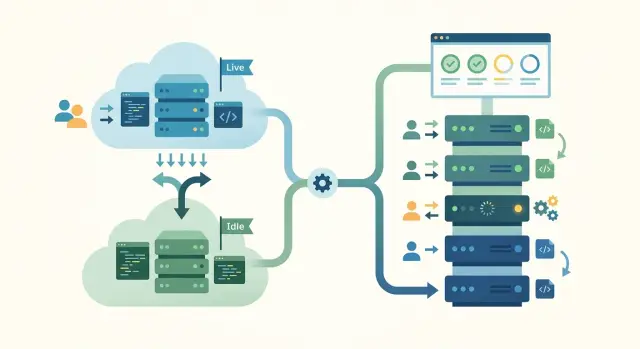
Table of Contents
Why this choice gets hard fast
A deploy pattern can look clean on paper and still turn every Friday into a mess. Small SaaS teams ship often, switch roles all day, and rarely have spare hours for cleanup. If the release method needs more care than the team can give, weekly deploys turn into delays, nervous rollouts, and late-night fixes.
The tradeoff is simple. Blue-green usually gives you a faster way back when a release fails, but it costs more because you keep two environments ready. Rolling deploys usually cost less because you update the live fleet in place, but rollback takes longer and demands steadier operations when something goes wrong.
Most teams do not struggle because they picked the wrong pattern in theory. They struggle because they picked one that assumes more servers, more automation, or more release discipline than they actually have. A team of three can run a solid weekly release process. That same team can get stuck if every deploy needs manual checks across two full stacks, database timing, cache resets, and traffic switches.
You can tell the method is working against the team when releases wait for the one person who knows the safe sequence, rollback feels different every time, and people delay small fixes because deploy day feels risky.
Fancy is not the goal. Repeatable is. If your team can ship, watch the system, and reverse course without drama, the choice is good enough. If the process looks impressive but people avoid using it, it is too heavy for this stage.
That is why blue-green vs rolling deploys is not really a style choice. It is an operating choice. Pick the one your team can run on a normal Wednesday, even when one person is busy and a customer bug needs a quick fix.
What blue-green deploys look like
A blue-green setup keeps two separate copies of your app ready to run. One copy, often called blue, handles real users. The other, green, stays updated and tested in the background.
When the team finishes a release, it puts the new version on green first. Then it checks that pages load, logins work, payments go through, and alerts stay quiet. Users still stay on blue during that check, so the team is not testing in public.
The release itself is a traffic switch. Instead of updating servers one by one, the team points incoming traffic from blue to green. If the release is healthy, users move to the new version almost at once.
That switch is the main reason teams like blue-green deploys. If the new version fails right after launch, the team can send traffic back to blue just as fast. In many cases, rollback takes minutes or less because the old version is still running and ready.
For a small SaaS team, this often feels calm and easy to reason about. You always know which environment is live and which one is next. That clarity helps when a release gets tense.
The downside is cost and upkeep. You keep extra capacity ready even when it is not serving live traffic. That can mean double app servers, duplicate background workers, and more work to keep both environments in sync.
Blue-green works best when the team can afford that spare capacity and has enough discipline to treat both environments the same. If blue and green drift apart, the clean switch stops being clean.
What rolling deploys look like
Rolling deploys are usually lighter to run. Instead of building a full second environment and switching everyone over at once, the team updates the app in small batches.
A typical rollout removes one or two servers from rotation, deploys the new version there, runs health checks, sends traffic back, and repeats the cycle until the whole fleet runs the new code.
That pattern keeps most of the service online the whole time. For a small SaaS, that often feels practical because you do not need twice the infrastructure sitting there for release day.
The tradeoff is that old and new versions often run side by side for a while. One user might hit a server with the new release while another lands on a server that still runs the previous version. If both versions read the same database, queue, cache, and session data, they need to behave well together.
This is where rolling deploys ask for more care than they first appear to. A database change that only the new code understands can break requests that still reach old servers. Background jobs can run into the same problem if one worker writes data in a format another worker does not expect.
Rollback usually takes longer too. You cannot just flip traffic back in one move unless you kept a clean fallback ready. Most teams need to deploy the older version back across the fleet, batch by batch, while watching logs and error rates.
Rolling deploys work well when releases stay small, compatibility rules stay strict, and the team can monitor each step without rushing.
Rollback speed when something breaks
Rollback speed is usually the first real gap teams notice. With blue-green, the old version still runs next to the new one. If the release goes bad, the team sends traffic back to the old stack and cuts the damage fast.
Rolling deploys move in smaller steps, but rollback is slower. The team updates servers one by one, so a bad release can leave part of the fleet on the new version and part on the old one. Users may see mixed behavior until the team pushes the previous build back across every instance.
A bad database change can undo the advantage of either method. Imagine the new release writes account data in a new format and background jobs start using it right away. Even if blue-green sends traffic back in 30 seconds, the old app may fail when it reads that changed data. The app is back, but the system is not fully healthy.
That is why fast app rollback does not always mean full recovery. The team may still need to fix data, replay jobs, clear queues, or restore a snapshot. Rolling deploys face the same problem, and they add another one: old and new code may touch the same database at the same time while the rollout is still in progress.
Before release day, teams should prepare a few basics. Database changes should stay compatible with both app versions for a while. Rollback should follow a tested checklist, not a vague plan. Risky paths should sit behind feature flags when possible. Backups or point-in-time recovery should cover the data that matters most. Health checks should cover the app, the jobs, and the database, not just one piece of the stack.
For a team that ships every week, the safer pattern is usually the one it has practiced under stress. A rollback plan on paper feels fine. A rollback drill tells the truth.
What each option costs to run
Weekly cost usually settles this faster than theory does. A small SaaS can live with a slightly slower deploy. It usually cannot afford a release pattern that quietly doubles the bill.
Blue-green costs more because you keep two app environments ready to serve traffic. That means extra compute for web servers, API instances, and often background workers too. If the second environment stays warm all week, you pay for that safety all week.
The database changes the math. Most small teams do not run two full production databases for blue-green because that gets expensive fast and creates sync problems. They usually share one database and switch only the app layer. That saves money, but it also means schema changes need more care. Caches, queues, and search indexes sit in the same gray area. You can share them, but shared state makes releases less clean.
Rolling deploys are usually cheaper because they reuse the current cluster or server group. You still need spare room so new instances can start before old ones stop, but that overhead is often much smaller than a full duplicate setup.
The real bill grows in four places: app compute during deploy windows, stateful services like databases and caches, monitoring for two release paths, and engineer time spent on checks, cleanup, and failed releases.
That last cost gets missed all the time. Blue-green sounds simple, but someone still has to keep both environments in sync, test the traffic switch, and make sure background jobs do not point at the wrong place. Rolling sounds cheaper, but it needs stricter health checks, better readiness probes, and enough observability to catch a bad release before half the fleet runs it.
Small teams usually spend less with rolling if the app is mostly stateless and they already have some spare capacity. Blue-green makes sense when downtime costs more than extra infrastructure and the team can keep two environments tidy every week.
The team habits behind each pattern
Blue-green asks the team to be neat and decisive. Rolling asks the team to be patient and observant. The better choice is often the one your team can repeat every week without stress.
Blue-green works best when releases follow the same script every time. Health checks should be strict and boring. Cutover rules should be written in advance, including who approves the switch. The team should test the switch itself, not just the code, and keep config, secrets, and database steps aligned across both environments.
Rolling deploys need a different kind of discipline. The team ships in smaller steps and watches the system while old and new versions run together. That means releasing in small batches, making new code work with the previous version for a while, watching errors and latency after each batch, pausing quickly when numbers move the wrong way, and keeping database changes backward compatible until the rollout finishes.
Weak release discipline breaks both patterns. A messy blue-green switch can send all users to a bad version in one move. A sloppy rolling deploy can leave half the fleet on one version, half on another, and nobody knows which bug belongs where.
Match the pattern to the team you already have. If your team writes clear runbooks, uses solid health checks, and can keep two environments aligned, blue-green often feels calm. If your team ships often, keeps changes small, and watches production with care, rolling often fits better.
For a small SaaS, consistency matters more than theory. The best release pattern is the one your team can practice until it feels routine.
How to choose a pattern step by step
Start with the cost of a bad release. If a bug can stop logins, payments, or data writes, slow rollback hurts fast. In that case, blue-green usually makes more sense because the team can switch traffic back in seconds.
If most release problems are minor and the app keeps working, rolling is often enough. It asks less from your budget, and many small teams can run it every week without much drama.
Next, check compatibility. Can the old version and the new version run at the same time for a few minutes without breaking sessions, jobs, or database writes? If the answer is no, blue-green is safer. If the answer is yes, rolling becomes much easier to live with.
Budget matters too. Blue-green often means spare capacity, duplicate app instances, and a bit more monitoring during the switch. Rolling needs less extra infrastructure, which is why lean teams often pick it.
A simple rule set helps. Choose blue-green if rollback speed matters more than server cost. Choose rolling if your app handles mixed versions cleanly. Keep one default pattern for most releases. Then make one exception rule for high-risk changes such as auth or billing updates.
That last part matters more than people expect. Teams get into trouble when they debate the release method every week. Pick one default, then keep exceptions rare and obvious.
Write the release flow down and keep it short. Include the order of checks, who watches errors, when to stop, and the exact rollback step. A repeatable process beats a clever one.
A simple example from a small SaaS
Picture a five-person team running a billing product for other software companies. They have one web app, one API, and a few background jobs that send invoices, retry failed payments, and sync account data. Most releases look small on paper. In practice, one bad deploy can block checkout or flood support with billing complaints within minutes.
Blue-green makes sense when even short downtime hurts revenue. The team brings up the new version next to the current one, checks sign-in, plan changes, and invoice creation, then switches traffic. If the new API starts failing payment requests, they switch back fast. That can turn a nasty release into a short blip instead of a long incident.
This matters even more for jobs. In billing systems, duplicate work gets expensive quickly. A rolling release can leave old and new job workers running at the same time, which raises the chance of double emails, repeated retries, or odd invoice states. Blue-green does not remove every risk, but it gives the team a cleaner cutover.
Rolling can still fit some teams better. If money is tight, running two full environments for each deploy may feel wasteful. Rolling also works well when the app handles mixed versions cleanly. That usually means the API keeps backward compatibility, database changes are additive, and job workers can ignore fields they do not know yet.
This team would probably pick blue-green for the web app and API because failed renewals cost more than a short period of extra infrastructure. If the budget got tighter and they proved their jobs were safe across mixed versions, rolling would be a fair next choice. For this kind of billing product, safer cutovers usually win.
Mistakes that make releases rough
Teams often compare rollback speed and forget the database. Code can roll back in minutes. A schema change that dropped a column or rewrote live data can turn a fast rollback into a long repair job. If you are weighing blue-green vs rolling deploys, make database changes that let the old and new app versions run side by side for a short time.
Another common mistake is changing two things at once. A team adopts a new deploy pattern and ships its biggest feature of the month on the same day. When errors show up, nobody knows what caused them. Start with a boring release. Push one small change through the new process first, then try larger releases later.
Teams also get burned when they skip health checks and stop points. A rollout should not keep moving if login fails, payments time out, or background jobs start backing up. Even a small team needs a short pause where someone checks the basics before traffic shifts or the rollout continues.
The warning signs usually show up early:
- One person still runs every deploy by hand.
- The team cannot stop a bad rollout in under five minutes.
- Database migrations have no safe fallback.
- Nobody checks errors, queues, or sign-in after release.
Weekly releases sound great, but the promise falls apart if one person still copies commands into production every Friday night. That setup does not scale, and it wears people down fast. A simpler pattern run the same way every week usually beats a fancier one the team cannot maintain.
Most rough releases come from ambition, not tools. Too much change, too little checking, and no clear stop button create the mess.
Quick checks before you decide
Most small teams do not struggle with the deploy pattern itself. They struggle with the gap between the pattern and their weekly habits. When you compare blue-green vs rolling deploys, judge them by the first 10 minutes after release, not by the clean diagram on a whiteboard.
Check whether your app can live with mixed versions for a short time. If one server runs new code while another still runs old code, sessions, jobs, and database changes still need to behave.
Check your spare capacity. Blue-green usually means enough room to run two environments during the switch. That may be fine for a funded product and painful for a lean team.
Check how fast someone can spot trouble. You need more than logs sitting somewhere. A person should see error spikes, slow pages, or failed background work within minutes.
Check who can roll back and when. If a release goes bad, one person should know the trigger, the command, and how long to wait before acting. Teams lose time when they debate while customers keep clicking.
Check whether the whole release process fits on one page. A teammate should be able to read it, follow it, and know who approves the switch. If the process lives in memory or scattered chat messages, it will fail under stress.
If most answers are yes, either option can work. If two or three answers feel shaky, choose the simpler pattern and tighten the process first. Small teams usually do better with a boring release they can repeat every week than with a clever one nobody fully trusts.
What to do next
Pick one release pattern and keep it for the next month. If your team keeps revisiting the same blue-green vs rolling deploys debate before every release, stop for a while. A steady routine beats a smarter plan that nobody follows when time is tight.
Use the next four releases as a test period. Write the deploy steps in plain language. Run one practice rollback before the next customer-facing update. After each deploy, record release time, rollback time, and incident count. Then review the numbers after a month and decide whether to keep the pattern or change it.
Those numbers tell you more than opinions do. If a rolling deploy saves money but rollback takes 25 minutes, that cost is real. If blue-green gives fast rollback but your team keeps missing config changes between the two environments, that cost is real too.
Keep the review short. Ask what slowed the release down, what made rollback harder than expected, and what single fix would make next week calmer. One small change each release is enough.
If the team feels stuck, an outside review can help. Oleg Sotnikov, at oleg.is, works with startups and small businesses as a Fractional CTO and advisor, including release process, infrastructure, and practical AI-first engineering workflows. That kind of help works best when it stays narrow: one deploy path, one rollback path, and a short list of fixes the team can finish this month.
Frequently Asked Questions
What is the main difference between blue-green and rolling deploys?
Blue-green runs two app environments and switches traffic in one move. Rolling updates the live fleet in batches, so old and new versions run together for a while.
Which one rolls back faster?
Blue-green usually gives you a faster way back because the old version still runs and you can send traffic back right away. Rolling rollback takes longer because you have to push the older build across the fleet again.
Which option costs less each week?
Rolling usually costs less because you reuse the current servers and keep only a little spare room for the rollout. Blue-green costs more since you keep a second app environment ready for release day.
When should a small SaaS team choose blue-green?
Pick blue-green when a bad release can stop sign-ins, payments, or data writes and you need a quick way back. It also fits teams that keep two environments in sync without a lot of manual steps.
When does rolling make more sense?
Rolling fits lean teams that ship small changes often and keep old and new code compatible for a short time. It works well when the app is mostly stateless and the team watches errors, latency, and job queues during each batch.
Do I need two production databases for blue-green?
Usually no. Most small teams share one production database and duplicate only the app layer to keep costs down. That saves money, but your schema changes need to work with both app versions for a while.
Why do database changes break deploys so often?
Code rolls back faster than data. If new code writes data that old code cannot read, a traffic switch or server rollback will not fix the whole problem, and your team may still need cleanup or a restore.
Can old and new versions run at the same time?
They can, but only if you plan for it. Sessions, queues, jobs, and database writes need to behave the same way across both versions until the rollout ends.
What should go into our rollback plan?
Keep it short and specific. Write down what triggers rollback, the exact command or traffic switch, who watches errors, and what checks prove the app, jobs, and database look healthy again.
Should we use the same deploy pattern for every release?
Use one default pattern for most releases so the team stops debating every week. Then make a small exception rule for risky changes like auth or billing updates.


