Bare metal with cloud burst capacity for launch spikes
Learn how bare metal with cloud burst capacity keeps steady workloads cheap while giving you extra room for launches, promos, and traffic spikes.
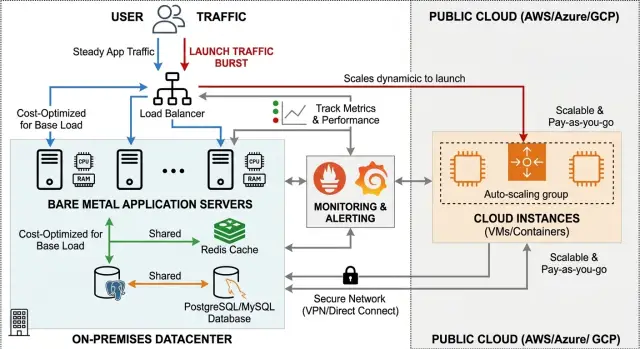
Table of Contents
What problem this setup solves
Most products do not run at peak demand every day. Traffic stays fairly normal most of the month, then jumps when a launch, campaign, or feature release lands. If you size your infrastructure for that peak and pay for it all year, quiet days get expensive fast.
A hybrid setup fixes that by splitting the job in two. You keep the always-on workload on bare metal, where monthly cost is easier to predict and usually lower for steady compute. Then you rent extra cloud capacity only when demand rises.
This works well for startups and growing software teams with a familiar pattern: stable traffic most weeks, then a few hours or days of much heavier load. If you buy enough infrastructure for the biggest possible spike, you pay for idle capacity most of the time. If you stay too lean, you risk slow pages, timeouts, or failed checkouts right when attention is highest.
Pure cloud avoids one kind of waste, but the tradeoff often shows up in the monthly bill. Pure bare metal avoids high cloud rates, but it gives you less room when a release does better than expected. A hybrid setup sits in the middle. It gives you a cheaper base for daily traffic and extra headroom when you need it.
You usually know this model fits when daily traffic stays within a normal range, spikes are short and tied to launches, the app can scale across more servers without a major rewrite, and the team wants lower fixed cost without gambling on downtime.
A simple example makes the math clear. If your product needs 12 cores every day but 60 cores for 36 hours after a launch, paying peak pricing all month makes little sense. Keep the 12-core base cheap and rent the extra 48 only when they actually help.
What should stay on bare metal
The steady part of your system belongs on bare metal. If a service runs all day, every day, and its load changes slowly, fixed-cost machines are usually the cheaper and simpler place for it.
Start with predictable app servers. These handle normal daily traffic, not the extra wave that arrives during a launch. If your product needs four app servers in a normal week, keep those four on hardware you control and treat the cloud as overflow, not as the default home.
Databases often fit this model too. When reads and writes stay within a known range, bare metal gives you stable performance and fewer billing surprises. It also gives your team direct control over storage, backups, and tuning. Databases do not enjoy sudden moves, so they usually belong on the most stable part of the stack.
Background jobs can stay there as well if they do not spike much. Nightly syncs, report generation, email batching, and cleanup tasks often follow a schedule you already understand. If a queue grows slowly and clears at a normal pace, there is no reason to push it into more expensive burst capacity.
Keep latency-sensitive services close to the database. If an API calls the database several times during a request, distance matters. A few extra milliseconds between cloud instances and your main data store can turn a fast page into a sluggish one.
A good rule is simple: keep the baseline on bare metal and burst only the parts you can add or remove without touching the core data path. That keeps launch traffic from turning your whole system into a moving target.
What should burst to the cloud
Start with web and API servers that do not keep user state on the machine. If one instance disappears, another can take the same traffic. That makes them the safest first target when a launch sends visits 5x or 10x above normal.
Queue workers are another easy win. Image processing, email sending, imports, report generation, and AI jobs can run in the cloud for an hour, clear a backlog, and shut down again. A simple trigger is often enough: when queue age or backlog passes your limit, add cloud workers. If jobs take two minutes each and the queue suddenly jumps to 4,000, the launch can feel broken long before users see an error page.
Preview environments also fit well in the burst layer during larger releases. Product and QA teams may need many temporary environments for a few days, not for the whole month. Paying for them only during release week is usually cheaper than leaving extra bare metal half idle.
A practical first burst layer usually includes web and API replicas behind a load balancer, workers for short background jobs, temporary preview environments, and batch jobs that can stop and restart safely.
Keep stateful services out of the first wave unless you have already planned the data flow. Databases, file storage, session stores, and message brokers can fail in subtle ways when latency changes or writes land in the wrong place. Many teams get better results by keeping the database on bare metal and bursting only the app layer and worker pool.
That approach is common in lean operations because it keeps the hard-to-move core stable while elastic traffic moves outward. Oleg Sotnikov uses the same logic in Fractional CTO work at oleg.is: keep the core steady, then scale the stateless edge when demand jumps.
Set the traffic rules step by step
Use one public entry point, such as nginx, Cloudflare, or a load balancer, and keep all routing logic there. If requests can enter through different paths, failover gets messy fast and the team loses track of where traffic is going.
Normal traffic should go to bare metal by default. That is where the lower base cost comes from. The cloud side should wait in the background until demand rises, not burn money all day.
Define overflow with hard numbers before launch day. Good triggers include CPU staying above 70 to 80 percent for several minutes, request queue time crossing a set limit, or response time moving past your target. Pick two or three signals and keep them simple enough that everyone on the team can read them at a glance.
When those limits hit, route only the extra traffic to the cloud. New requests can go there first while work already in progress stays where it started. That reduces session problems and makes rollback easier if something looks off.
Do not wait for the spike to begin before creating cloud capacity. Bring those instances up ahead of the public launch window, run health checks, warm caches, and confirm they can reach the database, file storage, and workers they need. A cold burst path often fails at exactly the wrong moment.
Then test the whole thing. Simulate traffic above your expected peak and watch whether routing changes at the threshold you set. After that, drop the load and make sure the system returns to bare metal cleanly, without stuck sessions, long queues, or half-finished jobs.
One more rule helps on the way back down: fail back slowly. If you move from 30 percent cloud traffic to zero in one jump, you can create a second spike on your bare metal servers. Shift traffic down in small steps and keep watching queue time and response time.
Teams often make this too clever. In practice, a few clear thresholds and one tested entry point beat fancy traffic policies nobody trusts under pressure.
Keep data, files, and sessions under control
A hybrid setup falls apart when each side keeps its own state. App servers can live on bare metal and burst to the cloud, but sessions, uploads, and writes need one shared plan.
Start with sessions. If a user logs in on a bare metal node and the next request lands on a cloud node, that session still needs to exist. Put sessions in shared Redis or another central store. Do not keep them in local memory or on local disk unless you want random logouts during a traffic spike.
Uploads need the same treatment. If one node stores files on its own disk, the rest of the fleet cannot see them. Put user uploads, generated reports, and media in object storage so every node reads the same files. This also makes scale-out much simpler because new cloud nodes do not need a file sync job before they can work.
Database writes need extra care. Keep one source of truth for writes whenever possible. That usually means one primary database, often on the bare metal side if that is where your steady load lives. You can add replicas near the cloud nodes for reads, but sending writes to multiple places is a big jump in complexity.
Replica lag is where many launch plans break. If cloud nodes start serving traffic before replicas catch up, users see stale data or broken actions. Set a simple rule: cloud nodes can serve read-heavy requests only after replica lag stays below your limit for a few minutes.
If the cloud side loses database access
Decide this before launch day. Most teams should choose one clear fallback: stop sending traffic to cloud nodes, serve only cached or read-only pages, disable write actions like login or checkout, or show a temporary error and route users back to bare metal. Pick one plan and rehearse it.
A small example helps. If you run three bare metal app servers all month and add four cloud nodes for a launch, all seven should use the same Redis, the same object storage, and the same database rules. It is less clever, but it breaks less often.
Watch the right numbers during a spike
During a launch, CPU can look fine while users still wait six or eight seconds for a page. Response time tells you what people actually feel, so it should drive your first scaling decisions more than raw server load.
Watch the slow end of the curve, not just the average. If signup, login, checkout, or your main API calls get slow for the busiest 5 percent of requests, users already notice.
Queue depth catches trouble early too. Background jobs often fall behind before the main app crashes. Emails, imports, image processing, webhooks, and reports can stack up quietly and then spill into customer-facing delays.
Keep the launch dashboard small enough to scan in a few seconds. Response time for busy pages and endpoints, error rate, failed health checks, queue depth, oldest job age, slow database queries, connection count, and current cloud spend are usually enough.
Set a hard cloud budget before the event starts. Pick a ceiling you can accept for the day, then decide what happens when spend reaches 50 percent, 75 percent, and 100 percent. Teams that skip this step often keep adding instances because traffic feels urgent, then regret it the next morning.
Database alerts matter as much as app alerts. A few slow queries can make both bare metal and cloud nodes look weak even when the real problem is one table, one missing index, or one noisy report job. Health checks matter too. If cloud nodes come up but fail checks, autoscaling only adds cost.
Write down who can turn burst capacity on and who turns it off. One owner and one backup is enough. Keep the rule clear: when response time or queue age crosses the limit, that person adds capacity. When traffic settles and queues clear, the same person scales it back down.
If you already use Grafana, Prometheus, or Sentry, keep one launch view open. A short dashboard with clear limits works better than twenty charts nobody can read under stress.
A simple launch-day example
A small SaaS team gets steady traffic every day, so they run the product on two bare metal app servers. That covers normal use at a lower monthly cost, and the servers stay busy enough to justify the spend.
A week before launch, the team learns that a press mention may hit on the same morning as a product update. They do not move everything to the cloud. That would cost more than they need. Instead, they burst only the noisy front-door traffic.
They add a few cloud web nodes and point them at the pages that usually spike first: signup, login, docs, and marketing pages. This keeps the core product stable. New visitors can read docs, create accounts, and sign in without overloading the two main servers that handle normal customer activity.
The main database stays on bare metal. The team wants one source of truth, predictable storage cost, and no rushed database move right before launch. They share cache and session data across both environments, so a user who signs up on a cloud node can still land inside the app without a broken login state.
On launch morning, traffic jumps fast. The cloud nodes absorb the wave of fresh visitors while the bare metal servers keep serving existing customers and app requests. If one cloud node gets hot, the team starts another. That takes minutes, not a hardware order.
By evening, the spike fades. The team scales the extra cloud nodes back down and returns to the cheap base setup they use every day. They pay for extra room only during the short window that needs it.
For launches, newsletter sends, and press hits, this is often enough. You keep the steady workload on hardware you already control and rent temporary headroom only when attention shows up.
Mistakes that raise cost or break failover
Many teams build a cheap base on bare metal, then ruin the savings with one bad assumption: they can move every part of the app to the cloud at the last minute. That rarely works. The biggest failures usually start with stateful parts of the system.
The database is the first trap. If you burst app servers but not the database, cloud instances may spend half their time waiting on a slow cross-network connection. If you burst the database too, you need a real replication plan, tested under load, with clear rules for writes, lag, and recovery. "We will sync it somehow" is not a plan.
User sessions cause the same kind of trouble. If each bare metal server keeps sessions in local memory, a user can log in on one machine and look broken on another. Put sessions in shared storage, a database, or a cache both sides can reach. Otherwise failover turns into random logouts and lost carts.
Another common mistake is waiting for total failure before shifting traffic. By then, queues are already full, timeouts spread, and the cloud side starts cold under stress. Move traffic earlier, when latency climbs, error rates rise, or CPU stays pinned for several minutes. Early movement is cheaper than a rescue.
Cost surprises usually hide in outbound bandwidth, storage for snapshots and logs, cross-zone or cross-region replication traffic, and cloud instances left running after the spike ends.
Teams also skip the only test that really counts: a failover drill. They test backups, they test scaling, and they assume the rest will work. Then launch day arrives, DNS rules lag, health checks flap, and one missing firewall rule blocks the whole path.
Run one rehearsal that looks boring and one that looks ugly. In the boring test, shift a small share of traffic and watch response times. In the ugly test, kill a node, force session movement, and confirm that the app still works for logged-in users. If that test feels uncomfortable, it is doing its job.
Quick checks before launch day
This setup works best when the handoff feels boring. Before launch, make sure all public traffic enters through one stable endpoint. One hostname and one front door keep routing simple when you need to add cloud nodes fast.
Do not assume health checks are fine because they worked last week. Shut down one app node on purpose and watch what the load balancer does. It should stop sending traffic there quickly without overreacting to a short CPU spike or a slow warmup.
Test sessions and files for real. Log in on a bare metal node, then force the next request to land on a cloud node. Upload a file, refresh, and open it again from the other side. If login breaks or files disappear, fix that before any marketing push starts.
Keep the runbook in one place and keep it short enough to use when people are tired. It should say when to burst, how much cloud spend you allow, who can approve it, and exactly how to roll back if extra capacity causes trouble.
A final ownership rule matters more than teams expect. One named person should make launch-day calls. That does not mean one person does all the work. It means one person decides when to burst, when to stop spending, and when to roll back. Without that owner, teams lose time in chat while the error rate climbs.
If you want one last check, simulate a small spike an hour before launch. Push a little more traffic, watch the first cloud nodes join, and make sure users stay logged in while requests move between environments. That short rehearsal often catches the one issue that would have ruined the day.
Next steps for a lean hybrid setup
Most teams should start smaller than they think. Pick one service with steady traffic and clear spikes, such as the web tier, a background worker, or a signup API. Leave the database and everything else alone until the first burst works cleanly.
A lean plan wins when it stays boring to run. If your team cannot explain the failover steps in one minute, the setup is too complex. That matters most at 2 a.m. when someone needs to act fast.
Start by writing down five decisions: which service moves to cloud nodes first, what number starts the burst, what number ends it, how traffic returns after the spike, and what daily or launch-week cost limit you will not cross.
Then wait for one real event. A launch, campaign, or product drop will teach you more than weeks of guessing. Measure when the burst started, how long cloud nodes stayed up, whether users saw slow pages, and how much the extra capacity cost. After the event, adjust your triggers. Most teams set them too early and pay for idle cloud time, or too late and miss the first wave of traffic.
Keep the operating model plain: one dashboard, one alert path, one person on point. A short runbook beats a long design doc every time.
If you want a second opinion before launch, Oleg Sotnikov at oleg.is helps startups and smaller companies with Fractional CTO work, infrastructure planning, and practical cost control. Sometimes a short review is enough to spot waste before you add more servers.
The next move is usually not a full rebuild. It is one controlled burst, measured well, with a setup your team can still trust when everyone is tired.
Frequently Asked Questions
When does a bare metal plus cloud burst setup make sense?
Use it when your product has a steady baseline and short spikes around launches, campaigns, or press mentions. Keep the normal load on bare metal for a lower fixed cost, then rent cloud capacity only for the busy window.
What should stay on bare metal?
Keep the parts that run all day and change slowly on bare metal. That usually means your normal app servers, the main database, and background jobs with predictable load.
What should move to the cloud first during a spike?
Start with stateless web servers, API replicas, and queue workers. They can come up fast, take extra traffic, and shut down cleanly after the spike ends.
Should I move my database to the cloud for launch day?
Usually no. Keep one write path and one source of truth unless you already tested replication, lag limits, and recovery under load. Most teams get a safer result by leaving the database on bare metal and scaling the app layer first.
How do I handle sessions and file uploads across both environments?
Store sessions in shared Redis or another central store, and put uploads in object storage that every node can reach. If each server keeps its own session or files, users will hit random logouts and missing uploads when traffic shifts.
What metrics should trigger cloud burst capacity?
Watch what users feel first. Response time, queue age, error rate, and failed health checks usually tell you more than CPU alone. Pick simple limits before launch and use the same ones every time.
How early should I start cloud instances before a launch?
Bring cloud nodes up before the public launch window, not after the spike starts. Give them time to pass health checks, warm caches, and confirm database, Redis, and storage access.
How do I move traffic back to bare metal after the spike?
Fail back in small steps. Move traffic down gradually, watch response time and queue age, and shut nodes off only after the load stays normal. A fast cut back can create a second spike on bare metal.
What mistakes usually break failover or raise the bill?
Teams often wait too long to scale, keep sessions on local memory, or ignore cross-network database latency. Cloud bills also jump when people forget bandwidth, logs, snapshots, and idle instances left running after the event.
Can a small team run this without too much complexity?
Yes, if you keep the design plain. Use one entry point, one short runbook, one small dashboard, and one owner for launch-day calls. Start with one service, test it, and leave the rest alone until the first burst works cleanly.


