Backfill jobs without starving live traffic in production
Backfill jobs without starving live traffic by limiting reads, batching writes, setting pause rules, and watching load before users feel it.
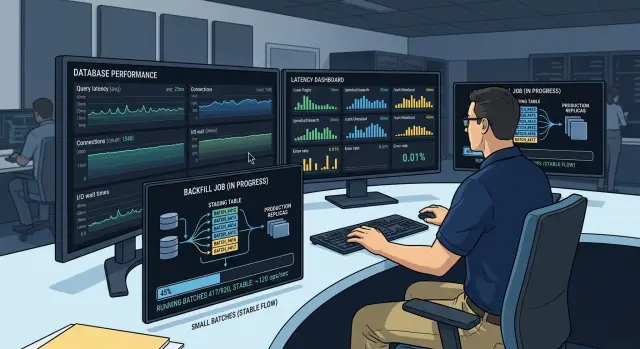
Table of Contents
Why backfills hurt live users
A backfill job looks harmless on paper. It reads old rows, fixes missing fields, and writes the result back. In production, it competes with real users for the same database CPU, disk I/O, memory, and locks.
That competition gets ugly fast. A large scan churns through pages the app rarely touches and pushes frequently used data out of cache. The next customer request has to fetch that hot data from disk again, so response times climb even when the app code did not change.
Writes often hurt more than reads. When a job updates thousands of rows in a burst, it creates lock pressure and extra work for indexes, replicas, and storage. Queries that were quick a minute ago start waiting behind write activity. On systems with replicas, that burst can also raise replication lag, so users read stale data or see screens that do not match their last action.
You do not need a full outage for people to notice. A page that normally loads in 300 ms can drift to 2 or 3 seconds while the backfill runs. Some users hit timeouts. Others retry, which adds even more load. Support hears about "random slowness," but the real cause is a maintenance job.
A simple example makes the problem obvious. Say an app updates old order records during business hours. The job scans millions of rows and writes them back in big chunks. Checkout still works, but product pages slow down, search gets sticky, and recent order status updates arrive late because replicas fall behind.
That is why a safe backfill needs limits from the start. Without them, background work stops being background work.
Find the pressure points first
Backfills rarely fail because of one dramatic crash. More often, they wear down the parts of the system that users touch every minute. If you do not know where that pressure shows up, you will spot the problem only after people start waiting.
Start with the database, but do not stop at CPU. Read-heavy jobs often hurt disk latency and queue depth before CPU looks scary, especially when they scan large tables or read rows in a poor order.
Average response time can hide the damage. Watch p95 and p99 latency on the endpoints that matter most, like login, search, checkout, or the main dashboard. If those slow down, the job is already too expensive, even if the median still looks fine.
Locks need their own view. A cleanup task that updates rows in small bursts can still create lock waits, and long waits can snowball into deadlocks when live requests touch the same records. If you use replicas, watch replication lag too. A backfill that keeps the primary alive but leaves replicas minutes behind still hurts production.
Set stop numbers before you begin
Decide what will make you slow down or pause the job before the first query runs. That saves you from arguing with graphs while the system is already under stress.
Keep the rules simple and specific. Pause if p95 on a user-facing endpoint rises more than 20%, if disk latency stays above its normal range for several minutes, if lock waits or deadlocks start appearing in bursts, if replication lag passes the limit your team accepts, or if request queues keep growing instead of draining.
Use numbers your team already trusts. If your app normally runs at 35% database CPU and 4 ms disk latency, do not wait for a disaster. Pause when the trend breaks, find the hot spot, and adjust the job size or sleep interval before users feel the next wave.
Throttle reads so the app keeps breathing
Most teams guess wrong on reads. They think writes will be the dangerous part, then discover that a few eager workers can make the app feel slow long before the first serious lock shows up.
Start with fewer workers than you think you need. One or two workers is often enough for the first run. Watch app latency, database CPU, and query time for a few minutes, then raise concurrency slowly if the system stays calm.
Full table scans are where many jobs go bad. Read by ID ranges or time windows instead, and use a column the database can seek quickly. A job that processes rows 1 to 5,000 and then 5,001 to 10,000 is much easier to control than one query that asks for everything left.
Keep each read small. A chunk should finish fast enough that canceling, retrying, or pausing stays easy. If one query runs for seconds on a busy table, shrink the chunk until it finishes well under a second.
Only fetch the columns the job needs. Wide selects waste I/O, memory, and network time. If the job needs id, status, and updated_at, ask for those columns and nothing else.
When live latency climbs, slow the job on purpose. Add a short sleep between chunks and let the app catch up. A pause of 100 to 500 ms often helps more than squeezing a few extra rows into each read.
A safe starting point is usually one or two workers, ID-based or time-based chunks, narrow SELECT lists, and a short sleep when p95 latency rises. It looks conservative. In production, conservative usually wins. A backfill that runs for six hours without complaints is better than one that finishes in forty minutes and drags the app down with it.
Batch writes without long locks
Long locks usually come from one mistake: updating too much at once. A backfill that touches 200,000 rows in one transaction can block normal app work, grow replication lag, and make retries slower.
A good batch size is whatever commits in a second or two under normal load. That might be 100 rows or 5,000 rows. Test on production-like data, then start smaller than feels necessary. Small commits release locks quickly, give the database room to serve active requests, and limit the damage if a batch fails.
Sort batches by primary key when you can. The database moves through rows in order instead of jumping around the table, which cuts random disk work and keeps cache behavior steadier. It also makes the job easier to resume because each batch has a clear boundary.
The pattern is simple: read the next primary key range, update only that range, commit right away, and save the last completed ID. That last step matters. If the job stops, you restart after the last commit instead of scanning the whole table again or guessing where to continue. Record progress after every commit, not every few minutes.
Huge transactions look efficient on paper, but they usually waste time during production database cleanup. They hold locks longer, write bigger transaction logs, and make failures more expensive. One bad batch should cost you a few seconds, not an hour.
Picture a cleanup job that fills a new column on an orders table. Updating 50,000 rows at once may freeze parts of the app. Updating 500 rows, committing, and moving to the next ID range feels slower when you watch it, but it finishes with far less user pain.
If a batch starts taking longer than usual, shrink it. If lock waits rise, shrink it again. Fast, boring commits are better than ambitious ones.
Run the job in small steps
A backfill goes sideways when it behaves like one giant run instead of a long series of small, boring moves. Small chunks give you room to measure the job, compare it against live latency, and stop before users feel it.
Start with a sample that feels almost too small. A few thousand rows is often enough to learn how the query behaves in production. If 3,000 rows finish quickly and app latency stays flat, try 6,000 or 10,000. If page loads slow down, database CPU climbs, or lock time stretches, drop back to the last calm setting.
Use a stable order, such as increasing id or created_at. Process one fixed window at a time. Commit that batch, record a checkpoint, pause briefly if the system looks busy, and move to the next window only after the previous one finishes cleanly.
The checkpoint matters more than most teams expect. Save the last safe id, timestamp, or cursor after each successful batch commit. If the job crashes halfway through a chunk, you can restart from the last confirmed spot instead of guessing where to resume. Only write the checkpoint after the database commit. If you do it earlier, you risk skipping rows.
Say you need to fill a missing column for old orders. Run 5,000 orders, check user-facing latency for a few minutes, then decide whether to stay there or increase. If the job gets through 5,000 rows in 12 seconds and customer traffic stays normal, you can raise the chunk size a little. If checkout starts taking 300 ms longer, the batch is already too big.
Steady windows beat one giant push. The safest backfills look dull in the logs: lots of small commits, clear checkpoints, and no drama.
Pause safely when traffic spikes
A backfill should stop before users feel it. If p95 latency jumps, lock waits climb, or replication lag starts to grow, pause the job and let the app recover.
Do not kill workers in the middle of a batch unless you have no other choice. A hard stop can leave half-finished writes, duplicate retries, or confusing gaps in your progress log. A cleaner rule works better: tell workers to stop taking new work, then let each worker finish its current batch and exit.
The pause trigger should be boring and clear. Most teams do well with a few simple thresholds: p95 latency stays above your limit for several minutes, lock waits rise above normal and keep rising, replication lag crosses a level that threatens reads or failover, or error rate climbs while the job is running.
When a worker stops, save a checkpoint right away. Use the last processed id, timestamp, or another stable cursor. Save it outside worker memory so a restart, deploy, or crash does not erase your place.
That checkpoint matters more than people think. If you resume from a rough guess, you either reprocess rows and waste write capacity or skip rows and leave the cleanup incomplete. Neither mistake is fun to find later.
Keep resume behavior simple too. Start again with the same read throttle and batch size you used before the pause. Then watch the graphs for a few minutes before raising limits. If traffic is still spiky, leave the job slow. Finishing one hour later is much cheaper than harming live requests.
Give on-call staff a manual stop switch. It can be a feature flag, a row in a control table, or a small admin command. The point is speed. When production gets noisy, nobody wants to redeploy code just to stop a background job.
A good pause is calm, reversible, and easy to explain.
A simple production example
A team added a new status column to an orders table with 80 million rows. They needed to fill old records so reports and support screens would stay correct, but they could not let the cleanup job slow checkout.
They started with a plain rule: read more slowly than you write. The job fetched 5,000 order IDs at a time, then updated only 500 rows per commit. That kept each transaction short, which meant fewer long locks and less pain for active users.
The reads were light on purpose. The job asked for IDs in order, kept track of the last one it finished, and moved forward in small steps. If the worker stopped, it could restart from the saved ID instead of scanning the whole table again.
The writes were even more careful. After each 500-row commit, the worker waited a moment before taking the next batch. That tiny pause sounds slow, but it gave the app room to handle real customer traffic first.
Traffic changed the schedule. Around lunch, when more users were browsing and paying, the team reduced the job rate. They did not guess. They watched query latency, checkout time, and database load. If those numbers started to climb, the worker slowed down.
During a sale, they paused the backfill completely. Because the job stored its last completed ID after every successful commit, the pause was clean. No half-finished chunk, no confusing rollback plan, and no need to start over.
This ran over several nights. The team never tried to finish everything in one push, and that is why it worked. By the end, all 80 million orders had the new status value, support could filter records correctly, and checkout stayed stable the whole time.
That is what a safe backfill looks like in practice: small reads, smaller writes, real pauses, and patience.
Mistakes that make cleanup jobs painful
Most production pain starts with one bad assumption: "staging handled it, so production will too." That is how teams launch at full speed and learn the hard way that real traffic changes everything. A quiet test database does not have impatient users, replica lag, cache churn, or background jobs fighting for the same rows.
Speed is not the first goal. Control is. A job that finishes in six hours without user impact is better than one that tries to finish in forty minutes and drags the app down for everyone.
One huge transaction is another classic mistake. It looks neat on paper, but it can block normal writes, hold locks too long, and make rollback slow and ugly. Small commits give the database room to breathe and give you a clean place to stop if traffic jumps.
Teams also read far more than they need. They grab whole rows, extra joined tables, and columns the job never uses. That wastes I/O, fills memory, and slows each batch before the write even starts. If the job only needs an id and one source field, read only those.
The database is not the only thing that can choke. Cleanup work often hits replicas, search indexes, caches, queues, and analytics pipelines. A backfill can look fine on the primary while replicas fall minutes behind and search updates pile up. Users still feel that damage, just in a different part of the product.
Resume logic gets skipped more often than teams admit. You usually notice only after a crash, deploy, or manual stop. Test that on purpose. Kill the job during a dry run and see what happens next.
After an interruption, a decent backfill should restart from a known checkpoint, avoid double-writing the same rows, and pause without leaving half-finished work in a bad state. If you cannot stop the job safely, you do not control it. You are just hoping it behaves.
Quick checks before, during, and after
The boring checks matter most. A job that can pause, resume, and prove its progress is usually safer than a fast job that runs blind.
Before you start, confirm the read path uses the right index. If the job scans the whole table, fix that first. Make sure the job has hard limits for batch size, sleep time between batches, max workers, and retry cutoffs. Check that every batch writes a checkpoint you can trust, such as the last processed id or timestamp. Finally, agree on stop rules before the run starts. For example, pause if p95 latency rises above its normal band, replication lag passes your limit, or lock waits stay high for several minutes.
Once the job is live, watch the system like an operator, not a spectator. A backfill can look fine on its own dashboard while users feel the pain somewhere else. Keep an eye on user latency and error rate, replication lag or queue depth, lock waits and deadlocks, rows completed versus the expected pace, and retry volume.
If the job is far behind schedule, do not rush by doubling workers. First ask why. Maybe the index is wrong, writes are too large, or daytime traffic is higher than the test window suggested.
After the job finishes, verify the result before you call it done. Compare source and target row counts, then spot-check real records from different ranges: old rows, recent rows, and awkward edge cases that often break defaults or formatting. Run cleanup scripts in small chunks too, especially if they drop temporary columns, rebuild indexes, or clear helper tables.
Then remove the temporary safety gear. Delete flags that existed only for the backfill, reset worker overrides, and turn off extra logging if you enabled it for the run. If you leave that debris in place, the next incident gets harder to read.
What to do next
A backfill should leave behind more than cleaned data. It should leave a clear runbook that the next person can follow at 2 a.m. without guessing. Write down the batch size, read limits, pause rules, retry behavior, rollback steps, and the signals you watched during the run.
That runbook should become your default template for future cleanup jobs. Teams should not have to invent the safety rules again. Add fixed checkpoints, traffic-based pause thresholds, and a simple rule for who can stop the job and who can restart it.
A short review now can save you from the same problem next month. Check for older jobs that still run with oversized batches. Lower read rates on jobs that compete with user queries. Split large write bursts into smaller commits. Add resume points so a paused job can continue cleanly. Record the safe window when the system has spare capacity.
Look closely at jobs that "usually work." Those are often the ones that cause trouble during a traffic spike because nobody revisited them after the database grew. A batch size that felt small six months ago can be too large now.
If your team wants a second opinion, Oleg Sotnikov at oleg.is reviews job design, expected database load, and rollout plans for startups and small teams. That kind of review is often less about fancy tuning and more about catching one risky assumption early, like a missing checkpoint or a pause rule that depends on someone watching a dashboard all day.
The best result is boring: the backfill finishes, users do not notice, and your team keeps the same playbook for the next job.
Frequently Asked Questions
Why can a backfill slow down live traffic?
Because it fights with live requests for the same database CPU, disk, memory, and locks. Large scans can also push hot data out of cache, so normal pages start reading from disk and slow down even when your app code stays the same.
What should I monitor during a backfill?
Watch p95 or p99 latency on user-facing endpoints, not just average response time. Keep an eye on disk latency, lock waits, deadlocks, replication lag, error rate, and request queues so you can stop before users start complaining.
How many workers should I start with?
Start with one or two workers. Let them run for a few minutes, check app latency and database load, and only raise concurrency if the system stays calm.
How should I throttle reads?
Read in small ID ranges or time windows instead of asking for everything left in one query. Keep each chunk small enough to finish well under a second on a busy table, and fetch only the columns the job needs.
Why should I use small write batches?
Small batches commit fast, release locks sooner, and limit the damage when a batch fails. Huge transactions may look faster, but they usually raise lock pressure, grow replication lag, and make retries painful.
How do I resume a backfill safely after a stop?
Pick a stable cursor like an increasing ID or timestamp, save it after every successful commit, and store that checkpoint outside worker memory. When the job restarts, continue from the last confirmed checkpoint instead of guessing.
When should I pause the job?
Pause when p95 latency rises beyond your normal band, lock waits keep climbing, replication lag gets too high, or request queues stop draining. Do not wait for a full outage; if the trend looks wrong for several minutes, slow down or stop.
What is the safest way to pause a backfill?
Tell workers to stop taking new work and let each one finish its current batch. That keeps writes clean, avoids half-finished chunks, and gives you a clear place to resume.
Should I only run backfills at night?
Many teams run it during lower-traffic hours, but timing alone will not save a bad job. A slow, controlled backfill with checkpoints and pause rules usually works better than a fast overnight push with oversized batches.
How do I verify the backfill finished correctly?
Check row counts, then spot-check real records from old, recent, and awkward ranges. After that, remove temporary flags, worker overrides, and extra logging so the next incident stays easier to read.


