Backend model router: keep provider logic server side
A backend model router lets you swap AI providers, change policy, log requests, and control spend without shipping a new app release.
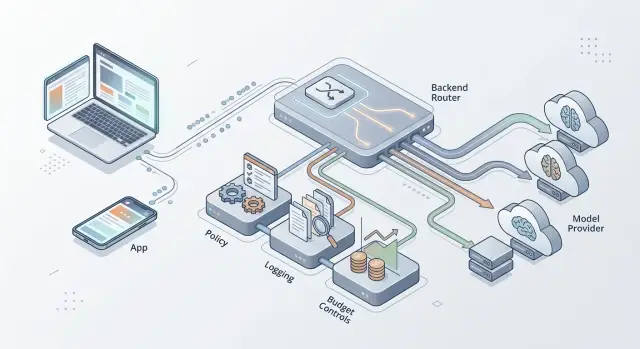
Table of Contents
Why this becomes a problem
Most teams do not plan a model router on day one. They pick one provider, hardcode the model in the app, and ship. Early on, that feels fine. Traffic is low, the product changes every week, and the fastest path usually wins.
The trouble starts when something outside the app changes. A provider raises prices, tightens rate limits, changes safety behavior, or retires a model. Suddenly the provider choice is no longer a small implementation detail. It affects cost, reliability, and support.
If the client owns that choice, every fix turns into an app release. Web teams can move quickly, but mobile and desktop usually cannot. Some users stay on old versions for days or weeks, so the same product starts behaving differently across devices.
That gap creates confusion fast. One customer gets shorter answers because their app still calls an older model. Another gets blocked by a policy change the team already meant to avoid. Spend gets harder to control too, because old app versions keep sending traffic with old rules.
Support feels this early. A user says, "my message failed," but the team cannot quickly tell which provider handled the request, which model ran, or whether any fallback rule fired. Engineers end up digging through logs from several apps, and the answer often depends on the user's version.
The problem spreads quietly. The web app keeps one model setting, iOS keeps another, Android adds its own retry rule, and desktop copies an older prompt. A few months later, changing provider logic means editing several clients and hoping they still match.
A simple chat product makes this obvious. The team starts with one provider because it is quick. Later, they want a cheaper model for short replies and a stronger one for long files. If that routing lives in the client, they need fresh builds, store approval, and time for users to update.
Once cost, policy, and debugging matter, provider logic belongs on the server. The app should send the request to the backend. The backend should decide what happens next.
What breaks when the client picks the model
When the app decides which model or provider to call, small changes stop being small. A price change, an outage, or a new privacy rule now waits for iOS review, Android rollout, desktop updates, and whatever old versions people still use. Something that should take ten minutes can take two weeks.
Old client logic also sticks around longer than teams expect. Some users update fast. Many do not. That leaves several routing rules running at the same time, which means the same request can take different paths depending on the device.
That leads to quiet failures. One user hits Provider A with an old prompt format. Another hits Provider B with a newer fallback rule. Support gets screenshots, product gets vague complaints, and engineering has no single place to see what happened.
Client-side routing also reveals more than it should. App code often exposes provider names, model IDs, fallback behavior, and parts of your pricing strategy. Users do not need that information. Scrapers and competitors will happily collect it.
Budget control gets messy fast. If each client decides when to use the expensive model, you cannot enforce one spending limit across every app version. A bug in one release can send a flood of premium requests before anyone notices. Finance sees one bill while support hears three different stories.
Debugging across platforms
When routing lives on the device, each platform becomes its own small backend. Web, iOS, Android, and desktop may all format prompts, retries, and timeouts a little differently. The same user question can behave differently for reasons the server never records.
A chat app shows this clearly. Suppose the web app moved to a cheaper model for short questions, but the mobile app still sends everything to a premium one. Users report slower replies on phones and different answer quality on desktop. Both reports are accurate, but the cause is split across clients.
A backend router fixes that. You change provider logic once, apply one routing policy, and log every decision in one place where the team can inspect it.
What the backend should own
Any decision that affects money, safety, or uptime should live on the server. The client should send the user message, a little product context, and maybe the conversation ID. The backend should handle the rest.
Start with secrets. Provider API keys, rate limits, quota rules, and monthly caps belong in backend code and config. If those values sit in a mobile app or browser client, people can inspect them, copy them, and use them outside your product. Even without bad intent, client-side limits are weak because old app versions keep running old rules.
Model choice should also stay on the server. A short summary request does not need the same model as a complex support case or a code review. User tier matters. Budget matters even more than most teams expect.
A simple policy is often enough:
- use a cheaper model for short, low-risk requests
- reserve stronger models for long or high-value tasks
- give paid users better latency or larger context limits
- stop or downgrade requests when a budget threshold is close
Fallback rules should sit in one place too. If one provider slows down, the backend can retry, shorten context, switch providers, or return a clear error. That change should happen once. You should not wait for app store approval to fix routing.
The server should also keep the paper trail. Record request IDs, provider name, model name, latency, token counts, and a cost estimate for each call. When users report slow answers, you need real data. When spend jumps for no obvious reason, you need a way to trace it.
Safety checks should run before any provider call leaves your system. Block prompts that try to expose secrets, break product rules, or abuse expensive paths. This is one of the clearest reasons to keep routing on the server. You can change filters, add new checks, and tighten policy without forcing every user to update the app.
If the client picks the provider, you lose control a little every week. If the backend owns it, you can change policy by editing one service.
How to move routing to the server
Start by giving every client one place to send model work. Web, mobile, and internal tools should all call the same backend endpoint. The app should ask for a result, not choose OpenAI, Anthropic, or any other provider.
That means the request needs better inputs. Send the task type, the user's plan level, message size, safety level, and a few facts about the session. Do not send provider names from the client. Once clients start naming providers, they lock your product to today's choices and force app updates for small policy changes.
On the server, map each task to a default model. A support reply can use one model, long document analysis can use another, and code review can use a third. This is where server-side routing pays off, because you can change the map in one place.
A practical setup is simple:
- create one server endpoint for all model requests
- define a small set of task types such as chat, summary, extraction, and coding help
- add a routing table on the server that picks the default model for each task
- set fallback rules for timeouts, errors, and provider limits
- return the same response shape every time, even if the server switched providers
That response format matters more than many teams expect. If every client gets the same fields, such as output text, finish status, token use, and safety flags, you can swap providers without touching app code. Your mobile app does not need to learn a new SDK because pricing changed on Tuesday.
Rate limits belong on the server too. You can cap expensive tasks, slow abusive traffic, and protect paid users from noisy neighbors. Teams that care about spend usually add logging at the same layer so they can see which task types burn money and which models fail too often.
If you already run a chat product, move one route first. Keep the old client-side model choice behind a feature flag, send 10 percent of traffic through the server, compare cost and latency, then cut over. It is boring work, but boring migration plans usually survive contact with production.
A simple example from a chat product
Picture a support chat app for an online service. At first, the team sends every message to one fast model because it is cheap, quick, and good enough for common questions like password resets or shipping updates.
That works until the chat starts handling billing problems. A customer writes, "I was charged twice and need a refund." That is different from "Where is my order?" A weak answer can create more tickets, angry replies, or even a chargeback. So the backend routes billing disputes to a stronger model with a stricter support prompt.
The user does not need to choose anything. The app still sends the same request to the same API. The backend reads the message, checks the account type, and picks the route.
A common policy might look like this:
- regular support questions go to a fast, low-cost model
- billing disputes go to a stronger model
- free users move to a cheaper route after they hit a daily cap
- paid users keep the better route for longer conversations
This gets even more useful when pricing changes. Say the team uses Provider A for all billing chats, then sees a sudden price increase. If the routing lives on the server, they can move that flow to Provider B the same day. The mobile app does not change. The web app does not change. No one ships a new app just to make that switch.
That matters because app store review takes time, and many users do not update right away. If provider logic sits in the client, old versions keep using old rules, old prices, and old limits. You lose control of spend and policy the moment users fall behind on updates.
The server can also record why it made each choice. It can log that a message matched a billing rule, that the user crossed a free-tier cap, or that traffic moved to a backup provider because costs jumped. That gives support, finance, and engineering one place to check what happened.
For a chat product, the practical win is simple: the app stays simple while the business can change model quality, budget rules, and providers when it needs to.
Logs, policy, and spend
A router only helps if your team can see what it is doing day to day. You need clean logs, simple policy controls, and hard limits on cost. If any of those live in the client, you lose control as soon as the app ships.
What to record
Log one event for every model request. Keep it small, but make it useful. Record the feature or endpoint, provider and model name, prompt size, response size, total latency, final status, and estimated cost. If you can fetch the actual billed cost later, store that too.
That is enough to spot the expensive paths. A support chat might look cheap until the logs show that long prompts and retries double the bill. A writing feature might feel slow until the data shows one provider adds two extra seconds under load.
Do not store raw user data unless you truly need it. Strip or mask emails, phone numbers, names, account numbers, and anything else that can identify a person before traces hit storage. In many teams, metadata and short redacted samples are enough to debug routing without keeping the full prompt.
If you already use Grafana, Prometheus, or Loki, send router events there. One shared dashboard beats a separate report nobody checks.
Keep policy and spend on the server
Put routing rules behind editable flags in the backend. Change providers, lower context limits, block a risky model for one feature, or send premium users to a faster route without waiting for a mobile or desktop release.
Set hard spend caps by feature and by plan. When a cap trips, the server should switch to a cheaper model, shorten context, or stop that feature until the budget resets. Soft warnings are easy to ignore. Hard limits protect margin.
Review fallback events every week. If one route fails often, stop treating it like bad luck. Fix the rule, change the timeout, or remove that provider from that path.
Most teams watch total AI spend. They should also watch fallbacks, retries, and prompt size. That is usually where the waste hides.
Mistakes teams make early
One common mistake is letting the client send provider names like "use Claude" or "use GPT-4" with the request. That feels flexible for a week or two. Then pricing changes, rate limits hit, or one provider starts giving worse answers for a certain task, and now your app release cycle controls your routing policy. A backend router only helps if the server makes the choice.
Teams also bury routing rules inside UI code. A chat screen checks one box, a document screen checks another, and soon every surface has its own little policy. Nobody can explain why the same user gets different behavior in different places. Mobile makes this worse because old clients can stay in the wild for months.
A small example makes the problem obvious. Say your app lets users summarize support tickets. Version 1 of the mobile app sends the provider name, temperature, and a fallback order. Later, you want cheaper routing for short tickets and stricter logging for enterprise accounts. You cannot fully change that on the server anymore because the old client still pushes yesterday's rules.
Another mistake is logging too much. Teams dump full prompts, pasted customer messages, internal notes, and sometimes secrets into raw logs because they want easy debugging. That habit gets expensive fast, and it creates a privacy problem you do not want. If a prompt can contain emails, tokens, account IDs, or contract text, log metadata first and sample content only when you have a clear reason.
Fallback loops create a different kind of mess. The app retries one provider, then another, then a third, and still shows a normal success state. Users see slow answers. Engineers miss the outage. Finance notices later.
Watch for these patterns:
- the client sends provider names or model IDs
- UI code decides routing, retries, or spend limits
- logs store full prompts by default
- fallbacks hide failures instead of reporting them
- rollout plans ignore old app versions
The safer pattern is intentionally dull. Let the client send the task, user context, and a few allowed constraints. Keep provider choice, logging rules, redaction, retries, and spend limits on the server, where you can change them today instead of waiting for the next release.
Checks before release
A model choice that lives in the app turns every policy change into a deploy. That is slow on the web and painful on mobile, where old versions can stay in users' hands for weeks. Server-side routing avoids that trap.
Before launch, make sure you can swap one provider for another in server config without an app update. Make sure you can set a spending limit for a single feature from one place. Support should be able to inspect failed requests with trace IDs, provider errors, and policy versions without seeing raw secrets. iOS, Android, and web should all receive the same response shape even if the backend picked different models underneath. And you should be able to test new routing rules in staging, or replay recent traffic, before real users hit them.
If any of that fails, fix it before launch. Teams often tell themselves they will clean it up later. Usually they do not. Once users depend on the feature, every routing change feels risky.
One small test catches a lot of problems: force the backend to send 10 percent of one feature to a backup provider for a day. The client should not notice. Your logs should show which provider handled each request, how much it cost, and why the router made that choice. Support should be able to answer "why did this fail?" from one dashboard, not by asking engineers to pull clues from three systems.
This also keeps product work moving. If one model gets slower, more expensive, or starts failing on a certain task, you can change the rule on the server the same day. That is the real benefit. You keep policy, logging, and spend in one place, and every client stays simpler.
What to do next
Start with a simple inventory. Write down every place your product calls a model today, including chat, summaries, support tools, search answers, background jobs, and internal admin features. Teams often miss the expensive paths because they only count what users see on the main screen.
Then pick one busy path and move it behind a single backend endpoint first. A chat reply flow is usually a good starting point because it gives you real traffic, clear latency numbers, and quick feedback when something fails. You do not need to rebuild the whole app at once.
Before you move more traffic, decide what the server must control: budget limits by day, month, or customer; fallback rules when a provider is slow or unavailable; logs for token use, errors, and latency; data rules for what must stay out of prompts and logs; and who can change routing policy without a client release.
After that, simplify the client. Let it send intent, message history, and safe metadata, then stop there. The server should choose the provider, apply policy, record spend, and return a clean result. That is the point of keeping provider logic on the server. You keep decisions in one place instead of scattering them across apps.
Keep the first version small. One endpoint, one policy file, one logging format, and one cost report are enough to start. The router does not need to be fancy on day one. It just needs to stop hardcoded model choices from spreading further.
You will know this is working when your team can lower a budget cap, switch a default provider, or turn on a fallback without waiting for an app update. If a provider slows down on Friday afternoon, the server should route around it before users notice.
If you want a second opinion before that logic spreads across multiple clients and services, Oleg Sotnikov at oleg.is offers Fractional CTO help with AI routing, cost control, and backend design. That kind of review is most useful early, while the rules still fit in one service and are easy to change.
Frequently Asked Questions
Why shouldn’t the app choose the AI provider or model?
Put provider and model choice on the server. That lets your team change cost rules, safety checks, and fallback behavior the same day without waiting for web deploys or app store updates.
If the app makes that choice, old versions keep sending traffic with old rules. That splits behavior across devices and makes support much harder.
What should the client send to the backend instead?
Send the user’s message, task type, plan level, conversation or session ID, and a small amount of safe context. Let the backend decide which provider, model, and retry rule to use.
Keep provider names, model IDs, API keys, and budget logic out of the client. That keeps the app simpler and gives you room to change policy later.
Does this still matter for a small product?
Yes, it matters early. A small product can ship with one provider at first, but you still want one backend endpoint between the app and that provider.
That thin layer gives you a clean place to add logging, spend limits, and routing rules when traffic grows. You avoid a bigger cleanup later.
How do old app versions make routing problems worse?
Users update at different speeds, so old routing code stays alive longer than teams expect. One phone may use an older model while the web app uses a newer rule.
That leads to different answers, different costs, and hard-to-reproduce bugs. Your support team then has to guess which app version handled the request.
What should the backend log for each AI request?
Log one event for each model request with the feature name, provider, model, latency, token use, status, and estimated cost. Add a trace ID so support and engineering can follow one request across systems.
Avoid dumping full prompts into logs by default. Mask or remove personal data unless you truly need a sample to debug something specific.
How do I keep AI spend under control?
Set spend caps and routing rules on the server, not in app code. When a feature gets close to its limit, the backend can switch to a cheaper model, shorten context, or stop that path for the rest of the period.
Hard limits work better than warnings alone. They stop one buggy release from sending a flood of premium requests.
Where should retries and fallback rules live?
Keep retries and fallbacks in one backend service. When a provider slows down or fails, the server can retry once, switch providers, or return a clear error with the same response shape.
If each client handles this on its own, every platform ends up with different timeout and retry rules. That creates slow failures and messy debugging.
Do I need one standard response format from the backend?
Yes. Return the same fields no matter which provider the server used, such as output text, finish status, token use, and safety flags.
A stable response format keeps your clients simple. You can swap providers or models later without rewriting mobile and web code.
What’s the safest way to move routing from the client to the server?
Move one busy route first, such as chat replies. Put it behind a feature flag, send a small share of traffic through the backend router, and compare latency, errors, and cost before you switch the rest.
That gradual move lowers risk and gives you real production data. It also shows you where old client logic still leaks into the flow.
When should I bring in a Fractional CTO for this?
Ask for outside help when provider logic already spread across several apps, costs keep surprising you, or your team cannot explain why one request failed. A short review can catch weak spots before they turn into a long cleanup.
If you want that kind of help, Oleg Sotnikov at oleg.is works on AI routing, backend design, and cost control as a Fractional CTO.


