B2B onboarding breaks when setup follows the sales deck
B2B onboarding often fails when setup mirrors the sales pitch. Learn how to match steps to user roles, data sources, and approvals.
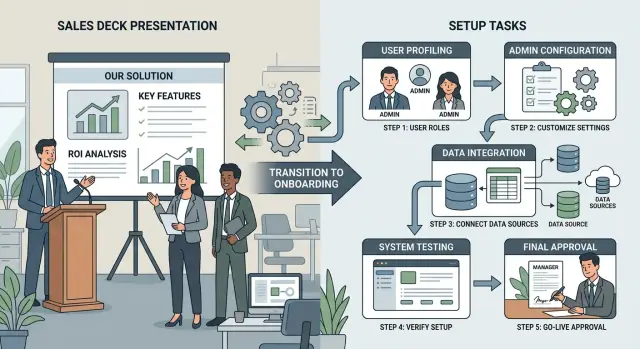
Table of Contents
Why onboarding breaks after a good sales process
A sales process can feel smooth from start to finish. The demo matches the buyer's goals, the budget gets approved, and everyone expects setup to move quickly. Then week one starts, and the product needs answers nobody settled during the deal: field names, access rules, source systems, import logic, and who can approve what.
That gap is common in B2B onboarding. Sales sells the outcome. Setup depends on the work behind it.
The buyer usually cares about cost, reporting, and time to launch. The admin has to connect tools, set permissions, and answer security questions. Daily users care about smaller, sharper problems, like whether the screen fits their routine and whether the data looks right. A smooth sale can still end in a messy rollout because each group heard a different promise.
Buyers heard speed and visibility. Admins heard control and low risk. Daily users expected fewer steps in their day. When setup follows the sales deck, the product guides the wrong person. It asks buyer-level questions when the admin needs technical choices. It assumes daily users can start right away when nobody has mapped the data yet.
Teams often blame adoption when this happens. The real problem started earlier. The onboarding flow did not match the people doing the work.
Most rollouts break in the same three places. Roles stay vague, so tasks land on the wrong person. Data looks simple in a demo but turns messy in a live account. Approvals take longer than anyone planned because legal, security, procurement, or department leads need to review changes before users can move forward.
A polished sales handoff does not guarantee a clean launch. Good onboarding starts with role-based setup, real data sources, and a clear approval path inside the customer's team. If those pieces are missing, even a product that sold well can feel confusing by day two.
Who actually does the work during setup
The person who buys the product rarely does the setup. In most B2B teams, the buyer approves the budget and goes back to other work. The actual setup lands on several people, and each one needs different tasks.
That gap causes trouble fast. Sales conversations usually focus on goals, pricing, and timeline. Setup depends on who can connect tools, who understands the data, who approves access, and who will use the product every day.
A simple role map prevents a lot of confusion. Write down real names before kickoff, not just department labels. If nobody can answer questions like "who owns the import?" or "who can approve user access?", the project already has a weak start.
Most teams need four roles. The buyer approves budget, success goals, and final sign-off. The admin connects systems, manages permissions, and handles account settings. The manager decides process rules and approves how the team will work. The daily user tests the workflow and spots missing steps or bad data.
One generic checklist usually mixes all of this together. It asks the buyer to invite users even though the admin controls access. It asks the daily user to confirm field mapping even though only the admin or operations lead knows where the data comes from. Tasks bounce around in email or chat, and nobody feels fully responsible.
That is why onboarding slows down right after a strong sales call. The promise sounds simple, but setup is not one job. Someone has to export data. Someone has to map fields. Someone has to approve what each team member can see. Someone has to test the workflow in real work, not in a perfect demo.
A short role map works better than a longer checklist. Keep it to four lines: person, task, access needed, and approval needed. Add one deadline to each line. If the sales to onboarding handoff starts there, the first week gets much easier and delays show up early, while they are still easy to fix.
Start with source systems, not screens
A setup plan fails quickly when it starts with screens and skips the systems that feed them. Most B2B products need data before they can prove any value. If the first login shows empty dashboards, broken records, or missing users, trust drops on day one.
Start with the real source systems, not the demo story. That often means a CRM, an identity provider, billing, support tools, a data warehouse, and whatever spreadsheet the team still uses to fill the gaps. Some teams also need exports from an older product because no single clean system of record exists.
Before setup begins, confirm four things: where each data set lives, who can grant access, which fields the product must have on day one, and how messy the current records are.
Imports sound simple, but they rarely are. One system calls a company "Acme Inc" and another says "ACME." One tool stores owners by email, another by internal ID. Dates use different formats. Status fields mean different things across teams. Field mapping decides whether the product shows one customer record or five half-correct ones.
Permissions create a different kind of delay. The person who bought the product often cannot approve API access, export rights, or single sign-on settings. IT may own identity access, operations may own the CRM, and finance may control billing data. If those owners join late, onboarding stops while everyone waits.
Data cleanup matters just as much as imports. A team may want churn risk, renewal dates, or account activity in the first week. That will not happen if contract dates are missing, users share generic inboxes, or customer records have no clear owner. The product may work fine, yet the first result still looks wrong because the inputs are wrong.
A better early win is small and real. Pull one clean customer segment, map the required fields, check permissions, and make sure someone owns each source. If nobody owns customer status or renewal dates, fix that before kickoff. Setup moves faster after that.
Approvals are part of onboarding
Most first rollouts slow down after the kickoff call because setup depends on people who never joined the sales meetings. The buyer says yes, but the product still needs permission from security, legal, finance, procurement, or an internal admin team.
These reviews rarely kill the rollout. They delay it. A team can finish account setup in two days and then wait two weeks for a security questionnaire, contract edits, or a purchase order.
The usual bottlenecks are predictable. Security reviews check data access, SSO, audit logs, retention, and vendor risk forms. Legal reviews check contract terms, privacy language, and data processing terms. Budget approval determines who owns the spend, which cost center pays, and whether procurement has to approve the amount.
The trouble gets worse when approvers stay hidden until the work starts. Sales may close the deal with a department head, but the rollout still depends on an IT admin who controls SSO, a security manager who owns vendor review, and a finance lead who releases budget. If one person is out for a week, the whole plan slips.
Real companies do not move in a straight line from signed deal to live account. Approvals happen in sequence, and one missing answer can block the next step.
A better plan treats approvals as normal onboarding work, not side work. Put them in the project plan from day one with an owner, a due date, and the exact document each approver needs. If security needs an architecture summary, prepare it before kickoff. If legal needs standard terms, send them before training starts. If finance needs a budget code, ask for it during handoff.
A short approval list helps:
- Who signs security review?
- Who signs legal terms?
- Who approves spend?
- What purchase threshold triggers procurement?
- Which documents unblock each step?
When those names and steps appear early, teams move faster. Otherwise, the product team finishes its work and waits on a silent queue nobody planned for.
How to rebuild onboarding step by step
Good B2B onboarding starts smaller than most sales decks suggest. If you try to turn on every promised feature in week one, the team loses track of who needs what, which data matters first, and which approval blocks the work.
A better plan is narrow, ordered, and owned by real people.
-
Choose one clear goal first. Pick the first job that has to work, such as getting customer records into the system or sending the first approval request. If the goal is vague, the plan gets vague with it.
-
Assign every task to one owner. Name the admin who grants access, the manager who approves the process, and the daily user who tests the workflow. Use real job titles, not labels like "customer team." If two people share a task, it often sits untouched.
-
Stage data access in the order the work happens. Start with a small sample, usually a CSV export or a read-only connection, to check field names, missing values, and odd formats. Move to live read access next. Leave write access for later, once the team knows the mapping is right.
-
Test one workflow end to end before expanding. Use one team, one data source, and one approval path. If a manager has to approve a request before a user can finish the job, test that exact sequence now, not after the full rollout starts.
-
Define go-live in plain language. Write down what must be true before launch: fields mapped, permissions approved, one workflow tested, and one named person ready to handle day-one support.
This document does not need to be long. One page is often enough if it answers a few direct questions: what is the first job users must complete, who owns each task, which data source comes first, which approval can block launch, and what must be finished before go-live.
If one answer is missing, launch usually slips. It is much better to find that gap during a small test than after the full account goes live.
A realistic example from a mid-size B2B team
A 120-person software company buys a reporting tool after a strong demo. The sales leader wants pipeline dashboards before the next board meeting. In the call, setup sounded easy: connect the CRM, invite managers, and start tracking team performance.
The work lands with Nina, the revenue operations admin, not the buyer. She needs API access to the CRM, permission to pull historical deals, and a clear answer on which fields count as "qualified," "forecast," and "closed won." IT puts the request in a queue because the new tool needs a security review.
While Nina waits, sales managers start asking for dashboards. One wants rep activity by region. Another wants stage conversion by segment. A third wants weekly forecast changes. They all expect fast answers because the sales process made the product look ready on day one.
The problem is not the dashboard builder. It is data mapping. The CRM has duplicate fields, old naming rules, and missing values in older records. In one pipeline, "close date" means signed contract. In another, it means verbal approval. If Nina builds reports before she sorts that out, every chart starts a new argument.
This is how onboarding slips. The sales to onboarding handoff passes along promises, but not the real work, the real owners, or the approval path.
The team gets unstuck when it switches to a role-based plan. The sales leader picks two business questions for phase one. Nina maps CRM fields and tests 20 sample records. IT approves access and limits permissions. Managers review dashboards only after the sample data matches the CRM.
That change cuts a lot of rework. Nina stops rebuilding reports for data that was never defined. Managers stop asking for custom views before the source data is stable. The sales leader gets fewer screens in week one, but gets numbers people trust. That is a much better start than copying a polished demo into setup.
Mistakes teams repeat
Onboarding usually breaks in ordinary ways, not dramatic ones.
One common mistake is starting with a giant checklist built around every feature in the product. New customers do not need all of that on day one. They need one real outcome, like getting the first report out, syncing one data source, or routing one request for approval.
Another mistake is giving the buyer the same tasks as the person who will run the system. The buyer may sign the contract and join the kickoff call, but they rarely clean fields, map permissions, or test edge cases. That work usually lands on an admin, an operations lead, or someone in IT. If the setup flow treats them as the same person, the handoff starts to wobble fast.
Data causes more trouble than most teams admit. Sales demos use neat sample records with clean names, complete fields, and no duplicates. Real customer data is messier. Teams import it too early, skip a short review, and then spend days chasing broken mappings, strange permissions, and reports that look wrong for reasons nobody can see at first.
Approvals also get ignored until the last minute. Security review, legal sign-off, procurement rules, internal access requests, and manager approval can each add days. When nobody plans for that delay, launch week turns into waiting week. The product team thinks the customer is slow. The customer thinks the product is harder than promised.
The last mistake is calling onboarding finished before any user completes one real task from start to finish. A workspace can be configured, data can be imported, and roles can be assigned, yet the customer still has not done the thing they bought the product for. If an operations manager cannot complete one live workflow without help, onboarding is not done.
A better test is simple: can the right person, with real data and the needed approvals, finish one job that matters? If not, setup still follows the sales deck, not the work.
Quick checks before launch
Teams often think they are ready because the demo looked smooth and the contract is signed. That is usually the wrong test. Launches fail on small gaps: one field has no source, one approver is missing, or one user gets stuck and needs an admin to step in.
A short dry run catches most of this. Pull in the actual people who will do the work, give them a real scenario, and watch one full task move through the product with real sample data. That hour will tell you more than another slide deck.
During the dry run, check a few basics. Each task should have one clear owner who can explain what happens next without guessing. Every field in the product should have a known source system, whether that is a CRM, ERP, spreadsheet, or manual entry. The team should agree on the approval order, including who steps in when the usual approver is out. One real user should be able to finish one complete workflow without help from support, product, or engineering. And the team should remove any step that exists only because it looked good in the sales deck.
A simple example makes this obvious. Say a sales operations manager creates a new account, finance checks billing details, and a department lead approves access. If the account owner does not know which system feeds the billing field, or if approval depends on a manager who was never named, the launch is not ready.
This is the point where onboarding gets honest. Stop asking whether the product can do the job in theory. Ask whether real people can do the job today.
A calm launch usually looks a little boring, and that is good. When owners know their next step, systems map cleanly to fields, and one workflow works without rescue, the team can expand with far fewer surprises.
What to do next
If your onboarding keeps dragging, stop adding more checklists. Look at the handoff between sales, product, and the team that runs delivery. In many companies, each group promised a slightly different version of setup, and the customer feels that gap right away.
Put the shared plan on one page. Keep it short enough that a salesperson, project manager, and customer admin can all read it quickly and agree on it. It should answer four questions: who logs in first and what job they need to finish, what data must be imported and where it lives now, which approvals can block progress, and what can wait until after launch.
That one page often does more for onboarding than a polished demo ever will. It replaces guesswork with a clear starting point.
Then trim the setup itself. If a step does not help the customer complete real work in the first week, move it later or remove it. Teams often ask for advanced permissions, custom reports, or long field mapping exercises before anyone has finished one basic task. That slows everything down.
A buyer may love the promise in the sales deck. The person doing setup usually wants something smaller: a clean import, the right roles, and one approval path that works. Build for that person first.
It also helps to pick one owner for the plan. Not five owners. One person should keep the roles, data, and approvals list current and flag gaps before kickoff. That alone can save days of back and forth.
If the process still feels tangled, an outside review can help. Oleg Sotnikov at oleg.is does this kind of Fractional CTO work for startups and smaller teams, with a practical focus on product architecture, infrastructure, and lean delivery.
Before the next launch, use one simple test: can your team explain the first user, first data source, and first approval in plain language on one page? If not, fix that first.
Frequently Asked Questions
Why can onboarding break even after a smooth sales process?
Because sales sells the outcome, while setup depends on real work. Teams still need to map data, assign access, name owners, and clear approvals. If nobody settled those details during the deal, the first week gets messy fast.
Who should own onboarding after the contract is signed?
Give one person clear ownership of the plan, then assign each setup task to the right role. In most teams, the buyer should not run setup. An admin, ops lead, or IT owner usually does the hands-on work.
Which roles matter most during B2B setup?
Most teams need four roles: a buyer, an admin, a manager, and a daily user. The buyer sets goals and signs off, the admin connects systems and manages access, the manager approves process rules, and the daily user tests real work.
Should we start onboarding with screens or with data sources?
Start with source systems. Screens look fine in a demo, but real value starts when the product pulls the right data from the right place. If the first login shows empty or wrong records, trust drops right away.
How much data should we bring in at the start?
Start small. Import one clean segment or a short sample first, check field mapping, fix bad values, and confirm ownership. After that, move to broader data and deeper access.
Why do approvals slow onboarding so much?
Approvals sit outside the product team, but they still control the timeline. Security, legal, finance, procurement, and IT often need documents or sign-off before setup can move. If you wait to name those people, the launch stalls.
What is the simplest onboarding plan that works?
Pick one job that must work first, assign one owner to each task, stage access in order, and test one real workflow end to end. That keeps the team focused and exposes gaps before they turn into delays.
How do we know we are actually ready to launch?
Run a dry run with real people and real sample data. If one user can finish one complete task without help, and every field and approval has an owner, you are close. If not, delay launch and fix the gap first.
What mistakes cause the most rollout delays?
Teams often try to turn on too much at once, treat the buyer like the admin, trust messy data too early, and ignore approvals until the last minute. Another common miss is calling setup done before anyone completes a real task from start to finish.
What should go on a one-page onboarding plan?
Keep it short and practical. Name the first user, the first job they need to finish, the first data source, the approvals that can block progress, and what can wait until after launch. If the team cannot explain those points on one page, the plan still has gaps.


