B2B file processing pipeline that isolates bad uploads
A B2B file processing pipeline splits uploads into checks, storage, transforms, and delivery so one broken file does not stall every customer job.
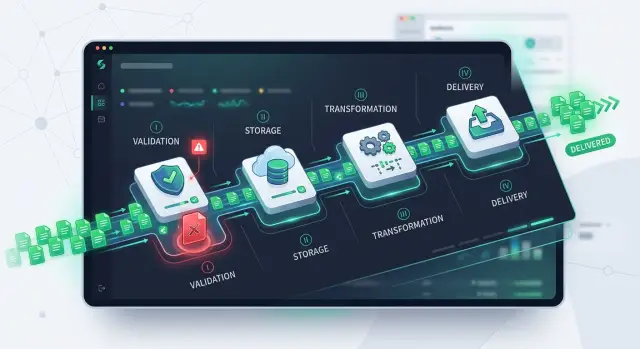
Table of Contents
Why one bad file stops the whole upload
Batch upload sounds efficient until one file breaks the parser. A CSV is missing a column. A PDF has broken metadata. One supplier exports dates in a different format. If the whole batch runs as one job, that single error can stop hundreds of clean files behind it.
This usually comes from the way the pipeline is designed. Validation, storage, transformation, and delivery get tied together under one final status: success or failure. That looks neat on a dashboard, but real uploads are messy. One exception in file 137 can block files 138 through 500 even though nothing is wrong with them.
Support feels the damage first. A batch marked "failed" does not tell anyone which file caused the issue, which files already saved, or whether any data reached the next system. People start digging through logs, asking engineers, and guessing what the customer should retry. A small upload problem turns into a long support thread.
Full-batch retries make it worse. The system rereads files that already passed, reruns conversions that already worked, and can deliver the same output twice if deduplication is weak. One parser bug can create queue pressure, duplicate records, and another round of tickets.
The fix is simple in principle: stop treating the batch as the unit of work. Treat each file as its own job. In a blocked batch, one bad file can stop 499 good ones. In a file-by-file flow, 499 keep moving while one waits for review. Support also gets a real answer: the exact file, the exact step, and the exact reason it failed.
A healthy B2B file processing pipeline isolates failure early. Each file needs its own status, its own retry path, and its own audit trail. When one upload goes wrong, the rest of the work should keep moving.
What each stage should do
The pipeline gets much easier to trust when each stage has one job and one clear result. That separation keeps small problems from spreading. If validation fails, storage should not change. If delivery fails, you should not rerun transformation unless the data changed.
Validation is the gate. It checks whether a file can enter the system at all. That usually means type, size, schema, required fields, and a few basic content rules. If a CSV must include invoice number, date, and amount, validation should catch a missing column right away. This stage should be fast and strict.
Storage should save the original file before heavy work starts. Keep the raw upload exactly as it arrived, along with metadata such as source, checksum, and upload time. That gives the team a clean recovery point. When a later step fails, you still have the source file and can retry without asking the customer to upload it again.
Transformation is where the cleanup happens. It turns raw input into the internal format your product uses every day. This is where you map columns, normalize dates, trim bad values, split line items, and turn text into structured records. Keep that logic here, not in validation and not in delivery. Clear boundaries make the system far easier to debug.
Delivery sends the result to the next place. That might be another internal service, a customer export, or an accounting system. Delivery should record whether the handoff worked and support safe retries. If the target system times out, the team should resend that delivery step, not reprocess the whole file.
Once each stage ends with a clear status, teams can retry one file, one step, and one failure at a time. That is what keeps uploads moving even when some files are bad.
How to split the flow step by step
A file processing pipeline works better when each file moves on its own path. If one file fails, the others should still pass through validation, storage, processing, and delivery without waiting.
The split starts the moment the upload arrives. Do not hold the whole request open while you inspect, convert, and export files. Accept the file, assign a file ID right away, and return control to the user quickly.
-
Receive the file and tag it.
Accept the upload, create a unique file ID, and record who sent it and when. Even if later steps fail, you now have a stable record for that file.
-
Run fast checks before anything heavy.
Check file size, type, extension, and basic structure immediately. If a CSV has no header row or a PDF is empty, reject it early. That saves compute time and gives the user a clear error while the upload is still fresh.
-
Store the raw file and write status.
Save the original file exactly as it came in. Then create or update a status such as "received," "rejected," or "ready for processing." Support teams often need that raw copy later to reproduce a problem.
-
Send transformation work to a queue.
Parsing, field mapping, virus scanning, OCR, and format conversion can take time. Put that work in a queue instead of doing it inside the upload request. The user gets a fast response, and one slow file does not hold up the rest.
-
Deliver the result and close only that file.
When processing finishes, write the output to its destination and mark that single file as complete. If delivery fails, keep the status honest, such as "processed" but not "delivered." That makes retries much safer.
You do not need a huge status model. A short trail like received, rejected, stored, queued, processing, delivered, and failed is usually enough. What matters is clarity.
This structure also makes support calmer. When a customer asks, "What happened to my upload?" the team can answer with one file ID instead of digging through a mixed batch and guessing where things went wrong.
Track every file on its own
A batch is just a container. The system should treat each file as its own job with its own record. That one decision makes operations much easier because one broken upload no longer hides the 199 files that worked.
Give every file a stable ID as soon as it arrives. Store the current status, last error message, retry count, and timestamps for events like uploaded, validated, transformed, and delivered. When support gets a ticket, they should not have to guess where the file stopped.
Search matters as much as status. Staff should be able to find a file by customer, batch ID, or file ID in a few seconds. If they can only search by batch, one failed document turns into a slow manual hunt.
Keep the original file separate from later artifacts. Save the raw upload in one place, then write transformed output, parsed data, and delivery copies somewhere else. That prevents accidental overwrites and makes reprocessing safe. If the parser has a bug today, you can fix the code and rerun the raw file tomorrow.
A small status model usually works well: queued for files waiting on the next step, running for files still moving through a stage, done for files that reached the end, and failed for files that need review or another retry.
On top of file-level records, show simple counts for the whole batch. People want the quick answer first: how many are done, failed, running, and waiting. After that, they can open the failed items and read the error.
This is especially helpful for small teams. One operator can spot a pattern quickly, like ten failures from one customer after a template change, instead of reading logs line by line. Good tracking does not make the pipeline fancy. It makes it calm when something breaks.
A simple example with supplier invoices
At month end, your product receives invoice CSV files from 60 suppliers. Finance wants the numbers in one standard format before sending them into accounts payable. This is where a file pipeline either saves the day or creates a support mess.
Each supplier upload should move on its own path. The system gives every file its own record, stores the raw upload, and checks the basics first. Are the required columns there? Do dates parse correctly? Are totals numeric? Does the supplier ID match the account that sent the file?
Now imagine 59 files pass and one does not. Supplier 18 sends a CSV with "amt" instead of "amount," and the due date column is missing. If the monthly batch runs as one job, finance waits for everyone because of that single bad file. That is a bad trade.
A better flow breaks the work into small stages. After validation, each good file moves into storage, then into transformation, where the product maps the supplier's columns into your internal schema. From there, clean output goes to delivery, whether that means a finance export, an API handoff, or a file ready for review in the dashboard.
The bad CSV stops at validation. The system keeps the raw file for support and marks that upload as failed with a plain error like "Missing column: due_date." Only the affected customer gets an alert. Everyone else hears nothing because nothing is wrong with their files.
Finance sees 59 completed files and 1 blocked file. They can work with the finished set right away instead of waiting for a perfect batch. When Supplier 18 fixes the template and uploads again, only that file reenters the pipeline. The team does not rerun the other 59 files, and finance does not lose a day chasing a small format error.
That simple split changes the mood of the whole process. Support handles one problem, the customer knows what to fix, and finance keeps moving.
Mistakes that clog the pipeline
Most clogged pipelines start with the same choice: trying to do everything during the upload request. If validation, parsing, storage, and delivery all run in one shot, one slow parser or one broken row can lock the whole job. The pipeline should keep moving even when one file fails.
Another common mistake is deleting the original file right after parsing. That seems tidy, but it makes support much harder. When a customer asks why totals changed or why a record disappeared, the team needs the raw file to inspect what actually arrived.
Generic error messages cause more damage than many teams expect. "Upload failed" tells the customer nothing and tells your team almost nothing either. Plain errors like "row 48 has an invalid date" or "required column invoice_id is missing" are much more useful.
Retry logic often creates a second problem. If one bad record appears in a batch of 500 files and your system retries the entire batch, you waste compute, create delays, and sometimes send the same output twice. Teams usually notice this only after customers report duplicates.
Skipping duplicate checks is another quiet failure. Suppliers resend the same file all the time, sometimes with a new name and the same content. If you do not compare checksums, source IDs, or batch markers, the pipeline can create duplicate invoices, exports, or notifications.
A few changes remove most of this friction:
- Split upload, validation, parsing, and delivery into separate jobs.
- Keep the original file and raw metadata until the retention window ends.
- Retry only the failed file or failed record group.
- Show exact errors to users and keep full logs for the team.
- Add duplicate detection before transformation and before final delivery.
The risk is easy to picture. A supplier sends 20 invoice files, and one file has a broken decimal format. If the app handles all 20 in one request, the entire batch stalls. If each file has its own status and retry path, 19 files finish on time and one waits for a fix.
That difference is not cosmetic. It decides whether operations stay calm or spend the afternoon untangling one avoidable upload problem.
Quick checks before release
A pipeline can look solid in staging and still fail in production because of a few small gaps. The safest test is straightforward: send a mixed batch of files, break one on purpose, and watch what happens to the rest.
If one bad upload stalls the whole batch, the design still needs work. A reliable flow treats each file as its own job, with its own status, retry path, and error record.
Before release, make sure you can do five things without touching the whole batch: retry one failed file, show the exact failed stage in the admin or support view, keep the original upload for later inspection, reject oversized or wrong-format files before heavy processing starts, and alert on jobs that sit too long in one stage.
The retry test matters more than it seems. If support has to restart an entire batch to fix one broken PDF or CSV, people will build manual workarounds by week two. That usually leads to duplicate records, confused customers, and long support threads.
Visibility matters too. The team should be able to see whether the upload failed in validation, got stuck in the file transformation queue, or finished processing but never completed batch file delivery. Without that view, every incident starts the same way: with guessing.
What to watch after launch
Once real customers start sending files, weak spots show up fast. A pipeline can look fine in testing and still jam on Monday morning when ten customers upload different formats at once.
Track how long each file spends in validation, storage, transformation, and delivery. Do not stop at total processing time. A file may reach the customer in six minutes and still waste five of those minutes waiting in one stage.
Count failures in a way that helps the team act. Group them by file type, by customer, and by the rule that rejected the file. If XML files from one customer keep failing on the same date field, you know where to look.
Averages hide traffic jams. Watch queue depth during busy hours and compare it with processing time. If the queue spikes every day at 9 a.m. and clears by noon, that is not random. It is a capacity problem.
Retries need their own metric. When you update validation rules or transformation code, measure how often a retry works on the second attempt. If retry success does not improve, the change did not fix the real issue.
Storage deserves the same attention. Track how much space raw uploads, transformed files, logs, and temporary working files use each week. Many teams watch the main bucket and forget the temp files created during conversion jobs. Those files pile up, raise costs, and slow cleanup later.
Cleanup rules should be treated like product decisions, not background chores. Decide how long to keep failed uploads, retry artifacts, and delivered files. Keep enough history to debug customer issues, then delete the rest on schedule.
When you watch these numbers every week, patterns appear early. That gives the team time to fix one parser, add one worker, or tighten one cleanup rule before a small fault turns into a backlog.
Next steps for your team
Most teams do not need a full rebuild first. The better move is to find the stage that creates the most support tickets and start there. If users keep asking why an upload vanished, fix the upload validation workflow and status tracking before touching the parser. If files reach storage but never arrive where they should, start with delivery.
Map the current upload path on one page. Show where a file enters, where type and schema checks happen, where the raw file is stored, where background jobs pick it up, and how a user sees success or failure. This quick map often exposes the real problem. A single parser error can block a whole batch because several stages still share one job record.
A practical order is simple. Create a unique ID for each file as soon as upload starts. Save status per file, not only for the whole batch. Keep validation results separate from transformation results. Move delivery into its own queue so one retry does not freeze everything else.
File-level status is often the first win worth shipping. You do not need to rewrite every parser to add it. Once each file can move through the pipeline on its own, support can answer customers faster, product teams can see where work stops, and engineers can replace weak parts one stage at a time.
Keep the first version narrow. Pick one painful upload path, make failures visible, and stop bad files from blocking healthy ones. That alone can cut a surprising amount of daily noise.
If your team wants an outside review, Oleg Sotnikov at oleg.is can assess the flow as a Fractional CTO or advisor. His work spans startup product architecture, production infrastructure, and AI-first development, which is useful when the issue is not only parsing files but deciding how the whole system should split.
Frequently Asked Questions
Why does one bad file block the whole upload?
One shared job usually causes it. When validation, parsing, storage, and delivery all run under one batch result, one exception flips the whole batch to failed. Give each file its own job and the rest can keep moving.
Should I process the batch or each file separately?
Treat each file as the unit of work. Keep the batch as a reporting container for counts like done, failed, and running. That split lets support and ops deal with one file without touching the rest.
What statuses should each file have?
Start small and keep it clear. Statuses like received, rejected, stored, queued, processing, delivered, and failed work well for most teams. The main thing is that each stage writes an honest result.
Do I really need to keep the raw file?
Yes. Save the original file exactly as it arrived, along with metadata like source, checksum, and upload time. That gives you a clean retry point and helps support check what the customer actually sent.
Where should validation end and transformation begin?
Validation should answer one question: can this file enter the system at all. Transformation should clean and map the data into your internal format. If you mix those jobs, debugging gets slow and retries get messy.
How should retries work in this kind of pipeline?
Retry only the failed file and only the failed step when possible. If delivery times out, resend delivery instead of reparsing the file. Full-batch retries waste compute and raise the chance of duplicates.
How do I stop duplicate records when suppliers resend files?
Check for duplicates before heavy processing and again before final delivery. Compare checksums, source IDs, and any batch markers you trust. Suppliers often resend the same content with a different filename.
What error message should the user see?
Show the exact file, the exact stage, and a plain error message. Something like Missing column: due_date or row 48 has an invalid date gives the customer a fix and gives support a starting point. Upload failed helps no one.
What should I test before release?
Send a mixed batch, break one file on purpose, and watch the others. You should be able to retry one failed file, see where it stopped, keep the raw upload, and reject bad files before heavy work starts. If one broken file stalls the rest, do not ship yet.
What should we monitor after launch?
Watch time spent in each stage, queue depth during busy hours, failure reasons by customer and file type, retry success, and storage growth. Those numbers show whether you have a parser problem, a capacity problem, or cleanup that needs work.


