Automation failure handling for safer business workflows
Automation failure handling helps you decide when to retry, pause, or undo steps so one broken app does not spread bad data across your process.
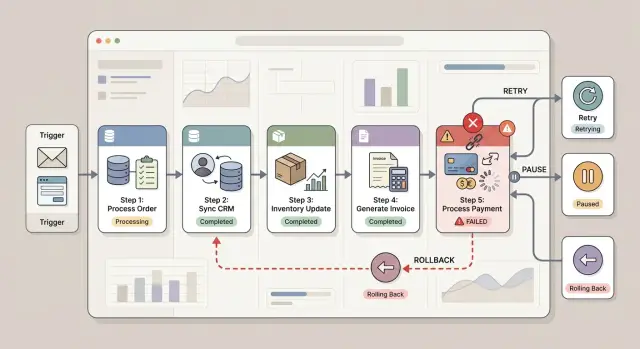
Table of Contents
Why one failed step can break the whole workflow
Workflow failures are rarely neat. One app finishes its part, another times out, and the process stops halfway through. You do not get one clean error. You get a business event that only half happened.
That is where the real cost starts. A customer record exists in the CRM, but billing never opens the account. An invoice goes out, but onboarding never creates the task. Each system tells a different story, and people keep working from whichever screen they trust most.
Small mismatches spread fast. Sales sees a new customer and follows up. Finance sees no payment and sends a reminder. Support never gets the setup task, so the customer waits. Then someone reruns the workflow and creates a second charge or sends the same welcome email twice. What looked like one broken step turns into duplicate actions, missed work, and confused customers.
Teams usually make this worse by trying to keep things moving. The business cannot stop every time one tool has a bad minute, so people patch the gap by hand. They edit records, keep notes in spreadsheets, and message each other to fill in missing steps. After a few hours, nobody knows which system still has the right version.
That is why automation failure handling matters from the start. The first break is often cheap. The cleanup after people react to that break is not. Once bad data reaches sales, billing, support, and reporting, fixing it takes time and judgment.
Stopping early often feels annoying, but it is usually cheaper. A paused workflow gives you one problem to inspect. A half-complete workflow leaves ten smaller problems behind, and each one takes longer to find than the original failure.
Map the workflow before you set failure rules
Most teams start with retries. That is backwards. If you do not map the workflow step by step, you cannot tell which failure is harmless, which one creates duplicate work, and which one quietly corrupts data.
Start with the full path in the exact order it runs. Include every handoff, even the boring ones: reading a form, checking a CRM record, creating an invoice, sending an email, opening an onboarding task. Small gaps in the map often cause the biggest problems later.
For each step, note six things: what triggers it, which system it reads from, which system it changes, whether it sends money or messages, whether it is safe to rerun, and who owns recovery if it stops. A one page map is usually enough.
The source of truth matters more than most teams expect. If the customer name starts in the CRM, trust the CRM for that field. If billing owns payment status, do not let another tool guess or overwrite it after a failure.
Be specific about side effects. "Update account" is too vague. "Create customer in billing," "charge a card," and "send a welcome email" tell you what can go wrong and what cleanup will look like. That detail is what separates a quick retry from a real repair job.
Safe repeats need special attention. Reading data again is usually fine. Sending the same contract twice is not. Charging the same invoice twice is worse. Mark each step with a plain yes or no for repeat safety so nobody has to debate it during an outage.
Then assign a human fallback. Use one role for each pause point, such as finance for payment errors or sales ops for CRM conflicts. If nobody owns the stop, the workflow will sit there while bad data spreads into the next system.
A map like this is not paperwork. It is how you set retry and pause rules without guessing.
How to choose retry, pause, or undo
Good automation failure handling starts with one simple question: if this step fails, can the system try again without making things worse? If the answer is yes, retry is usually the cheapest fix. If the answer is no, pause or undo is safer.
Use retries for steps that are safe to repeat. Reading data, checking status, or updating one record without creating duplicates usually fits. A temporary API timeout, rate limit, or short network issue should not pull a person into the loop.
Retries need limits. Set a small retry count, give each outside app a timeout, and leave a short gap between attempts. Three tries over two minutes is often enough. Ten retries over an hour leave stale jobs behind and confuse everyone.
Pause the workflow when a wrong action could hurt a customer or cost money. Billing, contract changes, refunds, account closures, and customer emails usually need that caution. A short pause is annoying. Charging twice or sending the wrong message is worse.
Undo makes sense when an earlier step already changed another system. If the workflow created an invoice, opened a support account, or reserved stock, and the next step failed, you may need a compensation step that reverses the earlier change as cleanly as possible.
Sometimes the right choice is to stop completely. If the CRM customer ID did not save correctly, do not continue to billing or onboarding. Later steps depend on that exact value. A bad ID can spread through three systems in seconds, and cleanup will take longer than the original task.
The rule is simple. Retry safe repeats. Pause money, legal terms, and customer communication. Undo changes that already happened in another system. Stop when later steps depend on exact data from the failed step.
That sounds strict because it is. It also saves time. One blocked workflow is manageable. Ten workflows that continue with bad data can turn a small bug into a week of cleanup.
Where compensation steps make sense
Use compensation when one step changed something real and a later step failed. In partial failure in workflows, that is often better than trying to rewind the entire process. Most business tools do not support a clean full rollback, so you need small, deliberate undo actions.
A good compensation step is narrow and easy to verify. If account setup fails after billing created a draft invoice, cancel the draft invoice. If the workflow adds a CRM tag like "ready for onboarding" but onboarding never starts, remove the tag. If the system requested a shipment and payment fails later, void the shipment request before anything leaves the warehouse.
Keep compensation steps small. Undo only what that run changed. Log every undo action with the same run ID. Prefer cancel, void, or remove actions over broad deletes. Test each compensation step on its own.
The run ID matters more than teams expect. When support checks a bad order or a missing account, they need to see the original action and the undo action tied together. Without that thread, people guess, and guessing is how bad data stays in the system for weeks.
Keep the logic simple enough that one person can explain it in a sentence. "If account creation fails, cancel the draft invoice" is clear. "Run a cleanup script that tries to fix billing, CRM, shipping, and user records" is risky. Big cleanup jobs often create a second mess.
Some actions cannot be truly undone. If a customer already received a welcome email or a warehouse worker already packed a box, software cannot erase that. In those cases, pause the workflow and hand it to a person with a clear follow-up task.
Set the order so failures stay contained
A workflow breaks in quieter, cheaper ways when you put the easy-to-fix steps first. Save a draft record, mark the status, and log the request before you do anything public or expensive. If something fails after that, your team has one place to inspect and one clear decision to make.
This matters most when money, messages, or outside systems are involved. A charge, a welcome email, or a shipped order changes the real world. Undoing those actions is slower, messier, and sometimes impossible.
A good default is simple: create your internal record first, then call outside services, then notify the customer last. If billing fails, you still have a record of what happened. If onboarding fails after payment, you know exactly which account, payment, and request belong together.
Save every outside system ID the moment you get it. If the payment provider returns a charge ID, store it right away. Do the same for CRM contact IDs, support ticket IDs, and account IDs from other tools. Those IDs are what you need for retries, refunds, audits, and cleanup.
Another common mistake is starting the next branch before you have confirmed the current step worked. If the CRM contact is still pending, do not fire off email, billing, and onboarding in parallel just because the API accepted the request. Wait for a clear success result. That extra pause often saves hours of cleanup.
Carry one run ID through the whole flow. Put it on the internal record, in the logs, and in notes sent to other systems when the tool allows it. When support needs to trace a bad run, they should search one ID and see the full path.
The order is what keeps one broken dependency in its lane. When the order is wrong, small failures spread fast.
A simple example with CRM, billing, and onboarding
Say a customer buys a monthly service plan. The workflow starts by creating a contact in the CRM, because the team needs a customer record even if later steps fail.
Next, billing creates the invoice. After that, provisioning creates the actual account, workspace, or subscription access. Only then should the workflow send the welcome email. That order matters. You do not want to send setup instructions before the customer can log in.
If provisioning fails, the process should stop there and move the order into a paused state. The welcome email stays blocked, because sending account details for an account that does not exist only creates support tickets.
At that point, the workflow should either undo billing or mark the invoice for review, depending on how finance works. If the charge already went through, refund it or route it to manual review. If the invoice is still open, mark it so nobody treats it as a completed sale.
Now look at a different failure. Provisioning succeeds, the account is live, but the email service fails. That should not roll back the account or cancel billing. The customer already has access. Retry the email only and leave the rest alone.
A paused order should land with one team, usually operations, support, or finance. They should confirm that the CRM contact matches the order, check whether billing charged the customer or only created an invoice, verify whether provisioning created a partial account, decide whether to retry or refund, and release the welcome email only after the account works.
That is what good workflow error recovery looks like. One broken dependency creates one reviewable problem, not a chain of bad data across three systems.
Mistakes that spread bad data fast
Bad data rarely starts with one dramatic crash. It usually starts with a small rule that looks harmless and then repeats across dozens of runs.
One common mistake is retrying a payment step without checking whether the provider already accepted the first attempt. The app times out, marks the step as failed, retries, and the customer gets charged twice. Before any billing retry, the system should check for a transaction ID, a prior success response, or another clear proof of state.
Another mistake is sending customer emails before setup finishes. A customer receives "your account is ready," clicks in, and finds no access, no plan, or missing data. Now the team has a support issue and a data issue at the same time.
Status design causes trouble too. If every issue lands under the same generic "failed" label, nobody knows where to look. Billing failure, CRM sync delay, and onboarding timeout need different states. Clear status names make manual recovery safer.
Timeout rules also drift apart between connected apps. One system gives up after five seconds, another waits forty five, and a third retries for ten minutes. That mismatch creates duplicate records, false failures, and race conditions. Set those rules together, not one app at a time.
Logs matter more than most teams think. When a run goes wrong, people need enough detail to decide whether to retry, pause, or fix data by hand. Record the request or transaction ID, the last completed step, the exact dependency error, and any manual change someone made along the way.
Skipping manual notes is a quiet but expensive mistake. A teammate pauses a run, edits a customer record, and says nothing. Two days later, someone else resumes the job and pushes bad data into three more systems.
Quick checks before you turn it on
Most automation failure handling issues start before the first live run. A workflow can look clean on a diagram, then a retry creates a second invoice or a paused step leaves one system changed while another stays untouched.
Before launch, mark every step as safe to repeat, safe once, or never repeat. Write down the exact change each step makes in each system. Decide who gets the alert, how quickly they need to act, and when retries must stop. Then define the first operator action after a pause. In most cases, that means checking the last successful step, confirming whether data changed anywhere else, and then choosing resume, compensate, or finish the task by hand.
Run three test cases before you switch the workflow on. Test one normal success, one temporary outage, and one bad input case. If your team can explain the next move in each case without debate, the process is probably in decent shape. If they cannot, fix that before live data starts piling up.
What to watch after launch
Most workflow problems show up in the first few weeks as small annoyances, not large outages. A step pauses more often than expected. A retry works only half the time. A vendor starts responding more slowly. If you ignore the pattern, the workflow keeps running while bad data quietly piles up.
Watch a few numbers closely: pause rate by step, retry success after the first failure, and time to recovery from failure to clean completion. Those numbers show where the weak spot is. If one API causes most pauses, fix that dependency first. Adding more logic on top of a flaky step usually makes the mess harder to understand.
Review failed runs by hand every week. Read the logs, check the inputs and outputs, and look for repeats. You want to know whether the same field breaks every time, whether users can recover on their own, and whether your compensation steps actually leave records in a clean state.
Be strict about noisy dependencies. If a billing provider times out often, or a CRM starts rejecting updates, solve that before you add more branches or downstream steps. One unstable service can waste hours across the rest of the workflow.
It also helps to remove steps that add risk but little value. If a nice-to-have sync creates duplicates, or a status update confuses users when it arrives late, cut it. A shorter workflow is often safer.
Vendors change limits, field rules, and response patterns more often than teams expect. Update your retry and pause rules when that happens. A workflow that pauses early and recovers in ten minutes is much safer than one that keeps pushing bad records into finance, CRM, and onboarding.
Next steps for a safer automation setup
Start with one workflow that already creates manual cleanup. That is usually where the cost is easiest to see and where better rules save time fastest. Order processing, invoice creation, lead handoff, and employee onboarding are common trouble spots.
Write the failure rules before you add more steps. Decide which actions can retry safely, which ones should pause for review, and which ones need compensation steps. If you wait until after launch, people usually patch the mess by hand and the bad pattern sticks.
Then test broken cases on purpose. Disconnect one app, send incomplete data, slow down an API, and force a timeout from an AI tool. You want to see whether the workflow contains the damage or spreads it.
Keep the first version small. One workflow with clear retry and pause rules teaches more than a large rebuild across ten systems.
If your process spans a CRM, billing, support, infrastructure, and AI tools, an outside review can help. Oleg Sotnikov at oleg.is works as a Fractional CTO and startup advisor on product architecture, infrastructure, and practical AI-first software operations, which makes this kind of workflow review easier to ground in real production work.
Frequently Asked Questions
What is a partial failure in a workflow?
A partial failure happens when one step finishes and a later step fails. You end up with a half-done business event, like a CRM record without billing or billing without onboarding. That mismatch creates extra cleanup, duplicate actions, and confused teams.
When should I retry a failed step?
Retry a step only when a second attempt cannot create a second real-world action. Reading data, checking status, or updating one record often fits. Put a short timeout and a small retry limit on it so jobs do not linger for hours.
When should I pause the workflow instead of retrying?
Pause when the next action could cost money, change legal terms, close an account, or contact a customer. A short stop is cheaper than a wrong charge or a bad email. Give one team clear ownership so the workflow does not sit unnoticed.
What does a compensation step do?
A compensation step undoes one earlier change from that same run. For example, if billing creates a draft invoice and account setup fails, the workflow can cancel that draft invoice. Keep the undo small and tie it to the same run ID so support can trace it fast.
What order should I use for workflow steps?
Start with internal records and state changes that your team can inspect and fix. Then call outside services. Send customer emails or other public messages last. That order keeps a failure contained and gives your team one clear place to investigate.
How do I avoid duplicate charges and duplicate emails?
Check whether the first attempt already succeeded before you retry anything that charges money or sends a message. Save provider IDs right away and use them to confirm state. If you cannot prove the last step failed cleanly, pause and review it by hand.
Why should every workflow run have a run ID?
One run ID lets your team trace the whole path of a single workflow run across logs and connected tools. When something breaks, support can search one ID and see what happened first, what failed, and what the workflow tried to undo. Without that thread, people guess.
Who should own a paused workflow?
Assign each pause point to one role before launch. Finance can own payment issues, sales ops can own CRM conflicts, and support or operations can own onboarding problems. When one person or team owns the stop, recovery moves faster and bad data spreads less.
What should I log to make recovery easier?
Log the last completed step, the exact error, every outside system ID, and any manual change a teammate made. That gives the next person enough context to choose retry, compensation, or manual completion. Thin logs turn a small failure into a long investigation.
How should I test failure handling before launch?
Run one clean success, one temporary outage, and one bad input case before you go live. Force a timeout, disconnect an app, and send incomplete data on purpose. If your team can explain the next action without arguing, the workflow rules are probably solid.


