Staging parity for auth and billing before full parity
Staging parity for auth and billing helps teams catch login and payment risks early, so they ship with confidence before matching everything else.
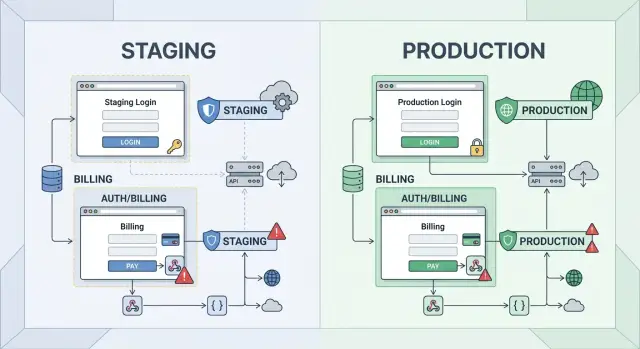
Table of Contents
Why teams get staging parity wrong
Teams often treat staging like a museum copy of production. They try to mirror every service, every flag, every data source, every background job, and every tiny behavior at once. That sounds careful, but it usually creates a staging environment that is slow to build, costly to run, and hard to trust.
The problem is simple: not every difference carries the same risk. A staging site can live with fake blog posts, reduced search data, or a smaller catalog for a while. Users rarely get hurt by those gaps. They do get hurt fast when they cannot sign in, cannot reset a password, or get charged the wrong amount.
That is why "staging parity for auth and billing" matters more than full parity everywhere else. Teams get this backward when they spend weeks copying low-risk details and leave the dangerous paths for later. They end up with a staging system that looks close to production on paper, while the login and payment flow still behave differently where it counts.
Think about the blast radius. A cosmetic mismatch might confuse one tester for a minute. An authentication testing miss can lock real people out of their accounts after release. A payment flow testing miss can trigger failed renewals, duplicate charges, broken trials, or invoices that do not match what the product shows.
A small SaaS example makes this obvious. If the staging version uses a different login callback, a simpler session timeout, and a fake billing webhook, the team may still feel "mostly aligned" with production. Then release day comes, and users who sign in with Google hit an error while subscription upgrades stall in the background. The homepage looked fine. The risky paths were not.
Teams also chase full parity because it feels neat. You can make a checklist, assign owners, and say everything matches. Risk does not care about neatness. Risk sits where identity and money move through the system.
A better staging environment setup starts with the paths that can lock users out or affect charges. Match those first. Leave the safer differences for later, when they stop being guesses and start being worth the effort.
Leave low-risk areas for later
Teams often waste time making staging match production in places that rarely cause real damage. It feels neat, but it does not lower release risk much. A small mismatch on a marketing page is annoying. A broken login or a bad charge creates tickets, refunds, and angry customers.
That is why staging parity for auth and billing should come first. Start with the parts that control access and money. Leave the rest for later unless a "small" area has already caused problems for your team.
Lower-priority gaps usually sit around the edges:
- marketing pages with different banners, copy, or experiments
- theme settings and cosmetic preferences
- analytics tools that send test data instead of real production events
- search or chat tools that run on smaller indexes or limited integrations
- rare admin screens that only internal staff use a few times a month
Those differences are often acceptable for a while. If staging search returns fewer results because the index is smaller, your release can still be safe. If analytics numbers differ a bit, you can still judge whether sign-in, checkout, and account access work.
The same goes for chat widgets and tracking scripts. They matter, but they usually do not block a customer from using the product. Treat them as second-pass work, not day-one parity work.
Back-office flows can wait too, especially the ones your team touches once in a blue moon. An internal export screen, a report for finance, or a one-off settings page should not eat the same attention as password reset, session expiry, subscription upgrade, or failed payment recovery.
A simple rule helps: spend time where failure creates support pain fast. Failed logins stop people at the door. Bad charges break trust and take time to unwind. That is where you want realistic staging data, matching providers, and repeatable tests.
Perfection across every feature sounds responsible. In practice, it often slows teams down and hides the real risk. Get auth solid. Get billing solid. Then close the smaller gaps one by one.
What auth parity actually means
Auth parity means a person can enter staging the same way they enter production, hit the same checks, and get blocked by the same rules. If staging skips those steps, your team is not testing authentication. You are testing a shortcut.
Start with the full account path. A new user should be able to sign up, confirm an email if production requires it, log in, log out, and reset a password through the same flow. If production sends a magic link, staging should too. If production uses SSO or MFA, staging needs those paths in place, not a fake local login that only developers use.
The less obvious cases matter even more because they break quietly. Good authentication testing should cover:
- session expiry after the real timeout
- locked accounts after failed attempts
- role changes that take effect on the next request
- email verification and expired reset links
- MFA prompts on the same accounts and actions as production
A lot of teams miss provider settings. Those settings change the real user path more than the app code does. One checkbox in your auth provider can force email verification, allow passwordless login, change token lifetime, block users from certain domains, or require MFA only for some groups. If staging uses a different config, the flow can look fine while real users get a very different experience.
SSO needs special care. If customers log in through Google Workspace, Microsoft Entra ID, Okta, or another identity provider, staging should test the same handshake, callback rules, and account mapping logic. Otherwise you only prove that a fallback login works. That is not the risky path.
Role and permission changes also belong in auth parity. Promote a user, remove access, suspend an account, then check what happens in the current session and after a fresh login. Some systems update claims right away. Others keep stale access until a token expires. If staging does not match that behavior, release day can turn into a support queue.
Auth parity is not about copying every production user. It is about matching the real gates, the timing, and the failure points that decide who gets in and who does not.
What billing parity actually means
A green test payment proves almost nothing. Billing parity means your staging setup behaves like production when money changes shape, timing, or status.
Most teams check one happy path with a test card, see a successful charge, and move on. Real billing breaks on the messy parts: a trial ends at midnight, a customer upgrades in the middle of a cycle, a coupon expires, or a bank declines a renewal after six months of smooth payments.
If your product uses subscriptions, staging should cover the moments that change revenue and customer access. That usually includes:
- trial start and trial end
- upgrade and downgrade during an active period
- renewal, cancellation, and reactivation
- failed charge, retry, refund, and charge dispute if your provider supports it
Those paths matter because they trigger more than a payment. They can change plan limits, seat counts, invoice totals, tax amounts, and the dates that control account status.
Taxes, coupons, proration, and invoice rules also need to match production logic. A small mismatch here causes support tickets fast. A customer expects one number, sees another on the invoice, and suddenly your team spends the afternoon checking spreadsheet math instead of shipping.
Webhooks deserve extra attention. Many billing bugs start after the payment provider sends an event, not when the card gets charged. Staging should receive the same webhook types, verify signatures the same way, handle duplicate events, and react correctly when events arrive late or out of order.
Retries matter too. A failed payment often does not fail once and stop. Providers retry on a schedule, and your app needs clear rules for access during that window. If staging never tests retries, teams miss some of the most expensive billing mistakes.
A good staging environment setup for billing feels a little annoying because it includes edge cases, waiting periods, and ugly invoice scenarios. That is the point. For staging parity for auth and billing, billing parity means you test the full lifecycle, not just the first successful charge.
How to close the gap in the right order
Teams waste time when they try to copy production all at once. A better move is to fix the parts that can lock users out or lose money. That is why staging parity for auth and billing should come first.
Make one shared map of every dependency in those two areas. Include your identity provider, session store, email or SMS step-up checks, payment processor, tax logic, subscription state, webhooks, and any internal service that updates account access after a payment event.
Then mark what must match production exactly. Some settings can stay lighter in staging, but a few details cannot drift without hiding real risk.
- callback URLs and redirect paths
- token lifetime, refresh rules, and session expiry behavior
- roles, access checks, and account state changes
- webhook endpoints, signing secrets, and retry rules
- billing plan logic, trial rules, and failed payment handling
Copy those settings early. Teams often leave callback URLs, secrets, or webhook config for later because they feel like setup work. In practice, they decide whether the whole flow behaves like production or gives you a fake pass.
After that, test the normal path first. Sign up, sign in, upgrade a plan, renew a subscription, and confirm that access changes at the right moment. If the simple path breaks, edge cases do not matter yet.
Once the normal path works, move to the failure cases. Check expired sessions, password reset flows, duplicate webhook delivery, declined cards, canceled subscriptions, and delayed payment confirmation. These tests catch ugly bugs, but they only help after the basic flow is solid.
Keep a short gap log as you go. Write down each mismatch, the user impact, and whether it blocks a release. Fix the gaps that stop you from trusting the result, then leave lower-risk cleanup for later.
This order is less glamorous than chasing full staging environment setup across every service. It is also the order that saves teams from the worst surprises on release day.
A simple example from a SaaS product
Picture a small SaaS tool for team planning. A new user clicks "Sign up with Google" in staging, lands back in the app, and starts a free trial. The team checks more than the happy path: the OAuth callback works, the app creates one account, the trial starts with the right dates, and the welcome email reaches the inbox it should.
This first step catches a common problem. If staging does not use the same auth settings and account rules as production, Google sign-in may work in a demo and fail for real users, or it may create duplicate accounts when someone later joins a workspace by invite.
A day later, a teammate invites that same user into a paid workspace. Now the team watches identity matching, not just the invite email. The user should join the existing account, keep the right login method, and land in the correct workspace with the right role.
If staging has parity, this is where role bugs show up early. A user who started on a trial should not lose access to their own account, and they should not gain admin rights by accident just because the invite flow and the Google login flow disagree about who they are.
Next, the workspace owner upgrades the plan. The billing provider records the change, sends the webhook, and the app updates seats, limits, and paid features. The team checks timing here, because many bugs hide in the gap between "payment accepted" and "account updated."
Then they force a failed renewal with a test payment method. That single event tells you a lot. The billing system should mark the renewal correctly, send the right emails, retry if that is the rule, and update account status without locking people out too early or leaving paid features open for weeks.
The team also checks logs and internal events. Did the webhook arrive once or three times? Did the app process it once? Did the account move into grace period, restricted mode, or cancellation based on the real production rule?
That is why staging parity for auth and billing matters before full parity everywhere else. One path covers sign-in, invites, roles, subscriptions, webhooks, and account status changes. If that path holds up, release risk drops fast.
Mistakes that create false confidence
Teams often think staging is ready because one clean test passes: log in, upgrade a plan, see the success screen. That test proves very little. Real problems show up when users have different roles, billing events arrive late, or settings drift between staging and production.
One common mistake is using a single admin account for every test. Admins can see and do almost everything, so they hide permission bugs. A staff user, finance user, or customer with a limited role will hit very different paths.
That matters fast in a SaaS product. An admin may buy extra seats without trouble, while a team manager cannot invite users because the seat cap logic breaks. A finance user may expect a tax field on the invoice, but staging never checked tax settings at all.
Another weak spot is billing tests that only cover successful charges. If you only test "card charged, account upgraded," you miss the cases that create support tickets and angry emails. Refunds, failed renewals, plan downgrades, cancellations at period end, and seat reductions all change account state in ways that can go wrong.
The same problem shows up with webhooks. Many teams test the happy path once and stop there. They do not simulate:
- delayed webhook delivery
- duplicate events
- timeout and retry behavior
- missing or invalid signatures
- events arriving out of order
When those cases fail, staging still looks healthy because the UI worked during the first click. Production then tells a different story when the payment provider retries an event three times and your app creates duplicate records.
Config drift creates another trap. If staging secrets, callback URLs, or webhook endpoints do not match production rules, your tests give comfort without accuracy. You are not checking the real integration anymore. You are checking a simplified version that users will never see.
Role rules and account settings also get skipped more often than teams admit. Seat limits, tax settings, trial end dates, and role-based access need separate checks because they change the result even when the same screen looks fine. Small settings cause big billing mistakes.
If you want staging parity for auth and billing, test the edges before you test everything else. Use more than one account type. Break the webhook flow on purpose. Run refunds and cancellations, not just purchases. That work feels less satisfying than a green happy-path demo, but it finds the bugs that usually escape.
Quick checks before each release
A release checklist for staging parity for auth and billing should stay short and strict. If these few checks pass in staging, you lower the chance of a nasty surprise after deploy.
Run them with real test accounts, not mocked screens. You want to see the full path: email, login, plan change, failed charge, and the trail your team uses to debug problems.
-
Create a brand new account and finish the first identity step your product requires. That might be email verification, a one time code, or a basic confirmation screen. If the account lands in the wrong state after signup, stop there.
-
Reset the password for an older test account, then log in with the new password. This catches broken tokens, bad session handling, and the common case where reset works but the next login does not.
-
Change a test user from one plan to another and confirm access changes right away. The UI, account record, and feature gates should agree within seconds, not after a manual refresh or background cleanup.
-
Force a failed payment and watch what happens next. The account should move to the exact state you expect: grace period, restricted access, or downgrade. Vague states are where support tickets pile up.
-
Open the logs and dashboards your support team uses and trace the same user journey from start to finish. They should be able to find the signup, reset, billing event, and access change without guessing which system holds the truth.
This takes a bit longer than a fast smoke test, but it saves far more time later. Teams often ship code that looks fine in the product and only fails when a real user hits email delivery, token expiry, or payment retries.
If you can only afford a few checks before release, do these first. Pretty UI bugs can wait a day. Broken signup, login, or billing usually cannot.
What to do next if your team feels stuck
If your team keeps talking about parity but never finishes it, cut the scope hard. Do one auth flow and one billing flow this week. That is enough to lower real release risk and build momentum.
Pick the auth flow that breaks trust fastest, such as login with MFA, password reset, or invite acceptance. Pick the billing flow that can lose money or create support pain, such as a new subscription, card update, or failed renewal recovery.
Write down the exact production rules you need to mirror. Be literal. List the provider settings, callback URLs, session length, retry rules, tax logic, webhook events, email triggers, and the failure states people usually forget.
A short checklist helps:
- name the single auth flow to match first
- name the single billing flow to match first
- copy the production rules into one shared doc
- assign one owner for staging config, test data, and webhook health
One owner matters more than most teams want to admit. When five people each own part of staging, nobody notices expired secrets, stale test users, or broken webhook retries until release day.
That owner does not need to build everything alone. They need authority to keep staging honest, prune fake shortcuts, and ask for production settings when something does not match.
If this work keeps losing to feature work, treat that as a management problem, not a team failure. Staging parity for auth and billing is small compared with the cost of a broken login or bad charge in production.
Outside help can speed this up when your team is too close to the mess. A fractional CTO can review the risky gaps, rank them, and set a lean plan that fits the team you already have. Oleg Sotnikov is one option for that kind of review. His background spans startup product work, production infrastructure, and AI-first engineering, so he can help teams tighten staging without turning it into a giant side project.
A good next step is simple: book one working session, choose the first two flows, and leave with owners, rules, and a deadline for a real test.


