Audit access to production data during support work
Learn how to audit access to production data during support investigations with logs for reason, records viewed, start time, and end time.
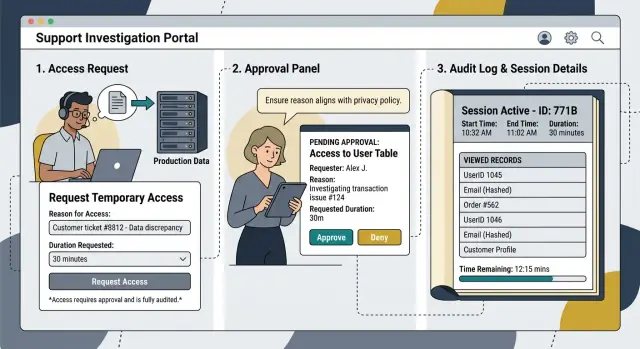
Table of Contents
Why support access needs a clear trail
A support ticket can look routine until someone opens a live account. A customer says an order disappeared, an invoice looks wrong, or a file will not load. To check the problem, a support agent or engineer may open production records, read notes, or inspect recent activity.
That happens during normal work, not only during major incidents. One person checks a billing entry, another opens the user profile, and someone else compares message history with system timestamps. In a few minutes, several people may touch private data.
If nobody records those actions properly, the company ends up with a loose story instead of a real record. The ticket exists, but nobody can say who opened which data, why they needed it, or how long they stayed in the account. That gap creates trouble fast.
Chat notes do not fix this. A message like "I checked the account" says almost nothing. Memory is worse. People forget the exact screen, table, or file they opened, and they rarely remember whether access lasted 30 seconds or 20 minutes.
The risks are simple. Privacy problems grow when people view more than the ticket requires. Customer trust drops when the company cannot explain an investigation clearly. Disputes drag on because managers have guesses instead of facts.
A clear record protects customers and staff at the same time. If a customer asks, "Why did someone open my data?" the company should be able to point to one entry that shows the reason, the ticket number, the name of the person who looked, what they viewed, and when access ended.
That is why production data access logs matter. They turn a fuzzy retelling into something concrete. They show that access happened for a specific support need, not out of habit or curiosity.
A simple test works well: ask whether your team can answer one question in one place - who opened this account, and why? If the answer lives across tickets, chats, memory, and system logs, the process is too loose.
What to record every time
If someone opens live customer data during a support case, the log should let another person reconstruct the session without guessing.
Start with identity and approval. Record the name or account that opened the data and the name of the person who approved it. If an engineer had to act during an urgent incident, note that clearly and make someone review it afterward.
Add the ticket, case, or incident number in the same entry. A note in another system is not enough. When a manager, auditor, or customer asks questions later, nobody should have to hunt across five tools to piece the story together.
The reason for access should fit in one plain sentence. Keep it specific. "Checked duplicate billing complaint for customer 1842 after support could not confirm the source in staging" is useful. "Troubleshooting" is not.
Then record what the person actually viewed. "Customer data" is too broad. Write down the records, fields, files, or screens they opened, such as one order record, two invoice PDFs, the email field, the last four digits of a card token, or the account settings screen.
Time matters just as much as scope. Store the start time, end time, and total session length. If the same person opens production twice for the same case, log both sessions instead of merging them into one block.
A good entry answers five questions: who opened the data, who approved the access, which case it belonged to, what they viewed, and how long access lasted. That sounds basic, but missing one piece is often enough to break the trail later.
Set rules before anyone opens production
Support work gets messy when people decide access rules in the middle of an incident. Write the rules first, keep them short, and make everyone follow the same path.
Only named people should touch live data. Shared admin accounts ruin accountability, and broad team access turns a simple ticket into guesswork. If one person opens production, everyone should know who it was, why that person had permission, and who approved it.
Access should start with a ticket, even when the issue looks small. The ticket gives the reason, customer impact, time window, and expected task. If someone cannot describe the problem well enough to open a ticket, they probably should not open production yet.
Time limits matter too. Give each session an automatic expiry, such as 30 minutes or 2 hours, depending on the job. Do not rely on people to remember to close access later. Systems should close it for them.
Many cases do not need live data at all. A masked record, recent snapshot, or support copy often gives enough detail to debug the issue without exposing names, emails, or payment details. Teams that skip this step start treating production as the default, and that is usually just sloppy.
After-hours work needs a rule of its own. Pick one person, or one small rotating group, who can approve urgent access at night or on weekends. Put that name in the policy so nobody wastes time asking around when a customer is blocked.
Picture a billing complaint at 11:40 p.m. The on-call engineer opens a ticket, gets approval from the named approver, receives a one-hour session, checks a masked record first, and only then opens the live account. That takes an extra minute, but it avoids the usual "who looked at this?" argument the next morning.
The best default path is strict and boring: named accounts only, a ticket before access starts, automatic expiry, masked data first, and one clear approver for urgent cases. Boring rules are easier to follow.
How a support investigation should run
A good support investigation starts before anyone touches production. Begin with the customer report, ticket history, app logs, error traces, and recent deploys. In many cases, that is enough to find the problem without opening live records at all.
If production access still makes sense, the investigator should open a request tied to the support ticket. That request should explain why access is needed, which customer or account is in scope, what systems they plan to check, and how long the session should last. "Debugging" or "checking data" is too vague.
Approval should happen before the session starts. Keep it simple: one named approver, a clear start time, and an expiry time. Read-only access should be the default. If someone needs more than that, they should say so in the request instead of deciding it on the fly.
During the session, the person investigating should leave a trail another teammate can follow later. That is what makes support investigation logging useful in practice.
A useful record includes the ticket or incident ID, the exact reason for access, when access started and ended, what records, tables, files, or screens they opened, and what they learned or changed. It also helps to note when they changed nothing at all.
Specific notes are the difference between a usable record and noise. "Viewed customer profile, billing status, and last three failed API calls" is useful. "Checked production" is not. If the person runs queries, record the query name or purpose. If they view one customer record, note which one.
When the investigation ends, close access right away. Revoke the token, end the session, and confirm that the temporary permission is gone. Then add outcome notes to the ticket: what caused the issue, whether customer data was exposed beyond the approved scope, and what follow-up work the team needs.
This sounds strict, but it saves time later. When a customer asks who opened their data last Tuesday, your team should not need to guess.
A realistic example from a support ticket
A customer writes in: "My refund shows as completed, but the money never reached my card." The support agent cannot answer from the normal admin screen because it only shows "refund sent." They request temporary read-only access to one production record tied to ticket #48271.
Before access opens, the team creates a log entry with the ticket ID, customer ID, agent name, approver, start time, and the reason for access: verify whether the payment gateway returned a failure after the refund job ran. That reason matters. "Need to check account" is too vague.
The agent opens one refund record and the related payment event. They do not browse other customers, recent refunds, or the full payment history. Scope stays narrow: one refund ID, one customer ID, one time window.
The record of what they viewed should be specific:
- refund_status, to confirm the app marked it as sent
- gateway_response_code, to see whether the bank rejected it
- gateway_response_message, to read the exact failure reason
- updated_at, to match the timing with the ticket
- account_status, to rule out a hold that blocked the payout
If the system also stores full card numbers, tax details, or private notes, the agent should not open them. They do not help with this case, so they stay out of scope.
At 10:14 the session starts. At 10:18 the agent finds the answer: the gateway returned a decline code because the original charge was outside the refund window. The agent closes access right away. A solid audit trail shows both times, so the session length is clear: four minutes.
The final note back to the customer team can stay short and plain: "Checked refund record for ticket #48271. Refund request left our system, but the payment provider rejected it with decline code 54. No further customer records reviewed. Access closed at 10:18. Please offer a manual refund path."
That is how you audit access to production data without turning a simple support task into broad, untracked browsing.
Make logging hard to skip
If logging depends on memory, people miss it when a customer is waiting and pressure goes up. The safer setup records most of the trail on its own, before the support person even sees live data.
Start with identity. Do not let people share one support admin login. Use SSO or named admin accounts so each session ties to one person, one time, and one approval path. If a contractor helps for a week, give that person a separate account and remove it when the work ends.
The session should ask for the ticket number up front. Better yet, pull it from the support tool and stamp it onto the access request, the session, and every audit entry created during that window. When someone reviews the event later, they should see why access happened without opening several other systems.
A login record is not enough. You need to capture what the person actually opened: customer pages, account IDs, record types, exported files, and query names. If your team uses saved queries, log the query name and the size of the result. If someone searched across thousands of records, that should stand out.
Keep the logs in a place support staff cannot change. Send them to a separate audit store with tight write rules, short admin access, and alerts if anyone tries to alter retention. If the same team can view customer data and edit the proof of that access, the control loses its point.
Two review triggers catch a lot of bad behavior and a lot of simple mistakes. Flag sessions that run much longer than normal, and flag searches that touch far more records than the ticket seems to need. A 12-minute session to check one billing record looks normal. A 90-minute session with repeated broad searches deserves a closer look.
The best logging feels a little annoying at first. That is fine. A small speed bump at the start saves hours of guesswork later.
Common mistakes that hide who did what
The worst gaps usually come from habits that feel normal inside a busy support team. They save a few minutes in the moment, then turn a simple review into guesswork later.
Shared admin accounts cause the most damage. If three people use the same login, your records can show that someone opened production, but not who actually did it. Every person needs their own account and their own temporary approval.
Permanent access creates the next problem. Teams often leave broad permissions in place because asking each time feels slow. The result is messy history and weak control. When everyone can open live data at any time, nobody can explain why access happened on Tuesday at 4:12 p.m. instead of during an approved support task.
What the logs often miss
Many systems log the start of a session and stop there. That is not enough. A useful record should answer a few plain questions: why did the person open production data, which customer or screen did they view, did they only read data or change something, when did access start and end, and which ticket approved the work?
Teams also skip the reason for access because they plan to fill it in later. Later rarely happens. A ticket might say "urgent issue" and nothing else. That tells you almost nothing during a review, especially if the case involved personal or financial data.
Another common miss happens at the end of the investigation. The ticket closes, everyone moves on, and the elevated access stays open for days or weeks. That leftover access then gets reused for unrelated work, which breaks the trail again.
One small rule fixes a lot of this: do not close the ticket until the access is closed too. Pair the two steps in the same workflow. If the team uses manual approvals, make one person confirm both actions.
If your company needs tighter support team data access without adding heavy process, keep the fix simple. A short access request, named user accounts, and automatic expiry usually work better than thick policy documents nobody reads.
A short checklist for your process
A support case can move fast, especially when a customer is waiting. That is exactly when teams skip the record-keeping that matters later. If you want a process that holds up under pressure, keep the checklist short and strict.
- Record the reason in plain language. Write the customer issue, the symptom, and why production access was needed. "Checking a failed refund after the customer reported a duplicate charge" is clear. "Support review" is useless.
- Tie the event to a real ticket. Use the exact case or incident ID so anyone can trace the access back to a customer report, bug, or outage.
- Note what the person actually viewed. Name the tables, records, screens, or account areas they opened. If they searched by customer email, order ID, or invoice number, log that too.
- Capture the time window. Store when access began and when it ended. If access stayed open for 47 minutes, your log should show that, not just the date.
- Review unusual access on a schedule. A manager should check cases with broad searches, repeated lookups, after-hours access, or access with no matching ticket. Weekly is often enough for a small team.
This works best when the checklist lives inside the support flow, not in a separate document people forget. Put the fields in the ticket form, the access request, or the tool that grants temporary access controls. If the form is missing a reason or ticket ID, the access should not open.
Production data access logs do not need to be fancy. They need to be complete. Even a lean team needs a trail that answers five basic questions: why someone opened data, which ticket allowed it, what they saw, when it started, and who reviewed the odd cases later.
What to do next
Start with one real support path, not a policy document. Pick a ticket type where someone already opens production data today, such as a failed payment, an account lockout, or a missing record. Write down each step: who asks for access, who approves it, what data they open, where they look, and when that access should end.
This small map usually shows the weak spots fast. Teams often find shared admin accounts, access that never expires, or logs that record a login but not the reason for it.
Then choose the smallest rules your team can enforce this month. Require a ticket number before anyone opens production data. Record the reason for access, the approver, and the start and end time. Note what was viewed or changed in enough detail to review later. Remove broad production roles from support staff who no longer need them. Review a sample of these logs every week and fix gaps right away.
That is enough to make the process real. You do not need a giant project first. A short form, a temporary role, and a weekly review beat a polished plan that nobody follows.
Be strict about open-ended access. If a support person needs elevated rights for a live issue, give them temporary access and let it expire. Permanent access for "just in case" work is where most bad habits start.
If your team is growing and the process is still messy, an outside review can help. Oleg Sotnikov at oleg.is works as a Fractional CTO and startup advisor, and this is the kind of operational cleanup he often helps with.
A practical next step for this week is simple: pick one support ticket type, run it through your current process, and see if you can answer three questions afterward - why someone opened data, what they saw, and how long they had access. If you cannot answer all three, fix that path first.
Frequently Asked Questions
Why is a ticket note not enough?
A ticket note usually says too little. If someone writes "checked the account," you still do not know who approved the access, which record they opened, or when they stopped.
A real log should tie the session to one ticket and show the reason, scope, and time window in one place.
What should every production access log include?
Record who opened the data, who approved it, the ticket or incident ID, the reason for access, what they viewed, and when the session started and ended.
If the person opened production twice for the same case, log both sessions separately. That makes the trail much easier to review later.
Should support agents keep permanent access to production?
No. Permanent access turns production into the default and makes reviews messy.
Give named people temporary access for a specific case, let it expire on its own, and keep read-only access as the normal choice.
Can someone open production before approval in an emergency?
Only for real urgent work, and even then you should document it right away. The person who opens production should note why they could not wait and who reviewed the decision after the fact.
That keeps the process moving without losing accountability.
How long should temporary access last?
Keep it short. For many support cases, 30 minutes to 2 hours works well.
Pick a default that fits your work, then let the system close access automatically. Do not rely on people to remember to revoke it later.
Do we always need live customer data to investigate a ticket?
Use masked data, snapshots, logs, and support copies first. Many issues do not need live customer data at all.
If those sources answer the question, stop there. Production should be the last step, not the first one.
How detailed should the record of what was viewed be?
Be specific enough that another teammate can picture the session without guessing. "Viewed one refund record, one payment event, and the account status field" works. "Checked customer data" does not.
If someone runs a query or opens a file, log the query name or purpose and the record or file they touched.
How do we spot sloppy or suspicious access?
Review sessions that run much longer than normal, happen after hours, or touch far more records than the ticket seems to need.
You should also flag access with no matching ticket, broad searches across many accounts, and any session where the reason field stays vague.
What mistakes usually break the audit trail?
Shared admin accounts break identity first. Broad permanent permissions, vague reasons like "troubleshooting," and logs that capture login time but not viewed records cause the next problems.
Another common failure shows up at the end: the ticket closes, but the elevated access stays open and gets reused for unrelated work.
What is the fastest way to improve this process this week?
Start with one ticket type that already leads people into production, like failed refunds or account lockouts. Add a required ticket ID, a short reason field, named accounts, and automatic expiry.
Then review a small sample every week. If your process still feels messy, Oleg Sotnikov can help tighten it as a Fractional CTO.


