Artifact retention rules that keep CI storage costs down
Artifact retention rules help teams cut CI storage waste. Learn what to keep, when to expire builds, and how to save release proof cleanly.
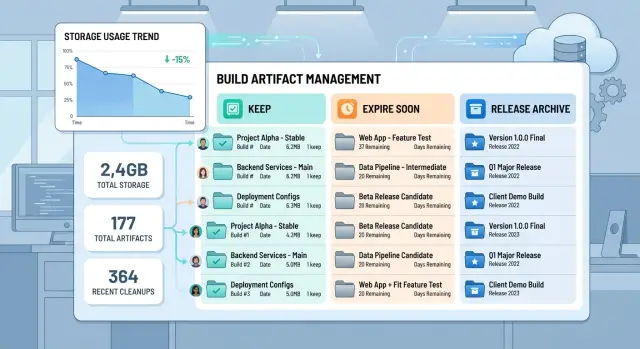
Table of Contents
What goes wrong when you keep every build
Most teams do this by accident. The CI system ships with a generous default, nobody changes it, and every build keeps its artifacts far longer than anyone needs.
Storage grows faster than people expect because build output multiplies at every step. A feature branch creates artifacts. The pull request creates another set. A retry after a flaky test adds more. A small fix often creates another near identical copy. In a small team, that adds up quickly.
The problem is not only size. The usefulness of most artifacts drops fast. A temporary test report can help for a day or two, then nobody opens it again. A full workspace from an abandoned branch can sit in storage for months, quietly adding cost and giving nothing back.
Release evidence is different. You may need the exact release package, a checksum, a signed log, or a short record of which commit went live. Those files matter during a rollback, a customer issue, or an audit. Keeping every failed build, every retry, and every intermediate file is not the same as keeping useful evidence.
Clutter also wastes time. When a bug appears in production, people search through long lists of similar artifacts and guess which one matches the release. During an audit, the same mess turns simple questions into slow work. Teams download the wrong archive, compare the wrong report, and lose time they never see on a storage bill.
Clear artifact retention rules cut CI storage costs and make the archive easier to trust. When noisy files expire on purpose, the files that matter stay easy to find.
Decide what deserves storage
Most pipelines create far more files than anyone will ever open again. A single run can leave raw job logs, test reports, coverage files, screenshots, binaries, installers, caches, temporary folders, checksums, SBOMs, signatures, and release notes. If you do not sort those files on purpose, every run keeps a small pile of maybe useful output and storage keeps growing.
A practical policy starts with three storage buckets.
Three storage buckets
The first bucket is release proof. This is the small set you may need months later: the exact release package, checksum, signature, version metadata, dependency manifest, and any report that proves what shipped. If support needs to reproduce a customer issue, or a customer asks for an installer from an older version, this is the set that saves time.
The second bucket is short term debugging output. Test logs, screenshots, crash dumps, and coverage reports help right after a failed run. Two weeks later, most of them are dead weight. Keep them long enough for engineers to investigate, then let them expire.
The third bucket is disposable output. Temporary workspaces, intermediate bundles, duplicate archives, and unpacked dependency files usually belong here. If a rerun can recreate them in minutes, storing them for months makes little sense.
The reason for keeping a file should fit in one sentence. A customer may need this installer later is a real reason. We might want it someday is not.
Exceptions should come from support, compliance, or customer delivery, not from habit. Signed release packages, audit reports, migration scripts, and deployment manifests often need longer retention because someone outside the build team may rely on them. A passing test log from an old branch usually does not.
If a small team uses GitLab or another CI system, this split already removes a lot of clutter. Keep proof of what reached users. Keep debugging data briefly. Delete the rest.
Set clear expiry dates by artifact type
Storage gets expensive when every artifact gets the same treatment. A release package that customers still use has a very different job from a pull request build that nobody will ever ship.
Start with one question: who will need this later, and for how long? If the answer is vague, the expiry should be short.
A useful starting schedule looks like this in practice. Keep shipped release packages for the full support window, plus a small buffer. Keep routine test reports for 14 to 30 days. Expire pull request and branch builds after 3 to 7 days if nobody ships them. If Sentry or your observability stack already owns logs, do not keep the same data in CI for months. Save one source snapshot per release instead of every branch build.
Release evidence deserves special care. Auditors, support teams, and future engineers may need to prove what you shipped. Keep the release package, the exact commit or tag, the dependency manifest, and a short build record. You rarely need the full temporary workspace, every intermediate layer, or every debug log.
Test reports are different. They help people investigate failures while the issue is fresh. After a few weeks, most teams never open them again unless a serious incident is still active. That is why build artifact expiration should stay short for routine reports and longer for anything tied to a shipped version.
Pull request builds are usually the first place to get strict. They pile up fast, especially when people rerun jobs for small fixes. If a branch goes stale or gets merged, the clock should already be running.
One rule makes cleanup much easier: if two systems store the same evidence, pick one owner. CI is good at proving how a release was built. It is usually a poor place to keep long term copies of logs, screenshots, caches, and branch snapshots.
When dates differ by artifact type, CI storage costs stop creeping up in the background.
Build your policy in a few steps
Start with a full inventory. Most teams know they store build outputs, but they forget about test reports, container layers, cache archives, security scan exports, and one off files added by older jobs. Check every repository and every pipeline, including jobs nobody has touched in months. Old CI habits often cost more than active work.
Then measure what you already keep. Break storage down by project, branch, artifact type, and age. That view usually reveals the real problem quickly. A small team might find that feature branches create most of the volume, while release builds take much less space and matter much more.
After that, set defaults that people can remember. Pull request and feature branch outputs should live only long enough to debug failed builds. Main branch artifacts should stay long enough to support recent rollbacks. Release packages should stay longer, with clear ownership. Logs and reports should stay only if someone still reads them after the first few days.
Write those defaults in plain language. Temporary test artifacts expire after 7 days is much better than vague wording about reviewing files when appropriate. Teams follow rules they can remember.
Then add a small exception layer. Some files need longer retention because they support releases, audits, legal records, or customer deliveries. Keep those on purpose. Do not let maybe useful later become a blanket excuse for saving everything. If a customer needs a signed build package, save that package and the evidence around it, not the full workspace from every run.
Review the policy on a schedule, such as every quarter, and again after major workflow changes. A new release process, a move to containers, or a larger test suite can change storage patterns quickly. If you never revisit the rules, old settings stay in place and costs drift upward again.
The best policies are boring. People know what gets kept, what expires, and who can approve an exception. That cuts waste without making CI harder to use.
Keep release evidence, not full workspaces
A shipped release needs proof, not clutter. If your team keeps every temporary file, cache, and job folder forever, CI storage costs rise quickly without helping much when you need to investigate a release.
For each version you ship, keep a compact record that tells the story clearly. Save the release package, the exact commit hash, the version number, the build date, the checksum, the pipeline ID, the approval record, and short summaries of tests and security scans. That is enough for most teams to answer the questions that matter later: what went out, when it went out, and which code produced it.
A small manifest is usually better than a full job workspace. It stays easy to search, copy, and review. A workspace is the opposite. It often includes downloaded dependencies, temporary outputs, debug files, and other junk that nobody checks again.
This matters even more for small teams. If a release issue shows up six months later, you want a clean record that anyone can read in two minutes. You do not want a multi gigabyte archive that needs special tooling just to find the build number.
Set ownership before you need it. Decide who can extend retention for a release, who can delete a release record, and when they need approval. In many teams, that should be an engineering lead or the person who owns compliance. Clear artifact retention rules stop random exceptions from turning into permanent storage growth.
Keep the evidence that proves what you shipped. Delete the rest on purpose.
A realistic setup for a small team
Picture a small SaaS team with one main repository and a daily release habit. They open pull requests all day, merge to main a few times, and tag a release when a change is ready for customers. If they keep every artifact forever, storage grows quietly every month.
A practical policy for this kind of team can stay simple. Pull request builds can expire after 3 to 7 days. Debug files from main can stay for about 14 days. Tagged release packages should stay for the full support period, and release records should stay with them for that same period.
That first rule removes the largest pile. Review builds stack up quickly, especially when people push several times to the same pull request. A week is usually enough for code review, QA checks, and one more look if something breaks right after merge.
Main branch debug files deserve a little more time. Two weeks gives the team room to inspect a production issue that appears after a deploy, compare logs, or reproduce a bug from a recent change. After that, the team usually knows whether the build still matters.
Tagged releases are different. If customers may run a version for six months, a year, or longer, the team should keep the release package for that whole support window. They should also keep the release record, not just the binary. That record can include the tag name, commit SHA, build date, package checksum, test summary, and dependency snapshot.
Months later, support does not need every temporary workspace from every failed branch build. They need proof of what shipped. If a customer reports a bug on version 2.8.4, support should be able to pull the tagged package, match the checksum, confirm the exact commit, and review the test record from that release. That is fast. Digging through thousands of old review builds is not.
Mistakes that quietly raise storage bills
Teams rarely drive up CI storage costs in one dramatic move. The bill usually grows through small habits that feel harmless.
One common trap is keeping almost everything because storage looks cheap at the start. Early on, a team might run ten builds a day and think there is no reason to delete anything. Then test output grows, screenshots pile up, and each merge request leaves behind another copy of the same kinds of files.
Another trap is one expiry rule for every artifact. Release bundles, temporary test reports, debug logs, and dependency caches do not do the same job. If you give all of them 90 days, you keep too much junk and still risk deleting the one file you actually needed.
Duplicate storage is another quiet leak. Many teams save logs inside CI artifacts while also sending the same logs to a central logging system. That means you pay twice for the same evidence. Keep the version people really use and drop the other one.
Some of the worst growth hides in places nobody checks often: failed jobs with full debug output, retried pipelines that store another full set of artifacts, forks that run similar jobs, temporary branches that never get cleaned up, and old merge request pipelines left behind after the branch is gone.
Incidents create another mess. During an outage, people often extend retention so they can inspect more evidence. That makes sense in the moment. The problem starts when nobody resets the rule after the incident ends.
A small team can avoid most of this with one habit: review retention settings every month. Check what grew, ask why it still exists, and cut anything that nobody opened, downloaded, or used in a real release review. Storage bills stay lower when deletion becomes part of normal CI/CD housekeeping instead of an emergency cleanup.
Quick checks before and after cleanup
Cleanup should leave you with fewer files and fewer arguments. Before you delete anything, ask one simple question about each artifact: why does it exist? If nobody can answer in one sentence, it probably should not stay around for long.
That sounds basic, but it exposes waste quickly. Teams often keep old test bundles, duplicate reports, and failed build outputs because nobody touched the defaults. Good artifact retention rules start with ownership, not storage math.
Before cleanup, do a few spot checks. Open random artifact folders and ask who uses them. Ask support to find the files from the last release. If that takes more than a few minutes, the naming or storage layout needs work. Compare expiry dates for failed builds and shipped builds, because failed runs usually need much less time. Look for reports stored two or three times across CI, shared storage, and release notes.
One test helps more than most dashboards. Pick the latest production release and ask someone who did not build it to gather the release evidence: build ID, commit, test summary, package checksums, and deploy record. If that person gets stuck, the problem is not only storage. The retrieval path is broken too.
After cleanup, watch behavior, not only total gigabytes. A one time drop feels good, but the real win is slower growth with no extra pain for support or engineering.
Over the next few weeks, weekly storage growth should flatten. Support should still find the latest release package and proof of what shipped without asking engineers to dig through old jobs. Failed build artifacts should disappear on schedule while release evidence stays easy to find. Duplicate reports should stop reappearing in more than one place.
If growth does not slow after cleanup, the policy is not the only issue. The pipeline is still producing files that nobody reviewed. Fix that first, then cleanup starts to stick.
What to do next
Pick one busy repository and change only its retention settings first. Two weeks is usually enough to learn whether shorter expiry dates cause real trouble or whether nobody misses the old files. That small test tells you more than guesswork and gives you a clean view of the change in CI storage costs.
Before you remove older artifacts, write down the smallest release record your team must keep. In many teams, that record is simple: the version tag, commit SHA, final package or image ID, checksum, test result, approval note, and a short build summary. Keep the evidence that proves what you shipped. You usually do not need every temporary file from every run.
A safe rollout is straightforward. Choose one repository with frequent builds, shorten expiry for temporary artifacts, logs, and caches, store shipped release evidence in a separate place with a longer lifetime, and review storage use, rebuild failures, and release friction after two weeks. Do not change every repository at once. One pilot is easier to reverse, and it shows where your team actually depends on older artifacts.
Watch for two problems during the pilot. Rebuilds may fail because something expired too soon, and release checks may break because nobody defined the minimum record. Both problems are useful because they tell you exactly where the policy needs adjustment.
Put storage review on the same schedule as release review. If you wait for a surprise bill, you will miss the slow creep that comes from one extra archive per pipeline, copied again and kept for months.
If nobody on the team owns CI full time, Oleg Sotnikov at oleg.is can review artifact retention rules, infrastructure spend, and lean build setup as part of Fractional CTO or advisory work.
Run the pilot, measure the result, and apply the same policy across the rest of your repositories.
Frequently Asked Questions
What should we keep for each release?
Keep a small release record: the final package or image, the commit or tag, the checksum, the build date, the pipeline ID, and a short test summary. That gives support and engineering enough proof without dragging old junk along.
How long should pull request artifacts live?
Start with 3 to 7 days for pull request and feature branch artifacts. That usually covers review, QA, and one quick follow up after merge.
Do we need to keep old test reports?
Yes, but only for a short time in most teams. Keep routine test reports for about 14 to 30 days, then delete them unless an active incident or compliance rule needs more time.
Should we keep logs in CI if another tool already stores them?
No, not for long term storage. If Sentry, Grafana, or another logging tool already holds the logs people use, let that system own them and stop saving the same data in CI for months.
What is the fastest way to cut CI storage costs?
Tighten expiry on branch builds, retries, and debug output first. Those files pile up fast and most teams never open them again after a few days.
How do we decide if an artifact deserves long retention?
Ask one simple question: who will need this later, and for how long? If nobody gives a clear answer in one sentence, set a short expiry or delete it.
Should we keep full workspaces for shipped builds?
Usually no. Keep release evidence, not full workspaces full of dependencies, temp files, and duplicate output that you can rebuild if you really need it.
How often should we review artifact retention rules?
Review them every month or at least every quarter. Also revisit the rules after a new release process, a switch to containers, or a big test suite change.
What can go wrong if we delete artifacts too aggressively?
You risk rebuild failures, missing release proof, or support delays. Run a small pilot first so you can spot the few artifacts your team still needs before you change every repository.
How do we test a new retention policy safely?
Pick one busy repository, shorten retention for temporary artifacts, and leave release records on a longer schedule. Watch storage growth, rebuild issues, and release checks for two weeks, then adjust before you roll the policy out wider.


