Approval matrix for automation in purchasing and HR
Build an approval matrix for automation that spells out roles, amount limits, exceptions, and escalation rules for purchasing, HR, and finance workflows.
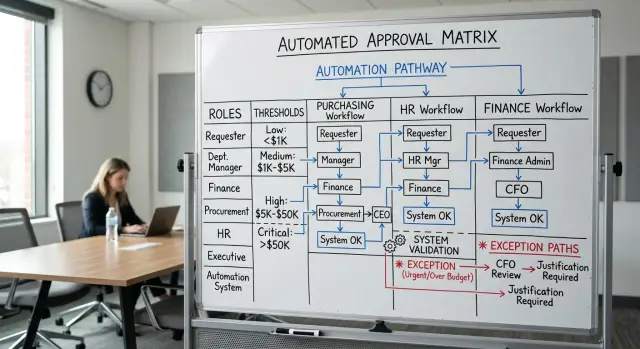
Table of Contents
Why bots need clear approval rules
People can work around vague rules. Bots usually can't.
Take a line like "manager approves large purchases." A person inside the company might know that "large" means anything above $2,000 for office gear, but only $500 for software, unless the team already has budget. A bot has no safe way to fill in those blanks. It will either stop the request, send it to the wrong person, or approve something it should not touch.
That happens because many teams do not follow one clean written policy. They follow habit. People remember that "Finance usually checks this," or "HR signs off when the employee is remote," or "the VP only gets involved for exceptions." Those rules live in chat, memory, and old email threads. Humans patch the gaps. Automation exposes them.
The cost is bigger than one wrong click. Requests bounce between managers. People redo work because the wrong person approved the wrong step. Senior staff get pulled into issues that never should have reached them. Over time, employees stop trusting the system.
In purchasing, that can turn a simple order into a multi-day delay. In HR, it can hold up onboarding or compensation changes. In finance, it can leave an approval trail that makes no sense when someone reviews it later.
A clear approval matrix fixes that by turning "usually" into rules. Who can approve? Up to what amount? For which department? Under which exception? When does the request stop, and when does it escalate?
Once those answers are written down, bots stop acting like guessers. They start acting like careful clerks. That is the real goal. You do not want faster approvals at any cost. You want approvals that stay predictable every time, whether the request is a laptop order, a salary change, or a refund outside normal policy.
What the matrix should capture
A useful approval matrix needs more than names and dollar limits. It has to tell the system who can decide, what they can decide, and when it must stop instead of guessing.
Start with roles, not people. People change jobs, take leave, or fill in for each other. Roles stay more stable. Write entries such as "team lead," "HR manager," "finance controller," or "procurement head," then note who covers that role when the usual approver is unavailable.
Next, define the action each role can approve. A purchase request, a new hire, a salary change, a refund, and a contract renewal are different actions. If one manager can approve office supplies but not software subscriptions, say that plainly. Bots fail when rules lump very different transactions into one bucket.
Amount bands matter too. One flat limit is rarely enough. Small requests often need one level of review, while larger ones need another. A simple matrix might use bands like under $500, $500 to $5,000, and above $5,000. Put the transaction type beside each band so the rule stays clear.
Some actions need two approvals. Write that as a rule, not a suggestion. A purchase above a certain amount may need both the budget owner and finance. A salary adjustment may need both the hiring manager and HR. If those approvals must happen in order, write down the order.
You also need stop points. A bot should hand the case to a person when:
- the request does not fit any listed amount band
- the approver has a conflict of interest
- the case needs a policy exception
- the budget code is missing or unclear
- the request mixes categories with different rules
Add the reason for each stop point. That helps the bot explain why it paused, and it helps staff fix the problem faster.
A good matrix is specific enough that two different people would route the same request the same way. If your team still argues about edge cases, the rule is not ready for automation.
Roles, limits, and actions
A usable matrix starts with the names people already use at work. If a bot sees labels like "management" or "finance team," it has too much room to guess. That is where bad routing starts.
List every role that can touch a request, even if that role only checks one detail. In many companies that includes the requester, direct manager, budget owner, purchasing, HR, finance, and the person who gives final sign-off.
A short matrix works best when each row shows the request type, the role involved, the action allowed, the amount limit or condition, and the backup approver.
Group requests by type, not only by department. "HR" is too broad by itself. A new hire offer, a salary change, a leave exception, and a training budget request can all follow different rules even if HR appears in every path.
The same goes for spending. "Purchasing" can cover office supplies, software renewals, contractor invoices, travel, and hardware. Those requests often need different checks, and the limits rarely match.
Set thresholds that fit how your company actually spends money. If most software purchases fall between $800 and $2,000, do not create limits that push nearly every request into an exception lane. The workflow should match normal buying patterns, not an old policy document nobody really follows.
Teams also mix up different actions. Keep these separate:
- review, which checks documents, policy fit, or the budget code
- approve, which allows the request to move forward
- reject or send back, which stops the request or asks for changes
- final sign-off, which releases payment, issues the contract, or confirms the change
That split matters. A finance analyst may review an expense report, while a department head approves it and the controller gives final sign-off above a certain amount.
Do not forget temporary delegates and backup approvers. People go on leave, travel, or switch roles. Mark who can act in their place, for which request types, and during which dates. If you skip that detail, exceptions pile up fast and the bot stalls at the first missing approver.
Write rules step by step
Start with one request that happens all the time. A laptop purchase, a leave request, or a contractor invoice is better than a rare edge case. Common requests expose the real policy faster, and they give your automation a safer place to learn the pattern.
Write the rule in plain language first. Then turn it into a sequence the system can follow without guessing. Every rule should answer five questions: what came in, how much it is, who approves it first, who joins later, and what result the system returns.
A simple rule usually follows this order:
- Name the request type.
- Set the default approver for each amount range.
- Add another approver when the request crosses a limit.
- Add review triggers for finance, legal, HR, or security.
- Define the exact result the system should return.
Keep the amount ranges tight and clear. Do not write "small purchases" or "manager review if needed." Write "$0 to $500 goes to the team lead," "$501 to $2,000 goes to the department head," and ">$2,000 also needs finance." Bots handle exact ranges well. Vague labels cause bad routing.
Then add cross-checks that sit outside the amount. Some requests need another team because of risk, not price. A software contract may need legal review even if the total is low. A new hire may need HR review before a manager can approve start dates or compensation changes. A reimbursement may need finance if the receipt is missing or the expense falls outside policy.
Be explicit about the trigger. Write "legal review required when a vendor contract includes auto-renewal" or "HR review required when leave exceeds 10 business days." That gives the system a clear switch to flip.
Finish each rule with one final response. The system should return something concrete, such as "approved," "sent to finance for review," "needs director approval," or "rejected because the amount exceeds the approved budget." One request should produce one clear status, not a fuzzy note.
If a rule feels hard to write, the policy is probably still unclear. Fix the policy first. Then automate it.
Handle exceptions before they break the flow
Normal cases are easy. Exceptions are where approval systems fail.
A bot can follow a clean path all day, then one urgent request lands, a manager is on leave, and the whole process either stalls or makes a bad guess. That is why exception handling needs the same level of detail as the main path.
Start with the exceptions that happen every month. If the team sees them again and again, they are not edge cases anymore.
In purchasing, that might be an emergency laptop replacement or a same-day software renewal. In HR, it might be a contract extension while the manager is on vacation. In finance, it might be an invoice above the usual limit that still has to be paid because of a legal deadline.
Write those cases down in plain language. Common examples include urgent purchases needed within 24 hours, requests that break normal policy but have a written business reason, approvals blocked because a manager is absent, requests with missing documents or unclear cost codes, and repeat requests that look like duplicates.
Each exception needs one short path. If a direct manager is out, send the request to a named delegate, not to a mystery backup chosen on the fly. If no delegate exists, escalate to a department head or the finance owner. If a purchase is urgent and above the normal cap, require two approvals instead of one. That keeps control tight without freezing the work.
Out-of-policy requests need even less guessing. The system should never decide whether a rule "probably" applies. It should label the request as out of policy, attach the reason, and send it to the person or group that owns exceptions.
Keep the audit trail simple. Store who requested the exception, why they asked, who approved it, and which rule got bypassed. Someone reviewing the log later should understand the whole decision in under a minute.
Short exception paths work best. If the bot has to check six conditions and four backup approvers, people will stop trusting it. When no clear rule fits, the safest move is to pause, escalate, and wait for a human decision.
A simple example across purchasing, HR, and finance
It gets easier to test a matrix when you run one request through several teams.
Picture a product team that needs a new analytics tool and also wants to bring in a contractor to set it up before a launch. The product manager submits one request: buy software for $18,000 per year and hire a contractor for six weeks. The request includes the vendor name, cost center, contract length, start date, and the reason the work cannot wait.
Purchasing checks the software part first. The matrix says team leads can approve software up to $5,000, department heads up to $15,000, and the CTO up to $25,000. Because the tool costs $18,000, the system skips the team lead and sends it to the CTO.
HR handles the contractor part. The HR rules say HR must confirm worker type, contract template, access level, and background check needs before anyone starts. If the contractor will touch customer data, HR also routes the request to security for access review.
Finance reviews both parts together. The finance rules say the budget owner must confirm funds in the current quarter, and finance must check payment terms. If the vendor asks for 100% upfront payment, the CFO must approve. If payment is monthly and within budget, a finance manager can approve it.
Now add one exception. The team marks the request as urgent because the launch is 10 days away. The matrix allows urgent routing, but it does not ignore limits. Because the software cost is over the department limit, the system still sends it to the CTO. Because the vendor wants full annual prepayment, the finance step still goes to the CFO.
The path is straightforward:
- Check the request type: software purchase plus contractor request.
- Read the amount, cost center, urgency flag, payment terms, and data access level.
- Route software approval to the CTO because $18,000 is over the department limit.
- Route contractor approval to HR, then to security if the contractor will access customer data.
- Route finance review to the budget owner, then to the CFO because payment is 100% upfront.
That path is precise. The system does not guess, and nobody argues later about who should have approved what.
Mistakes that lead to wrong approvals
Wrong approvals usually start with a shortcut. Someone says "use the manager title," someone forwards an old email, and the system ends up following a rule nobody meant to keep.
Job titles are a common trap. Titles change fast, especially in smaller companies. "Head of Operations" becomes "Operations Lead," then something else next quarter. If your rule points to the title instead of a stable business role, approvals break as soon as HR updates the org chart. Tie authority to a role in the process, not the label on someone's profile.
Teams also hide policy in places bots should never trust. A limit buried in an email thread, a one-off exception in chat, or a spreadsheet copied between departments will create two versions of the truth. An automated approval flow needs one source of truth and one owner who updates it.
Another common mistake is mixing spending limits with budget ownership. A department lead may own a budget, but that does not mean they can approve any amount from it. Finance often sets separate limits based on amount, contract length, vendor type, or payment terms. Keep "who owns the budget" separate from "who can approve this request."
Special cases also fail when nobody writes down the cross-team checks. A purchase may need security review. A new hire may need HR and finance sign-off if the role sits outside the approved headcount plan. A refund or write-off may need finance plus the team that caused the charge.
Watch for a few repeated patterns: no written rule for exceptions, approval rights tied to titles instead of stable roles, finance limits mixed with budget ownership, policy spread across chat and email, and systems copying past behavior instead of following written rules.
That last problem causes quiet damage. Past approvals often include rushed decisions, favors, and plain mistakes. If you let bots infer policy from history, they will repeat old errors at machine speed. When the rule is unclear, the system should stop and send the case to a human.
Checks before you automate
If a new manager cannot read the rules once and apply them with confidence, your system will not apply them well either. A good matrix should feel plain, specific, and maybe a little boring. That is a good sign.
Read the matrix like a stranger would. You should be able to answer every approval question without calling HR, finance, or procurement for extra context.
A few checks catch most problems:
- Test one simple standard: can a new manager follow the rule from start to finish in one read?
- Check every amount band. No range should end with "ask someone" or "depends."
- Read every exception and ask what the system does next: route to legal, pause for manual review, ask for missing documents, or reject the request.
- Make sure each decision leaves a trail. An auditor should see who approved, which rule applied, what amount triggered it, and whether an exception changed the path.
- Remove duplicates and collisions. If one rule says a department head can approve up to $5,000 and another says finance must approve anything above $3,000, you do not have a real rule yet.
A small dry run catches most of the rest. Take five recent requests, such as one normal purchase, one urgent purchase, one salary change, one contractor payment, and one awkward edge case. Walk them through the matrix line by line. If two people reach different answers, rewrite the rule.
This matters even more when rules cross teams. A laptop purchase might start in procurement, trigger a finance limit, and then need IT confirmation. If the matrix does not spell out the order, the request will either stop too early or circle around until someone steps in manually.
If your team is formalizing these rules before moving into AI-assisted workflows, outside review can help. Oleg Sotnikov, a fractional CTO and startup advisor at oleg.is, works with companies that are turning messy internal processes into clear systems that software can follow without guessing.
The best final test is simple. Pick one request, hide the names, and ask, "Could we explain this approval six months later?" If the answer is no, fix the rule before you automate it.
What to do next
Start smaller than you want. Pick one workflow, map it all the way through, and leave the rest for later. A purchase request is usually a good starting point because amounts, vendors, and approvers are easier to see than in more tangled HR cases.
Write the full path for that one flow on a single page. Include who submits the request, who approves at each amount, what documents must be attached, and what should happen when a rule does not fit. The matrix only works when the system can follow it without making a judgment call.
Then pressure-test it with real examples, not made-up ones. Pull ten past requests from email, chat, or your ticket system and run them against the matrix. Use a mix of normal and awkward cases: a small software renewal, a rush laptop order, a contractor payment, a leave request missing a document.
Watch for the moment people say, "Well, it depends." That is where the rule is still too vague.
Ask the actual approvers to read the matrix and mark anything that feels unclear, outdated, or annoying. Finance may use one limit in practice while the written policy says another. HR managers often know about exceptions that never made it into the formal rule.
Keep the matrix alive after launch. Teams change, managers move, budgets shift, and old approval limits stop matching reality. Review it on a simple schedule, such as once a quarter or after an org change, so the workflow does not drift away from how decisions really happen.
Small scope, real tests, honest feedback, regular updates. That is usually enough to make the first version useful and keep bad approvals out of the system.
Frequently Asked Questions
What is an approval matrix?
An approval matrix is a written rule set that tells your system who approves each request, for which action, at which amount, and under which exception. It turns habits like "Finance usually checks this" into rules a bot can follow every time.
Why can’t I just automate our current approval process as it is?
Because people fill gaps from memory and bots do not. If your process depends on old emails, chat messages, or unwritten habits, automation will route requests badly, pause work, or approve the wrong thing.
Should I build the matrix around people or roles?
Use roles first. Roles stay stable longer, while people change jobs, go on leave, or cover for each other. Your matrix should name the role, then name the backup for that role when someone is unavailable.
How specific should amount limits be?
Break them into exact bands that match real spending. Instead of "small" or "large," write ranges like "$0 to $500" or "$501 to $2,000" and tie each range to a request type. That keeps the bot from guessing.
When should the bot stop and send a request to a human?
The bot should stop when no rule fits cleanly. That includes missing budget codes, conflicts of interest, out of policy requests, mixed categories with different rules, or anything that needs an exception.
Do urgent requests need their own approval path?
Yes. Urgent work still needs written rules. You can shorten the path, add a named delegate, or require one extra approval for urgent requests, but you should not let urgency erase normal limits.
How do I handle vacations and backup approvers?
Write backup approvers into the matrix before you automate anything. Name who covers each role, which request types they can handle, and when they can act. If you skip that step, requests will pile up the first time a manager is out.
What mistakes lead to wrong approvals?
Teams often tie approval rights to job titles, mix budget ownership with approval authority, and keep policy in chat or email. Another common problem is copying past approvals even when those old decisions included shortcuts or mistakes.
How do I test an approval matrix before I automate it?
Run real past requests through the matrix line by line. Use a mix of normal and awkward cases, then ask two different people to route them. If they reach different answers, rewrite the rule before you launch.
When does it make sense to get outside help with approval rules?
Start small when rules cross teams, collide, or change often. If purchasing, HR, finance, legal, and security all touch the same workflow, an outside review can save time and prevent bad routing. Someone like Oleg Sotnikov can help turn messy approval habits into rules software can follow.


