API snapshot fixtures that stop web and mobile drift
API snapshot fixtures give web and mobile teams one set of real payload examples, so they catch field drift early instead of finding it in staging.
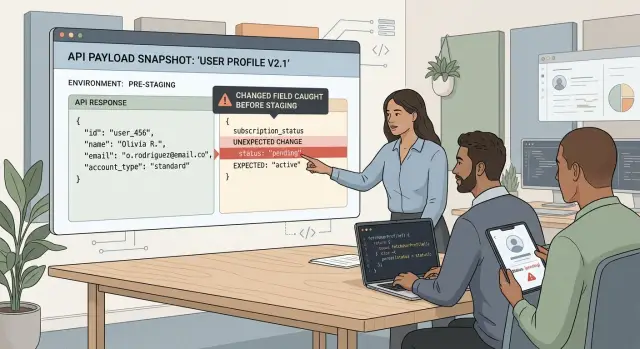
Table of Contents
Why field drift becomes a staging bug
Field drift usually starts with something small. A backend developer renames avatarUrl to profileImage, adds a nested object, or changes null to an empty string. The API still returns 200. Tests still pass. One client might not even notice.
Then staging turns into a blame session.
The web app may keep working because its mapper already handles both field names. The mobile app may fail because it still expects the old shape, or because its release cycle lags behind and it still ships last week's code. Same endpoint, same user, different results.
That is why shared API bugs feel so messy. Nothing fails in a clean, obvious way. Backend says the response is correct. Web says the screen loads. Mobile shows a crash or missing data. All of them can be right.
Docs rarely settle it. They usually describe the payload people meant to ship, not the one that actually left production yesterday. A field changed during a hotfix might never reach the spec. Optional fields create another problem. One team reads "optional" as "sometimes missing." Another reads it as "always present, maybe null."
So teams burn time on the wrong work. They compare staging screenshots, scroll through old chat threads, and argue over whether the bug lives in parsing, caching, or the API. They ask which sample payload is real. None of that helps much.
The cost climbs fast when web and mobile release on different schedules.
A shared source of truth fixes most of this. Instead of arguing over docs, screenshots, or memory, teams can inspect a real stored response that both clients use in development and testing. That is where snapshot fixtures help. They capture what the backend actually returns, so field drift shows up early, before someone finds it in staging at 6 p.m.
What a snapshot fixture should include
A fixture should look like a real API exchange, not a cleaned-up demo. If a mobile app sends a request and the server returns a response, store both parts together. That gives web and mobile the same reference and exposes small changes before they become staging bugs.
A useful fixture usually includes the HTTP method, endpoint, query params, request body, response status, and response body. Keep the headers that affect behavior too. Content type, auth shape, locale, version, and feature flags can all change the response. If you drop them, the sample stops matching reality.
Teams often make fixtures too neat. They remove null fields, skip empty arrays, flatten nested objects, or replace real values with vague placeholders. That is exactly where drift hides. A client can fail because middle_name is null, roles is an empty array, or preferences.notifications.email moved one level deeper. The fixture needs those awkward details.
One happy-path sample is not enough. Save a small set that reflects how the endpoint behaves in practice: a common success case, a response with nulls, one with empty lists or objects, one where optional fields are missing, and one where clients read deeply nested data.
Use real traffic when you can. Real payloads carry combinations that hand-written examples miss. Remove private data, but do not sanitize the structure. Replace names, emails, tokens, and IDs if needed while keeping formats intact. If the real value is a UUID, keep a UUID. If a field is sometimes an empty string, keep that too.
A profile fixture should not stop at name and email. Keep avatar fields, nullable phone numbers, empty team lists, settings objects, and server-generated metadata if clients receive them. The point is simple: freeze what the API actually says, including the parts nobody notices until an app crashes or a screen renders wrong.
If a fixture feels a little messy, that is usually a good sign. Real payloads are messy.
Which payloads to save first
Start with the payloads that break the app in obvious ways when one field changes. Login, profile, billing, and search results usually belong at the top of the list. Both web and mobile read them, they show up early in the user journey, and a small schema change can create a lot of noise.
Login deserves attention because auth bugs block everything behind them. Rename a token field, remove an expiration value, or wrap part of the response in a new object and one client may end up half signed in. Those mismatches often slip through because each team only tests its own happy path.
Profile payloads cause trouble for a different reason. They tend to grow over time. Avatar URLs, locale settings, feature flags, subscription status, team roles, and optional fields for new features pile up fast. One mobile screen may still expect phone while the web app now reads phone_number. A real fixture catches that before anyone starts guessing who broke what.
Billing should come early even if only part of the product uses it. Money fields, plan states, trial dates, and invoice status drive paywalls, upgrade prompts, and account pages. When a field changes type from number to string, or moves under a nested object, clients fail in frustrating ways.
Search results deserve fixtures sooner than many teams expect. Search payloads mix IDs, labels, thumbnails, badges, pagination, ranking data, and a surprising number of nullable fields. One missing image or changed result type can break cards, filters, or tap targets on mobile.
A simple rule helps: start with endpoints both clients hit every day, flows that block sign-in, payment, or navigation, and payloads with optional, nested, or fast-changing fields. Leave admin and back-office endpoints for later. If only one internal page reads an endpoint once a month, it can wait.
Fixtures pay off fastest when they protect shared payloads that users hit all the time.
How to build fixtures from real traffic
Start with a response from a stable environment, not a hand-made example. A real payload carries the details clients trip over: empty arrays, nulls, optional fields, old enum values, and nested objects that looked harmless until one app parsed them differently.
Production often gives the best sample, but only if you can capture it safely. If that feels risky, use a seeded QA or pre-release environment that mirrors real data closely. Pick endpoints that change often or feed more than one client.
Before you save anything, scrub it hard. Remove tokens, session IDs, email addresses, phone numbers, internal notes, and any personal data. If an ID could expose a customer record, swap it for a fake but realistic value. Keep the shape the same. The fixture should still look real, just without anything sensitive.
Naming matters more than people expect. Include the endpoint or domain name, add a short scenario such as profile-basic or profile-with-subscription, append the capture date if your team needs it, and store the file as plain JSON. A name like profile-with-subscription.2026-04-12.json is boring, and that is why it works.
Then add one simple test. Have the API produce the current payload for the same scenario and compare it with the saved fixture. If the response changes, the test should fail and show the diff. That catches field drift before web and mobile teams spend half a day debugging staging.
Do not auto-update the file when that test fails. Review every diff first. Some changes are correct, like a new field or a renamed enum. Some are quiet breakages, like a missing property or a number that turned into a string. A person should decide which is which.
If you already have solid logs and observability, this gets much easier. Oleg Sotnikov talks a lot about practical engineering systems at oleg.is, and this is a good example of why they matter: when teams can capture safe real-world samples quickly, they can turn them into checks that stay useful release after release.
Where to store fixtures so both teams use them
Teams stop trusting fixtures when they live in one app repo and everyone else has to copy them by hand. Put them where both clients already expect shared truth: next to API schema files or shared API tests. When a backend developer changes a response, the fixture should sit close enough that they see it in the same pull request.
If web and mobile live in separate repos, keep the fixtures in the repo that defines the contract and pull that folder into both test suites. One source beats two almost-matching copies. Once teams fork fixture files, drift starts again.
Use the same folder structure and the same names for every client. A mobile engineer and a web engineer should be able to say "use users/get-profile/success.basic.json" and mean the same file. Skip vague names like new.json, latest.json, or final2.json. Those names age badly.
A simple structure works well:
fixtures/
  users/
    get-profile/
      success.basic.json
      success.missing-avatar.json
      error.not-found.json
  billing/
    get-subscription/
      success.active.json
Group files by endpoint first, then by scenario. That makes it easy to answer two questions quickly: which payload does this endpoint return, and which odd cases do we already cover?
Teams also need one short rule for updates or fixtures turn into editable samples that nobody trusts. Keep it plain: update a fixture only when the API changed on purpose, and make that fixture change in the same pull request as the backend change and at least one test update. If someone wants to edit the fixture without those two things, they should stop.
That rule does more than keep files tidy. It gives both teams the same habit. When staging starts showing strange bugs, they check the same payloads first instead of arguing over whose sample is newer.
A simple profile example
A profile response is a good place to start because both web and mobile usually touch it early. A saved fixture might look like this:
{
  "id": "user_1842",
  "name": "Maya Chen",
  "avatar_url": "https://cdn.example.com/avatars/user_1842.png",
  "plan": "pro"
}
Both clients read the same shape. The web app uses avatar_url in the account menu. The mobile app uses it on the profile screen and in comments.
Now imagine a backend cleanup. A developer renames avatar_url to avatar because it feels shorter and ships the change. The new response looks like this:
{
  "id": "user_1842",
  "name": "Maya Chen",
  "avatar": "https://cdn.example.com/avatars/user_1842.png",
  "plan": "pro"
}
If you run snapshot tests against the saved fixture, the failure is immediate. The test tells you that avatar_url is missing and avatar is unexpected. That happens in CI, before anyone opens staging and wonders why profile pictures disappeared.
That is the practical value of fixtures. They catch field drift while the change is still cheap to fix. The backend developer can restore the old field, ship both fields for one release, or tell both client teams that the contract changed.
The payoff is small but real. Web and mobile update the field once, with one shared decision, instead of discovering the break in separate rounds.
In a healthy flow, the backend change fails the fixture test, the team agrees on the new field name, web and mobile update their models in the same work cycle, and the fixture is refreshed only after everyone accepts the new payload.
Without that shared fixture, the web team might patch staging on Tuesday and the mobile team might hit the same bug on Thursday in a different screen. You end up paying twice for the same rename.
Mistakes that make fixtures useless
A fixture fails when it looks tidy but tells a lie. The most common problem is hand-made JSON that never came from production or a real test environment. It may look cleaner than the live payload, but that is exactly why it misses the odd field, null value, empty array, or unexpected enum that later breaks a client.
Another bad habit is treating updates like housekeeping. Someone regenerates the file, sees a big diff, and approves it without reading closely. That hides field drift in plain sight. If display_name became name, or a nested object moved one level deeper, the fixture did its job. The team ignored it.
Teams also make fixtures too polite. They save one normal example with every field present and every value well formed. Real shared payloads are rarely that nice. A better set includes awkward cases: missing optional fields, old values that still appear in the wild, very long strings, empty lists, partial profiles, and flags that change behavior on one client but not the other.
File names matter too. A folder full of files called profile.json, profile-new.json, and profile-final.json hides breaking changes instead of documenting them. Names should say what the payload is and why it exists. profile-v2-missing-avatar.json tells both teams more before they even open the file.
Separate copies create a slower kind of failure. Web keeps one fixture, mobile keeps another, and backend has a third sample in a different repo. After a month, nobody knows which one still matches the API. One shared source of truth is less glamorous, but it prevents a lot of staging bugs.
Fixtures also become useless when they lose context. A raw payload without status code, endpoint, request params, or schema version leaves too much room for guessing. When a bug appears, the team wastes time asking where the sample came from instead of checking the mismatch.
A small example makes the problem obvious. If mobile tests against a fixture where avatar_url is always a string, but production sometimes sends null, the app may crash only in staging. The answer is not another hand-edited file. The answer is real snapshots, clear names, reviewed diffs, and one shared set that both clients use.
Quick release checks
A fixture diff can tell you in two minutes whether a release is safe or likely to waste a day in staging. The trick is to read changed payloads in the context of the release. If the team touched only billing, but a user profile fixture now shows three renamed fields and a new nested object, stop and ask why.
Small changes cause the ugliest client bugs. A field that turns from null into an empty list, or disappears when data is missing, can break one client while the other still looks fine. Shared payloads need boring, repeatable checks because drift hides in edge cases, not in the happy path.
Keep the review short and consistent. Compare fixture diffs with the actual release work. Look closely at null values, empty arrays, empty strings, and optional fields that may be absent. Run both clients against the same updated fixture and confirm they parse it the same way. Then have one reviewer read every changed fixture line by line, even if the diff looks small.
That last step matters more than teams expect. Developers skim code diffs. They skim JSON too. One careful reviewer often catches the ugly part: a renamed enum value, a timestamp format change, or a field that moved one level deeper.
When someone approves a fixture change, "looks fine" is not enough. The review should say what changed and why it matches the release. For example: "added middle_name to customer payload, mobile ignores unknown fields, web maps it but does not require it." Notes like that make later debugging much faster.
If a fixture changes and nobody can explain it, treat that as a bug until proven otherwise. It sounds strict. It is still cheaper than finding out in staging that web and mobile now disagree about the same response.
What to do next
Start small. Pick one shared endpoint that both web and mobile already use and create two or three fixtures from real traffic this week. A profile, session, or checkout payload is usually enough to prove the process.
Use examples that reflect normal messiness, not polished demo data. Save one common case, one edge case, and one older payload if clients still see it. That is often where field drift appears first.
You do not need a big framework for this. Even a small CI check helps. If the backend removes a field, renames it, or changes a type from null to an empty string, the build should fail before web and mobile teams waste time chasing it in staging.
Write one short update rule and keep it near the fixtures. Keep it plain: when someone changes a shared response shape, they update the fixture in the same pull request and add one note about client impact. That single rule cuts out a lot of guessing.
Fixtures work best when one person owns the rule but both teams use it. If nobody owns the files, they go stale fast. If one team hides them in its own repo, the other team stops trusting them.
The goal is boring releases. The backend adds marketing_preferences to a profile payload, the fixture changes in the same pull request, the build passes, and both client teams see the new field before staging.
If your team is setting this up while also cleaning up architecture, delivery, or client contracts, Oleg Sotnikov offers that kind of hands-on Fractional CTO help through oleg.is. The useful part is not the fixture itself. It is building a process both teams will actually keep using.
Frequently Asked Questions
What is a snapshot fixture?
A snapshot fixture is a saved copy of a real API request and response for one scenario. It gives web, mobile, and backend teams the same payload to test, so a renamed field or changed type shows up in CI instead of staging.
Why not rely on API docs alone?
Docs show what the team meant to ship. Fixtures show what the server actually returned. When a hotfix changes avatar_url to avatar and nobody updates the spec, the fixture catches the mismatch faster.
What should a good fixture include?
Keep the full exchange, not just the pretty part. Save the HTTP method, endpoint, query params, request body, status code, response body, and any headers that change behavior, such as auth shape, locale, version, or feature flags.
Do I need more than one sample per endpoint?
Yes. One happy-path sample misses most drift. Save a normal success case, one with null values, one with empty arrays or objects, one with missing optional fields, and one with deeper nested data if clients read it.
Which endpoints should I save first?
Start with endpoints both clients hit every day and flows that block the user fast. Login, profile, billing, and search usually give you the fastest return because small schema changes there create a lot of noise.
Should I use real traffic or hand-written JSON?
Use real traffic when you can. Hand-written JSON usually removes the awkward parts that break clients, like empty arrays, old enum values, and odd nesting. Capture from production or a close QA environment, then clean the secrets without changing the shape.
How do I scrub sensitive data without losing value?
Replace names, emails, tokens, phone numbers, and record IDs with fake values that keep the same format. If the live field holds a UUID, keep a UUID. If the API sometimes sends an empty string or null, keep that too.
Where should I store fixtures?
Keep one shared fixture folder near the API contract or backend tests, not inside only one client repo. Web and mobile should pull the same files, use the same names, and avoid keeping separate copies that drift apart.
When should I update a fixture?
Update a fixture only when the API changed on purpose. Put the backend change, fixture change, and test change in the same pull request. Let the test fail on unexpected diffs, then read the diff before you merge.
What mistakes make fixtures useless?
Teams ruin fixtures when they invent clean demo payloads, auto-approve big diffs, keep separate copies, or strip out context like status code and request params. Once the file stops matching real traffic, people stop trusting it, and staging bugs come back.


