API retries that stop duplicates without slowing users
API retries work best when request IDs, backoff, and clear user feedback work together to stop duplicate charges, signups, and webhook noise.
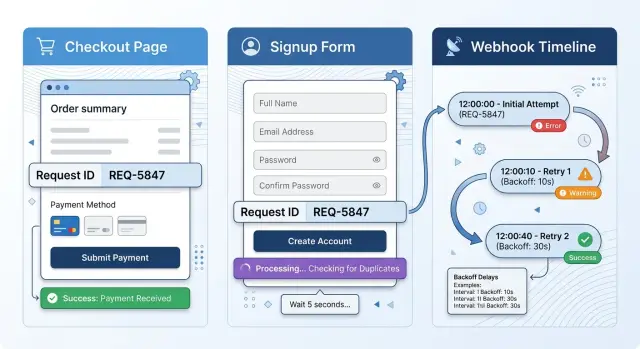
Table of Contents
Why retries create real problems
A failed request doesn't always mean nothing happened. The server can finish the action, save the record, charge the card, or create the account, then lose the response on the way back. The user sees an error, but the system already changed something.
That gap is where most duplicates start. A customer taps "Pay" again because the button looks frozen. A new user submits the signup form twice because the page never confirms success. From the user's side, both choices make sense. On the backend, those two identical calls can turn into two orders, two charges, or two accounts.
Payments make the problem obvious because money is easy to spot. Signups usually show it next. Support starts getting tickets about double welcome emails, locked accounts, and people who somehow exist twice in the database.
Webhooks run into the same issue without a person clicking anything. If a sender doesn't get a clean success response fast enough, it often retries the same event. That behavior helps more than it hurts, but only if your endpoint can recognize a repeat delivery. If it can't, one shipment can get created twice, or one invoice can fire the same follow-up action twice.
Retries themselves are normal. Networks drop packets, mobile connections cut out, browsers time out, and upstream services wobble. Retrying often fixes the problem. Trouble starts when the system can't tell the difference between "please try again" and "do this again."
A simple checkout shows how fast this gets expensive. The customer clicks once. The payment succeeds. The response times out. The customer clicks again. Now your team has a refund to process, a support thread to answer, and a user who no longer trusts the checkout.
Users don't experience this as a technical bug. They experience it as uncertainty. They don't know whether to wait, refresh, or try again, so they act. Most people would do the same.
What safe retries need
A retry flow works when the server can decide whether two requests refer to the same action or two separate actions. If it can't, one slow response can become two charges, two accounts, or duplicated webhook side effects.
Start with one request ID for each user action. When someone taps "Pay", "Sign up", or "Save", the app should create that ID once and reuse it for every retry of that action. If the app generates a fresh ID on every attempt, the server has no way to tie those calls together.
The server also needs a record of the first finished result for that ID. When a retry arrives, it should look up the stored result and return it instead of running the action again. That's the practical use of idempotency keys: same action, same ID, same outcome.
Timing matters too. Good retries don't fire five requests at once because the first one feels slow. They wait a little between attempts, then wait a bit longer if the problem continues. A simple schedule such as 1 second, 2 seconds, then 4 seconds usually smooths over brief network trouble without making the app feel stuck.
People also behave better when the app explains the delay. A short status message such as "Still trying. Please wait." cuts down on repeat taps and refreshes. It sounds minor, but it prevents a lot of duplicate actions.
In practice, a safe retry flow needs one request ID per action, the same ID on every retry, a stored result for completed IDs, spaced retries with a limit, and clear feedback while the app waits. Leave out one piece and the flow gets shaky. Keep all of them and even a messy connection feels manageable.
How request IDs prevent duplicates
A request ID gives one user action one stable name. If someone taps "Pay" twice, refreshes the page, or loses connection, every retry carries the same ID. The server can then separate "I didn't get the answer" from "I want to do this again."
Create the ID before the first API call. Do it on the client, right when the person starts a single action such as placing one order or creating one account. Don't reuse one ID for a whole session. A session can contain ten different actions, and each one needs its own ID.
Keep that ID even if the app reloads or reconnects. Save it somewhere that survives a refresh, or attach it to the pending action in app storage. If the network fails halfway through, the retry should send the original ID, not a fresh one.
On the server, store the ID with the result of the first successful attempt. Keep the action type, who sent the request, the final status, the response body you want to return, and an expiry time. When the same ID arrives again, return that saved result instead of creating a second charge, second user, or second webhook effect.
Those saved IDs should expire, but not too soon. A checkout request may need hours or a full day. A short form submit may only need a few minutes. Delete IDs too early and late retries can slip through. Keep them forever and storage grows for no good reason.
Good request ID handling feels boring in production. People retry, networks fail, and nothing strange happens. That is exactly what you want.
Why backoff helps
A retry should not fire again in the same millisecond a request fails. That turns one brief outage into a pile of extra traffic. Good retries start with a small pause, often a few hundred milliseconds, so a temporary hiccup can clear before the user notices much delay.
After that first pause, increase the wait each time. A simple pattern works well: 300 ms, then 1 second, then 2 seconds. The user still gets a fast recovery on small failures, but your system avoids hammering a slow database, payment service, or email provider when something is already under stress.
Add jitter to that schedule. Each client should wait a slightly different amount of time instead of retrying on the exact same beat. Without jitter, a thousand failed requests can come back in one wave and hit your service together. With jitter, those retries spread out and give the system room to recover.
Set a hard stop early for user actions. For checkout, signup, or password reset, two or three attempts are usually enough. After that, extra waiting feels broken rather than helpful. Show a clear message, keep the original request ID, and let the user decide whether to try again.
Background jobs need a different schedule because no one is staring at a spinner. A webhook processor or invoice sync can wait longer and try more times, as long as every retry still follows the same request identity rules. Payment and order flows need extra care. Retry when the error looks temporary, not when the gateway clearly declined the card or your own validation failed.
Backoff doesn't mean "wait as long as possible." It means "wait just long enough to recover from short failures without turning them into traffic spikes."
Why user feedback matters
A lot of duplicate actions start with a human reaction, not a server bug. People tap "Pay" again because nothing seems to happen. They refresh a signup page because the form looks stuck. Good feedback cuts off many duplicates before retries even matter.
The first second after submit matters most. Show progress right away. Change the button text to "Processing..." or "Creating account..." and keep the spinner small and obvious. If the page stays still, many users assume the click failed.
You should also stop the same button from firing twice. Disable it after the first click or switch it into a locked pending state until the request finishes. That one change prevents a surprising number of double charges, duplicate signups, and repeat support tickets.
A pending state needs words, not only animation. Tell the user the system is still working. Short text like "Your payment is still processing. Please do not close this page" is plain, but it works. People wait when you tell them what is happening.
When something goes wrong, give one clear next step. Too many choices lead to random clicking. If the request may still succeed in the background, say "Please wait a moment and check your order status." If the action definitely failed, say "Try again." Those messages lead to very different behavior.
A good error message answers one question: should the user wait or retry? "We got your request and we're still processing it" means wait. "We could not reach the server. Please try again" means retry. "Your card was declined" means change the payment method, not hit the same button again.
The backend still needs request IDs and backoff, but the screen does a lot of preventive work. If users see a clear pending message, most leave the page alone. If they see a dead button and no status, many will click three more times.
Build it in practice
Start with endpoints that can cause damage if they run twice. That usually means charging a card, creating an account, sending an email or SMS, or processing a webhook that writes to your database. Make a short list. Read only endpoints don't need the same protection.
For each write endpoint, require a request ID. You can send it in a header, often as an idempotency key, or as a field in the request body. The format matters less than consistency. The client, worker, or webhook sender must reuse the same ID when it retries the same action.
Then store that ID before you trigger any side effect. If your server charges the card first and writes the request record later, a timeout can still create a second charge on the retry. Save a "pending" record with the request ID, the endpoint name, and enough data to recognize the same call before you touch the payment service, email provider, or queue.
When the action finishes, update that record with the final response. If the same ID comes back, return the stored response instead of running the work again. Apply the same rule everywhere retries happen. Mobile apps retry when the network drops. Background jobs retry after temporary failures. Webhook consumers retry because the sender often doesn't know whether you received the last response.
Use backoff so the first retry is quick and later attempts spread out. That keeps the system calmer without making people wait long. Then test the ugly cases on purpose. Force a timeout after the server commits the action but before the client gets the response. Drop the response entirely. Send the same webhook twice. Return a 500 once, then retry with the same request ID. If your logs show one action and repeated requests getting the same stored result, the flow is working.
A checkout example
A customer taps "Pay" on a weak mobile connection. The app sends a checkout request with one request ID, such as pay_48291, and the server starts the payment.
The charge succeeds. The server creates the order, saves the success result under that same request ID, and prepares the response. Then the connection drops before the app receives anything.
From the customer's side, this feels terrible. They don't know whether the payment failed, whether it is still running, or whether tapping again will create a second charge.
A good checkout flow doesn't treat the retry as a new request. The app waits a moment, shows a status like "Confirming payment...", and retries with the same request ID.
When that retry reaches the server, the server checks its saved results for pay_48291. It finds the completed payment and the order it already created. Instead of charging the card again, it returns the stored success response.
The customer sees one confirmed order. Their card shows one charge. Support doesn't get a ticket that starts with "I think I paid twice."
Nothing fancy happened here. The app reused the same request ID, the server stored the first result, the retry read that result instead of creating a new payment, and the screen told the customer what was going on. Backoff helped space the attempts, but the request ID stopped the duplicate.
Mistakes that still create duplicates
Most duplicate actions don't come from one huge bug. They come from small choices that look fine in testing. Under real traffic, those choices turn a slow checkout or signup into two orders, two accounts, or two emails.
One common mistake is generating a new request ID for every retry. That breaks the whole idea. If the first payment times out and the second attempt uses a different ID, the server sees two separate actions and may charge twice.
Saving the ID only in browser memory causes another problem. If the page refreshes, the tab crashes, or the user opens the flow again, the app forgets the original ID and sends a new one. For anything that can cost money or create an account, keep the ID somewhere that survives refreshes or let the server issue and track it.
Timeouts also fool teams into bad retry logic. A timeout doesn't mean the action failed. Often it means the client stopped waiting before the server finished. If you treat every timeout as a hard failure and retry immediately, you can create a second order while the first one is already complete.
Webhook code often makes this worse. Payment providers and other services resend events all the time. If your handler updates data first and checks for duplicates later, the same event can ship the same order twice or add credits twice. For duplicate webhook prevention, record the event ID before you change data, then return the saved result when that event comes back.
Teams also delete stored request results too early. That looks tidy, but it opens a gap. A late mobile retry, a slow network, or a delayed provider retry can arrive after the record is gone, and the system runs the action again.
The UI causes damage too. If the form still looks active while the first request runs, people click again. If the screen shows no progress, some refresh and try once more. Disable the submit button, show a clear status message, keep the same request ID for retries, and let users check the final result instead of guessing.
A simple rule helps here: when the client is unsure, don't assume the server did nothing. Check first, retry with the same ID, and keep enough history to recognize that retry when it arrives.
Checks before you ship
A retry system is only safe when it behaves the same way under stress as it does in a clean demo. Test double clicks, slow responses, dropped connections, and repeated webhooks. If the system stays calm in those cases, your retries will help users instead of creating cleanup work.
Start with the request ID. Send the same request twice with the same ID and confirm that the API returns the same result both times. If the first call created a payment, account, or order, the second call should return that original outcome, not create a second one.
Then test the places where duplicates usually slip in:
- Click the checkout button twice in quick succession and confirm that only one payment goes through.
- Replay the same webhook event and confirm that your app updates the order, invoice, or user record once.
- Force a timeout after the server finishes the work, then retry with the same request ID and confirm that the user gets the original result.
- Check that every retry attempt sits under one action ID in your logs so you can read the whole story in one place.
- Set a hard retry limit and make sure the client stops after that point instead of looping until the user gives up.
Good logs matter as much as good code. When support gets a message like "I clicked pay and nothing happened," they should be able to search one request ID and see the first attempt, each retry, the final result, and any webhook that followed. If that takes five tools and three guesses, the system is not ready.
A small payment test is worth doing by hand. Start a checkout, cut the network for a moment, hit retry, and inspect the records after. You want one charge, one order, one customer message, and one traceable action from start to finish.
If you can pass those checks, you're in much better shape than teams that only test the happy path.
Next steps
Start with the flows where duplicate actions cost real money or real trust: checkout, signup, and webhooks. If those three behave well under retries, the rest of the system usually gets easier to clean up.
Pick one endpoint in each flow and trace the whole path. Check what the client does after a timeout, what the server does if work finishes late, and what happens when the same request arrives twice. Many teams assume their retries are safe until this test shows a double charge, two accounts, or a webhook that writes the same event again.
A short review plan is enough. Measure duplicate actions, timeout rates, and retry volume. Watch which screens make people tap again or refresh. Keep request IDs long enough for the action they protect. Test webhook handlers with repeated delivery and delivery that arrives out of order. Look for cases where the first request succeeded but the client never saw the response.
The screen deserves as much attention as the backend. If a payment button stays active, people press it again. If signup shows no progress, they assume nothing happened. A clear loading state, a short message, and a disabled button for a few seconds prevent more duplicates than many teams expect.
Retention needs a real rule, not a guess. A profile update may need a short window. A checkout request often needs longer. Webhooks can arrive much later than expected, so short retention for request IDs leaves holes that only show up in production.
If you want an outside review before a payment or webhook change ships, Oleg Sotnikov at oleg.is offers Fractional CTO and startup advisory help on product architecture, infrastructure, and production systems. That kind of review is most useful before a small retry bug turns into refunds, support work, and lost trust.
Do the tests now while the fixes are still small. Cleaning up double charges and duplicate records later is slower, more awkward, and far more expensive.


