API pagination mistakes that break exports and syncs
API pagination mistakes can make exports and sync jobs skip or repeat records. Learn stable sorting, safer cursors, and replay rules that hold up at scale.
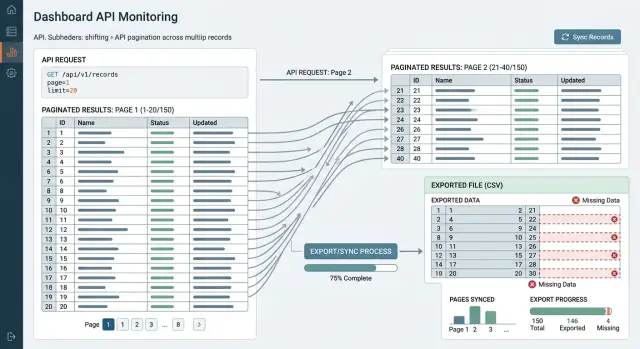
Table of Contents
Why pagination bugs stay hidden
Pagination bugs often pass early tests because small datasets are too tidy. A list of 200 rows often comes back in the same order every time, even when the API never promised that order. That is why these bugs can sit in production for months.
Small accounts do not put enough pressure on the endpoint to expose the problem. A developer exports ten pages, compares totals, and everything looks fine. The bug appears later, when one customer has 800,000 records and the job runs long enough for the data to change while it is still reading.
New writes make this much worse. While a sync job reads page 3, fresh records can land at the top of page 1 or somewhere in the middle of the sort order. If the API sorts by a field that is not stable, or if many rows share the same timestamp, records shift between pages during the run. One page steals rows from the next, and the next page has no idea.
Large accounts expose the gaps because they create more ties, more updates, and more time between the first request and the last. A ten-second export might look clean. A two-hour export over active data is a different story. That is where weak cursors, offset pagination, and unstable sorting start to drop or repeat rows.
The damage stays quiet. Skipped rows usually do not trigger an error because the API still returns normal responses and the job still finishes. A finance team may notice a missing invoice weeks later. An analytics report may look slightly low, but nobody can trace it back to one bad page boundary.
Testing with a calm dataset gives false comfort. To catch this kind of bug, you need data that changes while the export runs, not after.
How records get skipped or repeated
Most skipped or repeated records come from one simple problem: the dataset changes while the client walks through it page by page. A small account may never show this. A large account usually will.
The first trap is unstable sorting. If the API sorts by a field like updated_at, many rows can share the same value. When the database breaks those ties differently on the next request, page boundaries move. The last item from page 1 can appear again on page 2, or one item can slip past both pages and vanish from the export.
A few patterns cause most pagination failures. The endpoint might sort by a field that changes between requests. Two or more rows might share the same sort value with no fixed tie-breaker. A user might edit a row after page 1, which moves it forward or backward in the result set. A row might get deleted, which shifts every later offset by one.
Offset pagination makes all of this worse. Imagine a job that requests 1,000 records at a time. It reads page 1 with offset=0, then page 2 with offset=1000. If one earlier row disappears before the second call, the old record number 1001 becomes 1000. The job skips it. If a new row appears near the top, the job can read one old row twice.
Updates create a mess even without inserts or deletes. Say a sync sorts by updated_at asc. A record on page 4 gets edited after the job reads page 1. Its timestamp jumps forward. Now it may land on page 7. If the job uses a weak cursor or plain offsets, it can miss that record entirely or pull it again from its new position.
This is why these bugs stay hidden for weeks. The endpoint returns valid pages. Each page looks fine on its own. The break happens across requests, under real traffic, when records keep moving.
Set a stable sort order first
A page token cannot rescue a moving record order. If records shift position while an export runs, the job can skip some rows and repeat others without any obvious error.
Start with a sort that stays fixed for the life of each record. A common choice is created_at ASC, id ASC. That works because creation time usually does not change, and the ID gives every record one exact place in the sequence.
Teams often sort only by timestamp and assume that is enough. It is not. If 4,000 records share the same second, the database may return those equal timestamps in a different order from one request to the next. Page 1 might end with record 812, and page 2 might start with 815, with 813 and 814 quietly lost in between.
A stable sort follows three basic rules. Use a field that does not drift during the export. Add a second field that is unique, usually an ID. Keep the exact same sort on every page.
updated_at is where many problems start. It looks useful, but every edit can move a record forward or backward while the job is still reading pages. That can work for a "recent changes" view, but it is a bad base for a full export.
Keep the ordering rule identical from the first request to the last. Do not sort the first page one way and later pages another way. Even a small mismatch can create bugs that only appear on large accounts with busy data.
Test with messy data, not clean samples. Create thousands of records with the same timestamp, then pull every page and compare the final result to the source table. Each record should appear once, and only once. If one row disappears or shows up twice, fix the sort before you touch cursors, retries, or sync logic.
Build cursors that hold up under load
A cursor should return the next page from the exact place where the last page stopped, even while new rows arrive. Under real traffic, a cursor that stores only last_id or a page number starts to drift.
Store the fields that define the sort order, not just one ID. If the endpoint sorts by created_at descending, the cursor should carry that timestamp and the record ID used as the tie-breaker. Many rows can share the same timestamp during imports, batch writes, or busy hours.
In practice, a cursor often needs four small pieces of state: the sorted field value, the tie-breaker ID, the sort direction or cursor version, and a signature or checksum.
The tie-breaker is easy to skip and costly to miss. Imagine one page ends with three records that all have the same created_at value. If the cursor remembers only the timestamp, the next query can repeat one record or jump past one. That is the sort of bug that stays quiet for weeks and then breaks a large export.
Treat the cursor as untrusted input. Clients can edit it, logs can truncate it, and old apps can send damaged values. Sign the cursor, or at least validate every field and reject values that do not match the endpoint rules. A clear error is much better than silently falling back to page one or a default sort.
Keep old cursors readable when you change the endpoint. Add a version field, keep the old decoder for a while, and translate older cursor formats when you can. Long-running exports and sync jobs often span deploys, so a job that started before the release should still finish after it.
When a customer syncs millions of rows, cursor design decides whether the job finishes cleanly or leaves gaps nobody can explain.
Add replay rules before jobs fail
Many pagination bugs stay invisible until a long export dies at 2 a.m. and resumes in the wrong place. Every job needs replay rules before the first large customer runs a full sync.
Start with the resume point. Do not resume from the last page number unless page boundaries never move. Resume from the last confirmed record, meaning the last item your system stored and verified. If a worker fetched 500 records but wrote only 320 before it crashed, the next run should continue after record 320, not after the whole page.
Retries also need to be safe. A second run may fetch some of the same records again, and that is normal. Your importer should handle duplicates without creating extra rows, double charges, or repeated events. If the same page arrives twice, the final result should stay the same.
A short rule set prevents most of the damage. Save a checkpoint only after your code finishes the write for that record or batch. Store the exact sort values and cursor used for the next request. Make each write safe to run twice. Set a cutoff for the export window, such as updated_at <= job_start_time.
That last rule solves a common problem in long exports. New inserts and updates can appear while the job is still reading older pages. If you include those new records in the same run, later pages can shift and some older records can disappear from the result. A cutoff keeps one run consistent, and the next run picks up anything new.
This sounds small until a nightly sync fails on a large account. One timeout and one bad retry can leave a quiet gap in finance, analytics, or CRM data. Clear replay rules turn a crash into a normal retry instead of a long cleanup.
How to test an endpoint step by step
Most pagination bugs stay invisible in tidy test data. You need a moving dataset, not a frozen one. The endpoint should still return every record once, in a predictable order, even while rows change.
Start with a few hundred records, not ten or twenty. Make sure many rows share the exact same timestamp. That detail exposes weak sorting fast, because a sort like created_at desc is not enough on its own when several records tie.
Run the test like a real export job. Start an export and store every returned ID in the order you receive it. Add new rows before the export finishes. Update some existing rows during the run, especially fields used in sorting or filtering. Compare the exported IDs with the IDs that existed at the start and end of the run. Then repeat the same exercise with deletes in the middle.
The comparison matters more than people think. If you only count rows, you can miss silent damage. One skipped ID and one duplicate ID can leave the total unchanged while the export is still wrong.
Check the results from three angles. Did every expected ID appear exactly once? Did tied records keep a stable order across pages? Did the cursor keep working after inserts, updates, and deletes?
Updates deserve extra attention. If a row changes its timestamp or status while the job is still paging, a weak cursor can push that row onto a later page or pull it backward into an earlier one. That is how exports and sync jobs quietly miss records.
Deletes matter too. When a row disappears between page requests, the next cursor should still move forward cleanly. If the endpoint depends on offsets or on a loose sort, later pages can shift and the client may skip live rows.
Run this test several times, not once. Many bugs only show up on the second or third pass, when timing changes by a fraction of a second.
A simple example from a sync job
A billing export runs every night and reads invoices in ascending order by updated_at. The job asks for 100 rows at a time, saves the last timestamp from the page, and uses that value to fetch the next page.
That looks fine until a busy hour hits. Ten invoices get edited at 2026-04-11 10:15:42. The first page ends on invoice 8451, which also has that timestamp. The export stores only 2026-04-11 10:15:42 as its cursor.
The next request says, in effect, "give me invoices where updated_at is greater than 2026-04-11 10:15:42." The API skips every other invoice updated in that same second, because they are not greater than the cursor time. They are equal to it.
Finance notices the problem later, not during the export. The file has fewer invoices than expected, but nothing actually failed. Every API call returned data. Every page looked full. No alert fired.
Some teams try to fix this by switching to >= instead of >. That trades missing records for repeated records. The next page now includes invoice 8451 again, and the sync job can import duplicates unless it has strict deduplication.
The safer version uses a stable sort with a tie-breaker, such as updated_at ASC, id ASC. The cursor stores both values from the last row, not just the timestamp. The next page starts after (2026-04-11 10:15:42, 8451), so the API can continue inside the group of invoices that share the same second.
A replay rule adds one more layer of safety. If the export re-reads the last minute and deduplicates by invoice ID, a brief bug or retry does not quietly shrink the final report. That small rule often saves a finance team from a very long morning.
Common mistakes teams make
Most pagination failures look harmless in small tests. A team runs one export on a quiet database, gets the right row count, and moves on. The problem shows up later, when a large account keeps creating data while a sync job is still paging through old results.
Sorting only by timestamp is one of the easiest ways to lose records. Timestamps often collide, especially when many rows arrive in the same second or millisecond. If two records share the same time and the API does not add a unique tie-breaker like an ID, the database can return them in a different order on the next request.
Page numbers cause another quiet failure. They work for a user browsing a list, but they are weak for moving data. If new rows land between page 12 and page 13, the contents shift, and the job can skip one record or pull the same record twice.
Teams also break long-running clients when they change cursor design too casually. A cursor that starts as one encoded field often needs more later: sort values, filters, tenant scope, maybe a version marker. If the format changes with no fallback, old workers can fail in the middle of a run. Versioned cursors are boring, but they save a lot of pain.
Retries after partial writes cause a different class of bug. Say a worker writes 500 records to its target system, then crashes before it saves the next cursor. On retry, it asks for the same page again. If the target side cannot safely accept the same record twice, you get duplicates, conflicts, or silent overwrites. Good replay rules usually mean two things: save progress only after a durable write, and make repeated writes safe.
One successful run does not prove much. Record skipping usually appears under movement: fresh inserts, late updates, worker restarts, rate limits, or a job that runs for hours instead of minutes.
If you want stable pagination, test it while the dataset changes. That is where weak designs usually crack.
Quick checks before release
A pagination endpoint can pass basic QA and still fail on a busy account with millions of rows. Most problems show up only when data changes during a long export or sync.
Run one release check against the real query, real filters, and a realistic amount of data. If possible, test on a table that already changes throughout the day.
Keep the checklist short and strict:
- Freeze one sort order for the endpoint.
- Add one unique tie-breaker to every page query.
- Version your cursor format from day one.
- Define one resume rule after failure.
- Test while live data changes.
One simple exercise catches a lot. Start an export of 50,000 rows, pause it after a few pages, update several records with the same updated_at value, insert new rows, then resume. Count the final rows and compare IDs. If the count matches but some IDs differ, your pagination still has a hole.
Teams often stop after checking page 1, page 2, and "next cursor works." That is not enough. The release bar should be higher: same sort every time, deterministic tie-breaking, a cursor you can change later, and a resume rule your job runner follows without guessing.
If an endpoint cannot pass those checks, do not ship it for exports or syncs yet. Small datasets hide the problem. Large accounts pay for it.
What to do next
Start with the endpoint that moves the most data. If one export or sync job handles most of your records, fix that one first. Small pagination bugs stay quiet until a large account runs a backfill or a long sync.
A short review usually finds the problem fast. Check the exact sort order and make sure it cannot change between pages. Write down which fields the cursor stores and why those fields stay unique. Define resume and replay rules for failed jobs, retries, and partial exports. Then run one backfill test on a large account, not a sample tenant with a few hundred rows.
Documentation matters more than most teams expect. If an engineer cannot answer "what field do we sort by?" or "what happens after page 84 fails?" without reading code for twenty minutes, the endpoint is not ready. Stable sorting should be explicit, and replay rules should say when a job re-reads old rows, how it avoids duplicates, and when it stops.
Use a real stress test. Pick an account with heavy write activity, start an export, and let new records arrive while the job runs. Then compare counts, IDs, and timestamps after the job finishes. That is where most pagination bugs show up.
If gaps keep coming back, a second pair of eyes helps. Oleg Sotnikov at oleg.is works with startups and small businesses on API design, infrastructure, and sync safety as a fractional CTO. That kind of review is useful when the bug is not in one query, but in how retries, cursors, and background jobs work together.
One careful pass on the busiest endpoint can save days of cleanup later. It also keeps large customers from finding the bug before your team does.
Frequently Asked Questions
Why do pagination bugs show up on large accounts first?
Because large accounts keep changing while your job reads page after page. New inserts, edits, and deletes shift page boundaries, so a setup that looks fine on 200 rows can skip or repeat records on 800,000.
Is offset pagination safe for exports?
Usually, no. Offsets work for simple browsing, but exports and syncs need something stronger. If rows appear or disappear before the next request, offset=1000 no longer points to the same place, and your job can miss one row and read another twice.
What sort order should I use for a full export?
Use a stable sort that does not move during the run, such as created_at ASC, id ASC. The first field keeps a sensible order, and the ID gives every row one exact spot when timestamps tie.
Why is sorting only by updated_at a problem?
Timestamps collide all the time, especially during imports or busy periods. If you sort only by updated_at, the database can return rows with the same value in a different order on the next page, which creates gaps or duplicates.
What should a good cursor contain?
A solid cursor should store the sort field and the tie-breaker ID from the last row. Add a version too, and validate or sign the value so a broken or edited cursor does not send the client back to page one by accident.
How should I resume a sync after a crash?
Resume after the last record you actually wrote, not after the last page you fetched. Save progress only after a durable write, and make repeated writes harmless so a retry does not create duplicates or double charges.
Should I use > or >= for timestamp cursors?
Neither works well on its own when many rows share one timestamp. > can skip rows with the same time, and >= can repeat the last row. Store both the timestamp and the ID, then continue after that exact pair.
How do I test pagination properly?
Run the export against data that changes during the test. Insert rows, update rows that affect sorting, delete a few, then compare the final ID set instead of row count alone. One missing ID and one duplicate ID can cancel each other out in the total.
Can deletes and edits break pagination too?
Yes, both can break weak pagination. A delete shifts later offsets backward, and an edit can move a row to a new position if you sort by a field like updated_at. That is why stable ordering and replay rules matter.
What is the fastest way to improve an existing pagination endpoint?
Start with the busiest endpoint and fix the order first. Freeze one sort, add a unique tie-breaker, version the cursor, and set a cutoff like updated_at <= job_start_time so one run reads a consistent window instead of chasing fresh changes.


