API gateway vs reverse proxy for a small product team
API gateway vs reverse proxy can look like a small setup choice, but it changes auth, rate limits, latency, cost, and daily team work.
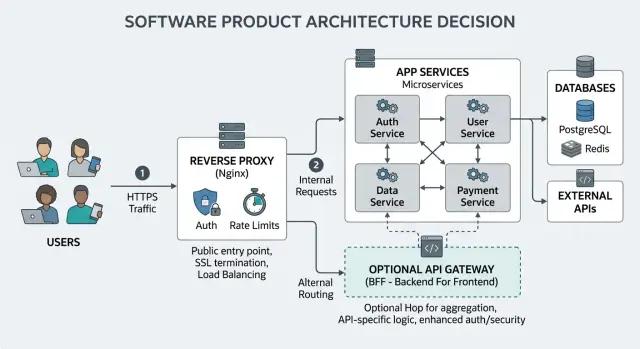
Table of Contents
What problem are you actually solving
A lot of teams add new network tools because the system feels messy. That feeling is real, but it is not enough to justify another layer. If requests already reach the app, a new proxy or gateway only helps when it fixes a specific pain you can name.
The API gateway vs reverse proxy choice gets easier when you split edge problems from app problems. Edge problems live at the front door: TLS termination, host and path routing, basic request filtering, and simple rate caps. App problems live deeper: weak user roles, tangled service boundaries, slow handlers, inconsistent APIs, and missing audit rules. A new hop will not clean up poor app design.
Auth often decides the path. If you only need to pass tokens to one app and check sessions in that app, a plain reverse proxy setup may be enough. If you need one place to enforce API keys, tenant rules, and limits across several services, the case for a gateway gets stronger. The same goes for abuse control. If bots hammer one login endpoint, you may need tighter app logic and a focused limit there, not a big gateway rollout.
Ask four blunt questions before you install anything:
- Where does the pain show up today: routing, auth, logs, or abuse?
- Does the fix belong at the edge or inside the app?
- Will one shared policy remove repeated work across services?
- Who will own config changes, alerts, and odd traffic every week?
That last question gets skipped too often. Tools look cheap on launch day. They cost time later, when headers break, limits block real users, or one bad rule causes a night incident.
A small team with one product and two services usually needs clarity more than new infrastructure. Write down the exact failure you want to stop. If the answer is vague, wait. If the answer is "we need central auth and rate limiting across several services," then you have a real reason to add more than a reverse proxy.
What a reverse proxy already covers
A lot of the API gateway vs reverse proxy debate starts after a team already has a working edge in place. That edge often does more than people give it credit for. For a small product, a plain reverse proxy can handle the first layer of traffic cleanly without adding another service to run.
It usually starts with TLS. The proxy accepts HTTPS traffic, keeps certificate handling in one place, and forwards requests to the app or API behind it. That means your backend services do not all need to worry about certificates, public exposure, or direct internet traffic.
Routing is also less dramatic than many teams expect. If your product has paths like /api, /admin, and /app, a reverse proxy can send each one to the right service with a few clear rules. You can split traffic by host name, path, or port and keep the public entry point easy to understand.
At the edge, you can also set the boring rules that save time later. A reverse proxy can add or pass headers, enforce request size limits, set sane timeouts, and block obvious bad traffic by IP or network range. That will not replace full API gateway auth or detailed policy control, but it covers a lot of everyday needs.
Logs matter more than most teams think. When requests first enter through one proxy, you get one place to inspect status codes, latency, request paths, and client IPs. That makes early debugging much faster. If a login request fails, you can often tell whether the problem started at the edge, in the app, or between services in a minute or two.
This is one reason lean setups often stick with nginx or a similar proxy for longer than expected. In small teams, keeping traffic management close to the entry point is often enough. You get TLS handling, path routing, header control, basic filtering, and useful logs without another hop, another config layer, and another thing to wake someone up at 2 a.m.
What an API gateway adds
An API gateway starts to earn its keep when your product has several services that should act like one system. Instead of copying the same access rules, limits, and request checks into each service, you put those rules in one place. That keeps behavior more consistent and cuts down on small mismatches that turn into support issues later.
Auth is usually the first place where this matters. A plain reverse proxy can pass requests along, but a gateway can do more of the gatekeeping itself. It can issue API keys, check them on every request, reject bad clients early, and attach client identity before the request reaches your app. If you have customers, internal tools, and outside partners all calling different services, that central control saves real time.
Quotas are another big step up. A reverse proxy can often handle simple limits, like requests per IP. A gateway can apply limits by customer account, partner, or pricing plan across multiple services. That matters when one client should get 100 requests per minute, another gets 1,000, and both use the same API surface. You avoid writing the same billing and usage logic over and over.
A gateway also helps when your API needs to stay stable while your backend changes. Say an older mobile app still calls an old endpoint format, but your team already split the backend into newer services. The gateway can translate the request, rewrite headers or paths, and route traffic where it needs to go. Old clients keep working while your team updates the product at a sane pace.
This is the part of the API gateway vs reverse proxy choice that often matters most: a gateway is not just another traffic hop. It is a central place for policy, identity, quotas, and compatibility work. If those problems are real in your product, the extra layer can pay for itself.
How auth and rate limits change the choice
Auth and rate limits often decide the API gateway vs reverse proxy question faster than any feature list. If both jobs are simple, a reverse proxy usually does enough. Once rules start to differ by customer, product tier, or service, the app often needs to stay in charge.
User login is a good example. If your team keeps changing signup steps, session rules, passwordless login, or team invites, keep that logic close to the app. You can still let a proxy pass headers or block obvious bad traffic, but the app should own the flow. That keeps product changes in one place instead of splitting them across the app and another layer.
Shared API key checks are different. If many services accept the same kind of machine to machine request, checking those keys at the edge can save time and cut duplicate code. A gateway can reject bad keys before traffic reaches internal services. That matters more when you have a public API, background jobs, and a few internal tools all hitting the same backend.
Rate limits also split into two very different jobs. One is blunt abuse control at the front door. A reverse proxy can handle that well: too many requests from one IP, too many login attempts, too many hits to one expensive endpoint in a few seconds. Those rules are simple and fast.
The other job is business logic. If one plan gets 1,000 requests a day, another gets 100,000, and enterprise customers have custom rules, keep that in app code. Billing, trials, grace periods, and overage rules change. Your team will hate updating those in a gateway config every week.
A simple rule works well:
- Put broad blocking at the edge
- Keep changing product rules in the app
- Share only the checks that many services truly reuse
- Log every deny decision with a reason customers can understand
That last point matters more than teams expect. Someone must review blocked requests before support tickets pile up. Decide who owns that queue: engineering, support, or both. If nobody checks false positives, rate limits and auth rules turn into customer pain very quickly.
For a small SaaS product, the usual split is boring and effective: proxy for basic abuse control, app for login and plan rules. Boring is good when your team has three people and too much to ship.
The team cost of another hop
An extra hop adds more than a few milliseconds. It adds one more config layer, one more place where headers can change, and one more place where a request can fail before your app even sees it.
That cost shows up fast when something breaks. A 401 might come from the reverse proxy, the API gateway, or the app. A 429 might mean one rate limit fired at the edge while a different rule fired deeper inside. The fix is often simple, but finding the right place to fix it is not.
On-call work gets heavier too. Instead of checking one access log and the app log, the team now checks proxy logs, gateway logs, app logs, and often a separate dashboard for policies or plugins. At 2 a.m., that extra search path matters.
New team members feel this even more. With a plain reverse proxy setup, they can usually trace a request in one sitting. Add a gateway, and they need to learn where TLS ends, which layer rewrites paths, where auth headers get added, and which service sends the final response code.
A few warning signs tend to show up early:
- The proxy and gateway both handle redirects or CORS
- Rate limits live in two places with different numbers
- One layer checks auth, while the other still has old allow rules
- Route rewrites differ between environments
- Nobody feels sure which config is the source of truth
Drift is the real tax. Teams start with clear boundaries, then small exceptions pile up. Someone adds an allowlist in the proxy because it is faster. Someone else adds the same rule in the gateway because that is where they expected it to live. Six weeks later, both layers do half the job.
A managed product can add another kind of burden. It often wants your team to work inside its own model for routes, plugins, identities, and limits. That can be fine if you need those features every day. For a small team, it can also mean extra training, slower debugging, and one more vendor-shaped box around normal HTTP traffic.
In an API gateway vs reverse proxy choice, this is easy to miss: the extra hop should remove enough work to pay for itself. If it does not, your team inherits more moving parts for no real gain.
A simple way to decide
For most teams weighing API gateway vs reverse proxy, the cleanest answer comes from current traffic, current rules, and current team time. Ignore the version of your product that might exist a year from now. Write down what calls your system today.
That list is usually shorter than people expect. It might be a web app, a mobile app, a few internal admin tools, and one or two webhooks from outside services. If that is your real traffic shape, you do not need to design for ten client types when you only have four.
Next, write your auth rules on one page in plain English. Skip policy jargon. Use sentences like "customers sign in with sessions," "internal tools only work from the office VPN," or "partner webhooks need a signed secret." If you cannot explain your auth rules simply, adding a gateway will not fix the confusion.
Rate limits need the same honesty. Count the limit types you actually need right now, not the ones that sound nice in architecture diagrams. Many small products only need a few basics:
- a per-IP limit for public endpoints
- a per-user limit for expensive actions
- a stricter cap for login attempts
- a separate rule for partner or webhook traffic
If your reverse proxy setup can enforce those rules without ugly workarounds, keep it. A plain reverse proxy plus app-level checks often covers more than people think. It is also easier to debug at 2 a.m. when one request path starts failing.
Add a gateway when you hit a real wall. That wall usually looks like this: many services need the same auth logic, limits differ by customer tier, external partners need separate policies, or your team keeps rebuilding the same controls in multiple places. At that point, the extra hop pays for itself.
Until then, choose the smaller system. Fewer moving parts means fewer surprises, less config drift, and less time spent explaining your edge layer to every new engineer.
A realistic small product example
Picture a small SaaS team with one web app, one mobile app, and two backend services. One service handles the product itself. The other handles support tasks such as billing events, exports, or background jobs. The team has one login flow, one customer-facing API, and not many people to run infrastructure.
At this stage, a reverse proxy is often enough. It can terminate TLS, route traffic to the right service, and block obvious abuse with a basic request limit. If the web app, mobile app, and public API all use the same auth rules, the setup stays easy to understand.
A common version looks like this: the reverse proxy sits in front, sends /api traffic to the main backend, sends admin or internal routes to the second service, and passes user identity checks to the application. That is boring in a good way. Fewer moving parts usually means fewer late-night surprises.
This is also the point where many teams overbuild. They add an API gateway because it sounds like the "proper" architecture, but they only have one public API and one set of users. Now every request takes another hop, every config change lives in one more place, and debugging gets slower because the team has to inspect proxy logs, gateway rules, and app logs.
The picture changes when outside partners arrive. A public customer API is one thing. Ten partners with separate API keys, different quotas, and different access rules are another. Now the team may need per-partner rate limits, better analytics, and a clean way to revoke or rotate credentials without touching app code each time.
That is when an API gateway starts to make sense. The gateway can own partner keys and quotas, while the reverse proxy still handles basic edge traffic. The team did not need that layer on day one. They needed it when the business model changed.
Oleg often works with companies that want to cut cloud spend and reduce ops drag. This is the same idea at a smaller scale: keep the path short until a real requirement forces you to add more control. When partners need separate rules, add the gateway. Before that, a reverse proxy can do the job just fine.
Mistakes that add more work
Most extra work starts with a tool choice that solves a future problem, not a current one. A gateway can sound like the more complete option, so teams buy it early and feel safer. Then they inherit more config, more logs, another deploy step, and one more place where requests can break.
For a small product, that cost shows up fast. If one service handles most traffic and your reverse proxy already does TLS, routing, and basic protection, a gateway may give you more moving parts than actual help.
Auth gets messy when teams split it across layers. The proxy checks a token, the gateway adds claims, and the app still keeps its own permission rules. A few months later, nobody can answer a simple question: which layer decides who can do what?
Pick one source of truth and keep it boring. If the app owns permissions, let the edge layer pass trusted identity data and stay thin. If the edge layer rejects bad tokens, make that rule clear and documented.
Rate limits cause the same kind of confusion. Teams often copy a default like 100 requests per minute before they know their traffic. That can block normal users during a product launch, while bad traffic still slips through on less protected routes.
Real traffic patterns matter more than tidy numbers. Login, password reset, and public search often need different limits. Start after you look at logs, not before.
Request rewrites are another trap. A rewrite can patch a broken path or header and make the app look fine from the outside. The bug stays in the app, though, and later nobody remembers why the proxy carries a strange rule that only one endpoint needs.
Fix the app when you can. Keep rewrites for stable public URLs, migrations, or old client support.
Edge changes also need a rollback plan. One bad rule can block every request in seconds. Save each config version, keep the last known good copy, and test changes on a narrow route first.
A small team usually wins with fewer layers, clear ownership, and rules they can explain without opening three dashboards.
Quick checks before you commit
Most small teams do not get stuck because a proxy or gateway lacks features. They get stuck because nobody can explain the request path when something breaks. If one person cannot describe the whole flow in 30 seconds, the setup is already harder than it should be.
That test sounds almost silly, but it works. A clear path means faster debugging, fewer handoffs, and less guessing at 2 a.m. When people argue about API gateway vs reverse proxy, this often matters more than the feature list.
- Ask one teammate to explain a normal request from the public edge to the app, including where auth runs and where logs land. If they need a diagram for a basic answer, you probably added too much.
- Test failure cases on purpose. Send a bad token, an expired token, and enough repeat calls to hit rate limits. The team should know the status code, the error message, and which layer returned it.
- Check the logs for a blocked request. You want a plain reason, not a vague 401 or 429 with no clue about what happened.
- Imagine traffic doubles. Do you still have one place to manage limits and access rules, or will people start copying config across multiple layers?
- Remove the extra hop on paper. If you cannot do that without changing app code, client code, and auth logic, the layer is too baked in.
Small teams usually gain more from clear logs and fewer moving parts than from one more control layer. A reverse proxy setup often feels easier because it keeps decisions close to the app. A gateway can still make sense, but only if the team can test it fully and explain it without hand-waving.
This is also where many cost problems start. One extra hop does not look expensive at first. Then it needs its own config, dashboards, alerts, and failure playbook. If you want lean infrastructure, keep the edge readable and easy to back out of.
A good choice still feels simple when traffic grows, a new engineer joins, or auth rules change on a Friday afternoon. If it only works when the one person who built it is online, do not commit to it yet.
Next steps for your team
Start with a diagram, not a product shortlist. Draw the full request path from user to app and back again: DNS, CDN, reverse proxy, app server, background services, and any third-party auth service. Mark where TLS ends, where auth runs, where logs land, and where a request can get blocked.
Most "API gateway vs reverse proxy" debates get easier once that path is on paper. Teams often find they already have two places rewriting headers, two places checking tokens, or no clear place handling 429 responses.
Pick one home for auth rules and one home for abuse limits. If the proxy checks one rule, the gateway checks another, and the app checks a third, people waste time chasing the wrong layer. Keep the ownership clear, then write it down in a short note the whole team can follow.
A practical checklist helps:
- Draw the request path for login, public API calls, and webhooks.
- Write which layer owns auth, rate limits, request logs, and error responses.
- Start with the simpler setup first if it already covers routing, TLS, and basic limits.
- Measure what hurts for a few weeks: duplicate config, slow changes, missing metrics, or hard-to-debug failures.
- Add another hop only when you can name the missing job in one sentence.
That last point matters more than feature lists. If your reverse proxy setup already handles routing, headers, and basic protection, run it first. Add a gateway when you need gateway-specific behavior, not because the market says mature teams use one.
A small example makes this clearer. Say your team has one web app, one API, and a few admin routes. You may find that a reverse proxy plus app-level auth is enough for months. If later you need per-client policies, token transforms, or stricter tenant rules across several services, a gateway starts to earn its keep.
If you want a second opinion before adding that extra layer, Oleg Sotnikov can review the tradeoffs as a Fractional CTO or startup advisor. He has run lean production stacks at scale, so the advice stays practical: less ceremony, fewer moving parts, and only the controls your team will actually use.


