API error response format teams can use on every client
Use an API error response format with human messages, machine codes, and retry hints so apps, support teams, and product staff read failures the same way.
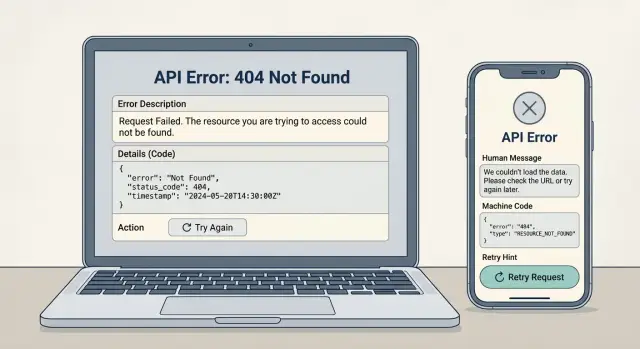
Table of Contents
Why teams misread API failures
A single failed request often turns into three different stories. On the web app, a user sees "Something went wrong." On mobile, they get a timeout message. In the admin tool, support sees a plain "500" with no context. The backend failed once, but every client describes it in its own way.
That gap creates extra work fast. Support cannot tell whether the user typed bad data, lost access, or hit a server problem. They ask engineering for logs. Engineering asks for a request ID or a screenshot. The user waits while everyone tries to guess what happened.
Product teams get bad signals too. If one auth problem shows up as "login failed" in mobile, "session expired" on the web, and "unknown error" in an internal tool, ticket trends become noisy. The team may think they have three separate issues when they only have one. That slows decisions, and it often sends people toward the wrong fix.
Different clients make this worse because each one tends to optimize for its own needs. Web teams want friendly text. Mobile teams want short text that fits a small screen. Internal tools often expose raw status codes because they are quick to ship. None of those choices are wrong on their own. The problem starts when they all invent a different shape for the same failure.
What gets lost is simple:
- what failed
- who can fix it
- what should happen next
A shared API error response format gives every client the same base facts. The user can still see plain language, but support can search a machine code, product can group the same issue across apps, and the client can decide whether to retry, ask for new input, or stop and show a clear message.
Teams usually notice the value after the first messy incident. One payment outage or broken login flow is enough. If the error shape is consistent, people stop arguing about symptoms and start fixing the cause.
What every error response should include
A good error payload answers two questions fast: what went wrong, and what should happen next. If either answer is missing, app code gets messy and support teams start guessing.
Start with a short message written for a person. Keep it plain. "Email address is invalid" works better than "Validation failed for input payload." The message should help someone using the app, reading logs, or checking a support ticket.
That human message is not enough on its own. Clients also need a stable code that does not change when you rewrite the text, translate it, or make it friendlier. A mobile app can match on invalid_email for form behavior. A support tool can group the same failure across many tickets. This is where good error code design pays off.
HTTP status still matters, but it cannot carry the whole meaning. A 400 tells you the request is bad. It does not tell you whether the password was too short, a field is missing, or a value broke a business rule. Put the status in the response, then add details next to it instead of hiding behind it.
Retry hints save a lot of wasted time. Some failures should never be retried, like a bad API token. Others should, such as a timeout or a temporary rate limit. Make that explicit with a simple flag, and add a delay when you can.
A practical error shape usually includes:
messagefor a personcodefor client logic and reportingstatusfor the HTTP resultretryableand, if useful,retry_after_seconds- room for
field_errors,request_id, and a shortdocs_note
That last group matters more than teams expect. Field errors let a form point to the exact input that failed. A request ID gives support and engineers one shared handle for logs. A docs note can add a brief fix such as "Use an access token with write scope" without forcing extra guesswork.
If you keep these parts consistent across endpoints, web, mobile, backend jobs, and support all read the same story from the same response. That alone cuts a surprising number of avoidable tickets.
Build the format step by step
A good API error response format starts small. If you begin with ten fields, every client will use a different five, and the mess starts on day one. Most teams do fine with a short base shape that every client can trust.
Use the same few fields everywhere:
codefor a stable machine namemessagefor plain languageretryablefor a simple yes or norequest_idso support can find the failed calldetailsonly when the client needs extra context
Keep the names boring and stable. That sounds less exciting, but boring wins here. Do not rename code to error_code later because one team likes it better. Once web, mobile, backend logs, and support tools depend on a field name, changing it costs more than it seems.
Write one JSON example early, before you spread the format across services. Then test that exact example in every place that will read it. A browser app may show message. An iOS app may use code to map local text. A support tool may need request_id first. If one client struggles with the shape, fix the contract now instead of patching around it later.
You also need a clean line between customer-facing data and internal data. Users may see a short message like "Payment failed. Try another card." They should not see stack traces, raw provider errors, or database names. Keep internal fields separate, or leave them out of the response and put them in logs.
A small team should own changes to the format. If nobody owns it, every service will drift. Pick one person or a small backend group, write a short rule for additions, and treat changes like an API change, not a quick tweak.
If you want a simple test, hand the same sample error to a frontend developer, a mobile developer, and a support person. If all three can tell what failed and what happens next, the format is doing its job.
Write messages people can act on
A good API error response format starts with a message a real person can understand on the first read. "Validation failed" is too vague. "We couldn't create your account because the email address is already in use" gives the user and the support team something clear to work with.
Plain language matters more than clever wording. Name the action that failed, name the reason if you know it, and stop there. If the user can fix it, say how. If they cannot, say what happens next.
A simple pattern works well: what happened, then what to do now. For example: "We couldn't save your changes because your session expired. Sign in again and try once more." That message is easy to show in a web app, a mobile app, or a support chat without rewriting it.
Keep the user text clean. Do not leak stack traces, SQL errors, vendor names, or internal service details into the message. "Stripe card_error" or "PostgreSQL unique constraint violation" helps engineers in logs, not customers on a checkout screen.
Short messages tend to work best:
- "This password reset link has expired. Request a new link and try again."
- "We couldn't upload the file because it is larger than 10 MB. Choose a smaller file."
- "You do not have permission to view this project. Ask the project owner for access."
- "We couldn't process the request right now. Try again in a few minutes."
Tone should stay steady across every endpoint. If one API says "Auth failed" and another says "Your sign-in session expired," users think they are different problems even when they are not. Support feels that pain first. They end up translating each message into plain English by hand.
That is why the best human-readable API errors sound a little boring. Boring is good here. The wording should be calm, direct, and repeatable. A support agent should be able to paste the message into a reply with almost no edits.
If you run a small product team, test error text the same way you test button labels. Ask one person from support and one person from product to read the message without extra context. If they can both answer "what happened" and "what should the user do now," the message is probably ready.
Add machine codes and retry hints
A solid API error response format does more than report failure. It tells both software and humans what happened, what to do next, and whether another attempt makes sense. Without that, each client team writes its own guess, and support gets the mess later.
Keep machine codes short and plain. AUTH_EXPIRED, RATE_LIMITED, and INVALID_FIELD are easy to read in logs, dashboards, and ticket notes. You can group codes with a simple prefix like AUTH_ or INPUT_, but keep one code tied to one problem only. If AUTH_FAILED means "bad password" in one place and "token expired" in another, nobody can trust it.
Retry hints need the same discipline. Add them only when another attempt can work. A timeout or a short service overload may recover on its own. An expired token needs a refresh first. A broken request body will not fix itself, no matter how many times the app retries.
A small response shape covers most cases:
{
  "code": "RATE_LIMITED",
  "message": "Too many requests. Try again in 30 seconds.",
  "retryable": true,
  "retry_after_seconds": 30,
  "action": "wait"
}
That action field removes guesswork. Use simple values such as wait, refresh_auth, or stop. Web, mobile, backend, and support teams can all follow the same rule. When a customer asks, "Should I try again?", the answer is already in the response.
Separate temporary failures from hard stops. Temporary failures include rate limits, timeouts, and short outages. Hard stops include invalid input, missing permissions, or a resource that no longer exists. If you mix those together, apps keep retrying when they should stop, and users see the same failure again and again.
A few rules keep this clean:
- Use short, readable codes.
- Give each code one meaning.
- Mark errors as retryable only when a retry can succeed.
- Include a wait time for backoff cases.
- Tell clients when to refresh auth or stop retrying.
This kind of error code design looks small, but it saves real time. One clear code can cut support back-and-forth, reduce noisy logs, and keep every client consistent.
A simple example across web, mobile, and support
A card payment fails during checkout. The customer sees a spinner, taps "Pay again", and then opens chat because nothing explains what happened. A good API error response format makes this moment much clearer.
{
  "error": {
    "code": "PAYMENT_AUTH_FAILED",
    "message": "The bank declined this payment.",
    "user_hint": "Try another card or contact your bank.",
    "retryable": false,
    "request_id": "req_9f3c2a"
  }
}
On the web checkout page, the app might show "Payment declined. Try another card." On mobile, the same code can become "Your card was declined. Use a different card or check with your bank." The wording changes to fit the screen, but the code stays the same.
That one detail helps support right away. If a customer says "checkout is broken," the agent can ask for the request ID, search req_9f3c2a, and see PAYMENT_AUTH_FAILED. Now they know the API answered, the bank rejected the charge, and the customer should not keep trying the same card.
The retry hint changes app behavior too. When retryable is false, both web and mobile should stop automatic retries and show the next step. When the code is something like PAYMENT_GATEWAY_TIMEOUT and the response says retryable: true, the app can retry once or twice in the background before it asks the customer to try again.
One shared shape keeps each team in its lane:
- Customers get plain language they can act on
- Apps read the code and retry hint instead of guessing
- Support uses the code and request ID to find the exact failure
- Product gets one clean label in reports instead of five vague ones
Without this, web may call it a network error, mobile may show a generic failure, and support may blame the wrong system. With one shape, every client tells the same story, even when the on-screen text is different.
Mistakes that create more tickets
A weak API error response format creates support work fast. When the API returns only a text string like "Something went wrong", the app cannot react well, support cannot sort cases, and product teams start guessing.
Plain text also breaks the moment someone rewrites the message. Keep a stable machine code next to the human message, even if the wording changes later.
Another common mess starts when one code covers several unrelated failures. If PAYMENT_FAILED means "card expired", "bank declined", and "provider timeout", every client has to inspect the message text and make a guess. That guess usually turns into a bad button, a wrong retry, or a ticket that should never exist.
Retry hints cause even more confusion when teams use them loosely. If the user entered a bad email, selected an invalid date, or missed a required field, the client should not suggest retry. The user needs to fix the input. A false retry hint wastes time and trains people to tap the same action again and again.
Raw internal errors are another ticket factory. Users should never see a database exception, a stack trace, or a provider message copied straight from a third-party service. Those details help engineers in logs, not customers in an app. Give users a clear message in plain language, and keep the internal cause in logging or tracing.
Changes to old fields can hurt for months, especially on mobile. If you rename code, move message into another object, or drop retryable without a version plan, older clients will keep failing long after the backend ships. Add new fields first, support both formats for a while, and remove old ones only after clients catch up.
A small example shows the difference. If the server returns INVALID_PHONE, retryable: false, and a short message like "Enter a valid phone number", the web app can mark the field, the mobile app can keep the form open, and support can spot the issue in one glance. That kind of consistency cuts tickets more than any polished status page.
Quick checks before you ship
A clean API error response format can still break in production if one client gets less detail than another. Before release, test the common failures: bad input, expired login, rate limits, timeouts, and conflicts. Those cases create most of the confusion.
Run a short release check on every client and endpoint:
- Make every error include both a human message and a machine code.
- Make retry hints match what the server really does.
- Make forms return field-level errors, not only one general error.
- Make logs, dashboards, and support tools show the same request or error ID.
- Make sure old clients still work before you rename or remove fields.
The first item sounds obvious, but teams miss it all the time. A message helps the person using the app. A code helps the app decide what to do next. If one endpoint returns only "Request failed", support has no clue whether the user should retry, re-enter data, or contact someone.
Retry rules need real testing. If your API says "try again later" but the server keeps rejecting the same request for ten minutes, users lose trust fast. Rate limits, temporary upstream failures, and queued jobs often behave differently than expected. Test them with real delays and repeated requests.
Forms deserve extra attention. A single top-level error is rarely enough when three fields are wrong. If the email format is bad and the password is too short, return both field errors so the app can point to the right inputs. That saves a lot of back-and-forth on mobile, where generic alerts are especially annoying.
Shared IDs matter too. If the API returns an error ID, your logs and dashboards need to store that same ID. Then support can search one value and find the full trail. Without that, product, engineering, and support all tell different stories about the same failure.
One last trap catches older apps. A rename from "error_code" to "code" looks small, but an older mobile build may stop reading errors entirely. Keep compatibility tests around for older clients, especially if users do not update right away.
What to do next
Start small. If you try to change every endpoint at once, the work usually turns into a long argument about edge cases and naming.
Pick one shared schema and test it on two common endpoints first. Good candidates are login and payment, or any two flows that create a lot of support questions. That gives product, support, and engineering something real to react to instead of debating a draft in a document.
A practical rollout looks like this:
- Choose one response shape for all clients, with a human message, a stable machine code, and a clear retry hint.
- Apply it to two endpoints that people already know well.
- Review older errors and map them into the new code set, even if some old messages stay messy for a while.
- Write a short team note with a few examples, plus simple retry rules such as "retry later", "do not retry", or "ask the user to fix input".
That team note matters more than most people expect. A short page can stop a lot of confusion if it shows the exact payload, explains what each code means, and says who owns the fix. Support needs to know what to tell the customer. Product needs to know which errors point to bad input and which ones point to a broken flow. Engineers need to know when a client should retry and when it should stop.
Do one quick cleanup pass on old responses too. Look for duplicate codes, vague messages like "something went wrong", and cases where the server returns the same text for three different failures. Those are the ones that waste the most time.
If your team wants an outside review, Oleg Sotnikov can look at your API error response format and suggest a model that product, support, and engineering can all use. That kind of review is often most useful before the format spreads across mobile, web, and internal tools, when small fixes are still cheap.


