Analytics event naming your team can trust in 6 months
Good analytics event naming keeps reports stable as teams grow. Learn simple rules for names, owners, reviews, and safe changes.
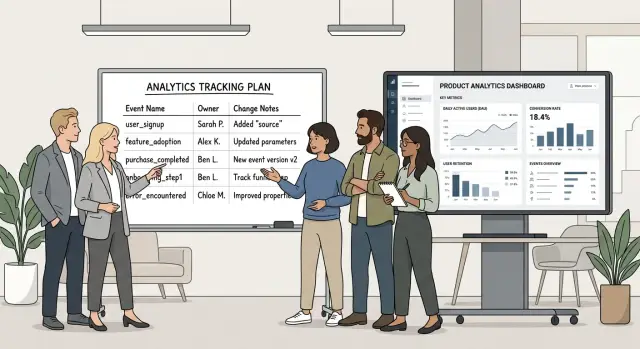
Table of Contents
Why teams stop trusting event data
Teams stop trusting data slowly, then all at once. A dashboard looks fine until two people ask a basic question and get two different answers.
A common cause is duplication under different names. Product adds "signup_started," engineering sends "begin_signup," and marketing asks for "register_click." All three may point to the same moment, but reports count them in different ways. After that, nobody feels sure which number is right.
Rushed releases make it worse. A team changes button text, moves a step, or shortens a flow, then updates tracking in a hurry. The code ships, but the event name no longer matches the original meaning. A month later, someone compares this week to last quarter and gets a clean chart built on mixed definitions. At that point, naming stops looking like a housekeeping task and starts breaking reports.
Old reports add another layer of confusion. Teams keep weekly dashboards long after the events behind them have changed or gone stale. The report still loads, so people assume it is fine. But maybe nobody has checked whether "payment_completed" means a successful charge, a submitted form, or a page view from an older checkout flow.
Trust drops even faster when nobody owns the decision. If someone wants to rename an event, remove a property, or split one event into two, who approves it? When no one knows, changes slip in through pull requests, chat messages, or last minute release fixes. The data model drifts quietly.
The result is familiar. Teams stop debating numbers and start debating meanings. They pull manual exports, keep side spreadsheets, or ask engineers to "just check the database." Once that happens, reports stop guiding decisions. They turn into background noise.
Decide what deserves an event
Most teams collect too much. A long list of clicks feels safe, but it usually creates noise, weak reports, and cleanup work later.
Start with the questions people ask every week. Sales may want to know where trials stall. Product may want to know which setup step users finish. Support may want to know what people try right before they get stuck. If nobody asks a question that an event can answer, that event probably does not need to exist.
This is where good naming really starts. Fewer events, chosen on purpose, are easier to name, own, and trust.
Track actions that change a user journey, not every tiny interaction. A button hover, tab switch, or random page scroll rarely helps a decision. A submitted signup form, a completed onboarding step, or a payment attempt usually does.
A quick test helps:
- Can this event answer a real business or product question?
- Will someone check it in a report at least once a month?
- Does it mark progress, failure, or drop-off in a user flow?
- Would losing this event make a decision harder?
If the answer is no across the board, skip it.
Teams also get into trouble when they mix product events with technical logs. Keep them separate. Product events describe what the user did or tried to do, such as account_created or checkout_started. Technical logs describe what the system did, such as API errors, retries, or cache misses. Engineers need both, but reports get messy when they sit in the same bucket.
A lean tracking plan is easier to keep healthy. Ten clear events tied to real decisions are better than fifty that nobody opens again after launch.
Set a naming rule people will follow
If a teammate cannot guess what an event means on first read, the rule is too loose. Good event names are boring on purpose.
A solid default is one verb and one object. Write what happened, then what it happened to. Names like signup_started, signup_completed, payment_failed, and invoice_sent leave far less room for debate than vague labels like user_action or checkout_step.
Pick one format and keep it for every event. Most teams do fine with lowercase snake_case because it is easy to read in code, dashboards, and CSV exports. The exact format matters less than consistency. If half the team writes PaymentCompleted and the other half writes payment_completed, reports get messy fast.
Keep details out of the event name. Put them in properties instead. The event should describe the action once, while properties carry the context.
For example, use payment_completed with properties such as plan: pro, billing_cycle: annual, or method: card. Do not create separate events like pro_plan_payment_completed and annual_card_payment_completed. That turns one action into a pile of near duplicates.
Examples people can copy
A short rule gets used. A rule with examples gets followed.
- Good:
signup_started - Good:
signup_completed - Good:
trial_canceled - Bad:
user_did_thing - Bad:
CheckoutFlowStepTwo
Teams usually break naming rules when they rush a release. A small example table in the tracking plan helps because people can match the pattern instead of inventing a fresh style.
If you want one test, use this: can a new hire read the name without extra explanation? If not, rename it before it ships.
Give every event an owner
When nobody owns an event, its meaning drifts. "signup_completed" starts with one definition, then a product manager changes the flow, an engineer adds a retry, and the dashboard keeps counting the old way. A few months later, people argue about the number instead of using it.
Assign one person to each event family, not to every single event. That is easier to manage and closer to how products actually change. Good families usually map to parts of the user journey, such as signup, onboarding, billing, and retention.
Product should define what an event means. Engineering should check that the app sends it the way the doc says. This split keeps the business meaning clear and catches messy implementation problems early, like duplicate fires, missing properties, or events sent from the wrong step.
For each event, write down the family, event name, owner, short definition, and last approved change date. Keep it short enough that people will actually update it.
A name in the doc changes behavior. If a report looks wrong, the team knows who to ask. If the flow changed on purpose, the owner can confirm it quickly. If tracking broke, engineering knows where to look first.
You also need a clear approval path. Decide who can edit definitions, who signs off on implementation, and who updates reports after release. In many teams, a product owner approves meaning, an engineer approves the tracking change, and an analyst updates dashboards. Smaller teams can combine those jobs, but the names should still be written down.
Take billing as a simple example. If one person owns all billing events, they can keep trial_started, payment_failed, and subscription_renewed consistent across reports. Clean names matter, but ownership is what keeps the definition from drifting.
How to add a new event
Start with the decision the event should support. If nobody plans to use it in a dashboard, alert, or weekly review, skip it. Extra events look harmless at first, but they pile up fast and turn the tracking plan into a graveyard of vague names.
Write one plain question on the ticket before anyone touches code. Good questions are narrow: "Where do users stop during signup?" or "How many trial users open billing before they pay?" That question keeps the event honest. It also tells the team which properties matter and which ones are just noise.
A practical workflow works well:
- Search the current tracking plan for an event that already answers the question.
- If none exists, draft one event name with a short description in plain English.
- Add only the properties the report needs, and mark which ones are required.
- Ask product, engineering, and the people who read the reports to approve the meaning before release.
That second step matters more than teams think. A name like signup_completed is clear. A name like user_action becomes useless after two weeks. Keep the verb and object obvious, and make property names just as plain. If the report needs plan type, use plan_type. If it needs payment amount, use amount. Do not hide meaning behind shorthand that only one developer understands.
The review should stay practical. Product checks whether the event matches the user action. Engineering checks whether the app can send it the same way every time. Report readers check whether the event and properties will still make sense when they build charts next month.
Only ship the event after everyone agrees on one definition. Write that definition in the shared tracking rules, not in someone's memory. If the team cannot agree on what the event means, do not release it yet. Disagreement before launch is cheap. Confusion after launch is not.
Control changes before reports break
Most reporting problems start with a small change that looked harmless. A developer renames "signup_started" to "signup_begin" for consistency. A product manager changes the event so it fires after email verification instead of on form submit. The dashboard still shows a trend line, but the line now mixes two different meanings.
When an event changes meaning, treat it as a new event or a new version. Keep the old name for the old behavior, and add a clear version marker to the new one. This can feel untidy, but it is far better than blending old and new data into one report.
Do not recycle an old event name for a new job. If "trial_started" used to mean "user created a trial account," do not reuse it later to mean "user opened the onboarding screen." Retire the old name, mark it as deprecated, and leave it in the docs until nobody depends on it.
A short change log helps more than most teams expect. Record the date, the event name, what changed, and why. That gives dashboard owners a quick way to explain odd numbers. It also helps new teammates understand why naming needs discipline, not guesswork.
Before you remove or replace any event, warn the people who own reports, alerts, and exports. Give them time to update filters, definitions, and saved views. Even a short heads-up can prevent broken weekly reports and tense Slack threads after release day.
Put tracking review inside your normal release process. If a change touches analytics, someone should check the event name, the meaning, and the reports that depend on it before code ships. It takes a few extra minutes and saves a lot of cleanup later.
A simple example from signup to payment
Start with one question: where do signups stall? If your team cannot answer that with one funnel and one shared definition, the data is already drifting.
A basic signup flow is enough to test whether your naming rules will hold up over time. Use names that describe one user action, not a screen title, button label, or internal code name.
For a path from signup to first payment, the tracking plan can stay small:
account_createdwhen the system creates the accountonboarding_startedwhen the user begins onboardingplan_selectedwhen the user confirms a planpayment_completedwhen the payment succeeds
Each event needs a named owner. Product can own onboarding_started if that flow changes often. Engineering or the billing owner can own payment_completed, because payment logic tends to change in small but risky ways.
Ownership is not paperwork. The owner decides what the event means, checks that the app still sends it the same way, and approves any change before it reaches production.
Some properties should stay fixed across reports. For this funnel, keep user_id, plan_id, plan_price, currency, and signup_source consistent. If one team sends plan_id and another sends selected_plan, the report turns into a cleanup job.
The easiest way to break trust is a rename that looks harmless. Say the app team changes plan_selected to pricing_selected because the new screen is called Pricing, but nobody updates the funnel.
Now the same step lives under two names. Last month's users appear in one bucket, this month's users appear in another, and the chart shows a drop between onboarding and payment that never happened. People stop arguing about conversion and start arguing about whether the data is real.
If you must change an event, let the owner approve it first, update the dashboard logic, and keep a short overlap period or alias so reports do not split in half.
Mistakes teams repeat
Teams rarely lose trust in data because of one big failure. It usually happens through small edits that seem harmless at the time. Six months later, nobody can tell whether "signup_started", "begin_signup", and "register_tap" mean the same thing or three different things.
A common mess starts when web and mobile teams track the same action under different names. Each team picks names that fit its own codebase. Reports then split one user action into multiple rows, and people start fixing numbers by hand.
Another mistake is renaming events when product copy changes. If a button label moves from "Start trial" to "Create workspace," the event name should not change just to match the screen text. Reports need stable labels. UI text can change every sprint. Event names should change only when the user action itself changes.
Some teams try to make one event carry too much meaning. They send a broad event like "user_interaction" and push the real meaning into a pile of properties. That feels flexible for a week. Later, nobody agrees on what the event actually means.
The same problem shows up with undefined properties. If nobody writes down what "plan", "source", or "status" means, teams will fill them in differently. One report says "pro", another says "Pro", another says "annual_pro." The event exists, but the report is still wrong.
A quick smell test:
- One action appears under two names in the same dashboard.
- An event name tracks screen text more than user behavior.
- A property accepts free text when it should use a fixed set of values.
- A dashboard still uses retired events after tracking changed.
Old dashboards cause more damage than most teams expect. A chart can keep showing numbers after a tracking update, so people assume it still works. In reality, it may mix old and new definitions. That is worse than a visible error because nobody questions it.
The fix is boring, which is why it works. When a team changes tracking, they should update the tracking plan, check every dashboard that depends on that event, and mark old events as retired. A little cleanup now saves a lot of arguing later.
Quick checks before release
A five minute review before shipping a new event can save months of cleanup. Most bad data does not start with broken code. It starts with small choices nobody questioned when the change looked harmless.
Ask a new teammate to read the event name and properties without extra context. If they cannot tell what happened, when it fired, and what each property means, the name is too vague or the properties need clearer labels. Good naming should survive a handoff, not depend on team memory.
Ownership matters just as much as naming. One person should own the definition, even if several people helped build it. That owner answers the same questions later: What does this event mean? When should it fire? Which reports use it?
Before release, run through this short list:
- Check that the event still means one thing and only one thing.
- Confirm one owner is listed beside the event definition.
- Review every property used in reports and ask whether product changes could remove it.
- Log the change in one shared place, not in chat or an old ticket.
- Note whether this is a new event, a renamed event, or a behavior change.
The third point causes more trouble than teams expect. A report may depend on a property like plan_type, but product might replace it next quarter with a new billing model. If nobody catches that risk before release, the report keeps running while the meaning quietly changes.
Use one more test before you ship. Imagine someone looks at this event three months from now, after the PM moved teams and the engineer forgot the ticket. Can they still understand it from the tracking doc alone? If not, fix the doc first.
Keep the record in one shared place the team already uses. A spreadsheet, a doc, or an internal catalog is fine. The format matters less than consistency. People trust data when definitions stay stable and changes leave a clear trail.
What to do next
Start with the reports people already use to make decisions. If a dashboard affects budget, product work, or sales calls, write down every event behind it and who depends on it. That gives you a short list of events that actually matter instead of a giant cleanup project nobody finishes.
Most teams do not need to rebuild tracking from scratch. They need to fix the names that cause the most debate. If one team says "signup_complete" and another says "user_registered" for the same action, pick one name, write a plain definition, and update the tracking plan. Once the most argued over terms stop moving around, the rest gets easier.
A first cleanup pass is usually enough: audit the main reports, fix the most confusing names, assign an owner to each event family, and add a short note whenever someone edits, replaces, or removes an event.
Do this before the next release, not after it. A quick review in planning or QA can prevent weeks of broken comparisons later. When someone wants a new event, ask who will use it, what question it answers, and whether an existing event already covers that action.
A small team can keep all of this in one shared document if the rules are clear. The tool matters less than the habit. Names, owners, and changes need to live in one place, and people need to check it.
If your team needs outside help setting up that process, Oleg Sotnikov at oleg.is works with startups and small businesses as a Fractional CTO and advisor. This kind of analytics cleanup often sits next to product architecture, engineering process, and broader AI-first operations work.
Frequently Asked Questions
What makes a good analytics event name?
Use one clear verb and one clear object, like signup_started or payment_completed. Keep one format across the whole team, and put extra detail in properties instead of stuffing it into the event name.
Should we track every click and page action?
No. Track actions that change the user journey or answer a real question your team asks often. If nobody will use an event in a report, alert, or review, skip it.
When should I use a property instead of a new event?
The event name should say what happened once. Properties should add context, like plan_type, billing_cycle, or method. That keeps reports cleaner and stops you from creating a pile of near-duplicate events.
Who should own analytics events?
Give each event family one owner, such as signup, onboarding, or billing. Product should define the meaning, engineering should check that the app sends it correctly, and the owner should approve changes before release.
When should I create a new event instead of renaming one?
Create a new event when the meaning changes. If trial_started used to mean account creation, do not reuse it later for opening a screen. Keep the old name for old data, mark it as retired, and document the change.
Can web and mobile teams use different names for the same action?
Keep the same event names for the same user action on every platform. If web sends signup_started and mobile sends begin_signup, your reports will split one action into two. Put platform details in a property if you need them.
Which properties should stay consistent across reports?
Start with properties that reports rely on across the flow, such as user_id, plan_id, currency, or signup_source. Define allowed values and stick to them so one team does not send pro while another sends Pro or annual_pro.
What should we do with dashboards after tracking changes?
Check every dashboard, alert, and export that uses the changed event before you ship. Then update filters, retire old events, and log the date, the change, and the reason in one shared place.
What is a quick test before shipping a new event?
Ask someone new to the feature to read the event name and doc without extra context. If they cannot tell when it fires, what it means, and what each property does, fix the name or the doc before release.
How do we clean up a messy tracking plan without starting over?
Audit the reports people actually use first. Fix the names that cause the most debate, assign an owner to each event family, and keep one shared tracking doc with definitions and change notes. A small cleanup on the busiest reports usually gives you trust back faster than a full rebuild.


