AI workshop for founders: prompt risk and workflow rules
Plan an AI workshop for founders that covers prompt risk, review rules, and workflow choices small teams can use the very next day.
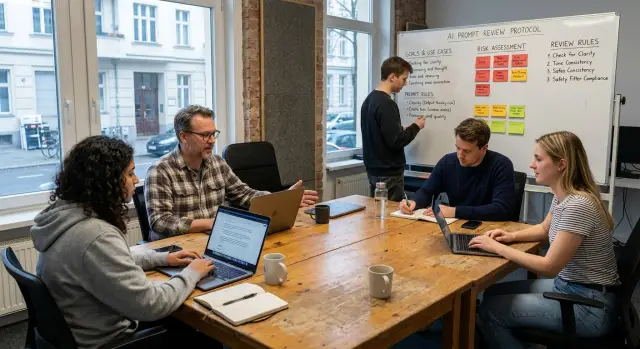
Table of Contents
Why small teams get stuck with AI
Small teams rarely get stuck because AI is too hard. They get stuck because each person uses it differently. One person writes careful prompts. Another pastes in half a client email. Someone else asks for code or copy and skips review. The result is mixed quality, mixed trust, and a lot of second guessing.
Random prompting is usually the first problem. A founder gets one great result and starts to trust the tool. The next day, the same task goes badly because the prompt changed, the context disappeared, or the model guessed. When a team works this way, nobody knows whether the problem came from the tool, the prompt, or the task.
Loose data handling creates the next problem. In a small company, people move fast and share whatever helps them finish the job. That often means customer notes, pricing details, internal docs, or product plans end up in a chat with no clear boundary. Most teams do not do this on purpose. They just never agreed on what is safe to paste and what must stay out.
Review is where the process usually breaks. People know AI makes mistakes, but they do not agree on when a human must check the answer. So review happens too late, or not at all. One bad output can waste an afternoon. A sloppy email draft confuses a customer. A bad code suggestion creates bugs that take longer to fix than the original task.
A shared method solves more than most founders expect. When the team agrees on prompt risk, review rules, and the jobs that actually fit AI, people stop guessing. They know which tasks are safe, which ones need approval, and which ones should stay fully human.
That is why a short workshop works well for small teams. In one session, the team can replace random habits with a common way to work. AI does not become perfect. The next day does become calmer, faster, and easier to manage.
What to bring into the room
Good workshops start before anyone opens a tool. If the team walks in with vague ideas like "we should use AI more," the session turns into talk. Bring real work, real examples, and one person who can make the final call.
Pick two tasks your team already does every week. They should be common enough that everyone understands them and annoying enough that improving them would matter right away. For a small team, that might mean support replies, first draft product specs, bug triage notes, sales follow ups, or customer call summaries.
Bring examples from both sides. You want one prompt that gave a useful result and one that failed badly. The failed one is often more useful because it shows where the team gets sloppy. Maybe the prompt was too vague. Maybe it used the wrong context. Maybe it asked for an answer nobody reviewed.
Before the workshop starts, write down the data that must stay out of the tool. Keep the list short and plain:
- customer names and contact details
- private contracts or pricing terms
- unreleased product plans
- passwords, tokens, and internal system details
That list gives the team a concrete way to talk about risk. It keeps the discussion in normal language instead of turning it into abstract policy talk.
One person in the room needs authority to decide when the team disagrees. If nobody can say yes or no, the session drifts into "maybe" and nothing changes on Monday. In many startups, that person is the founder, the product lead, or the technical lead.
Set one goal that fits in a sentence. "Safer support replies" works. "Cut first draft spec writing from 45 minutes to 15" works too. A narrow goal keeps the workshop grounded and makes it easier to judge whether the workflow is worth keeping.
You do not need slides. You need a few real tasks, a few sharp examples, and a room where someone can make a call.
Prompt risk in plain language
Prompt risk is the chance that a model gives you something that looks useful but creates a real problem. The output may read well and still be wrong, reveal private data, or push someone to act on bad advice.
Wrong facts slip in more often than people expect. A model can draft a clean summary of a sales call and still change a date, mix up a price, or invent a feature that nobody promised. If a founder forwards that draft without checking it, the mistake stops being a writing problem and becomes a business problem.
Privacy risk is even easier to miss. A team member pastes customer emails, contract terms, payroll notes, or roadmap details into a prompt because they want a faster draft. That shortcut can expose data that should stay inside the company. Small teams do this by accident when they move fast and never pause to set limits.
Confidence creates another trap. Models often sound sure even when they are guessing. A calm tone makes weak output feel finished. That is why prompt risk is not only about bad answers. It is also about false confidence.
Some prompts need extra care because they ask the model to do more than write. Risk rises when a prompt asks for legal advice, medical advice, financial claims, hiring decisions, customer promises, or actions that touch private records. If the task could hurt a customer, an employee, or the company, treat it as risky before anyone automates it.
A simple rating system is enough for most teams:
- Low risk: brainstorming, first drafts, headline ideas, meeting notes without private data
- Medium risk: customer emails, internal summaries, product copy, research that needs fact checks
- High risk: legal terms, pricing promises, HR decisions, security topics, and anything with sensitive data
This kind of triage keeps the team practical. Use AI freely on low risk work, require review on medium risk work, and block or tightly control high risk work. That one habit prevents a lot of cleanup later.
Review rules people will actually follow
Most small teams fail here for a simple reason. The rules are too vague. "Check AI output" sounds sensible, but nobody knows what that means when a customer email needs to go out in ten minutes. Good review rules name the task, the reviewer, and the red flags.
Start by listing the tasks that always need human review. Keep that list short and strict at first. Pricing messages, contract wording, hiring notes, customer replies about refunds, and anything that changes a public claim usually belong on it. A meeting summary may only need a quick skim. A legal clause or revenue claim needs a real check every time.
Then assign a reviewer for each type of output before anyone uses the tool. Do not leave it to "whoever is around." If AI drafts sales copy, the founder or marketing lead checks it. If it drafts code that touches billing, the engineer who owns that area checks it. One clear owner beats shared responsibility every time.
A short red flag list works better than a long policy. Many teams start with rules like these:
- pause if the output mentions price, savings, revenue, or guarantees
- pause if it includes legal wording, policy text, or compliance claims
- pause if it cites facts, numbers, or names the team did not provide
- pause if it gives medical, tax, or security advice in a confident tone
Approved examples help more than abstract rules. For each common task, keep one prompt and one finished result the team accepts. If someone needs to draft a follow up email, summarize a call, or write a spec, they should start from that example. That cuts random prompt experiments and makes review faster.
Store the rules where the whole team can see them. A shared doc, a pinned note in chat, or a page in the workspace is enough. If the rules live in one person's head, people will guess.
Most teams should start with tighter checks than they think they need. You can loosen a rule later. Fixing a bad claim after it goes out is slower, more awkward, and usually more expensive.
How to pick the right workflow
Most teams overcomplicate this. They hand people a chatbot and hope good judgment will fill the gaps. That usually creates mixed quality, slow reviews, and avoidable risk.
Pick the workflow by looking at three things: how risky the task is, how often the team does it, and how much human time it should take. If a task happens every day, even saving 10 minutes matters. If a mistake could hurt trust, speed matters less.
For low risk work with clear inputs, a single prompt is often enough. Think of tasks like turning meeting notes into action items, cleaning up internal summaries, or drafting a first pass of a job description. The input is clear, the output is easy to check, and the cost of a mistake is low.
Customer facing text needs a tighter flow. Use AI for the draft, then have a person edit it before anything goes out. That includes sales emails, help center replies, product copy, and investor updates. AI is fast at producing a draft, but tone and accuracy still need a human check.
Keep sensitive work manual at first. Pricing decisions, legal wording, hiring feedback, security responses, and anything with private data should stay with people until the team has real trust in the process. That trust should come from repeated good results, not optimism.
A simple decision table is enough:
- Internal recap -> single prompt and quick check
- Customer email -> AI draft plus human edit
- Policy or legal text -> manual only
- High volume support macros -> AI draft from approved examples
Do not give one task three possible paths. When people improvise, review gets messy and nobody knows what the standard is.
By the end of the workshop, the team should have a short table it can use the next day. If two people disagree on the workflow, choose the safer option first and revisit it after a week of real use.
A 90 minute workshop plan
Keep the room small: founder, one builder, one operator, and the person who will review AI output next week. Four people is enough. The goal is to leave with one usable workflow, not a pile of ideas.
- Minutes 0 to 10: Put two real team tasks on the screen. Pick work the team already does every week, such as drafting a customer reply or turning a sales call into action items. For each task, ask what goes in, what should come out, and who checks the result.
- Minutes 10 to 25: Mark prompt risks together. Use the actual text your team would paste into a tool and circle anything that should not leave the company, anything the model could invent, and anything that could create legal or customer trust problems. This part works best when people disagree a little.
- Minutes 25 to 45: Write review rules in plain words. Skip policy language. Write rules people can follow on a busy Tuesday, such as "AI can draft, but a person sends it" or "If the output includes numbers, check the source before sharing it."
- Minutes 45 to 70: Stop debating and test one workflow on a live example. Choose one path only, such as prompt -> draft -> human review -> send. Watch where the team hesitates, where the prompt needs more context, and where review takes too long. If the workflow feels clumsy in the room, it will fail even faster later.
- Minutes 70 to 90: Assign owners and next steps. One person owns the prompt template, one owns the review checklist, and one collects the first five outputs for feedback. Set a short trial for the next day, not next month.
A good close is specific. Decide which task the team will run first, how many times it will test it, and what counts as a good result. If the session ends without names, dates, and one live workflow, it was only a discussion.
A simple example the team can reuse
A support reply is a good practice case because teams send them every day, and the risks are easy to spot. A founder, an ops lead, or a support rep can all judge whether the answer is clear, polite, and safe to send.
Start with a real ticket, but strip it down before anyone pastes it into a model. Keep the order number only if the team truly needs it. Remove full names, phone numbers, card details, home addresses, and anything else that does not help write the reply. Most of the time, the model only needs the issue, the product, the timeline, and the company policy.
A plain prompt works well:
Write a short customer support reply based on these ticket details.

Issue: Customer says the package arrived late and wants a refund.
Order status: Delivered 3 days after the promised date.
Policy: Refunds need human approval. We can offer an apology and explain the review process.
Tone: Calm, clear, polite, no blame.

Draft a reply in 120 words or less. Do not promise a refund. Do not invent facts. If details are missing, say what support will check next.
That prompt does one job. It gives the model enough context, but not extra data. It also sets limits that matter in real support work.
Before anyone sends the draft, add a human review step. Keep it short enough that people will use it:
- Check refund language. The reply must not approve money back unless a person already approved it.
- Check promises. The draft must not promise dates, credits, or exceptions the team cannot keep.
- Check tone. The message should sound calm and respectful, even if the customer is upset.
- Check facts. Names, dates, and order details must match the ticket.
When the team likes the result, save two things in one shared note: the final prompt and the review checklist. The next person should be able to open the note, paste in a new ticket summary, and get a draft in minutes instead of starting from scratch.
Mistakes that waste the session
The fastest way to lose the room is to spend half the session arguing about tools. Founders often compare models, tabs, and prices before they define the job. That sends the team in circles. Start with one real task that already hurts, such as a sales follow up, a bug triage note, a support reply, or a draft spec that takes too long.
Teams also waste time when they write rules like a policy document. Nobody remembers a page full of exceptions. People remember short rules they can use under pressure. A few plain rules beat a long list every time: do not paste private client data into public tools, ask the model to show its basis when facts matter, and require a human check before anything reaches a customer.
Fake examples create another problem. They make the output look better than it will look on a normal Tuesday morning. A made up product brief is too clean. Real work is messy, incomplete, and full of assumptions. If a team wants the workshop to change behavior, it should test the model on actual drafts, actual emails, and actual notes from its own workflow. Remove names or numbers if needed, but keep the real structure of the work.
Ownership is where many workshops fall apart. People leave with a shared prompt in chat, then everyone edits a separate version and trust disappears. One person should own the first version after the session. That person does not need to be the most technical one. They need enough context to keep it useful. In practice, that means keeping the latest prompt in one agreed place, collecting examples of good and bad output, and updating the rules when the team keeps seeing the same failure.
The most expensive mistake is trying to automate a high risk task on day one. Do not start with legal approval, investor updates, payroll, security decisions, or customer facing work with no review. Pick a low risk task first. If the team saves 20 minutes a day on something boring and repeatable, people will trust the process for the right reason: it works.
Quick checks before you start
Five minutes of prep can save a week of confusion. Small teams usually do not get stuck because the model is bad. They get stuck because the task is fuzzy, the prompt includes the wrong data, or nobody owns the review.
Start with the work itself. Name the exact tasks AI may touch, and keep them narrow. "Draft a support reply from a ticket summary" works. "Handle support" does not. If a task affects money, contracts, hiring, security, or customer promises, keep a human in control from the first test.
Before the session starts, confirm these points:
- The team can name a few allowed tasks in plain language, and everyone agrees on what stays off limits.
- The prompt rules are simple enough to remember. No passwords, raw customer data, private contract terms, or anything the team would not paste into a shared chat.
- Each task has one review owner. One person checks output, sends feedback, and decides if the result is safe to use.
- The team saves one starter prompt for the first live run. That removes guesswork and stops people from testing five different styles at once.
- The trial has a scorecard. Count errors, minutes spent fixing them, and how often the team has to redo the work from scratch.
A small example makes this easier to picture. Say a four person startup wants AI to turn sales call notes into follow up emails. The safer first version is not "send the email." It is "draft an email from cleaned notes with names and pricing removed." The founder or sales lead reviews every draft. The team tracks how many edits each draft needs and whether the draft saves at least 10 minutes.
This is the part many teams skip. They want prompt tricks first. The checks above matter more. If the team agrees on task scope, prompt boundaries, review ownership, one saved prompt, and a simple error measure, the first live test feels calm instead of messy.
What to do in the first week after the workshop
The first week should stay small. Pick one or two low risk tasks and run the new process there first. Good choices are an internal summary, a first draft of a support reply, or a research note. Skip anything that can change pricing, legal terms, payroll, or customer commitments.
A narrow test tells you more than a big launch. If one prompt fails on a safe task, the team can fix it in minutes. If the same problem shows up in a client facing process, cleanup gets messy fast.
Keep a short log while people use the process. It does not need a special tool or a dashboard. A shared note is enough if it captures the same few things every time:
- what task the person tried
- what the AI got wrong
- what the human had to edit
- how long the task took before and after
- whether the review rule caught the problem
This log matters because memory is unreliable after a busy week. Teams often remember one strange failure and ignore ten routine wins, or they do the opposite. A simple record keeps the discussion honest.
Do not rewrite the rules after the first rough draft. Early drafts are supposed to be rough. Wait a full week, then look for patterns. If three people make the same edit, add a rule. If reviewers keep blocking harmless output, loosen that rule. Small teams do better with a few clear rules than with a long policy nobody reads.
Resist the urge to add a second workflow too soon. One stable process beats three half finished ones. When the first process feels boring in a good way, people follow it, review it the same way, and know where it breaks. Then add the next one.
If you want an outside review, Oleg Sotnikov at oleg.is helps startups tighten prompt boundaries, review rules, and practical AI workflows as a Fractional CTO and startup advisor. A short review can catch gaps that look normal from inside the company.
Frequently Asked Questions
What should we do first if our team uses AI in random ways?
Start with one low risk task your team already does every week, then write one shared prompt and one review rule for it. If everyone uses the same first version, you stop guessing and see what actually works.
Which tasks should we bring into the workshop?
Bring two real tasks, not ideas. Good choices include support replies, sales follow ups, call summaries, bug triage notes, or first draft specs because the team already knows the work and can judge the result fast.
What data should never go into a prompt?
Keep customer names, contact details, private contracts, pricing terms, unreleased product plans, passwords, tokens, and internal system details out of the prompt. If the team would not paste it into a shared chat, do not paste it into an AI tool.
How can we rate prompt risk without making it complicated?
Use a simple three part check. Low risk work includes brainstorming and rough drafts, medium risk work includes customer text and research that needs fact checks, and high risk work includes legal, hiring, security, pricing, or anything with sensitive data.
Which AI outputs always need human review?
Review every output that can change money, contracts, hiring, security, refunds, or customer promises. Internal notes and rough drafts usually need a quick skim, but anything public or sensitive needs a real check by the person who owns that area.
Who should own the review step?
Pick one owner for each task before the team starts. For example, the sales lead reviews sales copy, the founder reviews investor updates, and the engineer who owns billing reviews code that touches billing.
What workflow works best for customer emails and support replies?
Use AI for the draft, then let a person edit and send it. That works well for customer emails and support replies because the model saves time on wording while the human checks tone, facts, and promises.
How long should the workshop be, and who needs to attend?
Ninety minutes is enough if you keep the room small. Bring the founder, one builder, one operator, and the person who will review the output next week so the group can make decisions instead of debating them later.
What should we measure in the first week after the workshop?
Track the task, what the model got wrong, what the reviewer changed, how long the work took before and after, and whether the review rule caught the problem. A short shared note works fine if people update it every time.
When does it make sense to ask for outside help?
Get help if the team keeps arguing about boundaries, review ownership, or which tasks to test first. A Fractional CTO or advisor like Oleg Sotnikov can tighten the process, trim the risk, and give you a workflow the team can use right away.


