AI workflow state machines for safer multi-step automation
AI workflow state machines keep retries, approvals, and side effects visible, so teams can stop hidden failures and fix broken runs without guesswork.
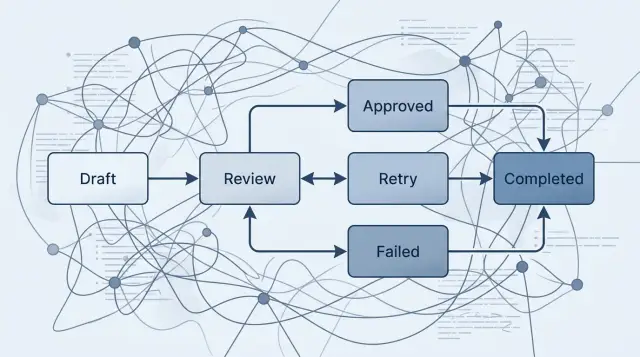
Table of Contents
Why prompt chains break in real work
Prompt chains look tidy on a whiteboard. Step 1 reads something, step 2 decides, step 3 acts. Real work is rarely that clean.
Business processes pause. Data is missing. People reply late. External systems fail at the worst moment. A simple prompt chain usually assumes each step runs once, in order, with no confusion. That assumption falls apart fast.
One missed step can push the whole flow in the wrong direction. If the model extracts the wrong customer ID, the next prompt can still draft an email, open a ticket, or prepare a payment. The chain keeps moving because it only knows what happened in the last step. It does not know the true state of the job.
Retries create a second problem. They sound safe, but they often hide the error instead of exposing it. If a model times out, a script may run the same prompt again and then repeat the next action too. On the surface, the task looks complete. Under the hood, the system may have sent two emails or created two support tickets.
Human approval gets messy in prompt chains too. Many teams treat approval as just another message in the sequence. That works until someone approves in the wrong channel, replies late, or changes the request after the model has already moved on. Then the chain has no clear place to wait, resume, or reject the change.
Side effects are where small mistakes get expensive. Once an AI system sends an invoice, updates a CRM, issues a refund, or edits a customer record, you need a clear way to know what happened and whether it already happened once.
A small example shows the problem. An AI reviews an invoice, asks a manager for approval, and then sends it to accounting. If the approval message gets lost and the retry logic kicks in, the system might ask twice, log one answer, and send the invoice twice. The failure stays hidden because each prompt only sees its own slice of the process.
That is why prompt chains feel fine in demos and shaky in production. They move forward too easily, and they make it hard to stop, inspect, or reverse a bad step.
What a state machine adds
A prompt chain knows what to ask next. It usually does not know where it is, why it paused, or what should happen after a bad result.
A state machine gives the work a map. Each step gets a clear name, such as drafted, waiting_for_review, approved, sent, or failed. When something goes wrong, you do not have to guess from logs and prompt history. You can see the current state and act from there.
The other change is discipline. A run moves only when a rule allows it. If the model produces a weak answer, the workflow can move to retry_requested instead of pushing bad output into the next step. If a person must approve a payment, the run stays in waiting_for_approval until that approval exists.
A good state machine also stores the reason for every move. Keep the result that triggered the transition, who approved it, what error blocked it, and when the system paused. That record matters later when someone asks simple questions: Why did this order stop? Why did the model try three times? Why did the email never send?
Most teams need four controls more than they expect: retry after a model error, cancel before a side effect happens, resume after a human decision, and fail loudly when a rule is broken. These are not edge cases. They are normal operating conditions.
APIs time out. People go offline. Models return the wrong format. A state machine assumes this will happen and gives each case a safe place to land.
If you have ever watched an AI task send the same message twice or stop halfway with no clear reason, this is the missing piece. The goal is not more process. The goal is a workflow you can inspect, pause, reverse, and trust.
Map the workflow before you build it
Most failures do not start in the model. They start in a fuzzy process. If you cannot draw the path from first input to final result, your automation will hide mistakes instead of containing them.
Write down the exact start and end. Be plain about it. The start might be "new support request arrives" or "draft contract enters review." The end should be just as concrete, such as "customer gets a final reply" or "approved contract is stored and sent."
Then name every step in between as a state, not a prompt. A prompt is only one action. A state tells you where the work is now, who owns it, and what can happen next.
A simple worksheet is enough. For each state, write what entered it, who or what acts there, what decision moves it forward, and where it goes if it fails. That small habit catches a lot of hidden problems early.
Pay close attention to decisions. Some belong to the model, such as classifying a message or extracting fields. Some should stay with a person, such as approving a refund, publishing content, or sending anything sensitive. If a human must step in, make that a real state like waiting_for_approval, not a note buried in the code.
Mark every outside action clearly in your notes. Sending an email, charging a card, updating a record, deleting a file, or opening a ticket can all cause damage if they run twice. Those steps need hard boundaries and visible results.
Exception handling also needs an owner. Decide who deals with low confidence, missing data, timeouts, and policy conflicts. If nobody owns those cases, they sit in logs until a customer notices.
A founder can sketch this on paper in 15 minutes. That quick exercise often exposes the weak spots right away: unclear approvals, duplicate side effects, and dead ends where the workflow has no safe next move.
Build the first version step by step
The first version should be boring. Start with the normal path that gets the job done when nothing goes wrong. If you cannot name that path in five or six states, the workflow is still too fuzzy to automate.
Write the states in order and keep each one small. A state should do one job: collect input, call a model, wait for approval, write data, or trigger an outside action. When one state tries to do two or three jobs, failures become hard to trace.
The structure can stay simple. Start with a clear entry state, add one state for each model call or outside action, and finish with a clear done state. Give each state one exit rule. Use names that non-engineers can read.
After that, add failure states only where failure can hurt you. A model can return a bad answer. An API can time out. A message can send twice. A database write can fail halfway through. Put those risky steps behind explicit states such as failed_validation, retrying, or awaiting_review.
Set retry and timeout rules before you write code. Keep retry limits low, usually two or three attempts. If a model call still fails, move the job to review or a failed state instead of looping forever. Timeouts need the same treatment. Decide how long each step can wait, and what happens when that limit is reached.
Save the trail for every move. Record the input, the output, the state change, and the reason the workflow moved forward, paused, or failed. Add timestamps and a job ID too. Later, when someone asks why a task stopped or why it ran twice, you can answer with facts instead of guesses.
Test control paths early, not at the end. Stop a job halfway through and resume it. Cancel it before a side effect happens. Force a failure after a local change and see whether rollback works. If you cannot roll back a step, add a recovery state for manual cleanup. A workflow is ready when it can stop, recover, and tell you exactly what happened.
A simple example: invoice approval with AI
Picture a finance team that gets 200 invoices a week by email. An AI model reads each file, pulls out the supplier name, invoice number, total, due date, and purchase order, then passes that data forward. This is where a state machine makes a real difference: every invoice sits in one clear state, and nobody has to guess what happened.
A simple flow might look like this:
received: the file arrived, got an ID, and is waiting for checksextracted: the model parsed the invoice and saved confidence scores for each fieldneeds_review: a person checks unclear or missing datapayment_ready: the invoice passed review and can move to the payment systemfailed: the invoice has bad data, is a duplicate, or never got approval
The duplicate check should happen before any payment work starts. If two invoices have the same vendor, invoice number, and amount, the system should stop and mark one as duplicate or failed. It sounds basic, but it prevents one of the most expensive mistakes in multi-step automation.
Confidence scores decide when the AI can keep moving and when a person should step in. If the model reads the amount and invoice number with high confidence, that is often enough. If the supplier name is blurry or the purchase order is missing, the invoice should move to needs_review instead of drifting forward.
A reviewer can fix the fields, confirm the total, and approve or reject the invoice. The system should record who approved it and when. If nobody approves it, the invoice should not hover in limbo. After a set time, it should move to failed so the team can see it and act.
Once approval is in place, the invoice can move to payment_ready. Notice what stays separate: reading the invoice is one step, approval is another, and payment is another. That separation keeps side effects under control. If the PDF is unreadable, the total does not match, or approval never arrives, the invoice lands in failed, where the team can inspect it, fix it, and retry it safely.
Put retries and approvals in the right place
Retries help when the model fails to classify a message or extract fields. They do not help when the system already touched the outside world. If a model returns broken JSON, retry the model call. If your app already sent an email or charged a card, a blind retry can repeat the action and create a bigger mess.
Put approval gates right before irreversible steps. Drafting a customer reply can stay automatic. Sending that reply should wait if the message includes a refund, a legal promise, or a price change. The same rule applies to payments, account closures, and order cancellations. Let the AI prepare the work, then ask a person to approve the moment that changes money, data, or customer trust.
A unique run ID for every outside action keeps duplicates easy to spot. Think of it as a receipt number attached to send_email_A41 or refund_A41. If the workflow restarts, the system checks that ID before acting again. When it sees the same ID, it knows the action already happened and should not run twice.
Good defaults are simple. Retry model calls a small number of times. Do not auto-retry payments, emails, or webhooks. Put human approval before money moves or a customer gets a message. After repeated failure, move the run to needs_review and stop.
That stop state matters. Many bad workflows keep looping until someone notices hours later. A clear stop state makes failure visible. Someone can inspect the inputs, fix the bad data, and resume from the right state instead of restarting the whole run.
Mistakes that create hidden failures
Hidden failures start when a team treats a multi-step workflow like one long conversation. The model answers, the next prompt uses that answer, and nobody saves what happened between steps. When something goes wrong, you cannot tell whether the model guessed badly, a person changed the decision, or an outside system failed. You only see the final mess.
Saved state fixes that. Each step should record what it received, what it decided, and why it moved forward. It sounds boring, but boring is exactly what you want when money, customer data, or live operations are involved.
Another common mistake is mixing model output with business rules. A model can read an email, classify a document, or draft a summary. It should not quietly decide your refund limit, your approval threshold, or whether a contract can move to signature. Those rules need their own checks. If you blend them together, bad model output starts to look like policy.
Retries cause a different kind of damage. Teams often retry the whole workflow after one failed step. That can send the same email twice, create two tickets, or charge the same card again. Retry only the failed state, and only if that state is safe to repeat. If it is not safe, stop and ask for a person.
Approvals and manual overrides create blind spots too when nobody leaves notes. If a manager approves an exception, the system should store who approved it, when, and what changed. If an operator edits a bad model result, save both versions. Without that trail, every later review turns into guesswork.
The mess gets worse when outside actions run before validation ends. A model extracts fields from a purchase request, and the system sends the order before checking the budget code. A model drafts a customer reply, and the system sends it before confirming the account status. Once an outside action fires, rollback gets hard fast.
Most hidden failures follow the same pattern. The log shows a final result but not the path. A retry repeats side effects. A human changes something and the system forgets it. A model guess slips through as if it were a rule.
The fix is plain: keep the flow explicit, keep the audit trail simple, and make every step easy to stop or replay. If a failure stays visible, you can fix it before it spreads.
Quick checks before you ship
Before a workflow touches money, messages, or customer records, test whether you can recover from a bad step in minutes, not hours. This is where many automations fail. They look fine in a demo, then one model mistake leaves the team guessing.
A safe system does not hide its progress inside logs or prompts. For any run, you should be able to open a record and see the current state, the last completed step, and the reason it moved or stopped. If someone on your team cannot answer "where is this stuck?" in a few seconds, the workflow is not ready.
Use a short review before release:
- every run shows a clear state, not just a wall of events
- a person can retry one failed step without restarting the whole job
- canceling a run triggers cleanup rules, so a bad model result does not leave partial changes behind
- the system stores stop reasons in plain language, such as timeout, failed validation, missing approval, or duplicate request
- any side effect that matters, like sending an email or charging a card, has a guard against running twice
Duplicate protection is the part many teams skip. If the model times out, your worker may try again. If that step sends a message, creates a ticket, or updates a record twice, users will notice fast. Add an idempotency key or another duplicate check before the action runs.
Retries also need boundaries. Retry model calls and temporary network errors. Do not auto-retry steps that need judgment, such as approvals, compliance checks, or edits to a live customer record. Put those into explicit waiting states so people can review them.
One more test helps: force a failure on purpose. Reject an approval, cut the network, or return bad model output. Then watch what the workflow does. A good system stops cleanly, explains why, and lets you continue from the right place instead of starting over.
What to do next
Start with the workflow that already annoys people a little every week. Do not pick the biggest, most political process in the company. Pick the one that drops details, needs manual follow-up, or gets stuck when one step fails.
Good first targets include refund requests, quote approvals, or vendor onboarding. Small cracks make good test cases. They show you where prompt chains hide problems, and they give you enough volume to spot patterns fast.
Put the whole flow on one page before you write code. If you cannot draw the states in plain language, the system will be harder to debug later. Name the moments that matter: request received, data checked, human approved, payment sent, failed and waiting for retry, closed.
Keep the first pilot tight. Choose one workflow with frequent but low-risk errors. Draw every state, transition, retry, and approval on paper. Run it with real people who can approve, reject, and escalate. Log every failure path, not just the successful path.
Success logs tell you the happy story. Failure logs tell you where the design is weak. When a model extracts the wrong amount, when an API times out, or when a manager does not approve in time, you want the system to stop in a known state instead of guessing.
Keep the pilot small enough that one person can review it end to end. A week of clean observations beats a month of rollout noise. You do not need to automate everything at once. You need to prove that the workflow stays visible, reversible, and calm under stress.
If you want an outside review, Oleg Sotnikov at oleg.is works as a Fractional CTO and startup advisor on AI-first software development and automation. A short review of the flow, failure paths, and rollout plan is often cheaper than cleaning up a broken automation after it starts touching money, customer records, or production systems.
When the pilot works, copy the pattern, not just the code. The reusable part is the state design, the approval points, and the retry rules.
Frequently Asked Questions
Why do prompt chains fail in real work?
Prompt chains assume each step runs once, in order, with clean input. Real work breaks that assumption fast. People reply late, APIs fail, and bad data slips through, so the chain can keep moving after the job already went off track.
When should I use a state machine instead of a prompt chain?
Use a state machine when the workflow can pause, retry, wait for a person, or touch outside systems like email, payments, or CRM records. It gives every job a clear place to stop, resume, or fail without guessing from logs.
What counts as a state in an AI workflow?
Think of a state as the job's current position, not just the next prompt. Names like received, waiting_for_approval, needs_review, sent, or failed make it clear what happened and what can happen next.
How many states should the first version have?
Start small. If you can map the normal path in five or six states, that is usually enough for a first version. Keep each state focused on one job so you can trace errors without digging through a tangled flow.
Where should retries happen?
Retry model calls and temporary network failures. Do not blindly retry steps that already sent an email, charged a card, or changed a record. When a risky step fails, stop the run and send it to review instead of repeating the action.
Where should human approval go in the workflow?
Place approval right before the step that changes money, customer data, or trust. Let the AI prepare the work, then wait in a named state until a person approves or rejects it.
How do I prevent duplicate emails, tickets, or payments?
Give every outside action a unique run ID or idempotency check. Before the system sends an email or issues a refund, it should check whether that exact action already ran and refuse to do it twice.
What should I log for every state change?
For each move, save the input, output, state change, timestamp, job ID, and reason for the transition. Also record who approved a step, what failed, and what the system tried before it stopped.
How do I test an AI workflow before I ship it?
Before launch, force failures on purpose. Cut the network, reject an approval, feed bad model output, and stop a run halfway through. The workflow should pause cleanly, explain why, and let you resume from the right state.
What is a good first workflow to pilot with a state machine?
Pick a workflow that annoys people every week but will not cause major damage during a pilot. Refund requests, quote approvals, and vendor onboarding work well because they expose missing approvals, duplicate actions, and weak retry rules early.


