AI workflow permissions for money, records, and promises
AI workflow permissions help teams decide when AI may read, draft, suggest, or commit changes in work that affects payments, records, and customer promises.
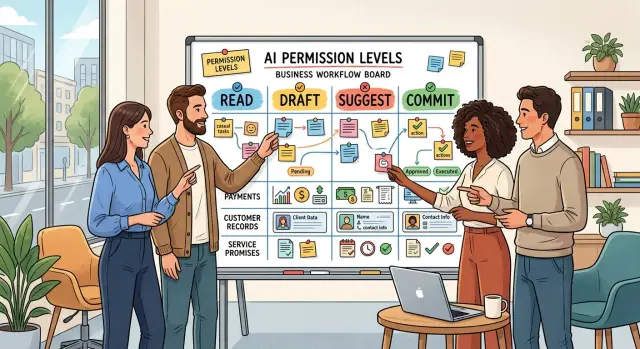
Table of Contents
Why permissions matter
When AI only reads data, a mistake is usually annoying. When it can act, the same mistake can cost money, alter a record, or promise something your team cannot deliver.
That difference matters more than most teams expect. A wrong approval, one edited customer status, or a refund message sent too soon can create a chain of problems across finance, support, and operations.
The tricky part is that bad output often looks fine at first glance. AI writes in a calm, polished tone, so people trust it faster than they should. A busy teammate may skim a message, see nothing obviously wrong, and approve something that should have stayed in draft.
Repetition makes the risk worse. If AI applies the wrong refund rule once, you fix one case. If it repeats the same mistake across fifty tickets, you now have fifty fixes, a stack of customer replies, and records that no longer match reality.
That is why permissions matter. Clear limits let teams use AI for speed without giving it room to create damage. For anything tied to invoices, refunds, contracts, account changes, compliance records, stock levels, or delivery promises, draft mode is often the safest default.
The difference is easy to see in a small example. If AI drafts a response that says, "We approved your refund," a person can still catch the error before it goes out. If AI can send that message on its own and update the billing record at the same time, cleanup gets much harder. The customer expects money back, support has a written promise on record, and finance now has to reverse or explain the action.
Teams that skip clear limits usually pay for it later. They spend hours fixing records, reversing transactions, checking logs, and apologizing to customers. A short human review step can feel slower in the moment, but it is usually much faster than untangling a confident mistake after it touches real business data.
What read, draft, suggest, and commit mean
These access levels sound similar, but the gap between them is huge once a workflow touches payments, records, or customer promises.
Read means the AI can look at data and do nothing else. It can scan invoices, support tickets, order history, or account notes, then summarize what it found or flag something odd.
Draft means the AI can prepare work for a person to review. It might write a refund reply, fill in a change request, or calculate a proposed adjustment, but a human still decides what goes out.
Suggest sits in the middle. The AI places a proposed change inside the real tool, waiting for approval. It might set a refund amount, queue a message, or mark a field for update.
Commit is the highest level. The AI makes the final change on its own. It updates the record, sends the message, applies the credit, or closes the case without a person checking first.
You can think of these levels as a risk ladder. The higher you go, the more time you save. You also increase the damage one bad action can cause.
The jump from read to draft is usually manageable. The AI helps with speed, but people can still catch wrong numbers, missing context, or wording that would upset a customer.
The jump from draft to suggest is more serious than it looks. Once a proposal sits inside a live system, people tend to trust it too quickly, especially when they are busy and the screen looks familiar.
Commit access is different from the other three. At that point, the AI is no longer helping with a decision. It is making one.
That is why draft mode often fits sensitive work best. You still get faster replies and less manual typing, while keeping a clear human check before money moves, a record changes, or a promise reaches a customer.
Suggest and commit can work, but only when the rules are narrow, the audit trail is clear, and fixing a mistake is easy.
When draft mode should be the default
Draft mode should be your starting point whenever AI can change money, records, or what a customer believes your company promised. In these cases, speed matters less than accuracy. A fast wrong answer can cost more than a slow careful one.
Draft mode works well for refunds, invoices, contracts, and account notes. The AI can prepare the refund message, fill in the invoice correction, suggest contract language, or write a CRM summary. A person still checks it before anything goes out or gets saved.
That extra step matters most when the task changes a customer promise. If AI says a refund is approved, changes a due date, offers a credit, or rewrites a contract term, the customer may treat that as final. Even one sentence can create a problem your team has to fix later.
Records need the same care. Account notes, invoices, and contract updates often become the source of truth for support, finance, and legal work. If the AI leaves out a detail, picks the wrong date, or adds a guess, the error spreads. People make the next decision using a bad record.
Keep a person in the loop any time money can move. That includes refunds, invoice changes, credits, and payment terms. AI can draft the action and explain why it suggested it. A person should approve the final step.
Draft mode also makes sense when you do not have clear error data yet. If you cannot answer how often the AI gets the amount right, misses a policy rule, or writes something misleading, commit access is too much. You need a review trail before you give it more freedom.
A simple rule works well here:
- If money moves, use draft.
- If the record becomes official, use draft.
- If a customer could quote it back later, use draft.
- If you do not track errors yet, use draft.
That approach keeps AI useful without asking it to make the final call too early.
How to choose the right level
Start with one plain sentence: what exact action will the AI take? "Summarize invoices" is very different from "send a refund" or "change a customer record." If the action touches money, legal records, or a promise to a customer, vague wording causes trouble fast.
Then ask what happens if the AI gets it wrong once. A bad draft usually wastes a few minutes. A bad commit can send money, alter a contract date, or tell a customer something your team cannot deliver. The bigger the damage, the lower the privilege should stay.
Review matters just as much as risk. If a person checks every output before it goes live, draft or suggest access can work even in sensitive workflows. If nobody reliably reviews the result, commit access is usually too much. "We'll catch it later" is not a real control.
A practical way to choose among AI access levels is to walk through the job in order:
- Name the single action the AI will perform.
- Write down the most likely failure and the worst failure.
- Decide who reviews it and when.
- Start with one narrow task, not the whole workflow.
- Keep a record of the suggestion, approval, and final action.
Narrow scope is what makes early pilots useful. Do not give AI control over all refunds, all billing updates, or every customer message. Start smaller, such as drafting refund responses for orders under a set amount while a person still approves the final reply and any account change.
Logs matter more than people expect. Keep the input, the AI output, who approved it, what changed before approval, and what happened after. That record helps you spot patterns, train reviewers, and explain a decision later if a customer complains.
Only move up one level after you track errors for a while. Look for the boring mistakes, not just dramatic ones. Wrong names, wrong amounts, missed exceptions, and tone problems usually show up before larger failures do.
Many teams move too fast here. They test AI on easy cases, then hand it broader access before they understand the edge cases. A safer path is simple: read first, then draft, then suggest, and commit only when the task is narrow, the review is clear, and the logs show the system behaves well.
A simple example: refund requests
Refunds look simple until one wrong click sends out money you cannot easily pull back. They touch payment records, order history, and the promise your team made to the customer. That is where draft mode makes sense.
Imagine a small online store with a busy support inbox. A customer says a pair of shoes arrived damaged and asks for a refund. The AI can read the order record, payment status, shipping notes, and return message in seconds. It can also pull in past support notes, so the agent does not miss that the customer already got a replacement offer or partial credit.
Then the AI does the prep work. It drafts a reply in the right language, fills in the refund form with the order ID and amount, and suggests a reason code based on the return notes. This is a good use of AI approval workflows because the tool speeds up the routine parts without making the final money decision.
A staff member still reviews the case before anything goes out. The check is short: confirm the refund amount, including tax or shipping, confirm the reason matches the case and policy, and confirm the reply sounds calm and clear.
After that, a person approves the refund in the payment system and sends the message. That last step matters more than it seems. If the AI reads a note the wrong way, misses an exception, or writes a reply that sounds cold, the business pays twice: once in cash and again in trust.
Later, the team might widen the AI's role a little. For example, it can suggest the refund amount based on policy and past cases. That is still very different from commit access. The AI can recommend. A person still presses the button.
That setup is boring on purpose. Boring is good when money leaves the account.
Mistakes that create real trouble
Teams often give AI too much access for one simple reason: the task feels routine. A refund approval, an address change, a contract update, or a credit adjustment can seem harmless after the first hundred cases. That is usually when people stop noticing risk.
Repetition does not make a task safe. It just makes mistakes easier to repeat at scale. If AI gets commit access in a workflow that touches money or customer records, one bad rule or one missing detail can spread across dozens of cases before anyone notices.
A common failure starts with records. The AI reads an old note, misses a newer comment from support, and combines both with a fresh instruction from a customer. Now the system has three versions of the truth. If the AI can write directly to the record, it may lock in the wrong shipping address, refund amount, or renewal date.
Confidence makes this worse. AI often sounds certain even when it guessed. A polished answer can trick busy teams into skipping review. That is risky in any approval flow, and it gets worse when a customer promise is involved. If the AI tells someone "your refund is approved" before a person checks the policy, the damage is already done.
The mess gets harder to fix when nobody leaves a trail. Logs, timestamps, and owner names are not admin clutter. They tell you who approved a change, when it happened, and which input the AI used. Without that, teams waste hours arguing about what happened instead of fixing it.
The same mistakes show up again and again: commit rights granted because the task feels repetitive, record updates without a human approval step, stale data mixed with fresh requests, trust placed in a polished reply instead of the underlying evidence, and weak audit details when something goes wrong.
Good permissions keep AI useful without letting it make silent promises on your behalf. Draft mode feels slower at first, but it is usually much cheaper than cleaning up bad refunds, broken records, or messages you cannot take back.
A quick check before commit access
Commit access is where small AI mistakes turn into real damage. If a workflow can move money, change records, or make a promise to a customer, draft mode should stay in place until the team has plain evidence that the system behaves well.
Start with reversibility. If the AI makes a bad change, can someone undo it in a few minutes without calling a bank, fixing several systems, or explaining the mess to a customer? If the answer is no, commit access is too early.
Then look at review effort. One person should be able to open a recent sample of outputs and judge them quickly. If a reviewer needs long context, tribal knowledge, or a second meeting to decide whether the AI did the right thing, the workflow is still too fuzzy.
Numbers matter too. "Seems accurate" is not enough. You should know the actual error rate from a real sample, and you should separate minor mistakes from costly ones. A typo in an internal note is one thing. A wrong refund amount or a changed customer record is another.
Billing and compliance risk should make you stricter. If the workflow can trigger a charge, affect tax data, touch regulated records, or create an audit issue, keep a human in the approval step. Quiet mistakes are the worst kind. If customers notice an error right away and report it fast, the damage stays smaller. If they only notice it at the end of the month, cleanup gets ugly.
The last test is the fallback. When the AI gets a strange input, times out, or returns something off, the system needs a clear next move. The safest default is simple: stop, log what happened, and send the case to a person.
If you can reverse errors quickly, review samples easily, measure the error rate, avoid billing or compliance trouble, catch mistakes early, and fail safely, then limited commit access may be reasonable. Start with a narrow slice, not the whole process.
When more autonomy makes sense
A workflow can move past draft mode when the rules are plain and repetitive. If the same few conditions decide the outcome every time, AI usually does better. Think: "approve if the amount is under $25, the order is less than 30 days old, and the customer has not asked twice this month." Short rules work better than fuzzy judgment.
Clean input matters just as much. If the AI sees the same fields every time, in the same format, with very few blanks, it has a fair chance to act safely. If staff still chase missing order IDs, unclear notes, or dates that do not match, commit access is too early.
The cost of a mistake sets a hard limit. A workflow is safer to automate when a wrong answer is cheap to undo and unlikely to confuse anyone. Changing an internal label is low risk. Sending money, changing a legal record, or promising a customer a deadline is not.
Another good sign shows up in the review queue. When people keep correcting the same tiny issue, the task may be more mechanical than it looks. Teams often notice this with invoice tags, ticket routing, duplicate record cleanup, or standard reply text.
Usually, the same signals appear together:
- Reviewers make the same small edit again and again.
- Most cases fit a narrow set of rules with few exceptions.
- The data arrives complete enough that staff do not need detective work.
- A bad result is easy to spot and easy to reverse.
Past performance matters more than optimism. Draft and suggest modes should run long enough to hit edge cases, not just the easy cases from week one. If reviewers rarely change the output, error patterns stay small, and the team can explain why the AI made each choice, more autonomy starts to make sense.
This is often how careful teams build trust in AI. They begin with review-heavy steps, track what humans keep fixing, and only then allow limited commit rights.
What to do next
Most teams do better when they put these permissions on paper. If a task can affect money, records, or a promise to a customer, decide the highest level the AI can reach: read, draft, suggest, or commit. Keep that rule visible. A shared document is enough.
Start with one workflow that wastes time every week but will not break trust if the AI makes a bad call. Good starting points are internal summaries, first-pass refund notes, or draft replies that a person still checks before sending. For most teams, draft mode for AI is the safest first step.
Use real work to set the rules. Review a small sample every week. You do not need a huge audit. Ten to twenty cases can reveal the same problems quickly: wrong numbers, skipped policy details, confused customer history, or language that promises too much. When you see a pattern, fix the prompt, add a rule, or lower the permission level.
A short working plan helps:
- Mark each step in the workflow as read, draft, suggest, or commit.
- Name one reviewer and define what they must check.
- Save a few strong examples and a few bad ones for comparison.
- Review a sample each week for a month, then decide whether the AI earned more access.
Do not try to settle every workflow at once. One clean decision is better than a long policy nobody follows. If a workflow touches refunds, contracts, billing, or customer promises, keep a person close to the final action until the error rate is consistently low.
If you want a second set of eyes before widening access, Oleg Sotnikov shares this kind of practical AI operations thinking on oleg.is and advises startups and small teams as a Fractional CTO. The useful part is not a grand policy. It is a workflow map, a review step, and real logs.
If you finish with one mapped workflow, one owner, and one weekly review, that is enough to start well.
Frequently Asked Questions
What does draft mode actually protect me from?
Draft mode keeps AI from making the final move. It can write the refund reply, fill the form, or suggest the amount, but a person still checks the facts before money moves, a record changes, or a promise reaches the customer.
Which tasks should stay in draft mode?
Keep AI in draft mode for refunds, invoice changes, credits, contract edits, account updates, and customer messages that sound final. If a customer could quote the message later or finance would rely on the record, a person should approve it first.
Is suggest mode much riskier than draft mode?
Yes. Suggest mode feels close to draft, but it places changes inside the real system. Busy reviewers often trust what they see on a familiar screen and approve it too fast, so a weak suggestion can slip through more easily than a plain draft.
When does commit access make sense?
Give AI commit access only when the rules stay narrow, the input stays clean, and your team can undo mistakes fast. You also need real error data, clear logs, and a fallback that stops the workflow and hands it to a person when something looks off.
How should I test AI before giving it more access?
Start with one small workflow and run it in draft mode for a few weeks. Review real cases, track wrong amounts, missed policy rules, tone problems, and stale data issues, then decide if the AI earned more freedom.
What should a human reviewer check before approval?
For sensitive work, the reviewer should check the amount, the reason, the customer history, and the exact wording that goes out. That review does not need to take long, but it should happen before anyone sends money or changes the source record.
Why do audit logs matter so much?
Logs show who approved the action, what the AI saw, what it suggested, and what changed before the final step. When a customer complains or finance finds a mismatch, that trail saves hours and helps your team fix the real problem instead of guessing.
Can AI help with refunds without full automation?
Yes, and that is often the best setup. AI can read the order, payment status, and support notes, then draft the reply and prepare the refund form while a staff member confirms the amount and approves the payment action.
What are the signs that AI has too much access?
Watch for repeated cleanup work, mixed-up records, promises that support has to walk back, and approvals that happen with little review. If your team spends time reversing transactions or fixing official notes, the AI probably has too much freedom.
What is a good first workflow to automate with AI?
Pick a workflow that saves time but does not create costly damage if the AI gets a case wrong. Internal summaries, draft customer replies, and first-pass refund notes usually make a good start because a person can still catch mistakes before anything becomes final.


